Do you have the same issue if you follow the OP’s steps to reproduce it?
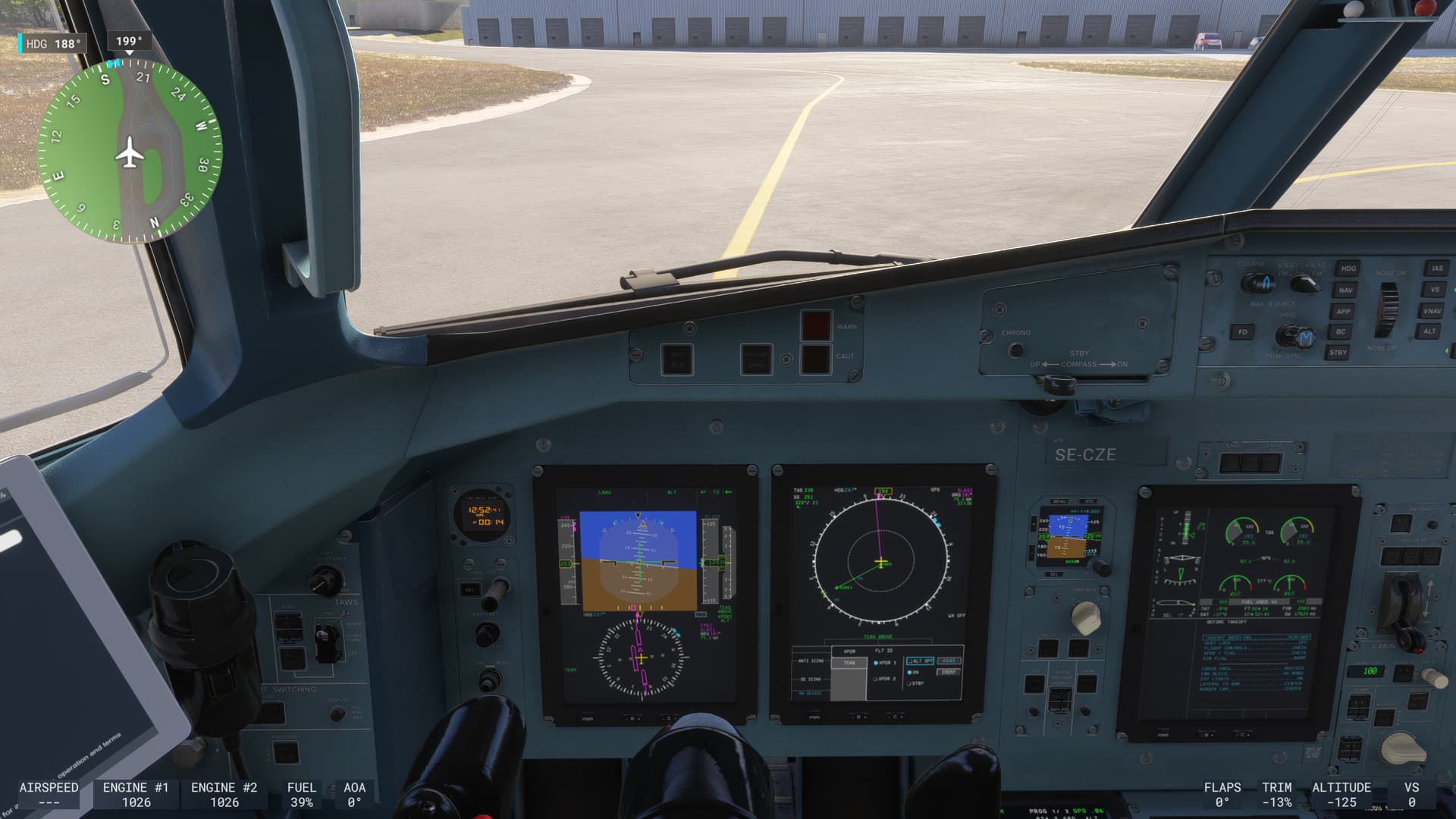
Encountered icing conditions, turned on Engine and Airframe Deice, and noticed Airframe Deice was not illuminating. Looking around, everything in the aircraft stopped responding to mouse click inputs (clicking pitot heat OFF did not change the state of the pitot heat button light, for instance), but I was able to click my joystick autopilot disconnect switch and found I could still fly around, but throttle levers did not physically move in-game nor control yoke.
Provide extra information to complete the original description of the issue:
none
If relevant, provide additional screenshots/video:
Aircraft - ATR 72-600
Object - Flight plan will not transfer from EFB or from Aircraft PAD.
Explanation :
After completed hotel mode startup and all electric components active.
1.EFB will not transfer the flight plan to Avionics/FMC.
2.PAD – IMPORT OFP tab – works fine.
SET Flight PLAN tab – (this sends fpl info to Avionics/FMC). It does transfer the data BUT the FPS drops in the 20s from 175fps in PC mode and in the 15s from 40sfps in VR mode. The PAD tabs and all instruments buttons are no more responding. It is unplayable in this instance. There is a bug with MSFS 2024 obviously within the aircraft FMC’s interaction and it’s PAD because with MSFS 2020, it does work perfectly with FMC, there is no lost in FPS and no frozen instruments: no problem.
MSFS 2024 version 1.4.12.0, i9-14900K, RTX4090, Pimax Crystal.
Do you have the same issue if you follow the OP’s steps to reproduce it?
Yes it happens randomly. it can happen on the ground or it can happen midflight
Provide extra information to complete the original description of the issue:
flying from KTPA-KFLL in the AT76 just in between FORTL and CHICK points on the FRTL9 Arrival when all systems froze and plane wasn’t moving.After I recorded the video the sim went back to normal until I did it again. I did notice that when I clicked Alt+F9 to record through Nvidia that it seemed to fix it the second time.
If relevant, provide additional screenshots/video:FR
Same problem as others; default game setup; fresh install; no mods. Also ATC/EFB just randomly changes flight plan to completely different destination with 0 explanation (multiple times throughout flight).
Do you have the same issue if you follow the OP’s steps to reproduce it?
Provide extra information to complete the original description of the issue:
If relevant, provide additional screenshots/video:
I have the same problem with both ATR 42 and 72. I found that if I move any of the panels to my second screen this problem happens in ATR aircraft. I left the NanoVG as “on” and tried flying the ATR 42 without moving the panels to the second screen. There was no problem with the panels and everything worked as it supposed to be.
Here is the issue: If your GPU is NVIDIA and your primary monitor is connected to your HDMI and a second monitor connected through a USB/HDMI Adaptor, the NanoVG API does not roll over to the second monitor. This is why the panels freeze.
Mine is a Laptop and I have no other option except to connect the second display through USB.
Turning off the NanoVg does not make any difference if you move the panels to the second screen. They still freeze up.
Using the template below will greatly help the team reproduce the issue and ease the process of fixing it. Before posting, search for an existing report. If you are not sure it’s a bug, please first report in User Support Hub.
3 tags are required - add them in the tag section next to the title above:
One for aircraft (start typing in your aircraft name in the tag section and pick correct option)
Feel free to delete this quote section after adding your appropriate tags.
ISSUE DESCRIPTION
Description of the issue:
I recently gave up flying the A310 because of very frequent MSFS crashes with that plane. So today I flew the ATR-42 instead. However, within 20 minutes, the airplane’s screens and instruments froze. The simulation continued, but all the aircraft screens and cockpit instruments were stuck in time. Lowering the landing gear and changing the flaps using my hardware buttons still worked, so I was able to land safely on ESSL29 (having travelled from ESSA26).
I have seen almost exactly the same problem several times before in the A320.
FREQUENCY OF ISSUE
Once recently in the ATR. Previously (the last year or so) a few times in the A320 Neo (v2).
REPRODUCTION STEPS
Please list clear steps you took in order to help our test team reproduce the same issue:
Fly the aircraft.
Pray for the screens and instruments not to freeze.
Observe the screens and instruments freeze.
YOUR SETTINGS
If the issue still occurs with no mods and add-ons, please continue to report your issue. If not, please move this post to the User Support Hub.
What peripherals are you using, if relevant:
[PC Only] Are you using Developer Mode or have you made any changes to it?
No
[PC, MSFS 2020 Only] Are you using DX11 or DX12?
DX12 (I think?)
[PC Only] What GPU (Graphics Card) do you use?
RTX 5070 Ti
[PC Only] What other relevant PC specs can you share?
13 gen i7, 64 GB RAM, 3×2 TB SSD, Windows 11 Pro
MEDIA
Very clearly, I’m not flying 203 KIAS at 12000 ft in a mild bank to the left just above ARS.
Mfd and digital screens freeze, throttle , pedal, yoke animations stop working while I am trying to set up mfd or pfd like setting weather radar or transponder.
I had very same problem with a400m while setting up the mfd