Hi,
Has anyone noticed this before?
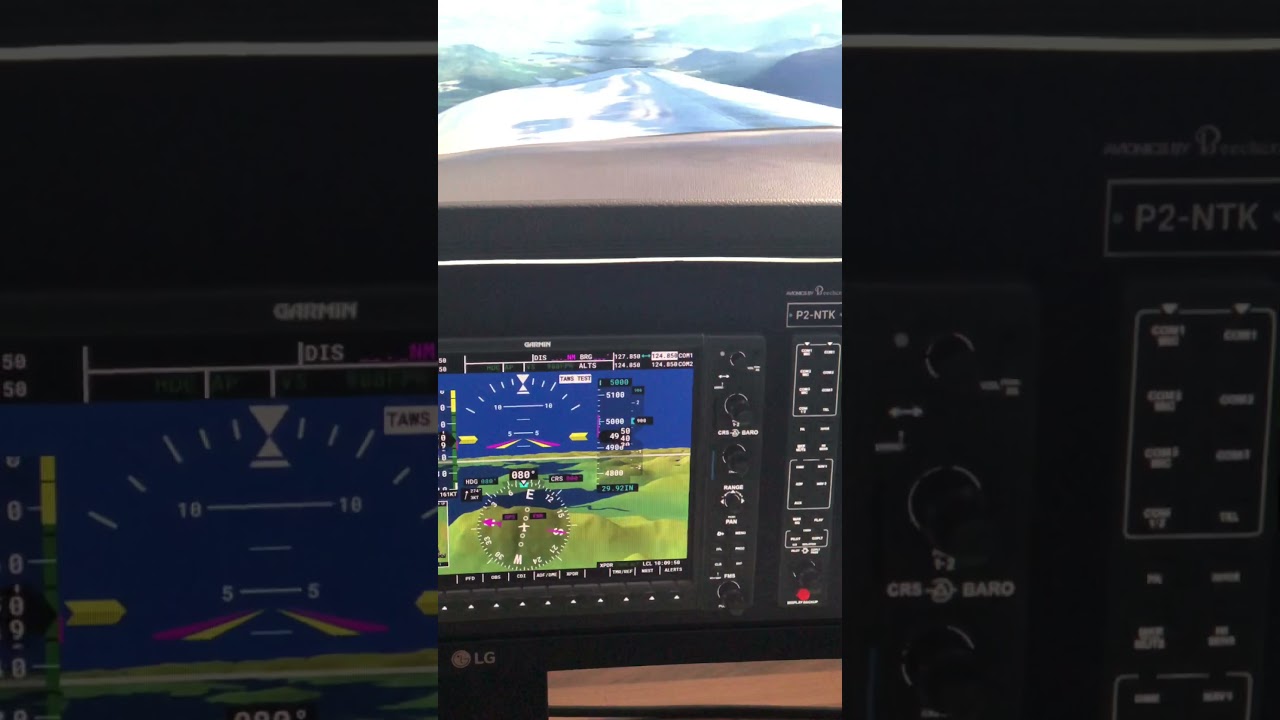
Maybe I’m doing something wrong here, but to my knowledge it should automatically switch to heading hold once the desired altitude is reached, right?
Cheers
Mark
Hi,
Has anyone noticed this before?
Maybe I’m doing something wrong here, but to my knowledge it should automatically switch to heading hold once the desired altitude is reached, right?
Cheers
Mark
Nope, never had this issue at all. Even flew most of the day yesterday with no issues. I am using the WT 4.0 for the G1000.
And no once the Alt is reached it does not go to HDG mode You are either already on HDG mode or VOR mode or not. But once you reach the assigned ALT it keeps it there and has nothing to do with HDG mode.
The PFD says ALTS so it would appear he is using VS to climb to the desired ALT or the ALTS would not be highlighted.
Thank you for your fast replies.
Its true that I climb using V/S mode.
I never did it another way.
And normally it’s stop climbing once the desired altitude is met. But this time it just keeps climbing.
Not sure what I’m doing wrong here.
Now as we speak I continued my bush flight and the auto pilot is working the way, I think, it should.
Here’s what I do using the Honeycomb Bravo.
On the ground I set everything up.
I start by pressing the altitude hold softkey and select my desired altitude. After that, I press the V/S softkey and select the rate of climb.
After take off I engage the auto pilot.
Not that it would solve your problem, but FLC is a better mode for climbing than VS. Pitch up to your desired speed, hit FLC and let it do it’s thing.
With VS, if you’re not paying attention, you can easily stall you plane as you lose airspeed maintaining the desired rate of climb. With FLC, it will hold your air speed and adjust rate of climb as altitude increases.
Thanks for the hint😉
Will do👍🏼
I just made a video showing you how the auto pilot should behave to my knowledge.
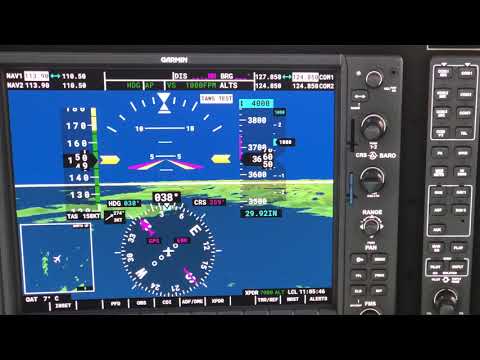
So I think there is some bug disrupting the native Asobo G1000’s behaviour randomly. Maybe.
That’s how it should behave, be it in VS or FLC. Set your desired altitude, engage your climb mode, and when you reach that preset, it should level off and try to maintain it. Not sure why it’s not working for you. I spent the weekend flying. Other than the temp / altitude bug at higher levels (ATC yelling to climb / descent when you’re at the right altitude), all worked as expected in terms of the autopilots.
Yeah for me too, no issues whatsoever.
Except this once.
Maybe it has something bushflight related, I don’t know.
I’ll keep an eye out for this and when it happens more frequently I’ll consider reporting it to Zendesk.
Thanks for your inputs!!
Cheers
Mark
Are you using the WT G1000 legacy mod? If so, which version?
Note that you need to press VS again once you select a new altitude to confirm it, otherwise it will climb/descent to the previously set altitude when you engaged VS mode, if I remember correctly.
EDIT: Just tried it, at least with the NXi installed there is no need to confirm a changed target altitude. I can’t test if the stock G1000 might still need this since I remember that on some system I had to.
Thanks for your reply, but no.
I’m still using the one from Asobo.
I consider switching over to the WT one once it is out of Bèta.
Currently there are three variants:
The stock one
The WT G1000 legacy (looks like the stock one with only small modifications left)
The NXi in the Marketplace (which looks different, so it’s not relevant here).
So you’re not using any G1000 mod I assume.
Do you have the same issue with other aircraft? Any aircraft mods installed on the one you’re using?
No nothing.
I’ve never used any mod.
I never had any issues before that I was aware of.
Just tested it with stock G1000 and the NXi, both automatically level off at the set altitude, even if I correct it down and don’t touch anything.
So there seems to be something else going on…
Where does that “TAWS TEST” annunciation come from? I don’t have it and it shouldn’t be there (usually shown just after booting up), maybe a hint that something is not correct with it.
Thanks for cross checking it.
Don’t know about this.
If I remember it correctly this was mentioned before in another thread.
The TAWS warning was always there, same goes for other aircraft with a G1000.
If you have no mods or addons installed, then the TAWS TEST should’n stay on. This is maybe a consistent hint that something is wrong if it stays lit throughout the flight.
As far as I understand, the ALT intercept issue is not always the case? If you can’t reproduce it, it’s maybe easier to chase the source of this TAWS TEST annunciation than the autopilot issue. Clearly something in the system isn’t right.
Here’s someone with the G3000 and having the same combination - with the Altitude select not properly working and the TAWS TEST annunciation lit, maybe you see something in common:
Thank you!!
I will look into this and report back once I have gathered more information.
Will continue flying later this week.
I don’t think this bugs&issues item will solve your issue.
You better see if you can find the source of the problem you have since this doesn’t seem to be a widespread one.
I see, I’ve read the this very topic and didn’t saw my issue.
I need to do some more digging.

