No, the values are correct, but the code to control the graphis was wrong (for AAO). But I have fixed this specific gauge, at least in part, and the nonlinear/degree code in AAO has been fiexed as well. So if you send an email to the support address on the last page of the AAO manual (including your proof of purchase), you can have the current devel version of AAO and the fixed gauge.
To run it as a Desktop FIPs, just copy the gauge (XML and the pictures in \1024) to \Documents\AxisAndOhs Files\UserGauges (pictures go into the \1024\ directory again). To amke changes, swtich off the DesktopFIPs in AAO, edit the XML or picture, then activate the DesktopFIPs in AAO - your changes will be visible.
There are additional FIPs on the AxisAndOhs website as free downloads, a PFD and MFD too.
Hello,
Does AAO Support Mapping Events from VJoy?
I want to use this regarding the issue of binding the condition levers of turbo prop planes like Cessna 208 to the honeycomb Bravo.
Anorher way is obviosly not possible at the moment.
See also link below.
There is a post about this a way up in this thread.
That seems to be controlled by a BVar: (B:Fuel_1_Condition_Lever) with the values of 0, 1 , 2 - so it is not just a simple assignment. You need the BVar mapper in AAO.
With the BVar mapper you can access that lever directly and assign it to your external controller. But AAO can also send key events, if you don’t want to go the BVar route.
I was trying this a few days ago with AAO. I monitored the sim events with AAO while either moving the condition lever in the sim with the mouse or binding the new axis for cond lever in the controller settings in msfs.
As I remember correctly, K variables were monitored.
Once a K variable „fuel valve“ as moving the lever with mouse and
Once a K variable with no Name mentioned, just a #number.
Can something go seriously wrong with Unding BVars? You mentioned a certain risk in your documentation!
I really am no expert in programming with variables!
Seriously wrong - not that I know of. Besides, you can turn the whole feature on and off with a simple mouse click (enable/disable the “hook”, bottom of the screen on the dialog below).
But it is definitely more involved that just sending events or scripts.
Make sure that MSFS is not running while doing this:
Create a BVar profile for the C208, create the BVar mapping, then activate it.
Thank you very much. I did it in the exact same way, like you described it, and (with values of axis X of my HC Bravo from 0 to 2) the lever in the VC moves from cut-off to high idle.
I have another query to be sorry for:
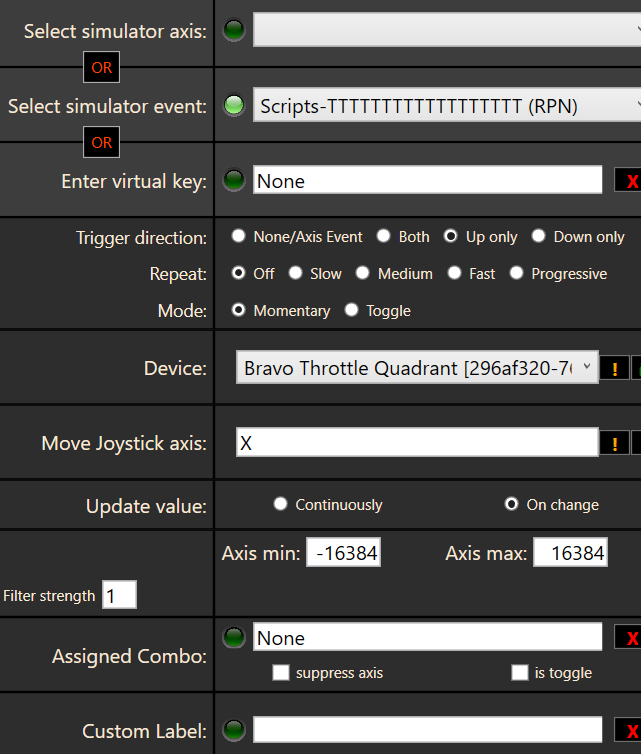
With my HC Bravo, I got real detents on all of the axis. I want to use this detent, which is a button at the Bravo, to use it as the cut-off position. I tried to bind a key with the same event (BVar) with this but had no success.
Can you please give me a hint how to use the detent (key) for the cut off postion?
The logfile lead me to the problem. I created a Stream Deck On/Off Event with an additional Read Variable. Over there I pasted in the entire RPN syntax of the variable including the brackets and type symbol. Stupid mistake indeed, but also kind of surprising that this can disable two Stream Decks.
I was wondering if there is a chance to make this more fault tolerant, like if the syntax of a read variable is wrong the button display remains zero but the rest keeps on working.
Depends on what the fault is I guess. Can you send me specifics about what exactly happened?
In general, the SD plugin is handling the entire profile in one request. So when you manage to break the JSON structure or cause an exception in one Action, they all stop working.
But this sounds more like you managed to break the web server. I would really like to know how you did that…
I deeply apologize for not trying to reproduce the behavior. I just don’t want to go back there. So, all I can give you is me trying to memorize it. Another thing, during the time of troubleshooting I decided to give my computer a fresh Windows installation. I wanted to do this for quite some time for several reasons. After I had installed everything anew I copied my AaO script backups and SD profile backups into the respective folders and ended up with the same behavior as before - still I am not sure if the fresh installation cleared some aspects of the fault. What let me to it were 3 entries in the LAAO_Startup_log.txt which I think looked something similar to this (and I am trying hard to be precise about the abnormal syntax of the brackets):
SH GetVar: (A: GENERAL ENG MASTER ALTERNATOR:1, Bool - rejected
SH GetVar: (A:(A: GENERAL ENG MASTER ALTERNATOR:1, Bool) - rejected
SH GetVar: (A: GENERAL ENG MASTER ALTERNATOR:1, Bool - rejected
Behind that there were a couple of other rejections which all disappeared after I fixed the cause of the above.
I checked the SD editor and found an On/Off Switch, which indeed was created closely before it all went sideways, which had declared a Read variable of type A: with the description (A: GENERAL ENG MASTER ALTERNATOR:1, Bool). So, I deleted the brackets and the A: in the description window, clicked on submit, in AaO clicked on disconnect, then connect and then I had my Stream Decks back. A couple of automated scripts and a couple of local String variables didn’t worked afterwards, needed a restart of the computer (even restarting the sim wasn’t good enough) before they recovered. But that was pretty much it.
I am running into an issue on the CRJ700 where some complex scripts work but the non-complex ones do not. All scripts Test ok in the script editor but only the complex work when assigned to a button press. The first example for APU_Start is a script that works, but Landing_ON does not (Again Tests ok but will not work when assigned to a button). No other assignments are set to the buttons either in AAO or MSFS, I am using the EXE.EXE file to launch AAO at MSFS start. I am using SU7 with latest Rev of AAO and Bravo Throttle, any help is appreciated,
I was just running a test with your second script. Working fine here. I made two of them, one that sets value 1 in all LVars and a second one that sets 0. Mapped both to two joystick buttons and I can turn all three landing lights on and off, and those thrust reverser switches go up and down.
Thank you, and I appreciate it, AAO is a great product that I am enjoying so far. I know that the script works because I can push the test button and see that all is well and works as expected in the CRJ. The problem I am seeing actually only happens when I assign it to the buttons/switches on the bravo. I was able to assign the APU_Start to a down press on switch 45, and an APU_Stop to the release on switch 45 and all worked fine, but when I change the assignment on the same switch to Landing_On and Landing_OFF I get no response in the CRJ7. Could this have anything to do with starting AAO with the EXE.EXE file? I saw mention much higher in this thread about a fake LVAR that you assign for a one time use, I tried adding that and did not see any change. Also of note is that I have not tried this yet with the new CRJ update that came out yesterday, I will give it a go tonight and see if that makes a difference.
What else did you try? Restarting/Disconnecting/Reconnecting the AAO app? Deleting the button assignment and creating it from scratch? Did you try to call the script with any other button or a keyboard combo?
I don’t know how old my CRJ is, but it is most certainly not the current version. Yet, I didn’t have any issues, I just created the two scripts, assigned them to two buttons on a CH joystick. Nothing more to it.