Thanks a bunch, this should help. 
Hey guys, been flying the Bronco for about a week now the only thing I’m currently having issues with is that it seems to need an excessive about of NU trim for me?
If I fly fully loaded (weapons, external tank, full fuel) the full NU trim at 220 KIA is no where near enough to be able to give level flight?
If I fly with around half fuel and no weapons (no external tank) I still need to use NU trim around the last mark before full NU trim?
That is interesting. I fly a clean airplane, and cruising around at ~220 KIAS typically requires just about 2 units NU trim. I’ll do some more checking on my end to see if I’m missing something.
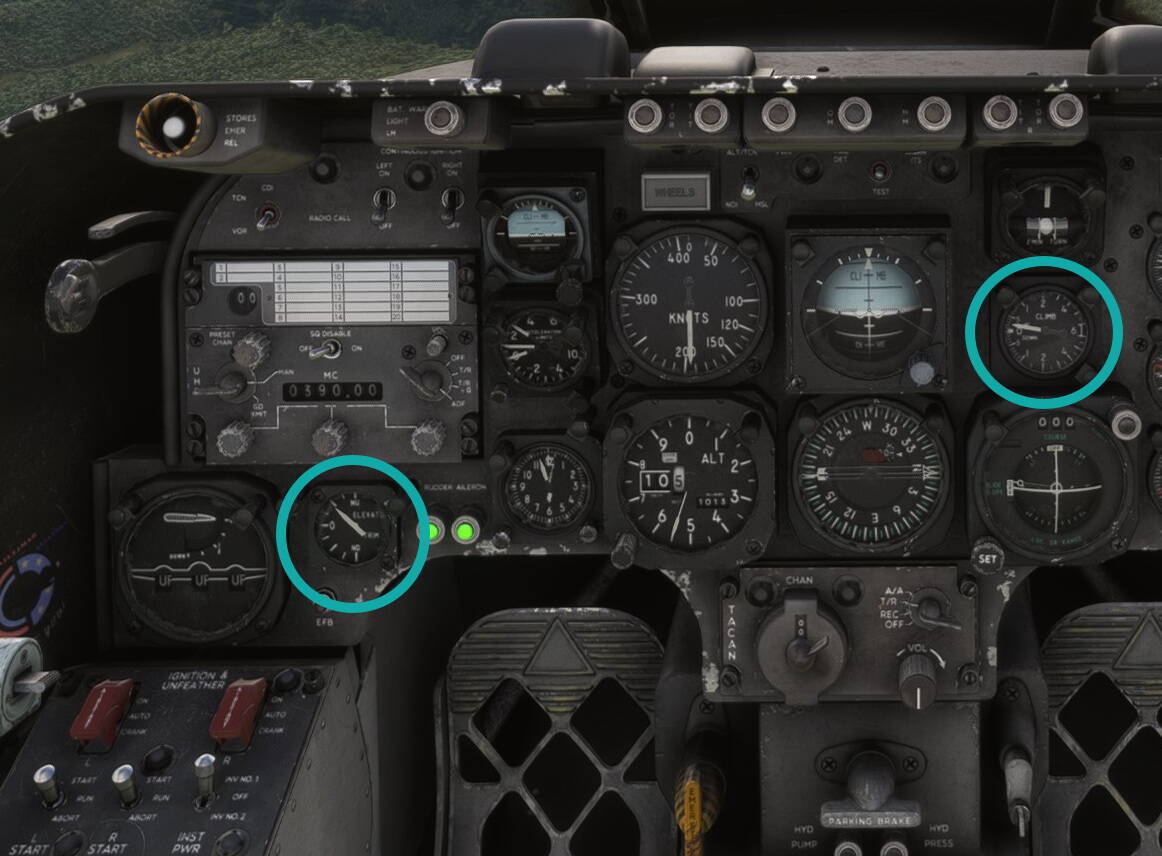
Cruising between Ship Rock NM and Monument Valley AZ with 50% fuel, just about 2 units to hold level flight. I noticed with this setting and 200 KIAS when I lowered the nose into a 10 degree dive the airplane was reluctant to attempt to nose up (to return to 200 KIAS). Without RL experience in this airplane I think the trim model is less than high fidelity.
Thank you for this, that’s exactly the trim level I’m having to use when flying ‘clean’ - so it’s not just me!
I noticed that the trim tabs on the elevator actually point down when trimmed to NU. I reached out to Azurpoly about this and they provided the following explanation:
It is a normal behaviour for the Bronco which has a trim tab acting as a servo tab, see Servo tab - Wikipedia.
Only thing for me though is that the Bronco has cabled controls so any upward deflection of the elevator generated by the downward pointing trim tab would surely pull the stick back slightly in the pilots hands?
I don’t know enough about this system to be fair, I can’t really find anything on the internet about it and I’m sure Azurpoly have done this right based on the calibre of test pilots they’ve employed during development!
That’s exactly one aspect of what trim does in a cabled aircraft - it essentially moves the neutral point of the flight control. If you were to release the controls, the aircraft will achieve whatever pitch/performance that combination of trim/power/airspeed/config will give you. Even in a 172, if you’re having to hold back pressure on the yoke to achieve a certain attitude (assuming the aircraft is stabilized), trimming relieves the pressure so you can fly that same attitude hands-off. The yoke/stick will be in a different position than it would in a different trim and performance regime.
This is one thing that’s impossible for the sim to get right unless we have proper implementation of force feedback across the board. Everything else at this point is a workaround of some sort, including the fact that the visual position of the stick/yoke in an airplane reflects the position of your controller axis, which is spring-loaded and returns to center, versus the position it would be in the plane. I can’t imagine how to reconcile that any differently at this point.
Ah cool, thank you for that!
Does anyone else have an issue where the aileron trim gets stuck way over to the left?
I’ve had this happen on a number of flights now and it looks like the little 4-way joystick on the lower left panel (next to the main flaps lever) gets stuck up and to the left?
I’ve not experienced this problem. Just to confirm we’re not talking about a POV perspective issue. The first jpeg shows how it looks to me when I glance down at the panel.
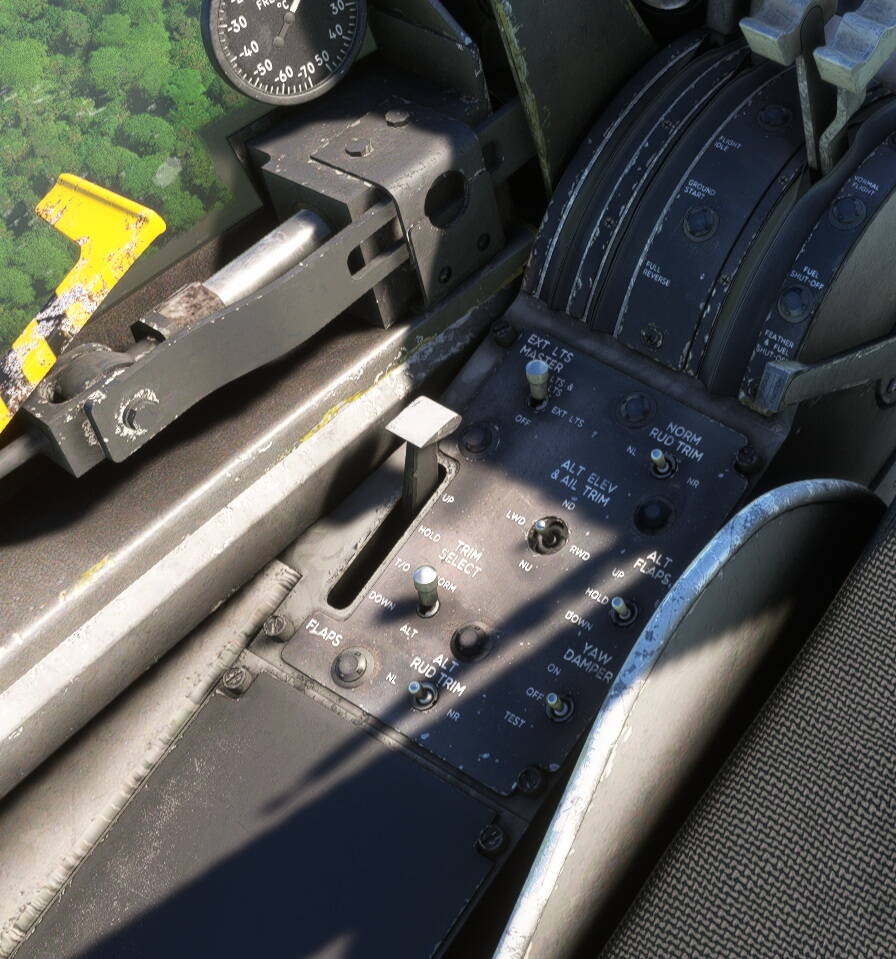
The second view is how it looks when I move my head over to the left to look at the panel.

FWIW how do the trim green lights on the panel look (next to the nose trim indicator) when you experience this issue?
Hey
I fly in VR so no, it wasn’t a perspective thing - it’s really weird when it happens, that little toggle is stuck up and to the left and can’t be interacted with. Just going to make it one of my pre-flight checks from now on.
I’m not sure how to actually take screenshots in the sim, especially in VR, but I’ll try and get something if it happens again.
Had it happen again yesterday - I actually notice it’s gone awry when I start the engines and move the condition lever forwards with the mouse, if they don’t ‘click’ into the detent then I also notice that the trim joystick is mashed up and to the left. Took a screenshot but forgot to bl**dy save it 
Is it possible you have an errant control assignment?
Sounds like somethings been tied to the controls.
Hey, I don’t think so as the little joystick is literally stuck up and to the left when this happens. Can’t move it using the mouse, in or out of VR. But works perfectly 90% of flights and only have to restart the flight to clear it.
Also have an intermittent issue where the external fuel tank can’t be added either.
Might try deleting and re-downloading the aircraft and see if that helps.
Yes, that’s exactly what happens when a control assignment is assigned to something it shouldn’t be. Did you check? It’s pretty easy to look in your control assignments.
It is, however, based on other comments, possible it’s a bug, too.
But it’s worth checking your control assignments.
It might also be due to other addons conflicting as well. So it’s worth emptying your Community directory of everything except for the OV-10.
Has anyone noticed that this thing got incredibly hard to taxi after SU15. It either won’t go, or is taxiing at 30 knots. I can’t find a sweet spot on the throttle to taxi like a normal aircraft.
I am on Xbox, version 1.37.19. I am definitely on the lastest version of the aircraft. I have uninstalled and reinstalled the aircraft and rebooted the sim. I do play with a controller sometimes, but it is the same with my turtle flight stick.
Pretty much. From initial release this airplane has always had a pretty short stopping distance after landing without using the brakes. I don’t do cold starts, but taxiing to the chocks after landing is like you describe.
Hi I am having similar troubles.
Some times I can take off correctly BUT other times it gets no acceleration in the take off run and cannot go above 60 or 70 knots while all tha gauges read normal.
I use hotas thrustmaster warthog.
When I can take off it is a very nice plane.
I think it is related to the tablet but I haven’t found what this bug is.
Any idea how to fix it?
Propellers need to be unlocked via tablet or by pulling shortly into reverse after start-up. Otherwise the propeller blades are in a position that does not provide much thrust.
What I have described happening is what is going on even if you make sure the props are unlocked.
Exactly my experice. Tried various setting, but either it won´t go, or instantly jumps forward. Beside that, it is so nose-heavy which might be a “no-wapon-xbox-only” issue. However, adding weight to the cargo does not move CG backwards as expected. For now it is unfortunately lagging behind my other AP aircraft.
Has someone here noticed the M60 gun sound is so different between the two versions?
The 2024 sounds like firecrackers (weak)!! Whereas the 2020 sounds more like the M60 itself.