Bad Performance and FPS Drops on the Ground

Using the template below will greatly help the team reproduce the issue and ease the process of fixing it. Before posting, search for an existing report. If you are not sure it’s a bug, please first report in User Support Hub.

2 tags are required - add them in the tag section next to the title above:

Feel free to delete this quote section after adding your appropriate tags.


ISSUE DESCRIPTION

Description of the issue:

For this example I was in the A330 at Asobo SBRJ, but this happens most flights with high-demand planes/airports.

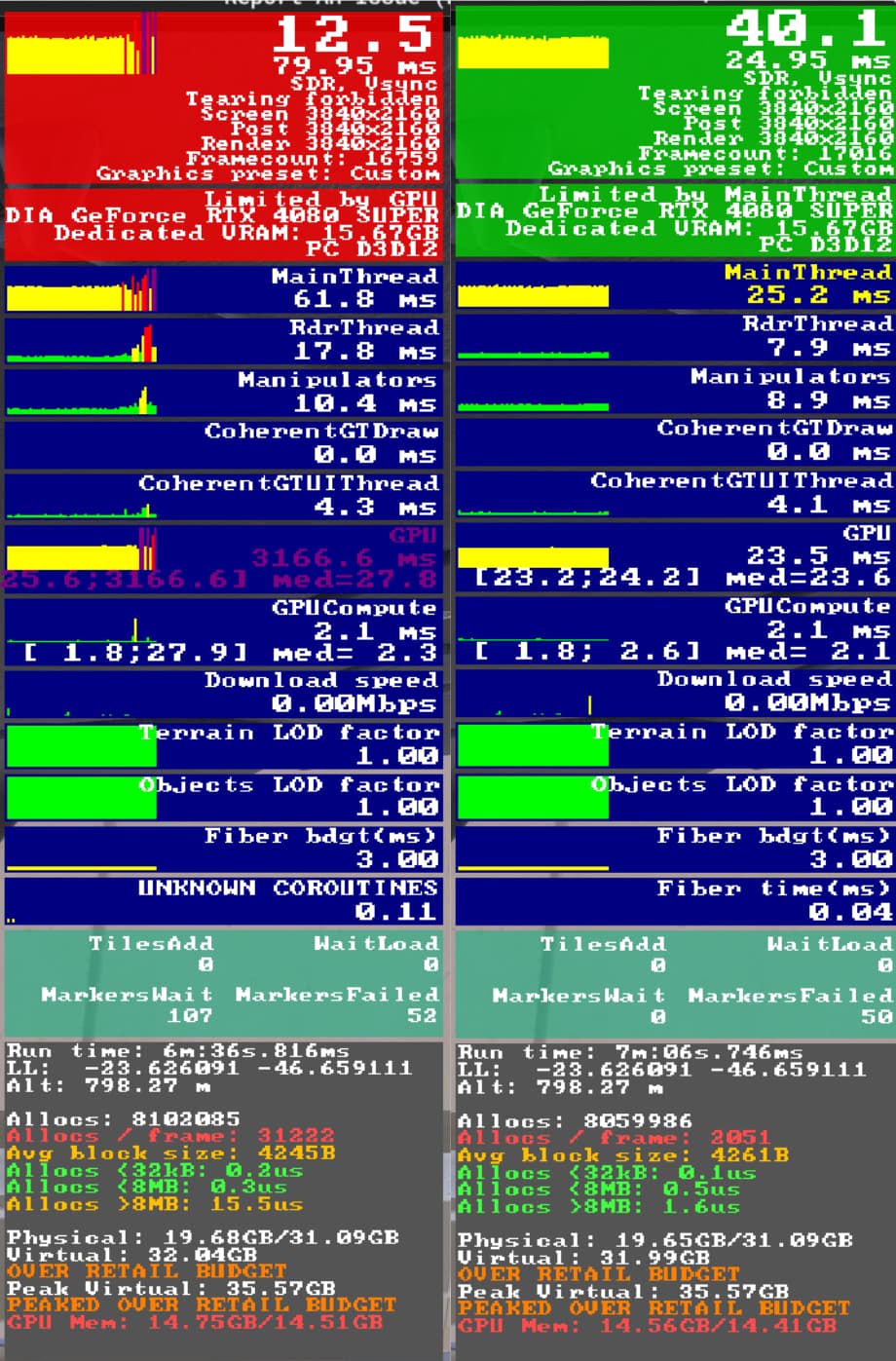
After spawning in I get 10-20 fps for the first minute or so. Then it suddenly jumps to around 30 FPS (or 60 with FG), super smooth, and stays there until something triggers a lag. Usually moving the camera too quickly or activating a custom quickview, but sometimes nothing in particular. Then, the frame gen glitch happens with the jittery and un-synced frames (which used to be solved by alt+enter back in 2020). I need to turn frame gen off and keep it off. At this point FPS drops to anywhere from 15 to quite literally 1 or 2 FPS and stays there until I pause, or sometimes recovers after waiting a couple minutes. At the same time the fans on my computer basically turn off. I pause and wait for 1 min or so, and when I unpause the FPS recovers to 30-40 again, and everything is super smooth. Sometimes this process repeats. Sometimes the frames drop to 15 or so for a min or two before recovering back to super smooth. This only happens on the ground (TLOD 100) – in the air I’m at 40 FPS or so (or 80 if FG is working) with all 100% maximum settings.

4K, 7800X3D, 4080 Super, most settings on Ultra. I refuse to accept that it’s my graphics settings too high like the game wants me to think, because clearly it CAN run with great FPS in these situations even on these settings – it’s just super inconsistent. I was on the latest driver and recently tried reverting to an older one from December which was recommended for the 40 series cards, but this made no difference.

Away from high-demand scenery I am getting around 80 FPS with FG on and all settings 100% maxed out and the game looks amazing.

[PC Only] Did you remove all your community mods/add-ons? If yes, are you still experiencing the issue?

all removed

FREQUENCY OF ISSUE

How often does this occur for you (Example: Just once, every time on sim load, intermittently)?

Every time flying with an advanced plane at a big airport

REPRODUCTION STEPS

Please list clear steps you took in order to help our test team reproduce the same issue:

  1. Choose e.g. A330 and a “high-demand” handcrafted airport, for example KJFK, SBGL
  2. Spawn in, observe frames, change views (external, cockpit, quickview), pan quickly

YOUR SETTINGS

If the issue still occurs with no mods and add-ons, please continue to report your issue. If not, please move this post to the User Support Hub.

What peripherals are you using, if relevant:

N/A

[PC Only] Are you using Developer Mode or have you made any changes to it?

No

[PC Only] Many issues may be due to an outdated graphics card. Please state your Graphics Card Driver Manufacturer (NVIDIA, Intel, AMD) and Version:

Nvidia 4080 Super with several different drivers:
566.36
576.28
576.52

[PC Only] What other relevant PC specs can you share?

7800X3D
32 GB RAM

MEDIA

Following screenshots were taken during issue happens and while issue doesn’t happen. It swaps between these two states.
[END OF FIRST USER REPORT]


:loudspeaker: For anyone who wants to contribute on this issue, Click on the button below to use this template:

Do you have the same issue if you follow the OP’s steps to reproduce it?

Provide extra information to complete the original description of the issue:

If relevant, provide additional screenshots/video:

2 Likes

Do you have the same issue if you follow the OP’s steps to reproduce it?
YES

Provide extra information to complete the original description of the issue:
Same performance issue with default A330 LIPZ, LHPB, LYBE

Do you have the same issue if you follow the OP’s steps to reproduce it?
• Yes

Provide extra information to complete the original description of the issue:
• maybe something related to the streaming, as I do noticed that the network download speed going up during the issue

If relevant, provide additional screenshots/video:

I have the same issues with OP’s steps to reproduce.

In my case, I have almost the same issue, I almost feel as though it is something with the frame gen and the VRAM. The only solution for me to stop the super severe stuttering was to completely turn off the frame gen button, turning it on would re-intorduce the issue. However turning frame gen off made it very stuttery afterwords and low FPS. I also noticed after going to the FPS viewer when this happened to be was that my VRAM usage was absolutely maxed, and so it gives me the impression that there is some type of VRAM issue or memory leak somewhere when this happened.

In my case, I have a 5800x3d with 4070 Super (12GB VRAM) and 32GB of system ram and I play at 1440p ultra wide.

I was at the new Taimodels Singapore (WSSS) at the time and the airliner I was using was the PMDG777-200er, and had nearly the same identical issues as the OP said word for word.

I also thought it was nothing that there was a reddit thread opened that also indicated that more people than just on here experienced that issue (30 comments): https://www.reddit.com/r/MicrosoftFlightSim/comments/1kpbi8z/horrible_performance_drops_on_the_ground_su2/

It is definitely a system issue here.

Juliana Airport and St. Barth’s same, EHAM really bad. At Juliana it is when looking at the parking lot, no buildings in that direction, EAHM also when parking lot in the view. Parked cars being rendered to heavy on the system?

Seems SU2 bring a drop of FPS, especially on ground. I’ve lost 20-30 FPS between SU1 and SU2 on the same airports (EDDH, EDDM, LFSB for example).

1 Like

I have similar problem as OP.
Inibuilds A330 at some random default airport, 60-70fps.
2-3 min in planning the flight, framerate drops to 30-35. I disable FG and I get 12-15 fps, re-enabling FG goes back to 30fps.
GPU goes cold (as if the workload / TDP is half of what it should normally be).
I got the impression this is triggered by “looking” at the MCDU screen (such as when flight planning). It may be completely unrelated.
I tried different flights from other airports, always the same outcome.
It never happen before SU2 and 576.52 driver update.

5800x, 32gb, 5060ti 16gb, driver 576.52, 3440/1440px mostly ultra settings (TLOD 200, OLOD 100).

1 Like

Have same issues but in Xbox Series X, before SU2 update I didn’t have any issues with fps drops in ground, but after SU2 update cannot play the game with this constant fps drop.

Same. During Start and Flight with 7900XT, 90FPS 10-12ms with FrameGen FSR3, and during final Approach in a random Airfield in California drip to 10FPS and 80ms Frametime

1 Like

I just wanted to bump this and basically say that I think I found the issue and the exact steps to be able to reproduce it, so that the developers may be able to look into this issue further. Essentially, the issue has to do with frame gen and VRAM usage, and after overspending on VRAM the game then goes into a non-recoverable (almost “backwards”) stutter. The problem is resolved by either turning of frame-gen or restarting the game. I will lay out in a easy to troubleshoot format for devs:

Relevant system specs: 5800x3d & 4070 Super (12GB VRAM, 10.8GB available for game use according to dev-mode FPS viewer). 32GB system RAM. Playing at 3440x1440 resolution.

Relavent settings I am using: 1. TAA+Frame Gen 2. V-Sync on in NVIDIA control panel 3. Reflex low latency on 4. Texture Resolution High, 8x filtering (to enable high VRAM usage case)

Primary Issue: When frame-gen is enabled (using TAA+FrameGen), and VRAM allocation goes over limit, the game goes into an unrecoverable stutter.

Diagnosis: When Developer mode FPS viewer is enabled, and TAA+Framegen enabled in settings, and VRAM is near limit (ex. my VRAM usage in one scenario was 10.2/10.8 GB), a high VRAM usage action will cause the VRAM expenditure to go over budget (10.9 GB / 10.8 GB). Without fail, this VRAM overspend will trigger an unrecoverable, severe stutter. In the FPS viewer, this stutter, even if you keep the camera still and your aircraft and everything is in a motionless state, VRAM overspend stays and the VRAM value permanently stays at (10.9/10.8 GB), the symptom of which is the unrecoverable stutter.

How to recreate the issue without fail: 1. Set TAA+Framegen on. 2. Load game with purposefully putting yourself in a high VRAM usage settings level (ex. texture resolution set to high, ultra clouds, spawn with complex airliner like PMDG 777, spawn at complex airport like Inibuilds London Heathrow, etc). This will put you at a VRAM use case that is very close to overspend (ex. 10.2/10.8 GB available in my use case). 3. Perform an action that causes very high VRAM usage (for me, this was simply, setting quick view cameras at different locations in the cockpit, and literally just button was them back to back, quickly swapping the views over and over. This without fail triggers your VRAM usage to overspend every time, and immediately causes the bug). 4. Observe severe stutter corresponding with VRAM overspend that does not come down.

Nuance: This stutter is further excasserbated if V-Sync is enabled via the in-game settings (not control panel), but the issue still occur, just slightly less severe if V-Sync is disabled in the in-game settings with the above recreation steps.

“Solution” to fix in game: Turn off frame gen &/or V-Sync (in game if enabled).

After “solution” result: The stutter immediately stops and VRAM usage goes under the overspend (back to 10.2/10.9 GB). However, re-enabling frame-gen at this point immediately re-introduces stutter.

Why I can confirm this is related to frame-gen: When you do this with frame gen enabled, and your VRAM usage overspends, without fail it results in the irreversible stutter associated with the VRAM being over budget. No amount of staying still to let the sim stabilize will fix the stutter, only turning it off. However, if you load the game (fresh) and don’t have framegen enabled, and you do the same thing (close to limit, and then go over the limit by quickswapping camera views back to back), the game stutters just a TINY but (no where as severe as what happens with the frame-gen related stutter), and the recovers within just a few seconds as the VRAM numbers go back under the overspend limit, and stabilize. Also BTW, having DLSS or any of the resolution scaling does not matter, the issue happens regardless and is only dependent on framegen and VRAM overspend.

I do hope that this could be addressed and fixed. Optimizing the VRAM in the game is one thing, but this should be noted as a bug, as once you do go over VRAM, the game is in an unplayable state.I feel as though it would be acceptable for me if I had framegen on and had this stutter if I experienced it for a few seconds and then it recovers. That’s fine, but the fact that it is unrecoverable is what makes it a “bug” per se. It should not make the game unplayable. To any devs reading this, if it would be helpful for me to record a video to recreate this, I can do that, but I’ve tried to detail it as best I can here.

3 Likes

Unfortunately, I have the same problem, but I can’t find a way to solve it. Not even by turning off FG, not even by turning off V-Sync, nothing. The error occurs with all existing settings. Same as the thread opener. I don’t know what can be done.

1 Like

No improvement in SU3 for me.

1 Like

I am experiencing this in SU4 now. Previous versions of SU4 were silky smooth…

1 Like

I’m having a similar issue for the last week or so. Buttery smooth when loading a flight, taxi out and take off / cruise.

But on every landing when I touch down and roll out my fps drops significantly stuttering as if it’s skipping frames. Doesn’t recover unless I restart the sim.

i only get stutters at the arrival airport after I touch down. Never before which I’m struggling to narrow down.

1 Like