There is no 36 GB Limit. In my screenshot AllocatedMem is close to 38 GB, and I have seen screenshots in this forum with even over 40 GB.
No, your “peak” allocated reaches 38, but that’s momentary, and it always then pushes back down to 36 (or roughly 36), by reducing LODs, etc.
Why doesn’t it go to 48, or 64? THAT is my point.
Seb SAID 36 was a limit. I’m going by what Asobo has said, on the record - it’s a limit. I’m questioning why is it a limit, and, can it be raised. That’s the purpose of this thread.
No, it does not. As you can see in my screenshot, it stays over 37 GB, and LOD is also at 100%.
It does. As I said, there are screenshots with far beyond 40 GB.
Please post a link.
There was a developer stream around a year ago with a lot of details regarding Memory Management. It was during SU3 Beta I think. Have you seen it?
Just have a look in System Monitoring tools. It is easy to see, that the MSFS 2024 consumes far more than 36 GB, if you consider RAM and VRAM.
BTW, I’m still waiting for the screenshots.
I have 100 screenshots of 100 tests shown in the Results of the top post - which one do you want to see, I’ll post it.
Can you show MSFS sustaining more than 36 GB of combined physical memory (RAM and VRAM, not swapfile) to validate your claim?
I want to see screenshots from the FPS Window.
Go to the first post in this thread.
Open the “Results!” section
There is a chart of the results of 100 tests.
I have 100 screenshots, 1 for each test…
Please pick one of those, and I’ll post the entire screen shot of that test incuding the FPS overlay.
For example, here is the A330 at KJFK, DLAA, 3 screens at 4-4-4K
(Note I had to downsize the screenshot itself by half just to upload it here.)

As I said, the really interesting figures are not included. It is not the occupied memory important for performance, but the available.
Quite interesting. In particular the render resolution for 3 screens. I have to check tomorrow a few things and compare it with my values.
“As I said”… all you have to do is specify which of the 100 tests you want to see, and I will give you the screen shot. Are you expecting 100 screen shots? Or are you not reading the replies?
here is the detail of the screen shot posted above, if you care to zoom in on it you can find what you are insisting on.

The FPS overlay only indicates the screen resolution of the main window, it does not itemize the resolutions of the additional side windows. However, my 100 screen shots DO show the DLSS overlay with the individual screen resolutions in the lower left corner of each of the 3 screens. If you care to zoom in and look at the 1 I posted just 2 posts up…
But again, Frank, I’m not posting 100 screen shots. Ask for 1, I’ll post 1, as I have just done above.
Your work is incredible!
I recently switched back to a 45‑inch ultrawide (3440×1440).
I’m starting to wonder if the RAM cap you’re seeing might actually be intentional — maybe to avoid massive memory leaks or runaway allocations (but I might be wrong).
I’ll wait for Asobo to improve the triple‑monitor implementation — if they ever do — and then I’ll try my triple‑2K setup again.
Like you, I’m also hitting RAM limits in several games.
I know upgrading from 32 GB to 64 GB would help, but I don’t want to invest until we know for sure whether MSFS 2024 has a hard RAM limit or not.
Thanks - depending on your specs, I don’t think I would be afraid of triple screens. I’ve only been doing this since SU3 beta, and have seen improvements, which allow me to run pretty well now. I do rely on FSR Frame Gen, and other things pretty finely tuned. It’s not perfect, but I’m getting the hang of it.
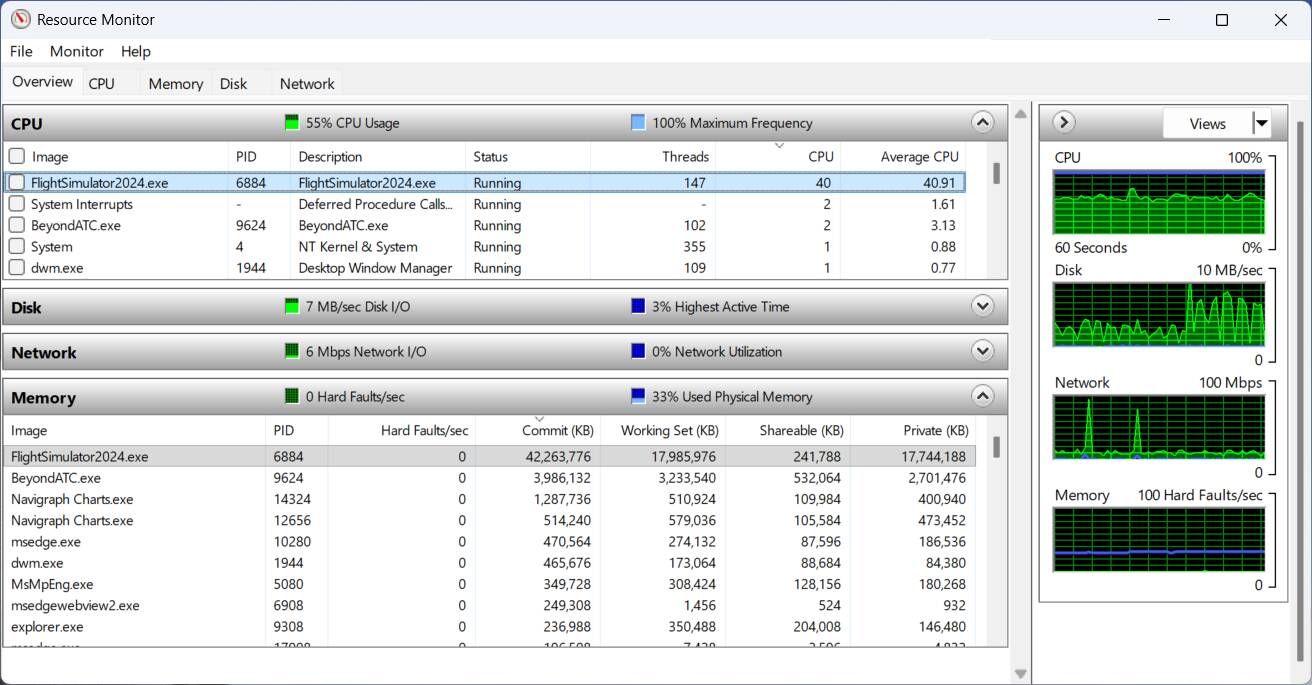
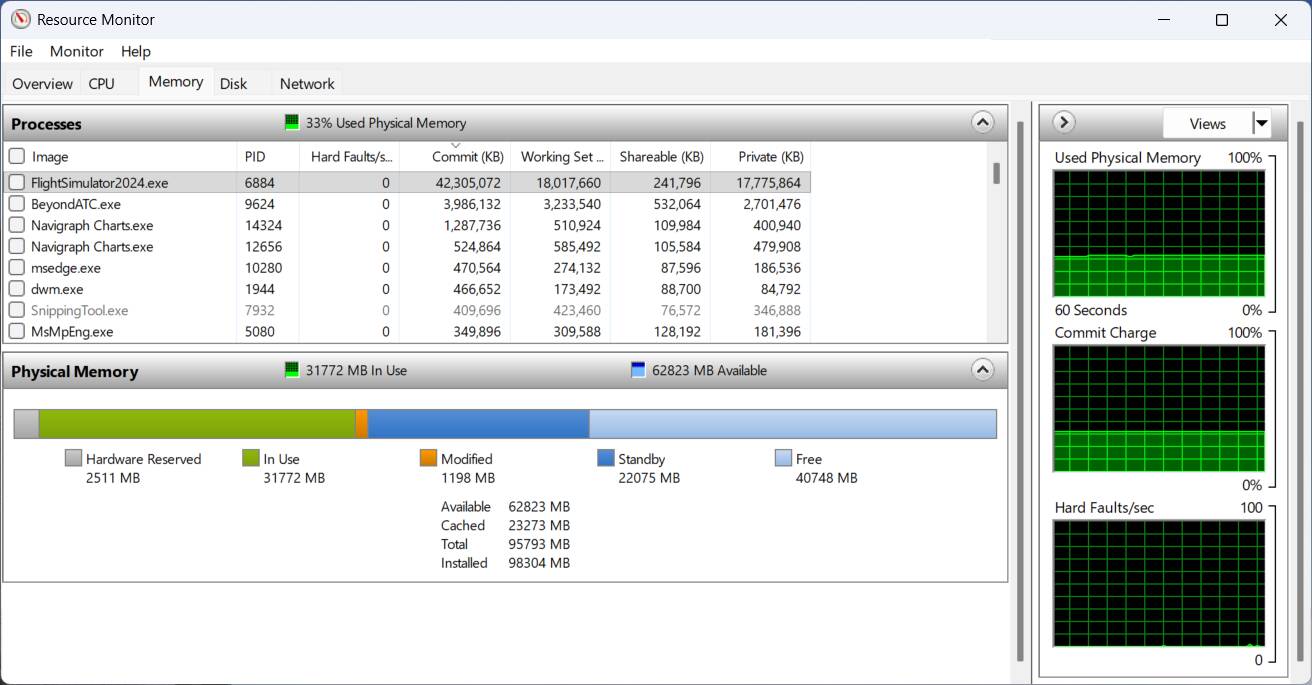
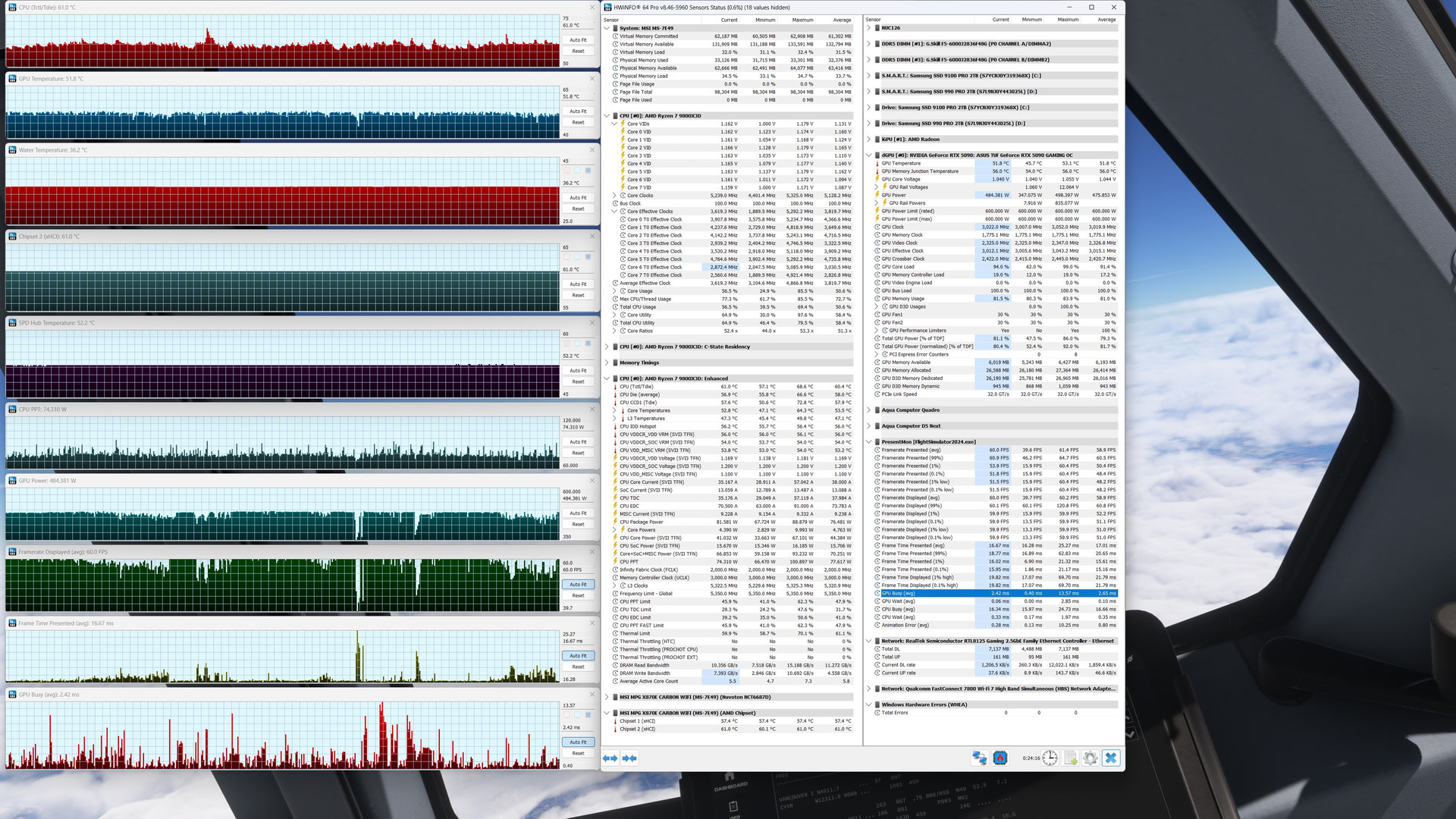
I’m still learning how to measure things, but here are a few screenshots while I fly in the default A330-300 CYVR to CYYZ, only addon is BATC, all streamed, MS Store.
I have running:
- MSFS 2024, in flight, triple screens
- Navigraph Charts
- BeyondATC
- Edge
- HWInfo
- Resource Monitor
- Typical background tasks (but I’ve disabled hibernation, onedrive, app resume, and most of the search indexing, and added defender exception for MSFS Limitless folder).
You can see the system is actively using about 32 GB, with about 22 more on “standby”. I’m pretty sure MS / Asobo have put guardrails to keep things in the published spec. That’s good, but I also wish there was an option to use more resources if those resources are available (assuming it would improve either performance and/or visuals, but that’s just my guess).
One other thing I’m noticing is the “GPU Busy” time, which is part of the PresentMon sensors in HWIno - When things are in balance, the FrameTime, GPU and CPU Busy times should roughly be the same. When one is lower, it means it is waiting more. So GPU Busy being low, while CPU Busy is high, means I’m CPU limited. This is distinct from single monitor, where they are largely in equilibrium.
I share both your frustration and suspicion that this has been artificially capped rather than taking the system max (of both DRAM & VRAM) and reserving a proportion of what is available. It’s jarring to see redraws of the cockpit when returning from an external view when less than half of my resources are being used. Also even with off screen cache set to ultra some frame time instability can be observed with rapid head movement. I see exactly the same max useage as you in the fps display
RTX5090/64gbDRAM/9800X3D/1gigLAN
I think I understand their rationale - having listened carefully to most of the Dev Q&A videos, especially around MSFS 2024 launch, to do with specs. They don’t want to create a divide between PC and console.
I think the sim actually does ok, however, I don’t think they even considered specs for using triple screens - it just was never part of their conversation about specs in the Dev Q&As. They seem very confident of how it works on 1 screen, but negelect to consider when a user either has more system resources which could be used for a better experience, or wants to drive 3 screens which definitely want to use more resources.
To not consider triple screens would be absolutely shocking to me.
This is quite possibly the best consumer flight sim ever created.
And what are the 2 most immersive ways to flight sim? IMO, VR and triple screen simpit with Tobii or similar.
But we are talking about Microsoft, Xbox Gaming… their management decisions are based on growth, which has for 3+ years been focussed on console (Xbox, PS5, Cloud, the Asus handheld thingy which I haven’t heard about since the PR last year)…
Jorg Nuemann stated in interviews about MSFS 2024, that he wanted it to be inclusive of what he sees as the 3 types of users of MSFS: Core Simmers, Gamers who like Missions, and ‘Digital Tourists’.
But to accomplish Microsoft’s business goals of moving MSFS to cloud and consoles, they had to spend an awful lot of time coming up with the Dynamic LOD system, and applying it to everything in the huge virtual world they had created. They also had to optimize to fit the memory and resource footprints of consoles, so that’s why I think that high-end PC triple screen was just not really on their radar or to-do list. They had a set of specs based on, at the top end, 1 4K screen and didn’t mention additional screens.
I think that’s fair, but I’m calling it out as a blind spot. I see no reason why they couldn’t allow MSFS to use more system resources - if doing so is beneficial and/or more efficient, and/or helps achieve as good as an experience on 3 screens as it is on 1 screen.
I am aware, however, that they really market MSFS as 1 experience, and insist that it be perceived as the same regardless of platform.
The pace of technology development means that capabilities will increase, along with resource demands, so artificial caps on memory usage (if it is an artificial cap) should be reconsidered, in my opinion. And that’s why I created a Wishlist Item to ask for offical specs for triple screens.
Thank you for all that interesting info. Not sure how I feel about that.
It seems like they are letting consoles hold back a bit of what msfs24 could be on pc in order to squish it into 14gb of shared dram/vram.
Maybe I am reading that wrong.
I feel optimisitc, because Jorg does recognize core simmers. They did respond with fixes when SU5 broke FSR3 frame gen (critical to anyone using FG on triple screens).
I think they have created a huge amount of “technical debt” by trying to make it work on such a wide range of devices, all while having an expanding fleet of aircraft and airports that all need updates and optimizations - but, I still believe they want to accomplish the goals, and are funded to do so. I just want to keep advocating for the core simming and use of triple screens, because I can’t imagine going back to 1 screen having experience the immersion.
I hope you are correct.
Personally, I don’t have much to complain about in VR. Almost every flight is awesome.
I don’t think there is a limit. See the following thread:
There are screenshots with >40 GB peak usage and 39 GB current usage. And I have seen screenshots with even more than 42 GB, but unfortunately can’t find them in the forum.
I think, the 36 GB limit does not exist.
I have it:
42 GB.
And even better: 59 GB+20GB VRAM
Except it’s not “better”, it’s a “bug-logged” thread showing examples of when MSFS is failing to purge items from memory (discussed in a recent Dev Q&A). And in those examples, MSFS is not running well, because the items in memory that are meant to be cleared, are not cleared. So it’s not memory “usage” by intent - it’s memory overflow by a bug.
If there is an example of MSFS using that much memory and running well, that’s another story. My belief is that there is an intent to keep the memory footprint below the threshold of 36.
It’s possible that memory is not the limiting factor, and that CPU processing, or transfers between CPU and GPU are the limit such that more RAM or VRAM utilization has no benefit. But, I do not think that is the case. Your example does not change my view.
There is one way to know for sure - for the developers to clarify. You, and I, and others have our opinions, based on our own observations and biases. But only the developers can say what the specifications are for certain.