I’m having flashbacks to when this “effect” first appeared 30+ years ago on Unix (solaris)
It does not (yet)
It should be top of the development roadmap for…obvious reasons.
They did that last year too - as I recall, if you left it long enough, it would drop more and more ornaments and start filling up the bottom of the window.
1 Like
I’m still new to BATC, but overall I really like it.
One odd thing just happened. I’m in the Longitude flying CYVR to CYYZ, Live Weather, flight plan from Simbrief, saved as a PLN file, imported in to EFB, then sent to Avionics.
CYVR/08R DCT ALNOD DCT IKNIX DCT 49N110W DCT HML DCT AGLIN DCT OTNIK BOXUM7 CYYZ/33R
On the leg to HML, BATC suddenly said, “C7GS, you’re off course. Cleared direct to HML. Resume own navigation.”
However, AP has me right on track. If the issue was the 49N110W waypoint, it would have happened en route to that waypoint, not after having passed it (I assume).

I’ve had that happen a few times, usually on long, direct legs between waypoints on a long-haul. I just acknowledge and ignore. I suspect it’s something to do with how Simconnect works in reading positional data and how BATC reads/interprets route files. Like, the sim uses/understand great circle/spherical coordinates and BATC has some kind of simplification in place that doesn’t consider the curvature of the Earth.
1 Like
the longest legs I hadwere between 350 and 400 NM and BATC never considered my “off course”. I got this only when I actually had a lateral deviation from my simbrief plan.
Your leg looks longer than that, so it might be as you say. But I also wonder about the Waypoint your are coming from. FPL000 sounds rather generic than being from Navdata Database.
Could it be, that this waypoint simly isnt recognised and the direct form the waypoint before that to HML would actually be a few miles off and BATC is seeing you off-course?
Either way I can only recommend to post this on their discord along with your players.log.
They are really resposnsive and supportive over there.
Have you ever flown a long distance great circle trans-Atlantic or -Pacific flight? Because that’s typically where I have encountered these messages, personally, despite have zero lateral deviations per the aircraft’s own ANP calculations.
Yes, quite possible. Since I imported the PLN file, I should have checked, since the Simbrief Jeppesen navdata and Sim’s Lufthansa LIDO navdata don’t always align. I usually manually enter in the FMC, but was lazy today.
That being said, if the waypoint was off, it would / should have registered as off course much earlier, en route to the waypoint (I assume.) Regardless, I think this was the issue.
1 Like
No, i didn’t.
Mostly because BATC clearly states that it does not support oceanic routes, yet.
I fly long haul a lot, usually between europe and Asia where the longest legs are somewhere in the 300s NM.
That’s kind of irrelevant - they don’t support oceanic clearance procedures, but they do fine with routing and handoffs between centers. Further, the spurious off-track messages for me generally occur on descending north-to-south legs over places like northern Canada. BATC has a problem interpolating courses for great-circle tracks, plain and simple, just like the problem they had with jagged courses and contrails for their injected traffic for many, many months until they dug into their code, found the bugs and fixed the math.
So anyway, the answer here is, if someone knows they’re on course but BATC complains otherwise, just acknowledge and ignore it.
1 Like
It did at least once for me and I learnt it the hard way. I continued in spite of go around and there was nasty gust when I got very close to the runway that threw me away. I had to go to TOGA and fortunately recovered from the situation.
Hello everyone! As per the announcement, if you are or have been an aviation professional and are willing and able to answer our questions and share your knowledge to help us shape VFR and BeyondATC as a whole, we’d love to hear from you!
To help facilitate this, we’ve gone ahead and added a new form to the bot, you can find it here:
Thanks to everyone as always for your continued support, if you are celebrating the holidays - here’s to a festive season
The BeyondATC Team 
Is it normal for BATC to overlap planes like this? I’m in the 787, and there is an A380 right on me..
SU4 v1.6.32.0, BATC v1.7.3
MSFS all off: Multiplayer, AIrcraft Traffic, Parked Aircraft, Live Traffic, AI Traffic, etc
FSLTL models installed
No other addons.
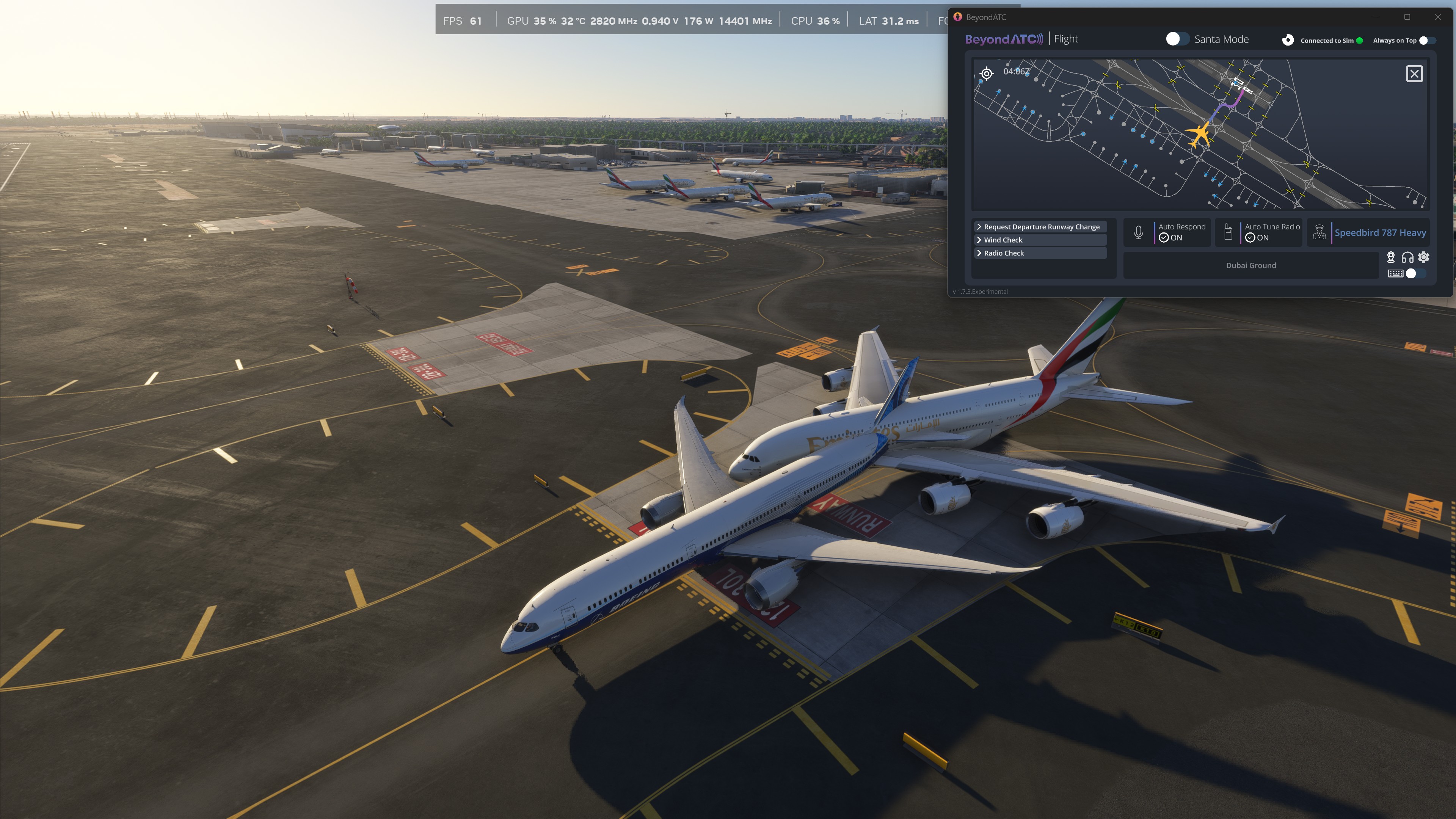
I wouldn’t call it normal, no. I have seen this with the last update to the Early Access version with FSLTL models as #1 and AIG as #2 and other choices OFF as you indicate with same version of MSFS. Which version are you using?
It looks like one of those isn’t generated by Beyond ATC, as it’s not showing on the map?
Do you have all MSFS injection set to off?
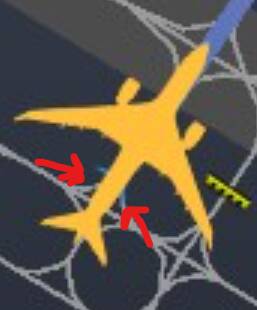
I thought so too, but that’s just because the traffic map makes your aircraft significantly bigger than injected traffic - this is definitely a BATC aircraft.
To be honest, I have been seeing the same behavior since after the last major BATC update, too. Just yesterday I had a plane on top of another at the gate next to me; they both appeared on the BATC map. Also saw 3 planes together the day before (all on the map as well)! I rechecked all the settings in case anything had changed, and everything was as it should be.
Yes, I followed the BATC instructions to the letter, but I will double check.
Another odd thing is that, while sitting at the gate, or beginning to taxi at a busy airport, I often HEAR a large plane near me - very loud with the feeling there is an invisible plane passing over or through my plane, in the same way MSFS Traffic would just run planes over your plane - and whatever plane I’m hearing is not visible outside or on the map.
So this makes me think that even if you turn off MSFS Aircraft Traffic, Parked Aircraft, and Multiplayer, and Traffic and Multiplayer in Flight Conditions before flight, MSFS is STILL rendering traffic and then masking visibility (but not audio). This seems like a huge waste of resources by MSFS if so.
It’s also possible that this is another issue of MSFS settings not quite being saved correctly. I’ve already had a few unexplained unresponsive control bindings, and I was planning on a complete wipe of Windows to start fresh with the release of SU4, so maybe I’ll do that today.