Any idea if anyone has actually mapped any of the above in Honeycomb Bravo using spad?
I don’t share your opinion, having a yoke and throttle doesn’t mean anything, i enjoy my hobby just fine the way it is , I’m completely used to controller, changing now would be more of a pain.
1 Like
I mapped mine in AAO which isn’t as flexible for configuring axis curves as SPAD but it works. I did play with it a little bit in SPAD but I’m very new to it so I was kind of fumbling around with it. I can definitely see how you could though.
Yes I understand it’s somewhat different but it is on devs to make aircraft compatible with the builtin user interface and features as a first and foremost thing. Anything else over and above this is obviously a bonus and that’s where you differentiate one from the other. I had a look into the Comanche fuel thing specifically at the time and I saw no reason why the standard simvar fuel values could not of been used as the input for their tablet which would of retained use of the built in interface and given users a choice of which to use.
I’ve managed to map throttle reverse and prop feather and condition cutoff via spad, using the usual methods of repeated events, for example continuously sending THROTTLE1_DECR 1, PROP_PITCH1_DECR 1 and B:FUEL_1_Condition_Lever 2 or 1 respectively.
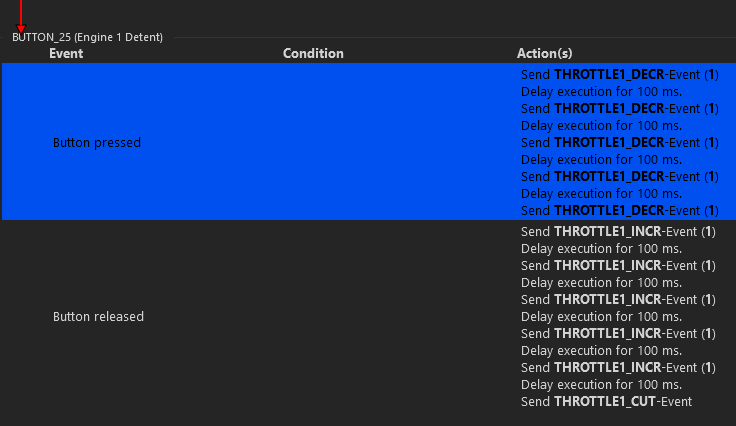
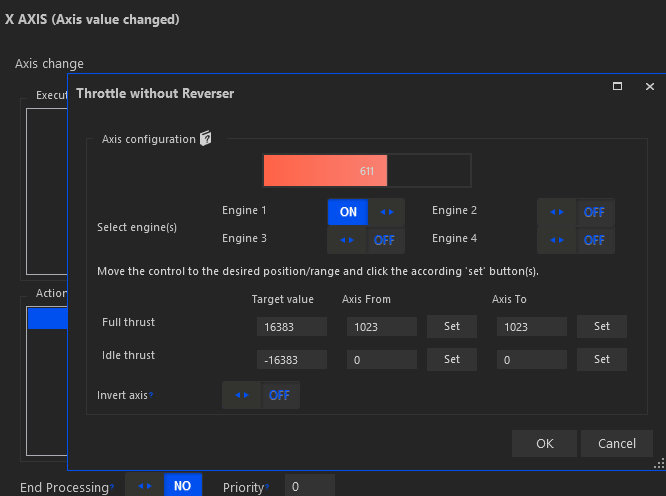
These seem to work fine, although getting throttle to remain in beta (aka. taxi) range is a bit challenging with the turbine lag. With medium weight the aircraft seems to start rolling at around NG 61.5% but it needs a higher percentage to turn and then it has to immediately go below 61% before it starts accelerating fast.
The main problem seems to be with landing, because I used to touch down with throttle idle but then I realized that reverse wouldn’t engage. While writing the previous comment, I found JayDee’s explanation and now it all makes more sense.
Since I’m not using ranges or curves or whatever, it means that once I’ve touched down I have to quickly increase throttle from idle to 15% or higher and then back to idle and then to the reverse detent. I was merely wondering if anyone else was doing it differently.
Another option would be to create some local variable for Beta and trigger it manually. When it’s enabled the throttle axis will only register throttle changes from 0 to 15% (i.e. the beta/taxi range) and when I disable my throttle idle will register as 15% minimum. This should work well from the very start until touchdown, it would allow me to go from 15% to reverse and then re-enable beta mode once I’ve gone out of reverse.
I think I’ll give it a try.
I think all you would need to do is move the throttle just enough to send an updated position to the sim. It’s been my observation that the axis only get updated when they’re moved (although I think some external binding software can be set to continuously update). Someone may correct me if I’m wrong. But for instance, if you fly a jet with autothrottle and it has commanded the thrust setting to something other than where you have, you may notice that when you disconnect the autothrottle that the thrust levers will remain where they were when you disconnected the autothrottle even though your hardware thrust levers are not in the same place. When you move your hardware thrust levers, the sim levers will jump to where you’ve moved your hardware thrust levers. This is why you will often see some ‘study level’ jets have an option that puts a little indicator on the engine display that shows where your hardware throttle in comparison to where the sim thinks it is. Then you may match your hardware to the sim so there’s a seamless transition when you disconnect the autothrottle.
I haven’t flown the TBM850 in a while but I suspect that there is coding that just doesn’t allow the throttle below 15% when the aircraft isn’t on the ground (not unlike a real aircraft with weight on wheel switches). I wouldn’t be surprised if what’s going on isn’t dissimilar the the autothrottle scenario. E.G. if after you landed and your hardware power lever was at 0% and you just bumped it enough to update the position, the sim power lever would ‘snap’ to where your hardware was.
I think I’ve got this, though I haven’t tested it in a flight yet:
- A button to trigger local variable beta mode on and off (only on the ground)
- The throttle axis to work differently depending on said beta mode:
- With beta mode off, throttle will only move between 15% and 100% (and I can use the entire Honeycomb Bravo range, from idle to full)
- With beta mode on, throttle will move only between 0% and 15% (and I’m only using a small HC Bravo range between idle and ~15%)
- Beta mode defaults to on when the flight loads and I have to manually turn it off during run-up tests or during takeoff
- Beta mode cannot be turned back to on during flight, so if I set my Bravo throttle to idle it’s translated to 15%, just out of the beta/taxi range (what the code is supposedly already doing anyway)
- Once I touch down, I’ll have my Bravo throttle to idle and then I’ll push it back to go to the reverse detent. Which does this:
It’ll enable beta mode, gradually send back the throttle lever from 15% to -15% (which is full reverse) and once I reduce rollout speed to 40 kts and go back to idle, I’ll be on beta mode ready to steer off the runway.

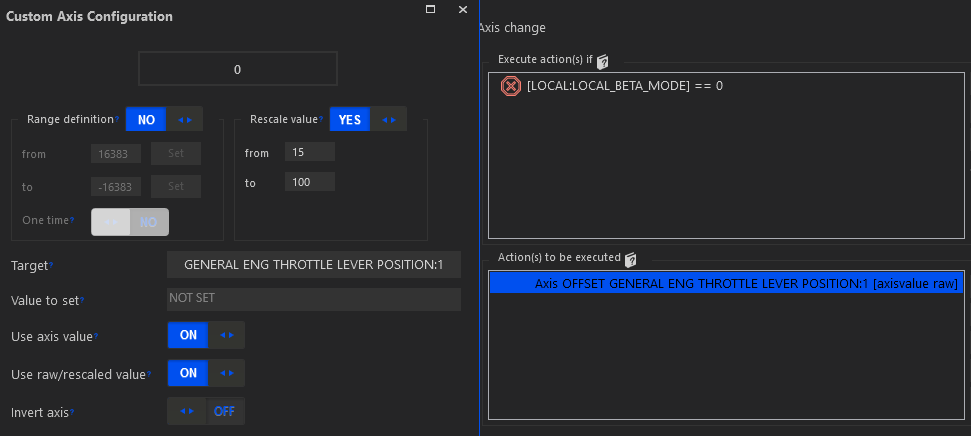
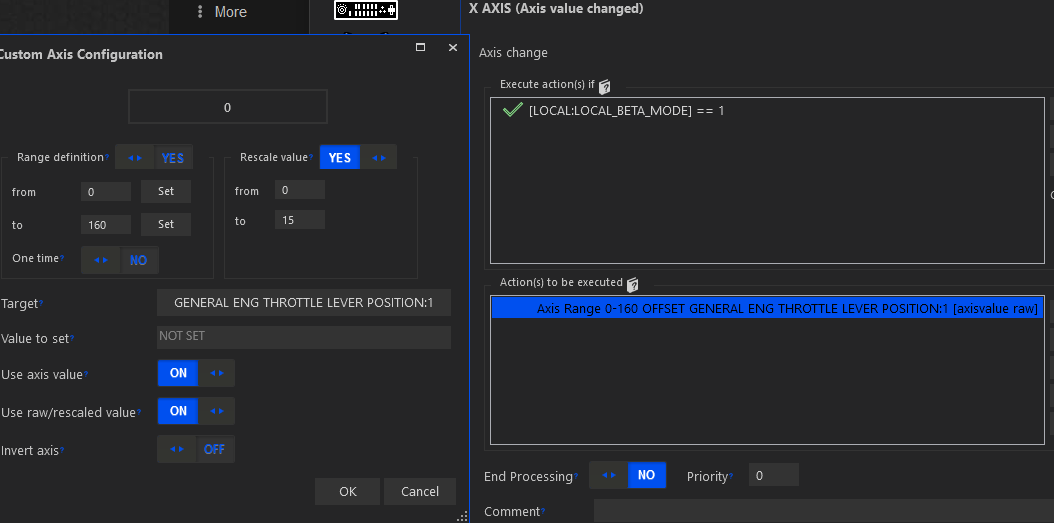
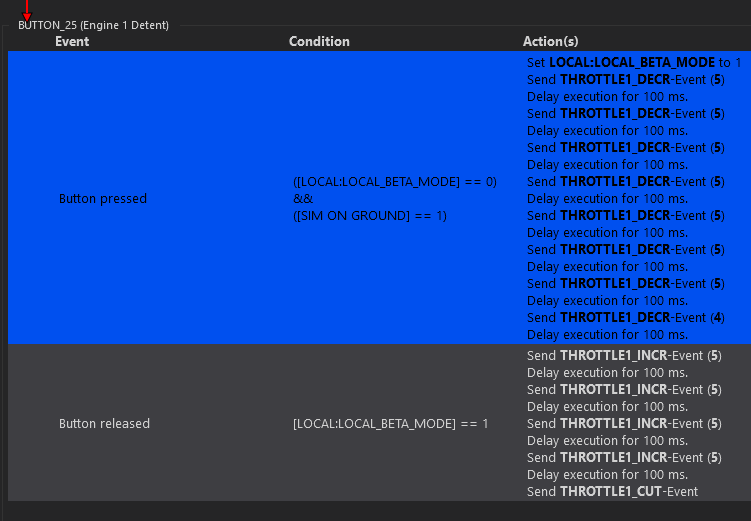
Not 100% perfect but it’ll hopefully do the job once I find some time to test in practice…
Is there any news or info on any potential update? Just curious that’s all?
1 Like
It should be sufficent if just jitter the throttle a little bit, after you have touched down, just enough to send a signal, so the throttle in game gets to full idle. You shouldn´t have to move to the 15% mark. Cheers
1 Like
This is what I was doing in my last couple of test flights once I figured out reverse wasn’t activated upon touchdown. I may revert back to this simpler solution if the beta mode thing turns out to be too complicated to manage, on top of all the other complexity of this fantastic aircraft.
What does manual override do anyway? I still haven’t got around to read the manual…
If you’re referring to the manual override lever in the cockpit, it’s linked directly to the fuel control unit on the engine in case the regular power lever becomes jammed or inop for some reason.
2 Likes
External throttle definitely only register when moved. An easy test of this is move the throttle with the mouse. It does not revert to the external throttle position until you move the external device.
There is a mod on Flightsim.to that implements Beta operation
What is the procedure you all use for setting the Rudder Trim on the 850? It’s not mentioned in the checklists or official BKSQ documentation (other than circuit breaker/failure references, and simply “Electric Trim - Test and Set”). The rudder trim needle has a “TO” setting which strongly suggests that you set it there for Take Off. :-).
When do you center it, right after takeoff? I’ve been at cruise many miles, and realized that I was still at T/O setting; the slip indicator “bubble” is off center if you’re in this state.
The right rudder trim seems to counteract the left roll tendencies, though my instinct is to use aileron trim instead.
I’ve had a CTD every other time for a few days now when I turn on the battery or the GPU, does anyone know?
Not sure what the procedure is supposed to be but I’ve done many T/O and landings with it in the sim and never touch the rudder trim. I leave it centered and don’t have any issue.
1 Like
Typically you’ll reduce the trim as you transition through different phases of flight as the need to counteract the effect of torque decreases. High power settings and high angle of attack require the most correction so take off, initial climb, cruise climb, cruise and descent will all require less trim respectively. You can always take your feet off the rudder pedals with wings level and trim to center the ball.
2 Likes
I’ve read that TBM850 pilots tend to not target “TO” trim before take-off. Instead they set rudder trim just shy of the “TO” mark because this lessens yawing moments immediately after takeoff.
As to when they change trim back to normal (or which setting is preferable during approach), I have no idea but I’d assume it’s nowhere near “TO”.
1 Like