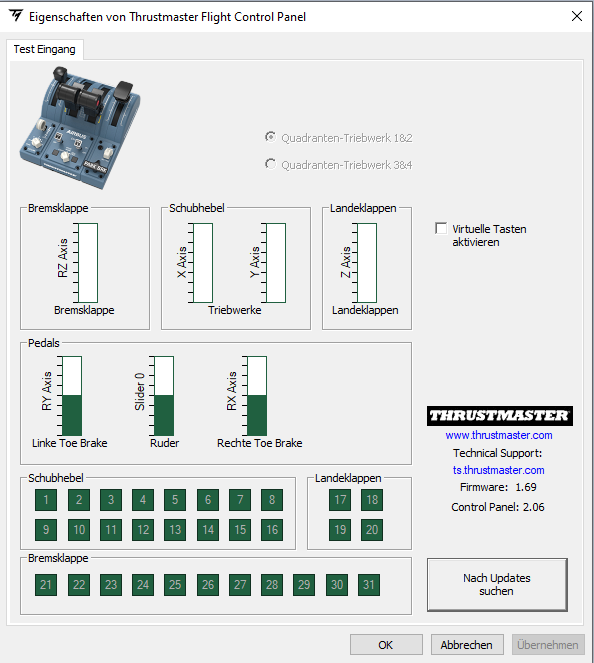
my idle and full reverse position are the same value in the both green bars…
when i move from idle to reverse nothing change, from reverse to idle the same and only above idle the green bars coming up
this is full reverse and idle
Okay.. in that case there’s definitely something wrong in your hardware where it’s not registering any movement between IDLE and FULL REVERSE on the hardware level, not MSFS. MSFS is merely receiving what your hardware feeds. So if the bar is still empty on both Full reverse and Idle, then the hardware isn’t feeing any throttle input into the sim.
yes. but when i do the calibration backwards, then the reverse range is working, but not corretly, but it doesn’t matter because the calibration is wrong
but why it works in X-Plane for example? this is something, what wouldn’t go inside my brain
Do you also have the spoilers and flaps addon attached? It may be unrelated, but if you do have them attached. You also need to position both spoilers and flaps at the same position as the throttle as you calibrate them.
So when you start the calibration process:
If following these exact steps doesn’t solve your throttle issue. You might need to contact Thrustmaster Support as either ask for a refund or a repair.
Also, I think you need to Enable the Virtual button option. I see it’s disabled in your screenshot.
ok I give up.
Anyways thanks for your help.
nothing helps and thrustmaster support is slow
On the contrary, TM have confirmed that the problem is not with their product and that the developers are aware and are working on a solution. We just have to wait until SU/WU6.
Had the same problem with my TCA throttles and your solution did the trick! Thanks
If even the thrustmaster control panel itself can’t detect the input range from reverse to idle, then it’s either not calibrated properly or a faulty hardware.
It’s only an MSFS issue if the thrustmaster software is behaving correctly but the sim isn’t behaving the same way.
trash sim omg!!! horrible
much money for nothing…  ■■■■ sim
The Ign/Start and autobreak buttons work on FBW mod, not on the original A320neo.
Works for me! Thanks a lot for the heads up.
I only purchased the Thrustmaster today to find out it does not work  However I’m a long time user of Spadnext software to configure my flightsim hardware and it seems if you use that and configure the controls it works fine. So I completely ignore the default setting from MS to get it to work. Spadnext is not free but it is great software for all kind of hardware (I mainly use it for all my Saitek/Logitech hardware).
That’s weird… like it doesn’t work at all? or does some buttons not working? Most people don’t have Spadnext and the hardware works fine. Maybe having Spadnext is actually disabling your default binding altogether, requiring you to actually use Spadnext to configure it.
No my engine one switch and the mode selector don’t work. Configuring those with Spadnext works fine and as I have Spadnext always running this works fine for me. I understand not everybody has Spadnext. I think you can try it for free to see if it fits your needs as it can do so much more in configuring your hardware.
This one is easily fixed by simply unbinding the TOGGLE ENGINE 1 FUEL VALVE and TOGGLE ENGINE 2 FUEL VALVE. As for engine mode selector, I think that doesn’t work on the default A320. But it works fine on the FlyByWire A32NX mod.
I’ve recorded a video on how I configure my controls and settings with the thrustmaster using the default, without the need for external software.
Thank you for finding and reporting this fix!
Thank you - just bought the TCA quadrant today and this was driving me nuts!! Appreciate the solution.
Another random question - what do you guys use for rudder? (I do not have rudder pedals) - is it okay to use the joystick as rudder or could that wear it out a bit down the road?
I just use the sidestick twist function for my rudders. I don’t use rudders that often anyway, only for taxiing.
Same as me. And that works for you then? Ok, I’ll do the same. Was just concerned that it could add extra wear to the stick (my t.Hotas one stick rudder never worked well and always skewed to the left). So far I’m very happy with this TCA Officer stick and throttle quadrant. Very nice!