I’m doing the first tutorial with a mouse and extreme pro joystick on windows 10.
The mouse was able to hide the yoke. But when I get to the next step of “Interact with cockpit using the cursor” and the “Lock the clock knob pressing” [left mouse button], I am unable to get it to work. I tried both a short click and a long click and hold - neither cause a reaction.
I also tried enabling Legacy mode in accessibility and that didn’t work.
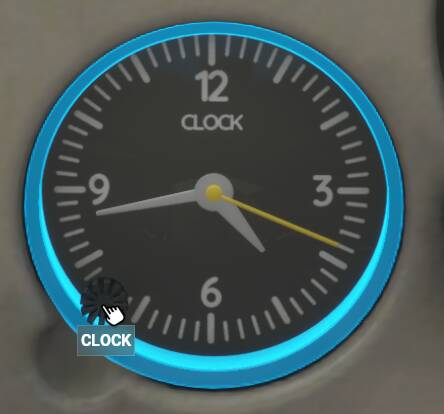
Yes it is very annoying and I faced the same problem. Take a close look at the clock…you should see a small knob in the bottom left side of the clock, right at 8:30 on the clock face. When you click your mouse on that small knob within the clock you are able to lock onto it.
I’m pretty sure I’m in cursor mode as I can get the triangle menu with the options (like the camera). I don’t see “cursor mode” in assistance options - where is it? I think you might mean accessibility options, but I don’t see it there either.
Me too.
Can change the time with mouse by moving sideways, right click to change between hrs and minutes, left click etc.
But it never moves to completed.
FWIW, I have 200hrs in the sim, so it is not unfamiliarity, it is the xbox changes!
Try “zooming in” to the clock with the camera controls with the mouse, or keyboard controls (arrows and +/- keys), I recall not being able to get it to lock on when zoomed out
Change cockpit interaction system from LOCK to LEGACY.
Options > general options > accessibility > cockpit interaction system
Select LEGACY and save changes.
Also select default mouse profile.
Go to options > controls options > mouse
Select default profile and save changes