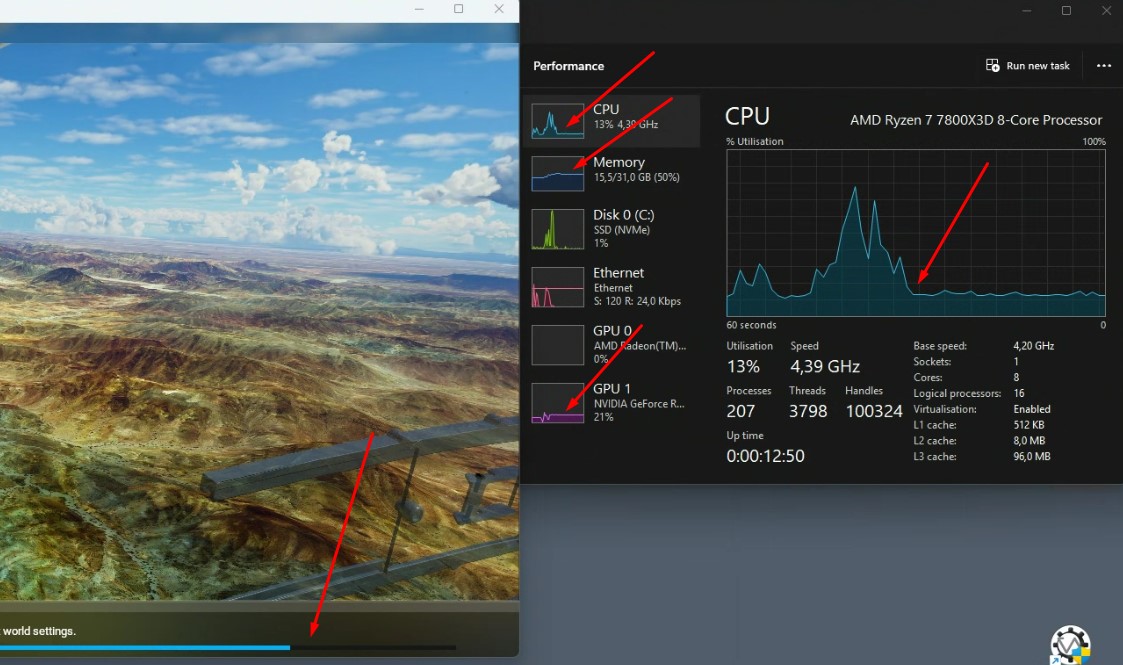
Same issue for a couple of days now.
I completely reinstalled msfs2020, but the problem remains. There is like a 20% chance that I can start a flight.
If I monitor performance in the task manager, the moment the problem starts, the CPU, GPU, and memory graphs just start flattening out and the blue loading bar continues to 100% and nothing happens. I have to kill FS and try again.
Hi @EchoWisky3959 ,
I have created that support topic for you since you originally posted in a msfs-2024 report and you indicated your issue is with msfs-2020 .
Thank you, but to be fully correct, it isn’t the blue bar that is stuck. The blue bar advances until the end, and even the tips keep changing, but the flight never starts.
I would empty the community folder (move the contents to a temporary storage area) and disconnect all peripherals except the mouse and keyboard. If it starts, reconnect the peripherals one at a time; if it fails, you have found the problem. If not found, connect the peripherals one at a time. Again if it fails you have found the problem.
Regards.
I did a complete re-install of msfs2020 with an empty community folder, and I had the same problem again with the clean install. I only use that PC for msfs2020 by the way.
The strange thing is that it suddenly started. It worked flawlessly before with all the same peripherals connected.
I would run a memory check: you may have one bad spot and when the install tries that spot the system can’t continue. If that checks ok, I’d run sfc and DISM to make sure all components of the operating system are installed. This video is a good explanation on how to use them together. This was about Win10 but I believe is applies to Win11, also.
Did that, the same problem remains.
It looks like more and more people have problems with textures not loading.
As of today, I also constantly have a message that the sim is offline.
I suspect that there is something wrong with the servers…
I forgot to post the link to the video I recommended. Let’s see if I get it right this time. I found this helped when I had to trouble shoot a memory problem.
Additionally, with this problem comes that I will never be able to load a second flight. So when I start the sim and be able to load a flight (20% chance), I have to close the sim completely and start it again before I’m able to load in another flight. A second flight is never loaded. It gives 100% of the time the described problem with the blue bar going to 100% and never loads the flight.
Some additional info after some tests:
If I load a flight without Bing data, it always loads!
If I then, during the flight, turn on Bing data, msfs2020 again keeps on loading.
I’m pretty sure that the problem lies in the server part.
There are starting to rise other topics with the same problem btw…