Career Mode mission failure straying too far from flight plan

Using the template below will greatly help the team reproduce the issue and ease the process of fixing it. Before posting, search for an existing report. If you are not sure it’s a bug, please first report in User Support Hub.

2 tags are required - add them in the tag section next to the title above:

Feel free to delete this quote section after adding your appropriate tags.


ISSUE DESCRIPTION

Description of the issue:

I finally bought a C208. Decided to do my first medium cargo mission. Set autopilot to follow the flight plan. Mission failed due to straying too far from flight plan. Now the plane requires more repairs to fly again than the plane was worth to begin with. Back to grinding with C172 I guess…

[PC Only] Did you remove all your community mods/add-ons? If yes, are you still experiencing the issue?

FREQUENCY OF ISSUE

How often does this occur for you (Example: Just once, every time on sim load, intermittently)?

REPRODUCTION STEPS

Please list clear steps you took in order to help our test team reproduce the same issue:

  1. Fly medium cargo mission
  2. Stay on flight path with autopilot
  3. Fail

YOUR SETTINGS

If the issue still occurs with no mods and add-ons, please continue to report your issue. If not, please move this post to the User Support Hub.

What peripherals are you using, if relevant:

[PC Only] Are you using Developer Mode or have you made any changes to it?

[PC, MSFS 2020 Only] Are you using DX11 or DX12?

[PC Only] What GPU (Graphics Card) do you use?

[PC Only] What other relevant PC specs can you share?

MEDIA

Please add a screenshot or video of the issue occurring.

[END OF FIRST USER REPORT]


:loudspeaker: For anyone who wants to contribute on this issue, Click on the button below to use this template:

Do you have the same issue if you follow the OP’s steps to reproduce it?

Provide extra information to complete the original description of the issue:

If relevant, provide additional screenshots/video:

Do you have the same issue if you follow the OP’s steps to reproduce it?
• Same failure

Provide extra information to complete the original description of the issue:
• Had updated the flight plan and submitted it to ATC and Avionics prior to flight. Followed gps flight plan with Autopilot

If relevant, provide additional screenshots/video:

1 Like

I have a similar issue. You fail missions at airports with pit stops (u turn) at the end of the runway. Just lost 25000cr because I decided it’d be better to turn around at the end of the runway than turning abruptly at a taxyway. At least it should be a deviation from route, not a complete failure. Nonsense.

same here. After 2 hours pc12 vip mission i was changing the route in the FMS. But that was still 2 hours flighttime. Suddenly got the failed message…these bugs are realy a joke

Ive not had any issues if you use the prescribed flight plan for the PC-12, C208 or PC-24. It looks like the issue occurs if you change the flight plan in the efb and you stray off the original prescribed plan for the quest. Or at least thats what i am seeing. The updated efb plan doesnt seems to register for the quest itself from a completion perspective.

Do you have the same issue if you follow the OP’s steps to reproduce it?
• Yes.

Provide extra information to complete the original description of the issue:
• Took a cargo mission from BGBW to BGGH in the C208B. Right after takeoff I barely managed to turn around and the NAV just engaged and I got this error. Happened first time after hundreds of flights in career mode. And aircraft was right on the GPS path on autopilot.
I did no changes to EFB flightplan and was just doing the mission with whatever was given at default.
This never happened to me before.

Same issue. C208B. Cargo mission. Has happened last three missions failed due to being too far off course. Flying the default flight plan generated by the sim - no modifications. Flights are direct.
I monitor the plan on the in-craft tablet and on the GPS. I also follow it on little navmap app. There is a slight discrepancy between the tablet and the GPS, but not enough to trigger any warnings. All failures occur around the 3/4 of the flight being completed. First warning says you are about to go too far off course followed within second by the second error that says you went too far off course and ends the flight.
Lost a couple of million in-game $$$ not to mention several hours of flight time gone.
Can this restriction be removed please once you get over level 100 or something. I’m level 207 and I think I know how to do these cargo runs myself.
It would be great to turn off most of the restrictions and just have the success based on getting from A to B successfully. Forget about ATC (so we can use 3rd part apps), runway width exceeded, flight plan deviations (so we can use 3rd party and manage deviations ourselves).
All that needs to be known is that we delivered the cargo. Maybe put in an extra bonus payment challenge for delivering on time, or ahead of schedule. No bonus if late delivery.
But it is very frustrating to fail a mission when I believe I have followed the requirements exactly.
Keep in the aircraft wear and tear from poor aircraft handling etc.

3 Likes

Still happening here … took a VIP passenger flight from NZ to Sydney. Default FP had me heading north halfway up the North Island before turning SW virtually back past where I took off before heading across the Tasman Sea to Sydney … about an hour of totally useless flight. So I removed two way points in the EFB flight plan so I could head straight west from takeoff, across the ocean to Sydney … sent it to ATC and Avionics, confirmed all was good and took off …

Get to just off Australia, 3 hours later … and BAM! Mission ends with no warning and amessage: you deviated too far off the flight plan, when I was smack bang on my GPS track, and had been for 3 hours. The enraging part is - the two waypoints I removed were back in NZ, not near the Australian coast!! Thousands of clicks away!

PC-12 and this is the second time this has happened in career mode … 6 hours down the toilet :frowning: I’d take my Beechcraft 350i instead but that thing keeps falling out of the sky halfway through missions for no reason at all and I can’t complete a single flight in it … this PC-12 garbage only seems to happen every 3rd flight … seriously Asobo, it shouldn’t be this hard for you to have planes that can actually fly a route from beginning to end in flight sim in 2025 … we’ve had the technology to do it for 40 years and the game has been out for a year already!!!
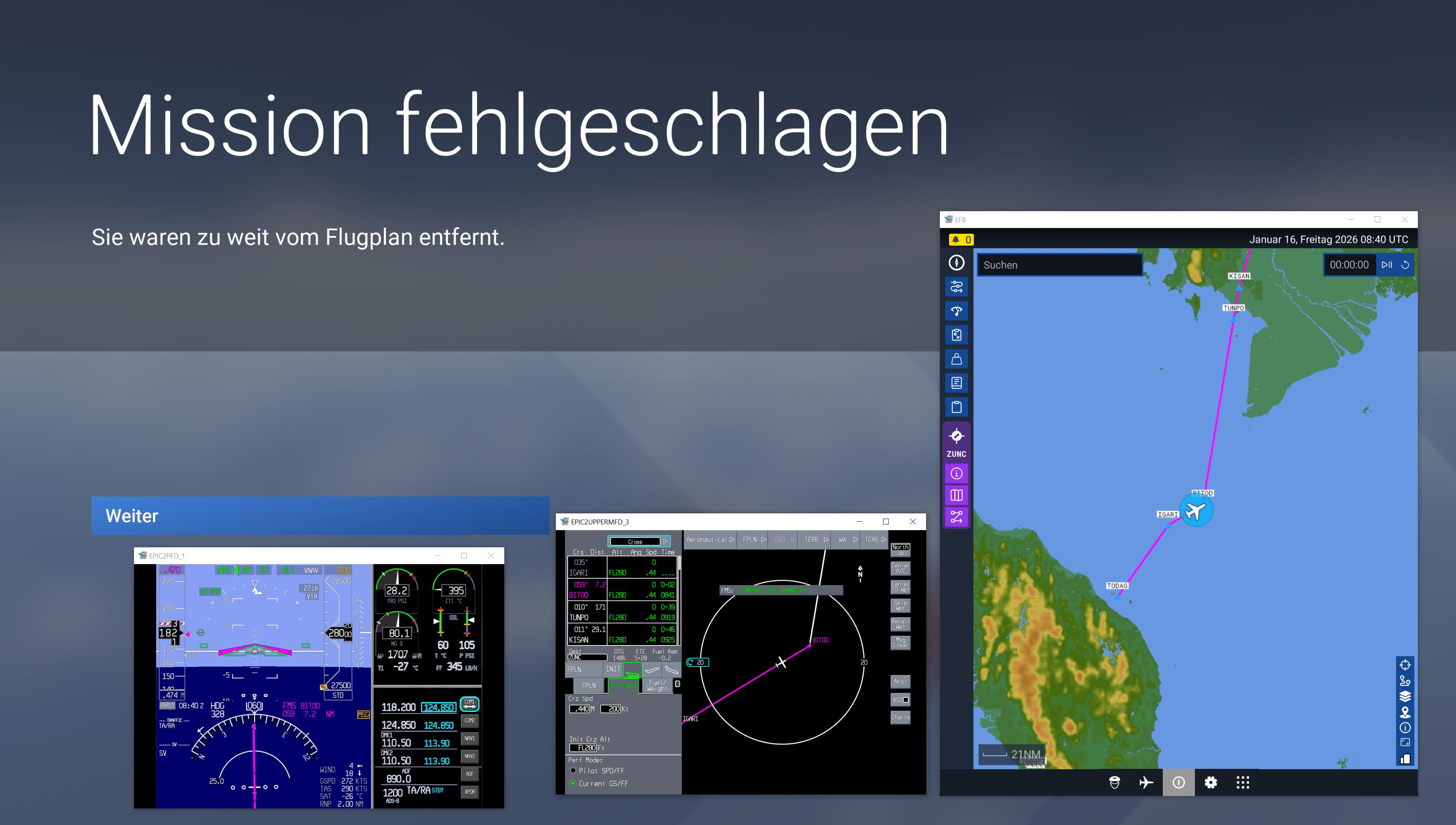
1 Like

The quest flight plan is fixed so you need to be following that. Regardless of what you set in EFB.

@PirateAntz : a post has been marked as the solution. Can you confirm issue has been fixed ?

In a way, - it’d be nice for a solution to be to never throw people off for making their own flight plans, but yes, sticking to the one the game makes for you follow does indeed avoid being thrown off.

Moved to User Support Hub since not a bug and a solution has been marked.

Have a look at this wish: Career Mode: Allow us to create our own Flight Plans

i still think there is some kind of bug here. i have been getting this a few times lately on longer missions. (VIP Charter in PC-12 and Citation Longitude).

i did not change the flight plan in any way.

as i can see from the pop out instruments and the efb the plane is perfectly following the flight plan but still gets mission failed.

1 Like

Very well, I have unmarked this issue as solved… maybe it is a bug after all then.

1 Like

PS5 in a CJ4, DNKN to DIAP, VFR at 18000’

VIP mission in Nigeria. Mission failed because it said I had strayed too far from mission path. I had not, it was on NAV mode and following the route.

Just before mission failed the plane started swaying a few degrees port, then starboard and so it carried on as if it was trying to find a signal. Avionics was not looking for an AHERS signal at that point, although it does lose the avionics randomly between MFD and PFD.

Not sure that bug is connect to this though as it only started after SU4. (AHERS that is)

Still it is annoying - lost reputation for no reason.

Please could this be marked as a bug as it has happened to more than just one person.

Do you have the same issue if you follow the OP’s steps to reproduce it?
yes it cost me my first pc24.

Provide extra information to complete the original description of the issue:

Changed the flight plan to straight flight. Send it to tower and amc. Floow blue path BANG LOST PLANE.

STARTED AGAIN BOUGHT VISION JER G2 SAME STROY BANG LOST PLANE

If relevant, provide additional screenshots/video:
I AM GETTING SO TIRED OF ALL THIS SS€€€€

GET YOUR ACT TOGEHTER AND MAKE THIS PROGRAM WORK I PAID 240 EURO FOR IT

DO YOUR JOB OR DONT SELL THE PRODUCT.

This just occurred for me in a passenger transport mission between Anchorage and Seattle in the A330. I had the flight running in the background and was just monitoring ATC to make my responses so hadn’t looked at the flight path in a while. It appears that the issue has to do with incorrect waypoint locations and the default flight plan not matching the current navdata. Frustrating, but can be avoided by examining the flight plan prior to starting the flight.

Great, so that is the bug! :slight_smile:

Mods, can this be put back into bugs again?

What do you mean not matching curent navdata and examining flight plan? In my last 5 missions 3 failed due “too far from flight plan”.

Everyone says check your plane computer but when I do this the flight plan looks normal to me. How I can know its incorrect? Where I’m supposed to verify this?

What I have experienced is that the flight plan will display normal with the problematic fix showing at the correct location in the EFB’s map but in the aircraft’s avionics it’s location is thousands of miles away. I believe I have only experienced this issue with the default A330. The only way to check for this is to look at the flight plan leg lengths in the FMC. The last time this occurred the offending fix was nearly 7,000 miles away. I think it is an issue of duplicate waypoint names and the aircraft selects the incorrect fix when the flight plan is loaded to the avionics.

1 Like