Just for curiosity, I was going to the place you take that screen Shot with PG enbled to compare with my without PG enabled.
I do not see any difference
.

That’s because all airport buildings are handcrafted. The PG can be found in neighbouring buildings outside the airport perimeter.
As there are reports that CDT is happening after some time, in long flights (more 1h or 2h) , would you please start a flight from LFPG to EGLL, make a Touch and Go there and fly to EHAM, to see if CDT arises.
I am mostly fly Airbus A320. So, you may try that one, even if I do not believe it is Airplane related.
Thank you.
About your settings: I would not set details over 100%, you probably are introducing pixels that does not exist, and problably degrading the image quality.
The more import in quality settings is the Texture Resolution it is Mesh Resolution and Ultra is setting to the max available. Beyhond that, is not possibly, wasting resources.
That reads like the goalposts have shifted. If it happens in a particular plane, and after flying a certain route for 2 hours, I’m not sure how the PG comes in to it.
You first said it happens at spawn or even when zoomed in on the map screen.
I don’t believe I am rendering at more than 100%. I’m pretty sure there is nothing in config to suggest that. Perhaps you are confusing TLOD/OLOD with render scale.
As I said at first post, I can reproduce every time CDT at those airports, exactly the same way.
In another post, above, I can start at LFPG with PG enabled, and flying to LFPB around 7 NM away from LFPB it crashes. I did this testing 2 times ( see pictures above).
Now, I have seen in other postings that are CDT reporting Flying over Handcrafted Airports, and other saying after several time of flight.
My point is, that I suspect PG is causing CDT not only at Airports I said above, but in some other situations, and the reason I asked you is to sort that out. It seems to me an intermitent situation that could be the cause of other problem around. Who knows? Testing is the way.
You forgot to mention that your hardware configuration does not meet the minimum requirements needed to run MSFS 2024.
What are the technical specifications for PC?
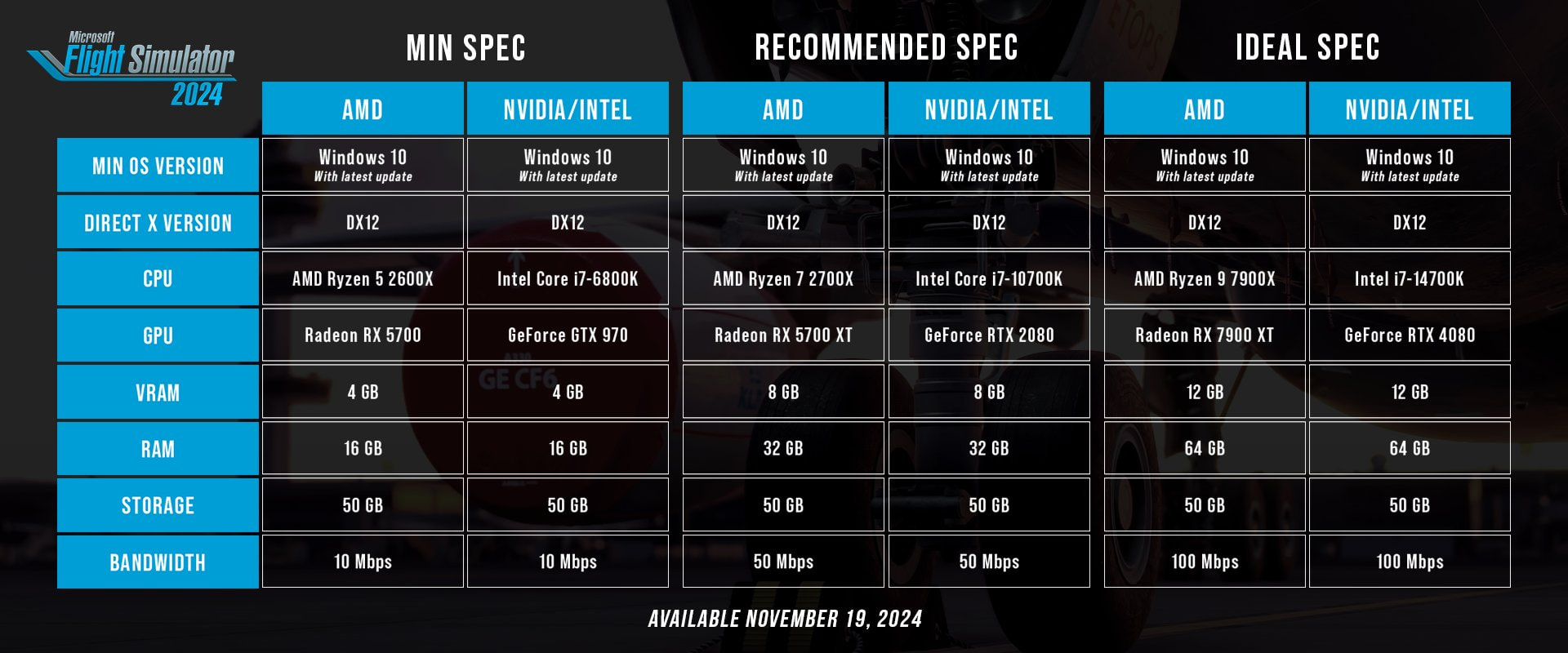
So the minimum requirements are a Ryzen 5 2600X (you do have a Ryzen 5 5500U CPU) and either a Radeon RX 5700 or an NVIDIA GTX 970 graphics card.
The problem is that you’re using an integrated graphics card, which simply is not suitable for demanding games like MSFS 2024. That’s the harsh reality.
However, MSFS 2024 also gives us the option to download most airports, City Updates and World Updates directly to the disk. On weaker systems, this can help avoid some performance and streaming-related issues.
So if I were you, I’d download as much content as possible locally instead of relying on streaming.
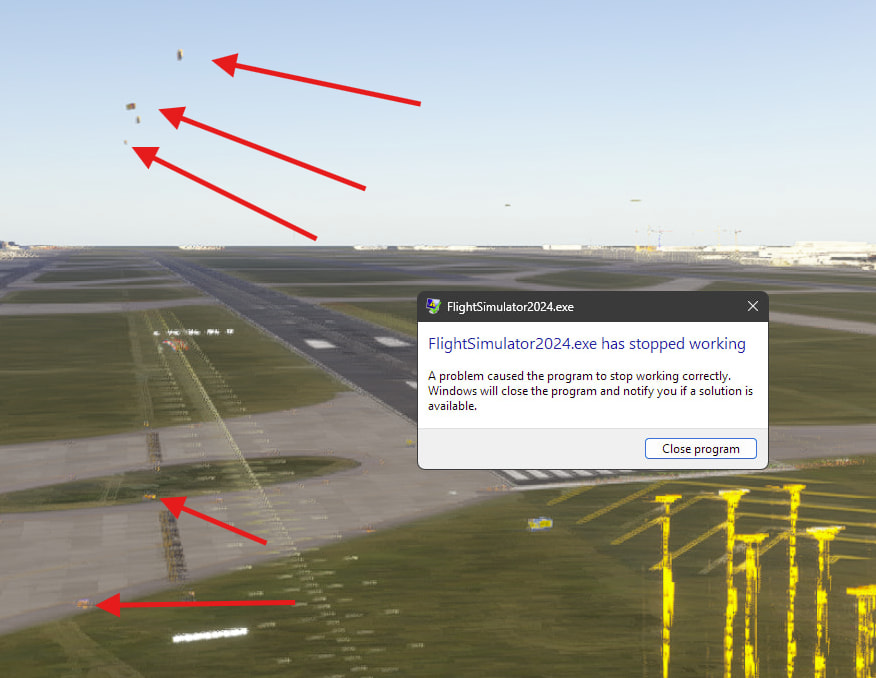
In the screenshot above, you can clearly see that something is overlapping (possibly two same sceneries from different developers?) or not rendering properly, which suggests that your laptop is struggling to keep up with proper rendering.
Going back to an earlier image, I can see two sets of taxiway signage, which makes me think you have two scenery packages which may be conflicting. Altitude of a given airport is oftten something I see on group flights, with planes moving along in the air as they may or may not have the same scenery that I have.
One way to find duplicate sceneries is to go into your Library, and search for ICAO. If there are multiple ones, this should show them. You can then choose which one to disable.
I noticed it too.
@FS20246320
Go to
C:/Users/Username/AppData/Local/Packages/Microsoft.Limitless_8wekyb3d8bbwe/LocalCache/Your_Gamertag
Open the Content.xml file in Notepad, copy its contents and paste it in your reply. I’m not sure if I’ll have time later - if not, someone else will check it.
EDIT
If you ever post a screenshot of an airport you’re having issues with, please also include its ICAO - it will make troubleshooting much easier.
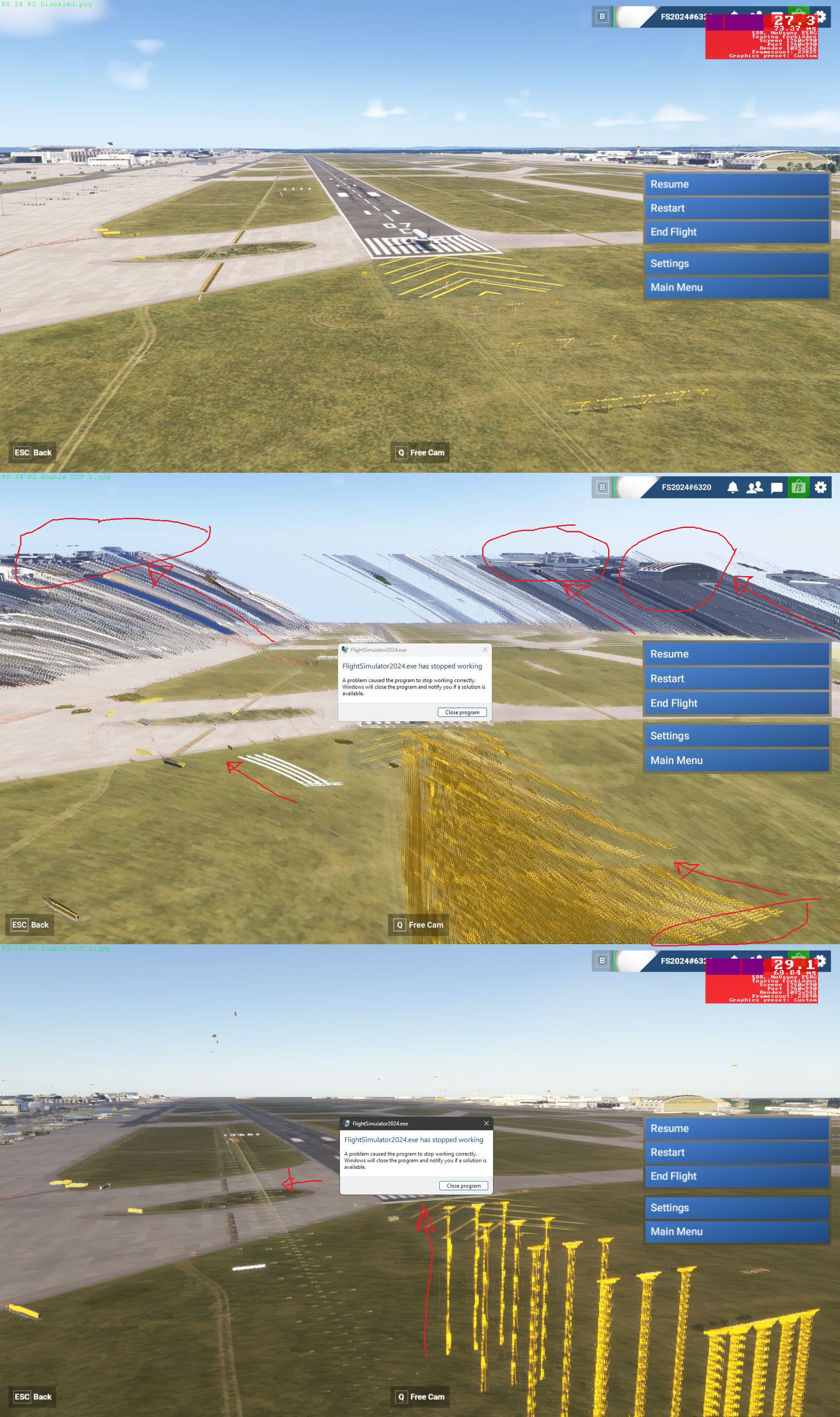
Scnerey Duplication, that could be an explanation, as in the 2 Pictures (see the other one further above) , both from EDDF, seems that when I enable PG, FS beginns to redraw another Airport a litle aside the other one.
Also the yellow lights seems they been deslocated in Height.
Look at the redrwaing of a 2nd RWay on this picture.
Well, I have complete deleted FS 2024 an re-installed from Store.
Do you believe that even then there are still 2 Scenery versions beeing installed?
If it’s marketplace, it could be.
When I search for LOWI in my library, I find the Asobo streamed one, and the OrxX streamed one. I have disabled the Asobo one, otherwise many objects are duplicated, like buildings, and windsocks. It doesn’t crash the sim, it just looks wrong.
I am using MS-Store to install FS. From marketplace, I updated the Scenery updates that are available. Once installed, I can not delete them, evey time I install FS, that updates are installed automaticaly along.
Search for EDDF in your library, and see how many sceneries you can see. I’m willing to bet you have more than one.
I’m at work, so I can’t show you what I mean, but I have found a forum post from years back, for 2020, where I showed images of duplicate sceneries for TNCM.
https://forums.flightsimulator.com/t/omdb-inibuilds-conflict-with-premium-deluxe/650082/2
You can see I have de-installed the default Microsoft one, leaving the third party one installed.
For 2024, those would read either Streamed or Disabled, in the case of a Marketplace streamed scenery.
I have searched in My Library, and there is showing 3 times EDDF: 1 in Standart to Deluxe upgrade, 1 in Standart to Premium Deluxe upgrade and 1 in Deluxe to Premium Deluxe Upgrade packages. But they are all the same package, at least same Version and same Autor.
I do not know if that konflicts.
I disabled , one by one those packages and still CDT. That will not be the problem, I think.
I keep in mind that the issue is not only EDDF, there are several others Airports with same CDT (See list above)
I keep in mind, that Sim was working with PG enable in SU3 and SU4 until release 1.6.21 ( according to my windows error logs. But it stoped working in a eralier release, perhaps 1.6.13 , I am sure).
The pictures above shows a rendering problem, it looks like Sim is redrawing Airport moving it to another position.
As requested I am posting the content.xml :
Packages.txt (93.2 KB)


How to clean MSFS Cache? The available information is saying to go to Settings-General-Data but such item is not available on my Sim.
I have disabled that 2 before, and now again and did not help.
The only thing that helps , as I already said before, is disabling 3D Photometric Cities Packages.
I have also downloaded and installed all the 3 complete Packs related to “Standart to Premium deluxe upgrade” That was over 40GB of data.
That also did not help.
But lets stop with Evidence based on “Guessing” and go directly to technical evidence:
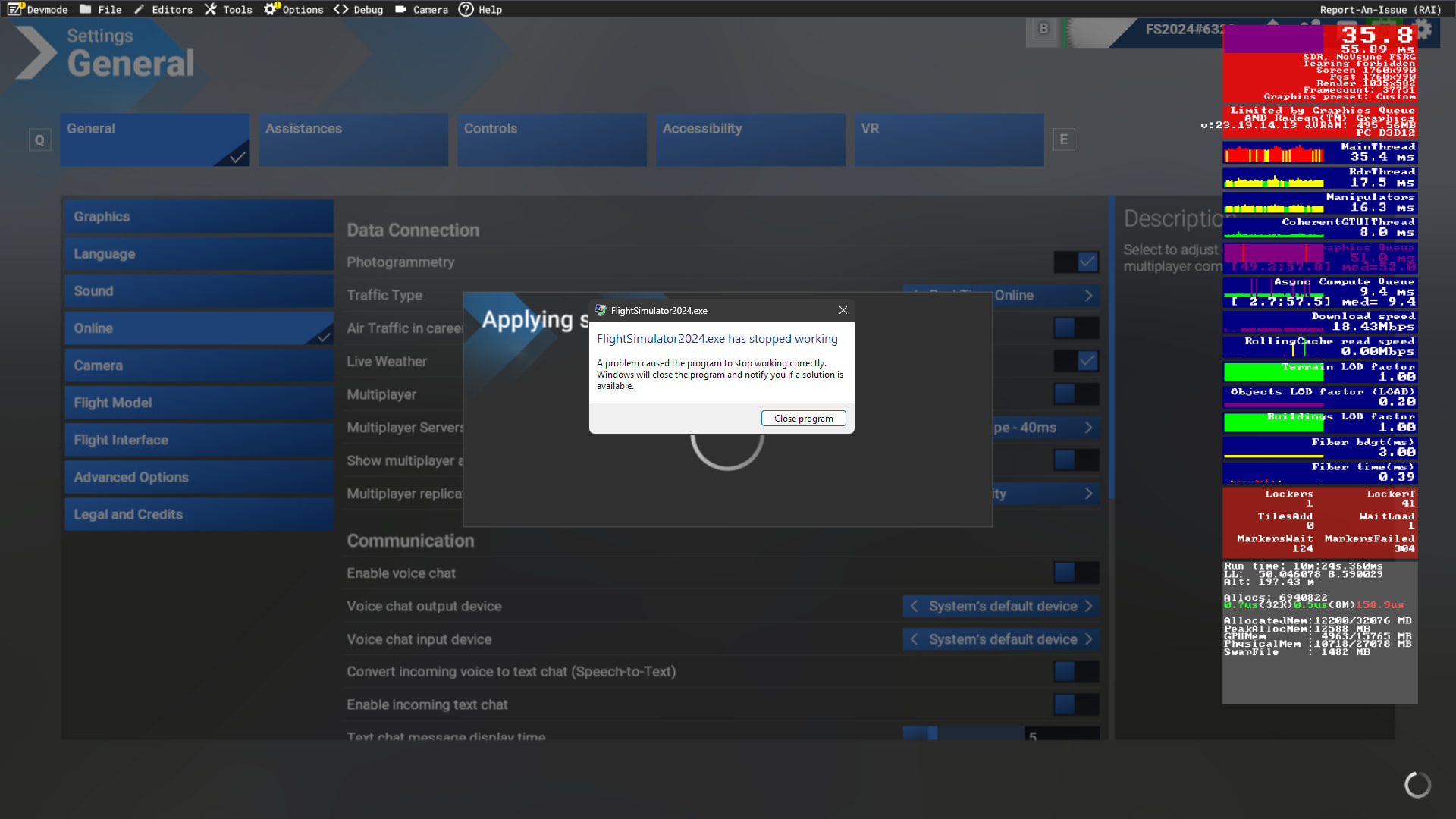
- Windows Error Log is saying it an App error , error Code 0xC000005, that is Access Violation.
- We see in the 2 pictures above, clearly Sim is redrawing Airport aside the existing one.
- What I conclude from this, is that Sim have 2 instances concurrently drawing the Airport, probably one instance is starting with PG, while the other did not release the mem resources, then of course it is crashing.
I did post here the Asobo Reort error and also the Windows Reort Log, and also open Tickets at Zendesk but seems nobody is caring about.
For me, I am finished with this, it is enough.
Thank you all for the Help
Good luck with that one. That has plagued the sim since 2020 was released, and it could be almost anything.
That’s my assumption, but we’ve seen no evidence of that. I’d also add that the altitude discrepancy is very large. When I have seen planes taxiing around in the air, the difference is usually only 5-10ft or so.
There is this article that gives some causes of that error code:
I am talking about Windows Error Logs from MS FS2024, not any DLL or AFterBurner or something else.
Why do you post such things ?
Faulting application name: FlightSimulator2024.exe, version: 1.7.28.0, time stamp: 0x00000000
Faulting module name: FlightSimulator2024.exe, version: 1.7.28.0, time stamp: 0x00000000
Exception code: 0xc0000005
Fault offset: 0x0000000003bdec6c
I do not under estimated that Access Violation errors. It could lead to System corruption and at the you loose everything, all is only garbage.
I have seen someone in Beta 5.1 Forum saying that his Registry got corrupted and lost everything. (It can be that is not FS related)
Some days ago, is was typing in Windows Explorer and system was writing from right to the left, I had to reboot (It can be that is not FS 2024 related)
But, as I do not play with fira, I leaved Beta and PG will stay disabled until the issue is solved.
Now, about FS redrawing the Airport I post here a comparison of Pictures one without PG, the other 2 CDT with PG Enabled.
It is clear how things are beeing redrawed in another place.
It is a long way since October 2025 I am around this CDT, and last days I was “reconecting” all things.
PG is not important for me, it is likely beeing disabled becaus of drop in FPS. My point is the Access Violation, it a serious error that must be corrected, otherwise Data maybe compromised.
At time of upgrading from Win 8 to Win 10, I lost an entire 1 TB external USB drive, as many other also loose.
I do not play with Fire, for sure.