I’ve been using th CJ4 mostly, but having issues with the second leg of my flights.
If I make a flight and setup for an ILS approach with VNAV it works perfectly for the first leg/flight.
If i do a hot changeover and leave quickly, try for an ILS and VNAV again, it always fails - the ILS will not take the approach and VNAV fails to engage at all, the PFD never shows VALT etc and it has no effect.
Today I tried two short trips - my home field of Cranfield EGTC to Southampton EGHI with ILS and VNAV - perfect trip, I then set EGHI to Gatwick EGKK and again wanted ILS with VNAV but as with other second legs, everything failed, even FMS1 failed to perform the U-Turn before approach and just sailed straight past, VNAV would not engage at all.
99% it’s my fault, i’m an occasional flyer but not terrible usually
I presume by “hot changeover,” you mean you land and taxi to parking, then load a new flight plan to head back out on another trip without returning to the main menu? I haven’t done back to back trips, but have you checked for any discontinuities in your flight plan legs after entering the new flight? I also made a video about the new AAU update for the CJ4 a while back that may provide some clues as well. It’s kinda long but I have chapters marked to make it easy to find the flight planning sections.
There’s also a dedicated CJ4 support thread you could look over (which this may get moved to anyway).
I fly this almost exclusively, but sorry I can’t help more directly. I may try to recreate your scenario later today/tonight and see what I find.
I just flew the routes you mentioned in your first post and it all went off without a hitch. I flew on the few clouds preset with no wind just to make the legs short. If you can remember which specific runways, departure, and arrivals you used, I’ll try again later in case it’s a bug for a specific waypoint or something I didn’t come across. For example, I didn’t have any u-turns, but I did have a descending 360 turn coming into EGHI that the autopilot followed correctly with VNAV.
Maybe thats where I’m going wrong - i fly direct, no SID’s or STAR’s
From memory EGTC rnwy 21 to EGHI rnwy 20 - its almost a direct straight line, then EGHI 20 to EGKK rnwy 26L has a u-turn - these are just from memory but real runways will be very close to these numbers
I would normally do these short hops at about 9000 feet
That sounds like the issue. You need to add these into your flight plan, at least the runway you plan to land at. Then make sure you set your altitude hold setting to whatever your approach altitude should be prior to reaching top of decent. Ideally this altitude would match whatever is shown on the FMS legs as part of the STAR, but you can select one of your choosing.
If you set up the FMS as a direct to flight, the aircraft just considers the arrival airport to simply be a waypoint. It knows nothing about your intentions to land, what runway to use, or how to set up for it on approach.
When programming the FMS, it’ll prompt you for that info when selecting your departure and arrival info, so it’s not that hard. Select the SID/STAR and transitions you want to use and it’ll set it all up. If there’s multiples to select from, you can select and it’ll preview the route on the MFD before you execute it. A lot of times there’s only a few, so it doesn’t take long to pick the best looking route. Some airports have a lot, in which case I use Simbrief to pick the best. It’s a free service but you do need to create an account.
If you do use it, the stock CJ4 is now updated to allow you import from Simbrief to automate the FMS route planning. There also now an assistance setting that forces ATC to abide by your route start to finish if you want when flying IFR, regardless of the weather. I.E. if you want to land a specific runway, it’ll assign it to you based on the flight plan even if it’s in a strong tail wind. If you turn this off, the departures and arrivals could differ from your planned route and require updating if conditions changed enough to switch things up in the sim. This can cause discontinuities, which are breaks in the flight path. I cover how to remove them in my video above, or you can hand fly or use heading select mode to the next assigned waypoint.
Oh, and not all airports have SIDs/STARs, which would require you to manually fly or enter waypoints into the FMS. The airport I departed from in my video doesn’t have a SID, so I could show how to do this and get on track for cruise. VNAV also will not work the same because you won’t have the steps in the flight plan. You’ll just set your autopilot altitudes as needed, or follow ATC instructions if flying IFR.
I’m just playing with LittleNavMap and planning a multi-leg route from EGTC - EGHI - EGKK - EGMC - EGTC with hot-changeovers at each point
Do you have to use a transition when picking a STAR, I think I read it right that the transition fills the gap between the end of the STAR and the approach?
If available, I will. If there isn’t one available, I’ll just select vectors and then delete any discontinuities to essentially make my own transition. The idea of the vectors in the real world would be where you get to the lady waypoint and then rely on ATC to guide you to the next waypoint. I think the sim will do that to some extent, but I’m more casual and just do it my own way.
Well i did the tour, spent about 3 hours flying my four-leg trip
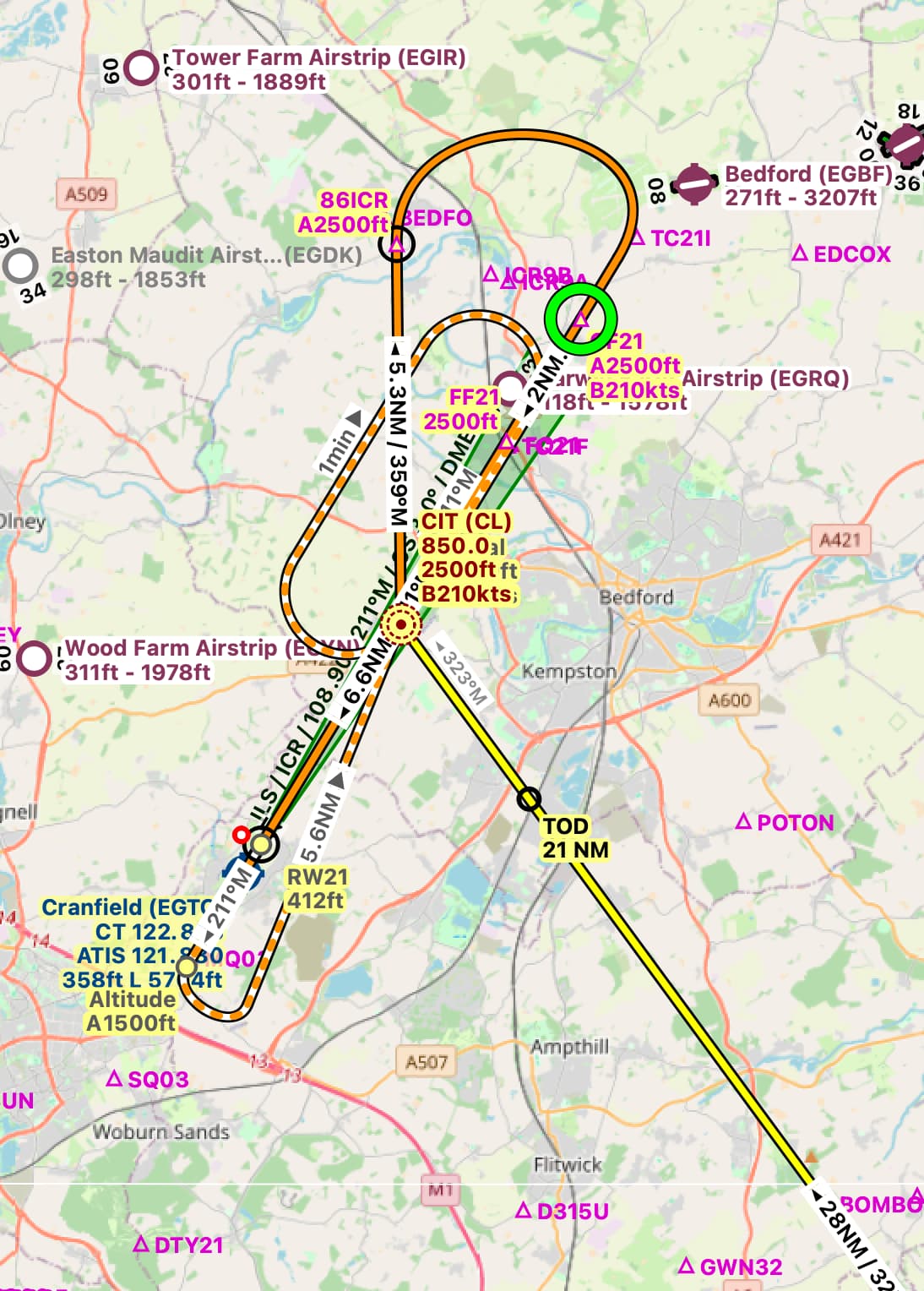
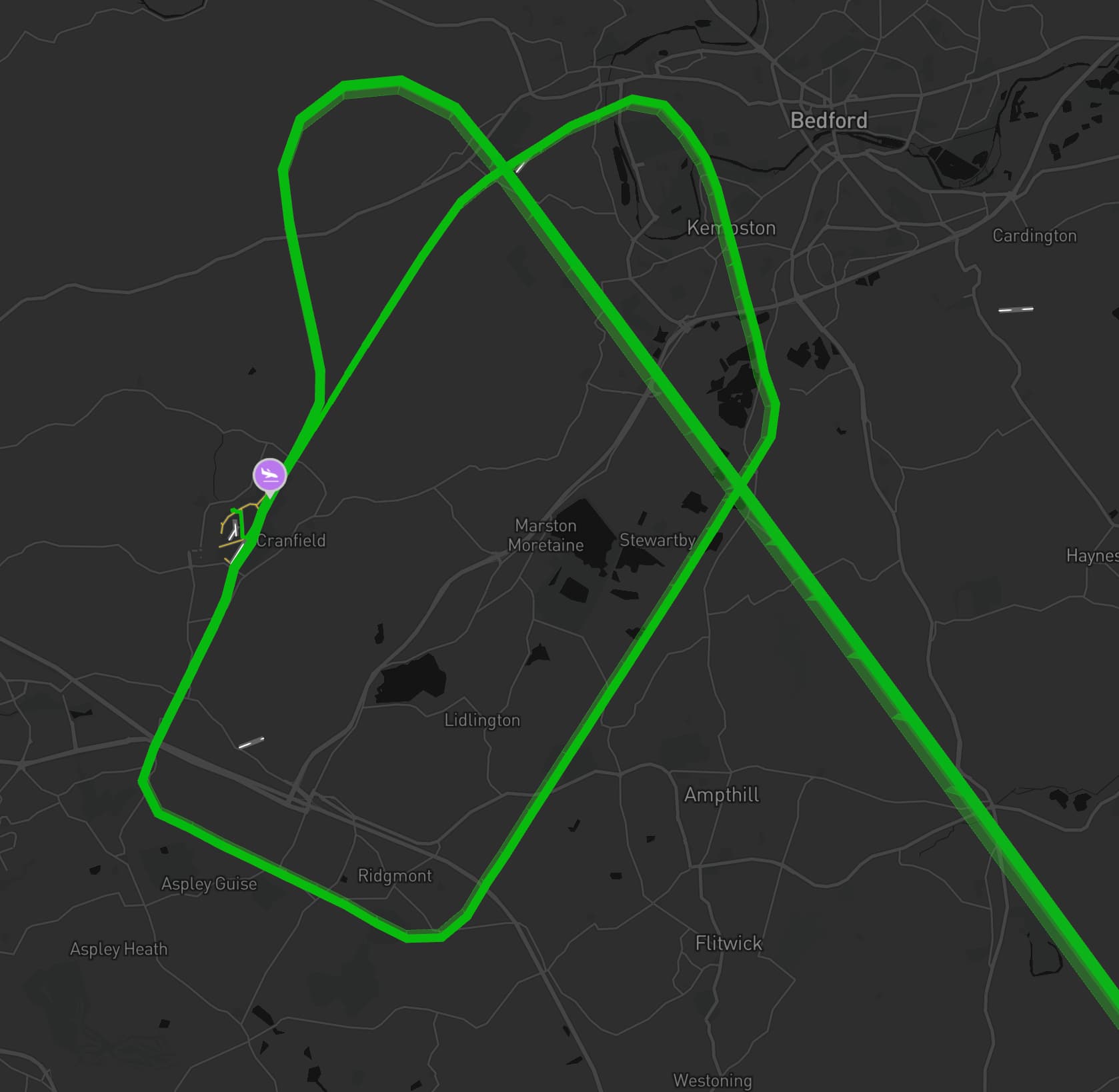
It worked much better with the Sids, stars and transitions, apart from EGTC arrival where ILS failed to engage and I sailed straight over the runway, I set for HDG & ALT then did a wide circuit and tried again but ILS still let me down.
It showed the correct ICR ident on the PFD but Approach mode did nothing. No idea why but I dont think I have ever flown into my home airfield, especially at night, in the rain The landing was a little bumpy but we all made it back.
Another failure was that VNAV only worked on the first leg, never again would it have any effect.
Other minor failures were that ATC stopped showing me the route to parking after two landings, no idea why, and I forgot to preselect FMS1 on the NAV once so messed up my departure a little
I also need to find out why I get the message “Check flightplan altitude” ??
This means your altitude setting is incorrect for VNAV to work. One example would be if you still left it at cruise altitude when reaching TOD, or set it too late for a waypoint and requiring a high descent rate to get to the proper altitude in time. I’ve also seen it pop up but then resolve itself without me doing anything, and not sure what caused that. If I’m remembering correctly, it was on an approach with a descending 360 as part of the flight plan. It may have been because the straight line distance to the waypoint was not enough distance for a standard descent and it was measuring that instead of the 360 path that did bring me down properly.
The way I do it for VNAV is get to my cruise altitude, then turn the altitude knob to the altitude required at the final waypoint before the runway and verify VNAV is engaged. That’s it. When getting to TOD, don’t forget to pull back the throttle. Otherwise it won’t be able to maintain proper descent, which may trigger that alert as well.
For the other stuff, hard to say off hand. If you have the ability to record a flight showing the problems, we should be able to figure it out. At the very least, a screenshot of the PFD indicating the autopilot status would be helpful. My immediate thought is you may be forgetting to set something, but I know there have been a few bugs related to multi-leg trips. Maybe you’re getting that too.
I generally do everything the same for each flight, it always seems that VNAV only works on the first leg. I’m pretty good with the throttles, no issue there. I generally set VNAV in the cruise section of my flights - long before any descent is visible - works on the first leg at least.
I need to setup recording again, not done any since fitting triple screens, I got as far as installing OBS director (i think thats the one) but not set it up yet.
If you want to record the flight for after flight analysis I would suggest rather using Sky Dolly than OBS. With OBS you can only see what you were seeing on the monitor. However, replaying a flight with Sky Dolly, you have the option of switching views, controlling cameras etc. to see different settings and events much more easily. You can replay a sequence over and over looking at different things. That way you can easily review settings and specific controls at a point where things started going wrong.
Odd, I’ve just been looking at my approach to EGTC, the route planned in LittleNavMap was a flyover and large clockwise loop into the ILS, however, looking at my route track in Volanta, it gave me an anticlockwise turn despite telling the FMC the same data, as far as I know.