No matter what settings, I cannot change weather on saved flights.
Changing weather setting or multiplayer off and on didn’t work as some suggested.
Please fix it.
No matter what settings, I cannot change weather on saved flights.
Changing weather setting or multiplayer off and on didn’t work as some suggested.
Please fix it.
This is intended. Saved flight is a flight, including weather, flightplan and W&B. If you want the route and be able to change planes, weather and/or W&B, you should save only the plan
This is stupid. I save a flight to continue from the same airport the next day, but I want to load new weather or change the load or be able to refuel. My word, there are so many decisions in this sim that are just plain stupid, illogical, and very inconvenient. Why did they have to break so much stuff we used to in previous MSFSs?
I’m still having this problem today.
I’ve reported it on zendesk https://flightsimulator.zendesk.com/hc/en-us/requests/88750
on 13.1.21.
Today it is signed as solved, but no entry on zendesk ticket, in which version it will be solved, and what they did. I can not write any comments in the zendes ticket, cause it is in solved status.
It seems to be an easy way to close problems without finding a real solution. Very annoying for the work to report that…
I created a ticket, which is still open:
https://flightsimulator.zendesk.com/hc/en-us/requests/89498
The button being greyed out isn’t the issue. When you load a saved flight the button is simply not there!
I have the exact same problem. I want to fly somewhere and park. Then pick it up on another day and proceed.
When I land at an airfield, it’s easiest to just start a new flight from there. But I also sometimes want to land in a field somewhere. Even worse, this also usually means my Toolbar is gone COMPLETELY after loading a saved game.
In this topic, I posted what I think will work as a work-around for this scenario. It’s not great and involves editing the .FLT file. Maybe it will help you too:
Saving a Flight allows you to save aircraft, airport and parking.
However, the option to change Flight Conditions before clicking on the FLY button, or even accessing the Weather Option after the flight is loaded is turned off.
Is there anyway to get access to the weather options? I realize when you save you are saving the weather at that time, but unlike your aircraft and airport, the weather does change.
I have submitted this to ZenDesk
Hello,
very sry, this is not possible from day one. This feature is known and requested/submitted to Zendesk many times, till this time no implementation.
Indeed as @OMICO4146 says this isn’t working well in the product. However, you can work around the issue, but it involves modifications of the saved .FLT file in a text editor.
Please have a look at this post if you are interested in what to change exactly:
https://forums.flightsimulator.com/t/toolbar-missing-and-ability-to-change-certain-weather-settings-missing-when-loading-a-saved-flight/342575/41?u=monkfishman3086
I don’t think this solves the Weather change options BEFORE the FLY button, only after the flight is loaded.
Thanks for your reply.
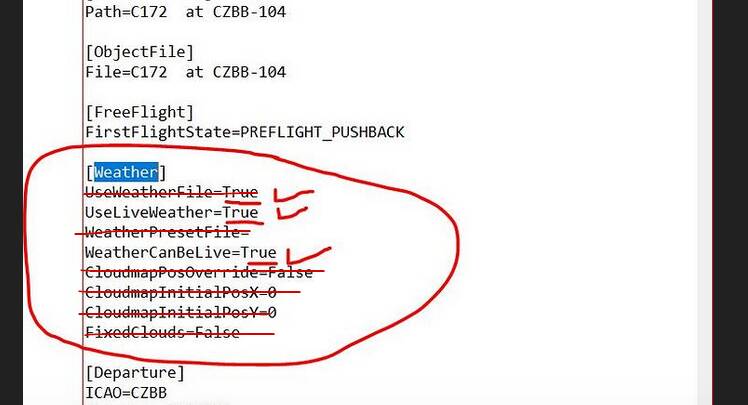
See attachment for when I look at my ORIGINAL save FLT - not sure what to change…
Then I made the following changes but it did not make a difference…
What we’ve seen is you have to remove everything from the [Weather] section except for these two lines:
UseLiveWeather=True
WeatherCanBeLive=True
We’ve concluded the additional parameters are causing the issues with the Toolbar. We don’t know why, but that was the observation.
So in your screenshot:
That was the situation at that time, it could’ve changed in subsequent updates.
Let us know how it goes.
THANK YOU - AMAZING.
Your recommendation works perfectly - Now the weather is Live and I can also change it.
THANK YOU!!! I have been trying to understand this UTTERLY RIDICULOUSLY STUPID problem since release date last August. I tried editing the .FLT file in the past, but did not think to leave only those two lines in the file. This is amazing! For the first time, I have been able to resume a saved flight with actual weather settings and not a clear sky with no wind. Microsoft adamantly refused to fix the problem even though I submitted multiple “Zendesk” (a complete joke) reports.
Once again, thank you to the community of MSFS users for fixing completely absurd problems that Microsoft could fix in 30 minutes if they cared.
I’m absolutely the same meaning as RoqueLeader214!
Thank you to the community and shame on Asobo, that they don’t care for that.
Hello all,
yes, workaround is fine but system is working little bit differently. Try again save FLT and change original first saved flight file for weather and after load you can be very surprised that this isn’t working  On other side loading of saved FPL working ok in sim to me as another important feature.
hi there, may i ask how you managed to find and load teh config-file in question? i can’t even find it…
cheers
l.
ps. apparently i came across how to find the specific flt-files. nevertheless, in my case, it did not work out with the changing froim false to true. but maybe i’m on the wrong road 
Reloaded a saved flight after editing .FPN, and the menus for everything are randomly inaccessible. What a joke that this is still an issue 9 months later, and loading a saved flight IS STILL a waste a effort.
I have no idea why it’s not working for some. But then again, I have also no idea why it is working for me and some others.
In my case, it’s a saved flight (FLT file, never use an FPN myself) where I am parked on the ground (after flying for a bit), engines stopped.
I then have to go and remove everything from the [Weather] section except for UseLiveWeather and WeatherCanBelive. I’ve tried it only with GA aircraft (C152 and Savage Carbon). Been using it for a world travelling trip in the Savage Carbon and so far it still works for me.
I agree this should be fixed. New questions about this pop-up frequently. All we can do is help each other with clumsy work-arounds likes this, “vote” on this post and log a Zendesk ticket.
But since this has only 30 votes so far, it looks like not a lot of people use this feature?