Good morning, I can add more details from tests I’ve done. The “new” problem occurs in all airplanes and/or helicopters. What’s new is that in external view and also in cockpit view, but when exiting the aircraft (in walkaround mode), the problem isn’t there. In fact, the movement of the camera menu window (I used this window as an example, but it also happens with other menu windows or even with the flight charts in the Fenix or PMDG EFB) is smooth and normal. When you enter the cockpit, the movement is jerky, and even the controls, despite not being blue around them, are very often pressed by clicking outside their position with the mouse. I ask Asobo and other users to check because this is a much bigger problem than before and is causing microstuttering in demanding scenarios.
Use PC version with mouse and keyboard for camera moving. My pc is: I9 13900k with 64gb ram ddr5, 5090 and windows pro 11 (last update), on 5k monitor.
…I have to correct myself…
The problem is not present in the external view without controls (show) or in the cockpit view outside the aircraft. In the external view with controls and in the internal cockpit, the problem is always present.
The Blue highlight is gone - BUT, the invisible white dot still “captures” on all cockpit controls if you use an Xbox controller (which I do) even if it is turned off in settings, so panning around still gets hung up on every button.
All they did was mask the Blue, they did NOT revert to Legacy mode.
Ugh, no, the capturing is an overlap of the 2 threads - they are in fact the same issue, where the Setting is being ignored. When Legacy is on, or White dot turned off, capture should not be happening.
I don’t know about others, but personally, the problem is worse than before. First of all, the blue color around the controls used to appear, and at least you knew something was wrong. But the most important thing is that the problem wasn’t always present before. In fact, I remember doing a lot of flights in the penultimate beta without ever having the problem. Now, however, it’s fixed and makes the sim unusable, as you get unwanted double presses on the controls and also experience microstuttering in complex situations with add-ons like pmdg or fenix. I hope it’s a temporary issue and they don’t release the official su5 with this problem, because it would be a real embarrassment.
Luckily I found an xbox controller and connected it. That is the 1st time I am using one so not sure if I am using it correctly but having the cockpit interaction system set to legacy, I don’t see any interaction of the cursor (white dot activated or not) with the cockpit knobs/buttons:
Not the same on your system then ?, could you post a video ?
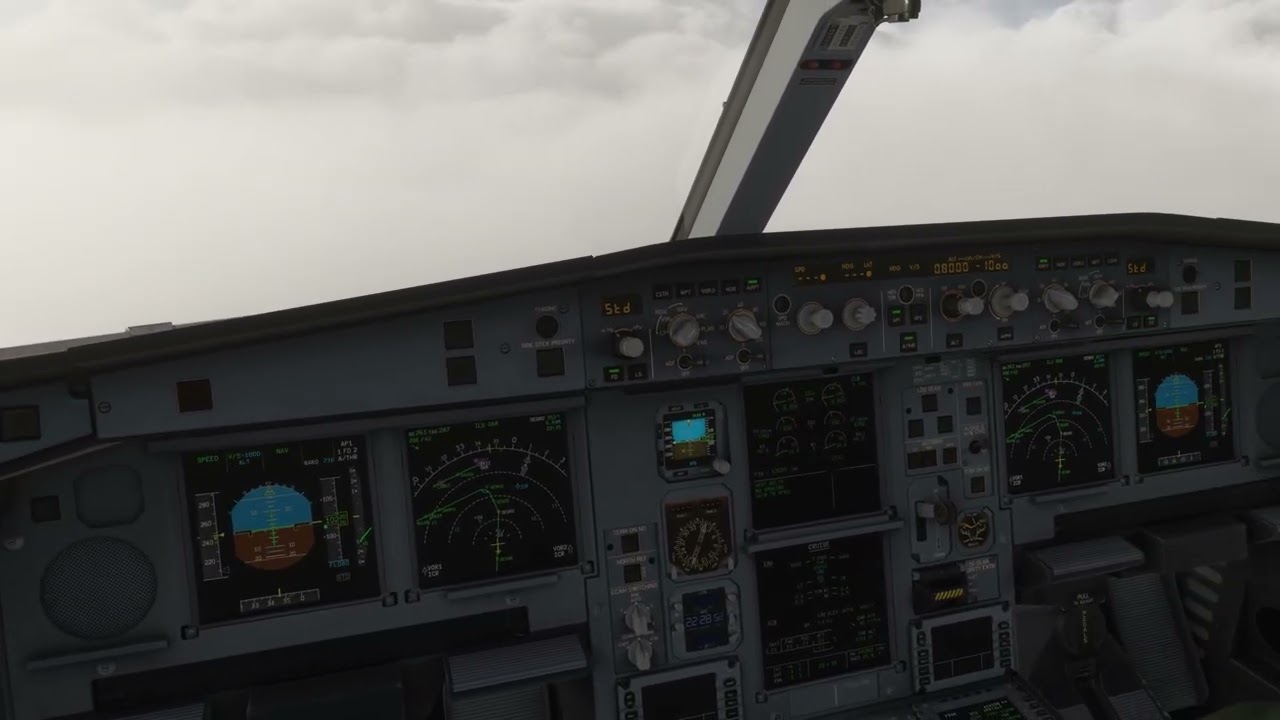
Look where the White Dot would be (I have mine set to Off) - in the exact center of the screen. When you pan the camera so that the cockpit buttons pass under that center spot, the camera movement slows to molasses because it is capturing as if still in “Lock” mode. All that has been fixed is they masked the blue - the behaviour and movment and sticking is still “Lock” when it should be “Legacy”
Also if the center passes over a screen, the screen highlights a white border… Here is an attempt at a video (I was trying to prepare for landing) :
Notice when I pan the camera (using controller), the movement “sticks” when any button passes under where the “invisible white dot” is - all that has changed is the “Blue” doesn’t highlight any longer, but the behaviour is still the same - it “sticks”.
The Dot is set to Off. The behaviour is as if it still “Lock” when it is set to “Legacy” in Settings. Also, the screen’s capture with a white border. Settings are not being obeyed.
The thread nesting/linking is getting confusing. As I see it, there are three issues that are very different but get conflated as I browse. And I do understand the community organizer’s perspective. We users complain A LOT. And we often cannot resist starting a new thread to amplify our angst as opposed to just taking our matching complaint to an existing thread. The issues as I understand them are:
Total lack of the LEGACY option on an XBOX (and presumably PS5).
LEGACY still snagging on PCs when view panning with a controller and
AI taking aircraft control when the screen center snags (resolved?).
I don’t play with a PC and I never understood 3); I suppose my particular setup avoided the problem somehow. So my complaint was strictly 1).
My fear is that by combining the threads and linking “related” complaints, one issue will get “solved” and it will be assumed that the others were resolved too given that they were lumped into the same discussion. My personal workaround is to just avoid buying complex cockpits, even if I really want to fly something bigger in the sim. By sticking to simple cockpits, my view has less snag-points to capture and I can (usually) keep my sanity.
Just for your awareness - at the request of the Development Team who have reviewed your comments above, they have asked me to separate this into a new thread as this is a separate issue. This should hopefully be marked as bug-logged for you shortly!
I believe the issue is based on (faulty) logic that if you use a Controller, then you have a need to click on things with the controller instead of a mouse… so they try to “help” by making anything clickable that passes under where the White Dot would be, “stick” to help you “aim” your click. I seem to remember that in an early Dev Q&A about Xbox.
Currently if you disable the White Dot in settings, all it does is mask the visibility of the dot (which still flashes on as you move, btw), but it does not change the behaviour of capturing / sticking to any clickable buttons that pass under that center spot as you pan the view.
The logic should be:
if you have chosen to disable the White Dot
you should also be allowed to disable the “stick” or “capture” behaviour.
Also if you have a mouse and don’t use the Controller to click anything, ever, then the “sticking / capturing help” is not a help, but interferes.
@gianluk81 : could you advise if you experiencing the issue using an xbox controller to move the camera or using a mouse ? (also add this information in your 1st topic, so that devs can replicate using the correct device).
I started on Xbox in MSFS 2020, and moved last year to PC and MSFS 2024.
I use the controller for panning views and flying, but use the mouse for cockpit interaction (on Xbox and PC) Using the Controller to click was always way too “involved” and a mouse was just better. But it always bothered me that I couldn’t turn off that “capture” behaviour when panning the view with the controller, even when explicitly turning off the White Dot.
It is worth noting that it took YEARS of complaints to get Microsoft to allow us to just Turn Off the White Dot… but all they did was mask it’s visibility. The “capture” behaviour is still there, annoyingly.
Hi, I apologize for omitting important details. I use a PC and a mouse and keyboard as my camera controller. I have a 13900K, 64GB of RAM, and a 5090. I use a 5K monitor with Windows 11 that is regularly updated.
Update today: without touching anything, neither the SIM card nor my PC, the problem has now “magically” disappeared, or at least, it hasn’t happened yet. I’ll run more tests in the next few hours to confirm. I honestly don’t know what happened to “fix” the problem, but I hope it doesn’t recur.
I think the various threads about this issue have become convoluted.
I’ll try to state it simply:
At some point in the UI Design, somebody decided that IF a user was using an Xbox Controller (or Playstation controller, I assume), then there would be a White Dot in the center of the screen to act as a pointer (like a mouse pointer). Ok so far
Since the White Dot stays in the center of screen, you pan the camera to position the Dot over any button you intend to engage with the controller. To “help”, they added “lock on” or “sticky” functionality, where as you are panning the view, the motion of panning slows to 1/2 or 1/4 speed whenever the button passes under that center Dot locatoin, to “help aim” the pointer. This part makes sense if the White Dot is visible, and if engaging the button is actually the intent…
The problem is, when the user explicitly turns the White Dot OFF, the sticky motion behaviour should also turn off, but it doesn’t. Insteady, you have an invisible on-screen cursor engaging things (like sticking to buttons when you try to pan the view, or locking on to screens (white outline).
Whe the Mouse Pointer, or White Dot is not visible, it should not engage. It should only engage the camera motion or buttons when it is visible.
 .
.