Constant CTD every flight now (ntdll.dll)

The most recent of the four CTDs…

Faulting application name: FlightSimulator.exe, version: 1.26.5.0, time stamp: 0x00000000
Faulting module name: grammar.pggmod, version: 76.0.0.3, time stamp: 0x61977cfe
Exception code: 0xc0000005
Fault offset: 0x0000000003eace61
Faulting process id: 0x6b0
Faulting application start time: 0x01d8b573ea032ef3
Faulting application path: G:\Steam\steamapps\common\MicrosoftFlightSimulator\FlightSimulator.exe
Faulting module path: \?\G:\MSFS\Official\Steam\bf-pgg\PGG\grammar.pggmod
Report Id: a4a3e268-05d4-4c3f-ba4e-5fe2cbaec940
Faulting package full name:
Faulting package-relative application ID:

The third CTD:

Faulting application name: FlightSimulator.exe, version: 1.26.5.0, time stamp: 0x00000000
Faulting module name: ntdll.dll, version: 10.0.22000.832, time stamp: 0x3907dfbc
Exception code: 0xc0000374
Fault offset: 0x000000000010c9a9
Faulting process id: 0x4858
Faulting application start time: 0x01d8b567dc054df9
Faulting application path: G:\Steam\steamapps\common\MicrosoftFlightSimulator\FlightSimulator.exe
Faulting module path: C:\windows\SYSTEM32\ntdll.dll
Report Id: 01f98581-775d-4d93-a68c-7830cf9b75af
Faulting package full name:
Faulting package-relative application ID:

The second CTD:

Faulting application name: FlightSimulator.exe, version: 1.26.5.0, time stamp: 0x00000000
Faulting module name: FlightSimulator.exe, version: 1.26.5.0, time stamp: 0x00000000
Exception code: 0xc0000005
Fault offset: 0x0000000002142297
Faulting process id: 0x34e4
Faulting application start time: 0x01d8b55dbe590d3d
Faulting application path: G:\Steam\steamapps\common\MicrosoftFlightSimulator\FlightSimulator.exe
Faulting module path: G:\Steam\steamapps\common\MicrosoftFlightSimulator\FlightSimulator.exe
Report Id: ecc9a5fb-3ae1-4dfb-a811-92032b81ce48
Faulting package full name:
Faulting package-relative application ID:

Count me also :frowning:
SU9 + Fenix 320
Two CTD today. The first one after landing at EGSS when I turned on GSX and I was chasing the “follow me car” (that one could be GSX relatd).
Second one after around three hours, on descend phase, on the second flight after a turnaround. GSX app was not running.
I have had two or three more CTD in the last two days, though I blamed those on GSX (which may not be the culprit after all).
Before that, two months “clean”
No FS updates, no changes in software or hardware (at least that I know).
Nvidia GeForce driver 512.95
i7 11700 + RTX360Ti + HP Reverg G2
All those CTD left not trace in the Windows event viewer, but at least in one I got the infamous memory error dialog box.

I’ve fly in Western Europe and got every flights a CTD, i’ts totally random.

Ok so my fix above does not fix things just had another one. Going to give up with this just now until the developers get back in tomorrow and try and fix things.

Another one

It didn’t work…CTD again,

All day trying to solve this, I give up. Lots of time and money wasted again!!

1 Like

SU10 will be released soon, maybe this will be fixed (or server problem due to a pre-release maintenance…). That’s will be weird but i’ve didn’t tried spiritism yet.

I just had also CTD, never happened before in MSFS for me. No new airports, airplanes installed since last flight.
EDIT: no GSX installed.
EDIT2: event from event log:
Faulting application name: FlightSimulator.exe, version: 1.26.5.0, time stamp: 0x00000000
Faulting module name: ntdll.dll, version: 10.0.19041.1806, time stamp: 0x1000a5b9
Exception code: 0xc0000374
Fault offset: 0x00000000000ff609
Faulting process id: 0xc240
Faulting application start time: 0x01d8b596e6b77113
Faulting application path: C:\Program Files\WindowsApps\Microsoft.FlightSimulator_1.26.5.0_x64__8wekyb3d8bbwe\FlightSimulator.exe
Faulting module path: C:\WINDOWS\SYSTEM32\ntdll.dll
Report Id: 5a3fe2d1-24c1-4980-ba53-2706b93e72df
Faulting package full name: Microsoft.FlightSimulator_1.26.5.0_x64__8wekyb3d8bbwe
Faulting package-relative application ID: App

More info with bucket ID:

Fault bucket 1855134808529458861, type 5
Event Name: MoAppCrash
Response: Not available
Cab Id: 0

Problem signature:
P1: Microsoft.FlightSimulator_1.26.5.0_x64__8wekyb3d8bbwe
P2: praid:App
P3: 1.26.5.0
P4: 00000000
P5: StackHash_c6ba
P6: 10.0.19041.1806
P7: 1000a5b9
P8: c0000374
P9: PCH_95_FROM_ntdll+0x000000000009DA94
P10:

Attached files:
\?\C:\ProgramData\Microsoft\Windows\WER\Temp\WER7B92.tmp.dmp
\?\C:\ProgramData\Microsoft\Windows\WER\Temp\WER7E90.tmp.WERInternalMetadata.xml
\?\C:\ProgramData\Microsoft\Windows\WER\Temp\WER7EA1.tmp.xml
\?\C:\ProgramData\Microsoft\Windows\WER\Temp\WER7EAE.tmp.csv
\?\C:\ProgramData\Microsoft\Windows\WER\Temp\WER7ECF.tmp.txt

These files may be available here:
\?\C:\ProgramData\Microsoft\Windows\WER\ReportArchive\AppCrash_Microsoft.Flight_4ae8285069b969f313456703cb5b6fa9cd6766_936bb001_79bfb717-4686-452a-a2d2-ce073d4ab488

Analysis symbol:
Rechecking for solution: 0
Report Id: 5a3fe2d1-24c1-4980-ba53-2706b93e72df
Report Status: 268435456
Hashed bucket: 3a7191d0498051c379bec34788dc56ad
Cab Guid: 0

For what it’s worth I dont have GSX so its probably not related to this crash error.

1 Like

Not one flight complete this weekend - i give up…

Description
Faulting Application Path: C:\Program Files\WindowsApps\Microsoft.FlightSimulator_1.26.5.0_x64__8wekyb3d8bbwe\FlightSimulator.exe

Problem signature
Problem Event Name: MoAppCrash
Package Full Name: Microsoft.FlightSimulator_1.26.5.0_x64__8wekyb3d8bbwe
Application Name: praid:App
Application Version: 1.26.5.0
Application Timestamp: 00000000
Fault Module Name: StackHash_e741
Fault Module Version: 10.0.19041.1806
Fault Module Timestamp: 1000a5b9
Exception Code: c0000374
Exception Offset: PCH_4A_FROM_ntdll+0x000000000009DA94
OS Version: 10.0.19043.2.0.0.768.101
Locale ID: 2057
Additional Information 1: e741
Additional Information 2: e7416f17cba8c0ab30fa39851c7eafcf
Additional Information 3: 2c3a
Additional Information 4: 2c3a61935d46a331d0e430dae9a0650e

Extra information about the problem
Bucket ID: 5868fbb8970d2cb1335bfc04c8fd4519 (1394985607083410713)

SU10 delayed about 2 week.

1 Like

For those wanting to help out too.

It’s related to another problem, “Memory could not be read error”.
Here it’s about the “ntdll.dll” error.

1 Like

Yeah I know, I’m posting it there too. Might as well offer the same trick, seeing as we/the community as just aiming in the dark at this point.

It’s probably server related anyway, but it can still be a combination of things. :man_shrugging:

also people in the SU10 beta have since yesterday CTD hope they are not too much

We’ve seen this and this post was renamed to separated theses problems. Tried, doesn’t work.

Summarizing all the data I’ve collected from this thread so far:

  1. This specific CTD is only affecting PC players (both MS Store and Steam). Xbox and Xbox Cloud Gaming players are NOT impacted.
  2. Only some, not all, PC players are getting this CTD.
  3. This specific CTD starting occurring on or about Friday, August 19.
  4. It is affecting players with both Nvidia and AMD GPUs. Driver version does not seem to matter.
  5. It is affecting players on both the SU9 live build and the SU10 beta build.
  6. It is affecting players on both Windows 10 and Windows 11.
  7. It is possibly (unconfirmed) related to online services such as Live Weather, Live Traffic, and Azure terrain caching.

Based on the above, my personal best guess at this time is that it is indeed a change unrelated to the MSFS code or servers (I’m not making a definitive statement here; I could very well be wrong about this). The suggestion that it could be caused by an update to Windows (and/or Windows Defender) makes a lot of sense to me. It’s a good working theory that when flightsimulator.exe requests online data (such as live weather, live traffic, etc.), Windows Defender is somehow interpreting this as a security threat and terminates the application. That would explain why @GeomitraLNG1987 does not get a CTD when flying over the UK (that terrain is already cached locally) but does get a CTD when flying over Australia (non-cached terrain is being requested from Azure).

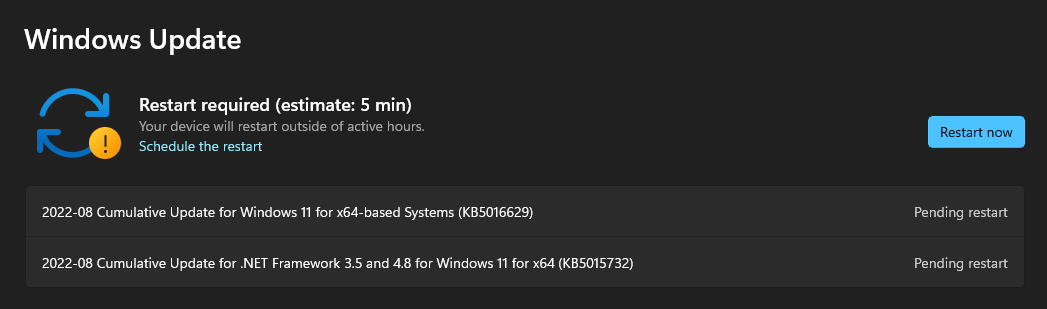
As I mentioned in an earlier post, I flew for over four hours yesterday trying to replicate this crash with and without live weather enabled, but my sim was perfectly stable the entire time. I noticed today that I have two pending Windows Updates (see screen capture below) that will be installed the next time I restart my PC. If I reboot and install these updates, will I start getting this CTD?

12 Likes

Interesting… So it’s a server problem

I don’t use WIndows Defender though, my firewall + other protection is handled by a different application.

I must say it was pretty violently scanning for heurs-virusses the past few days though. It treated GSX and ProATC-SR pretty suspicious, while I normally don’t see it fire up so much.

Could there be some global activity going on too, large-scale cyberattacks that are shutting down servers and pulling up firewalls?

:stuck_out_tongue:

Don’t waste your time guys :confused:

3 Likes