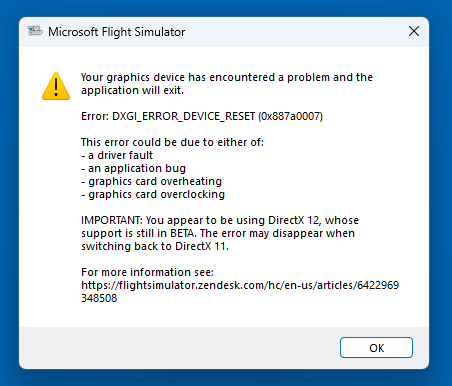
Constant CTD "Your graphics card encountered a problem"

I keep getting a CTD at random times within flight with the attached error. I had the same issue with the last nVidia driver, downloaded and installed latest nvidia driver released today.

RTX5080

9800X3D

64gb RAM

Samsung Oddysee G9 monitor

dx12 Frame Gen

error attached

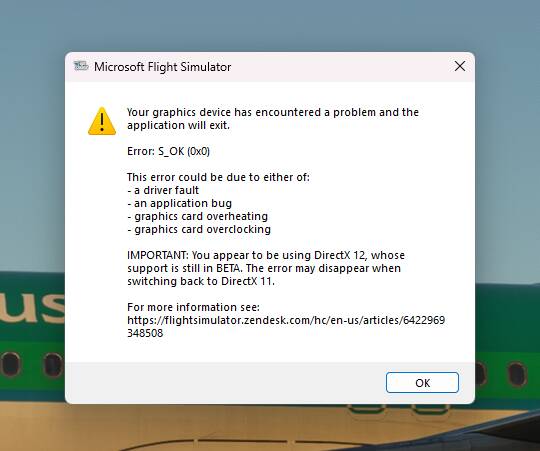
Other error code was 880007x I believe

1 Like

I believe that comes from FSR framgen, if using it, turn it off.

Thank you. is that turned on/off within MSFS game settings or Nvidia Geforce app?

Thank you for taking the time to respond.

Both actually, you can do it universally in the app, or in the Anti Alias settings in General - Graphics.

1 Like

I’m using TAA with Framegen.

very strange.

Same here since su 16 and some win11 updates. No message like this, but somethimg from eventmanager.

Fehlerhafter Anwendungsname: FlightSimulator.exe, Version: 1.39.9.0, Zeitstempel: 0x00000000
Fehlerhafter Modulname: CoherentUIGT.dll, Version: 2.9.5.0, Zeitstempel: 0x680f81a4
Ausnahmecode: 0xc0000005
Fehleroffset: 0x00000000000b0f30
Fehlerhafte Prozess-ID: 0x4688
Fehlerhafte Anwendungsstartzeit: 0x1DC322A2A3C079F
Fehlerhafter Anwendungspfad: D:\Steam\steamapps\common\MicrosoftFlightSimulator\FlightSimulator.exe
Fehlerhafter Modulpfad: D:\Steam\steamapps\common\MicrosoftFlightSimulator\CoherentUIGT.dll
Berichts-ID: 22cfd242-5688-418d-a444-eaafbce20dad
Vollständiger Name des fehlerhaften Pakets:
Fehlerhafte paketbezogene Anwendungs-ID:

Just had another one, different error code it seams.

To all those affected, try this:

Open the Nvidia app, search for MSFS within your Library and select it and choose Settings. Once this is done a new menu will appear - press “optimize” and the settings for MSFS will be optimized for use. (If you have an older version of this software, look for MSFS, choose optimize and then select the 3 dot menu and press play.)

I never let the Nvidia app optimize my game, strange that it’s only happening now. doesn’t happen with any other game.

Literally just happened again

TheSevenflyer seems to be right, just for my case. I turn off framegen and DLSS, and it looks like it´s stabile for now ( Nvidia/DX12 ) . But to be sure i´ll need to do a longer flight. If so, it doesn´t solve the problems. Wy do i suddenly need to switch somethings off ?? It all runs well before …. something !!?

Strange, I will try the same. did you stay on DX12?

Yesss ! DX12 ….

I’ll try the same. where you getting the same error when getting a CTD “ GPU encountered a problem”

The most errorlogs were mentioned in the eventmanager after several CTDs. But the last one gave me a complete reboot of my pc with a short errormassage on the screen… “something is wrong with your device“. But all this only happens with MSFS2020. Other sims with a very colsed codingstructure because of the simulationcharacter, like X4 Foundation, doesent´t do anything bad like this….

1 Like

I will try what you suggested and revert back, very very strange and terribly annoying as I just got a new monitor!

Turn off Frame Generation.

1 Like

Thank you! Is it a bug with the last two GPU drivers?

Right now Windows, Nvidia drivers and MSFS are all so buggy that I can’t point the finger at just one culprit. This is something Asobo needs to work on, not us. For now, please try running the sim without Frame Generation and see if it makes any difference.

EDIT
Software, like MSI Afterburner, also have a significant impact.
2 Likes

I have MSI afterburner should I remove that? I don’t always have it on if that makes sense?

It’s up to you if you want to test the sim without MSI Afterburner.

1 Like