I found that the Nvidia app had overclocked my GPU. I have turned that setting off.
1 Like
I had the same, turned it off. No difference unfortunately.
I will try with FG off
I’ve always said the Nvidia app is garbage. I’m wondering, was the GPU overclocking enabled by default without your consent?
Hello @TenPatrol for me I believe not, its a feature within “performance tab” which apparently does a scan gives you a slight overclock - all automatic.
If im correct, I did enable this myself.
1 Like
Thanks for info mate.
Have you already tested MSFS with Frame Generation turned off?
1 Like
Unfortunately not yet, return from work trip tomorrow and I will check it immediately.
Thank you very much as always, go to person for any tech advice or issues😂
1 Like
Quick update - I have removed MSI Afterburner - CTD once again.
Next test: Turn off frame gen (DX12)
If issue persists I will try DX11
The lasts few drivers will crash the sim anyway if the sim is launched in DX 11
Thank you @Eriadus6724
To add, something I should of mentioned, this all started happening since I upgraded my monitor currently using Samsung Odyssey G9. I noticed within Nvidia app G-Sync is enabled but I dont have G-Sync or V-Sync enabled anywhere else - could this create conflict somewhere?
So, i did a flight with FG/DLSS off, DX12 running, result CTD. Next I´ll try is a nvidia driver rollback to an earlier state.
No, just CTD. But instead of “CoherentUIGT.dll” as the trigger in eventmanger it is now “CoherentGTJS.dll“.
OK separate issues, I’m going to try FG off.
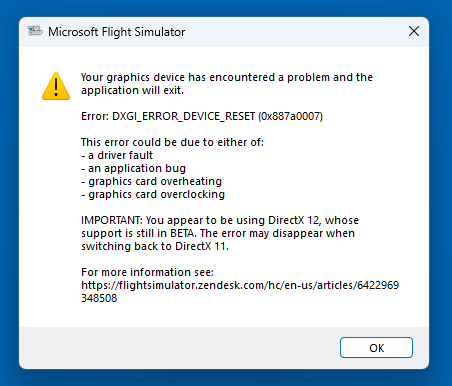
Tried this morning with FG off and an immediate CTD with error code 0x887a0006 which appears to be a new error code
test 1: Tried this morning with FG off and an immediate CTD with error code 0x887a0006 which appears to be a new error code
test 2: Uninstalled driver and reinstalled - issue once again back to the original error code.
That is really annoying!
Extremely annoying!
I’m baffled at this point.
Just some suggestions: Are you running the sim with empty community folder? Have you tried lower your settings? Reinstalled the sim itself?
Have you checked GPU temperature?
(i have not read every message in this thread)
Haven’t tried empty community folder which is actually a good suggestion.
trying to avoid reinstalling the sim… will try empty folder first.
Have tried lowering settings, FG off etc.
GPU temps are fine as well.
MSFS 2020. Never crashed in 5 years until now. I uninstalled NVidia APP. No crashes since. We’ll see.