Pressing and holding rt mouse button has worked for me.
Thats what mine is doing, but it still sucks because i cant use hardware listener to adjust my deadzones and sensitivites to something I like.
2 Likes
Except they don’t work!
Can you elaborate? Screenshots of the axis assignments would be a great help.
I had the same issue, I mapped my winwing F16 throttle and stick and the throttle works but the stick does not. I set the pitch and roll and it seemed to recognize it until I actually try to fly
Do you have the same issue if you follow the OP’s steps to reproduce it?
•
Provide extra information to complete the original description of the issue:
• I had the same problem with my Bravo Throttle. The “default” control assignments delivered in MSFS2024 do not work correctly. There were strange joystick button assignments that I removed that were interfering with the throttles. I had to remove most of the assignments and copied the ones from MS2020. Also, there isn’t any information about how the assignment files interfere with each other. I removed the “default” file from the screen. The keybinding process is too confusing and takes too much time.
If relevant, provide additional screenshots/video:
•
i think you are going to have to re map all bindings one at a time. i had too do it
ISSUE DESCRIPTION
Description of the issue:
If you go to the hardware settings, you can change axis parameters and insde the graph there’s one white dot, usually showing the current input of the device.
The white dot (input indicator) is not working. It stays at the centre. It is not possible to check the changes made to the axis parameters, if the input is not measured and displayed. This is the case for every input device, HOTAS, Joystick, Yoke, Pedals…
[PC Only] Did you remove all your community mods/add-ons? If yes, are you still experiencing the issue?
no mods added
FREQUENCY OF ISSUE
How often does this occur for you (Example: Just once, every time on sim load, intermittently)?
permanently
REPRODUCTION STEPS
Please list clear steps you took in order to help our test team reproduce the same issue:
- go to the settings page
- open the hardware settings
YOUR SETTINGS
If the issue still occurs with no mods and add-ons, please continue to report your issue. If not, please move this post to the User Support Hub.
What peripherals are currently plugged in? Please name all of them as there could be a potential conflict.
no it is not a conflict, worked in fs 2020, DCS…
[PC Only] Are you using Developer Mode or have you made any changes to it?
no
[PC Only] What other relevant PC specs can you share?
not relevant, high end pc
MEDIA
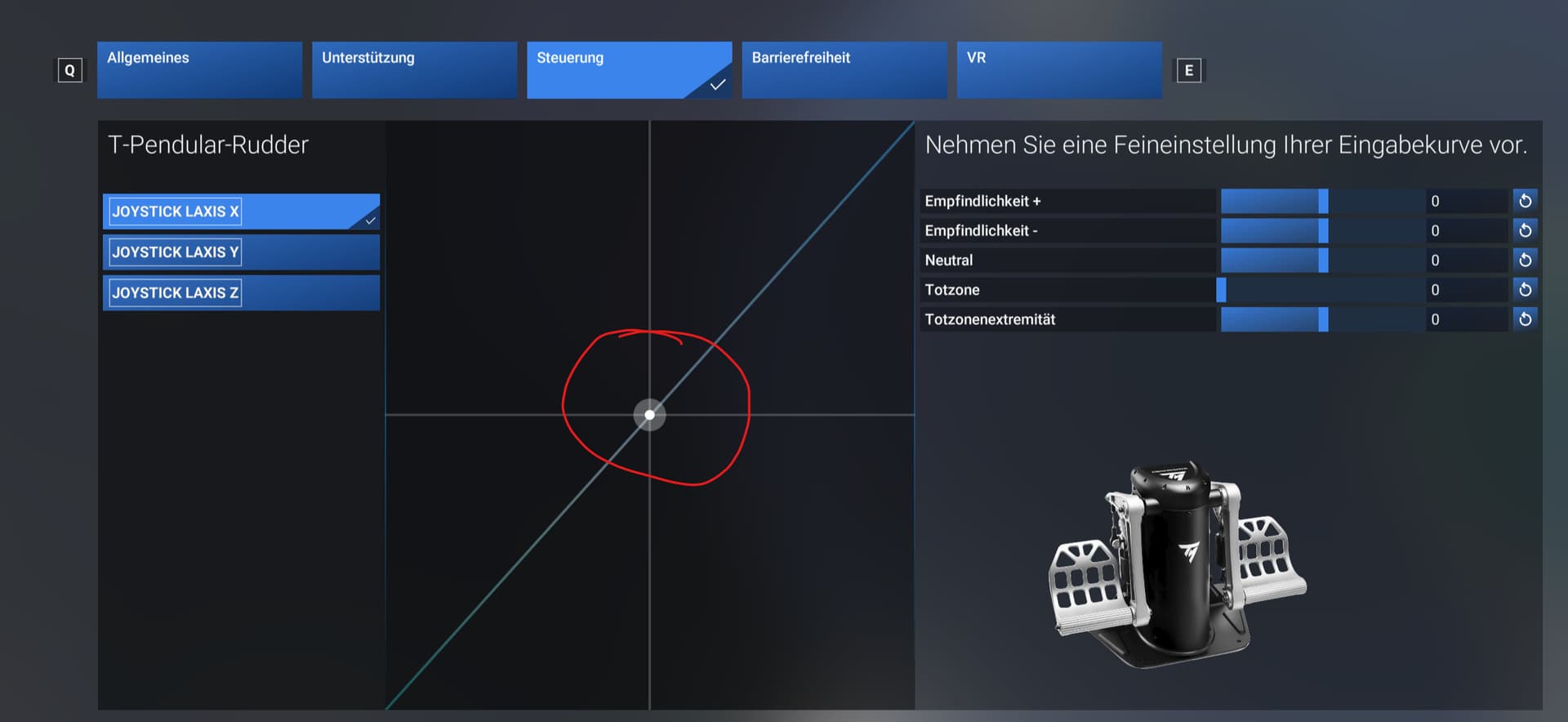
[END OF FIRST USER REPORT]
 For anyone who wants to contribute on this issue, Click on the button below to use this template:
Do you have the same issue if you follow the OP’s steps to reproduce it?
•
Provide extra information to complete the original description of the issue:
•
If relevant, provide additional screenshots/video:
•
3 Likes
Do you have the same issue if you follow the OP’s steps to reproduce it?
• Yes
Provide extra information to complete the original description of the issue:
• version 1.1.9.0 -
Honeycomb Bravo power management levers.
I have varying instances of failure of specific aircraft axis assignments. In some the throttle will not work, but the others do, in others it’s the mixture. In some cases the lever is working, but it will then jump to another position. Normally, this is the result of conflicts, but I have checked for this. I have tried with many native 2024 models and ported 2020 stock and marketplace aircraft. I have not loaded any external content into the community folder.
Since Thursday when I finally loaded into the sim, I have not managed to get a single aircraft flying yet, although other binding issues are a problem for some aircraft. E.g. The Norden utilises a throttle lever only, but I cannot make the ECU switches work, either by assigning keybinds or just using the mouse so I am assuming these problems are related to my hardware too.
Edit: I have managed to find one aircraft that I have managed to fly, FS Reborn Sting S4. This has throttle and prop axis only, so perhaps it’s a combination of throttle and mixture that is causing the problem for the Bravo.
Peripherals used (all connected and visible in control menu):
Honeycomb Alpha
Honeycomb Bravo
TM Wathog Joystick and Warthog Throttle
XBOX Gamepad wired (mapped for camera views only)
Turtlebeach Velocity One Rudder
Wireless mouse and keyboard
Tobii eyetracker
Even with the new version 1.1.9.0 I can’t get any of my control devices working.
No reaction in the hardware settings window.
Even a new installation didn’t help.
Are they working on this ? I’m not the only one with this problem !
This topic is a mess right now. There appear to be three different issues:
-
The axis response on the hardware settings screen page doesn’t work. This affects everyone, it’s just this screen which is broken and it doesn’t mean controls won’t work in the aircraft.
-
Default bindings don’t exist/work. That should be a case of remapping them manually. Bit of a pain but something every flight simmer should be able to manage.
-
Controls don’t work at all. No idea what might be causing this, but suspect at least some of the cases being reported are simply one of the above.
4 Likes
I have spent 3 days trying to get mine to work. I know how to map bindings, and I know how to look for conflicts, so I think there is a deeper problem here, perhaps to do with certain combinations of peripherals.
Just read your previous post. I use a Virpil Sharka panel for throttle and mixutre etc.. Have had several occasions when the mixture lever has either not responded or moved when adjusting the throttle.
Doesn’t feel like a controls issue to me, I think there’s something else going on with the sim.
Possibly, but at the moment it’s manifesting through the controls. One thing I haven’t tried, which I might have a go at later, is to unplug the warthogs.
In my case the Thrustmaster AVA Base and F16 flight stick don’t work at all, even though they do work perfectly in MSFS2020 and in the game controller settings are flagged as status ‘OK’.
While I can get into the sim, I can’t use enjoyably use it without the joystick working.
Any ideas?
Can you post screenshots of the axis assignments?
@BeardyBrun you are a life saver. Had not assigned the axis!
Thank you.
Glad it helped, and thanks for proving my point. 
I unplugged the Warthogs, rebooted PC and opened sim, no problems with Honeycomb Bravo. Reconnected the warthogs, switched them to the appropriate profiles and again no problems with the Bravo.
I didn’t uninstall/reinstall drivers, just a simple unplug, no idea why I didn’t try this before. Whether it stays like that though…
Edit: spoke too soon. First test was with the Ag Tractor, which worked. Landed that, swapped to the Draco, checked that my warthog had blank profile and the throttle problem was there again. Did another check, absolutely no other throttle bindings assigned on anything but Bravo (except for keyboard).
Do you have the same issue if you follow the OP’s steps to reproduce it?
•
Provide extra information to complete the original description of the issue:
• I can fly from inside the aircraft but from outside view controls do not work control surfaces. Inside all controls work and aircraft responds
If relevant, provide additional screenshots/video:
•