Since WU6, CTDs are permanently present in my case. Before today they took place while entering the main menu after the flight. Now they are random (after take-off, cruise, approach).
Lot of free space, fresh setup, barely no community mods (only A & B points of the trip). It is becoming annoying.
Not sure about that, I’ve had MSFS running sweetly on PC-3200 @ 4400Mhz even though Windows 11 stopped responding behind it. However the overclock profile I used inadvertently pushed my CPU speeds way past their normal boost clock which was both unexpected and hopefully useful once I have a proper gpu and cooling installed.
well well thought i was one of the lucky ones only had 1 ctd until now,bristol to malaga flight going smooth 100 miles to go ctd,so so frustrating,looked in the event viewer and yeah its what most ppl are having that 000005,i do hope this will be fixed
I have officially given up. I have used this “game” for some time now beginning as an ALPHA tester. While there were many frustrating issues during its development, CTD’s where never one of them.
UNTIL WU5. Since then I can no longer complete a single flight.
I’ve tried all the “fixes” to no avail.
Tonight I uninstalled this “GAME” and will not install it again until Asobo can get their act together.
Hello guys, it’s been a month since I couldn’t play it, CTD directly after launch.
I opened a support request, but they closed it saying this is Process lasso interfering, but process lasso is not runing…
Since last update I started from scratch, downloaded the 120Go files and It runned! twice…
Now it is crashing again at start, this is really annyoning
I have an intel 9900k, nvidia RTX2080 , 32Go ram and samsung 1T ssd, I should be playing it nicely.
I had similar issues and tried almost everything… I have a 1080ti and it turned out the new 471.XX drivers don’t like MSFS. I reverted to 466.77 and my CTD’s disappeared! (Except the ones when exiting the game). Hopefully it will help some of you as well.
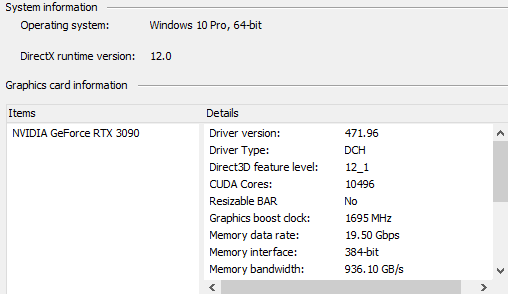
I have 471.96 installed, and hardly ever have crashes now. The last two times it happened, one was a hang on loading the sim, so not really a crash per se, and the other was a crash as the flight loaded. I restarted the sim, and the same flight loaded correctly.
Just in case anyone think MSFS is somehow unique with these crashes, and the 0xc0000005 type, I was just watching a video on YT about Arkane’s Deathloop where the reviewer got hit by this: