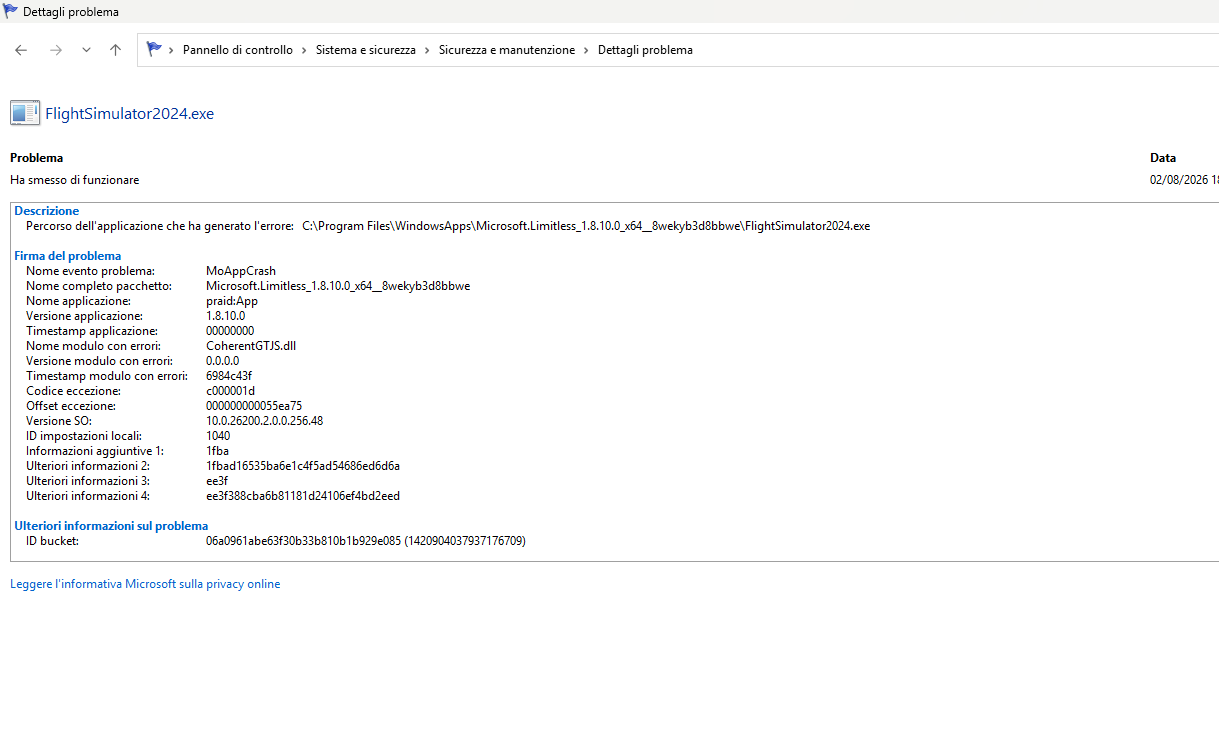
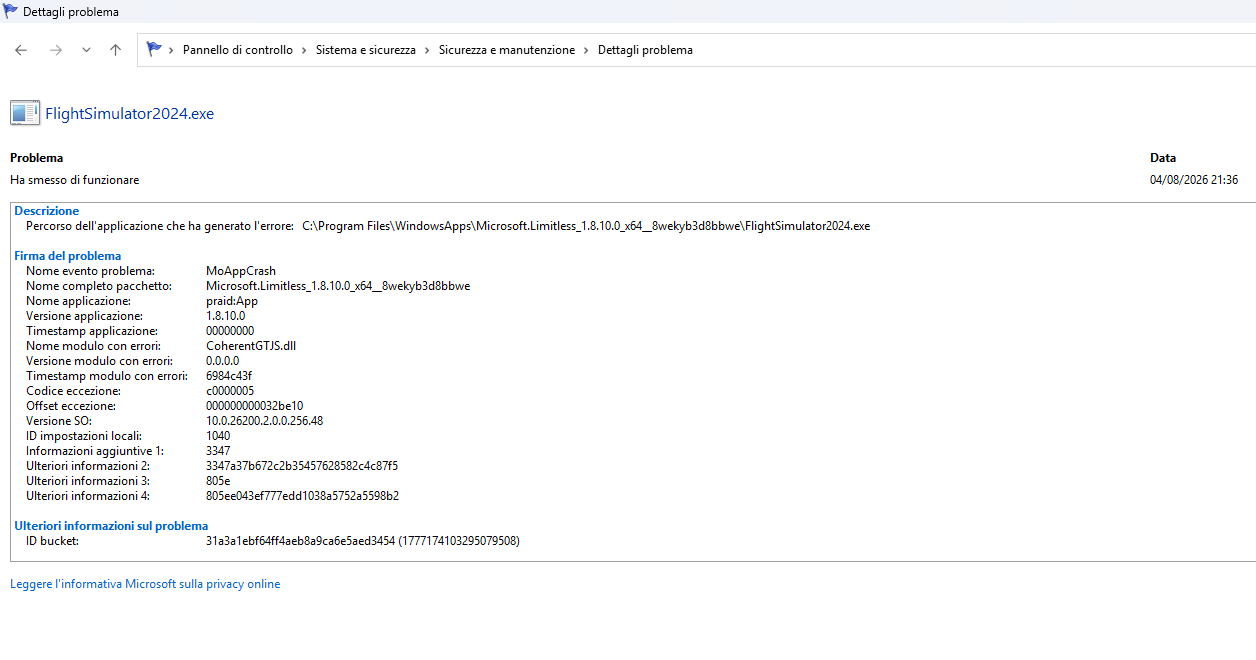
In Live free flight, CTD happen randomly, often after some minutes, sometimes after 1 hour.
FREQUENCY OF ISSUE
Almost each time I launch free flight
REPRODUCTION STEPS
It happens with any aircraft in free flight.
YOUR SETTINGS
Operating System: Windows 11 Professionnel 64-bit (10.0, Build 26200) (26100.ge_release.240331-1435)
Language: French (Regional Setting: French)
Processor: AMD Ryzen 7 3700X 8-Core Processor (16 CPUs), ~3.6GHz
Memory: 32768MB RAM
Available OS Memory: 32690MB RAM
Page File: 24626MB used, 13695MB available
DirectX Version: DirectX 12
DirectX Database Version: 1.8.6
System Mux Support: Mux Support Inactive - Ok
Mux Target GPU: dGPU
OS Build Version: 10.0.26100.8737 (26200.8737)
Card name: NVIDIA GeForce RTX 2070 SUPER
Device Name: SideWinder Force Feedback 2 Joystick
Device Name: Throttle - HOTAS Warthog
Device Name: MFG Crosswind V2/3
MEDIA
Windows event view :
Nom de l’application défaillante : FlightSimulator2024.exe, version : 1.8.8.0, horodatage : 0x00000000
Nom du module défaillant : FlightSimulator2024.exe, version : 1.8.8.0, horodatage : 0x00000000
Exception code: 0xc0000005
Fault offset: 0x0000000003d089a8
Identifiant du processus défaillant : 0xBA8
Heure de début de l’application défaillante : 0x1DD192B09F0DE53
Chemin de l’application défaillante : C:\Program Files\WindowsApps\Microsoft.Limitless_1.8.8.0_x64__8wekyb3d8bbwe\FlightSimulator2024.exe
Chemin du module défaillant : C:\Program Files\WindowsApps\Microsoft.Limitless_1.8.8.0_x64__8wekyb3d8bbwe\FlightSimulator2024.exe
ID du rapport : e397f44a-31cf-4f8f-8e22-eb1d096832a3
Nom complet du package défaillant : Microsoft.Limitless_1.8.8.0_x64__8wekyb3d8bbwe
Package défaillant – ID d’application relatif : App
Nom de l’application défaillante : FlightSimulator2024.exe, version : 1.8.8.0, horodatage : 0x00000000
Nom du module défaillant : FlightSimulator2024.exe, version : 1.8.8.0, horodatage : 0x00000000
Exception code: 0xc0000005
Fault offset: 0x0000000003d735c5
Identifiant du processus défaillant : 0x1C38
Heure de début de l’application défaillante : 0x1DD1A5124450B27
Chemin de l’application défaillante : C:\Program Files\WindowsApps\Microsoft.Limitless_1.8.8.0_x64__8wekyb3d8bbwe\FlightSimulator2024.exe
Chemin du module défaillant : C:\Program Files\WindowsApps\Microsoft.Limitless_1.8.8.0_x64__8wekyb3d8bbwe\FlightSimulator2024.exe
ID du rapport : 52cd946c-673c-4502-a0c7-42c9d7f30c02
Nom complet du package défaillant : Microsoft.Limitless_1.8.8.0_x64__8wekyb3d8bbwe
Package défaillant – ID d’application relatif : App
Finally I could resolve my random CTD issue by updating my motherboard BIOS. I had a very old version, so it was needed to flash all version to the up to date version. I try 3 flights of approximatively 3 hrs and no CTD until now.
0xc0000005 means memory access violation. Try to update all your MB & chipset drivers first, but it could just indicate that there is not enough RAM or VRAM memory, try to reduce resolution and others like trees settings and see if it happens again. If anything else also try to run without addons just to be sure…
I have had a very similar problem with my MSFS2024 on my PC. After tens of minutes (after a random time - sometimes after 5 minutes, sometimes after near one hour) it hard freezed my PC. After some experimenting I needed to lower my DDR5 memory timings in BIOS from 6400 MT/s CL32 to 6000 MT/s CL30. MSFS 2024 si probably very hard pushing the memory subsystem (like some advanced memory stress tests) and may induce some edge instability of modules / IMC. After this adjustment no more crashes occured. I’ve never experienced these crashes in any other software or game. MSFS 2024 is very complex and therefore very demanding piece of software.
You forgot to include your full hardware specifications, including the motherboard model and the exact RAM model (part number). This information will also be useful for other users who may have a similar issue.
You may have had problems running your RAM at 6400 MT/s because your memory kit isn’t on your motherboard’s QVL of officially supported memory modules. That could explain why it was unstable at 6400, while lowering it to 6000 eliminated the CTDs.
Yes, that might be the cause of instability. After lowering to 6000 CL30 it is rocksolid stable and no more crashes/freezes in MSFS 2024, so in my case it was the solution. Btw. 6000 CL30 has the same effective latency of 10ns with slightly lower bandwith with no observable performance hit in MSFS 2024 nor elsewhere. Now I’m able to perform 2 or more hours long flights without any issues.
Glad you’re back to no issues. I havent experience the similar problem but I can tell you that my CPU was really running hot when I first started 2024 and I’ve got good cooling etc. Then I updated my BIOS to the latest drivers and the CPU runs much cooler.
I just mentioned this because an overheated CPU would definitely cause any software to crash to desktop.