This is back in 2024 now!!
Again it came out of the blue. Was working fine and dandy with 566.14 since launch, no recent changes, came back after 2 days away and BOOM.
Faulting module path: C:\Windows\system32\DriverStore\FileRepository\nvmdig.inf_amd64_12673283c5a4c598\nvwgf2umx.dll
I think it is 100% something with OpenXR Toolkit. Running with that, crash every time after about 10 mins and IT USUALLY CONICIDES WITH TURNING MY HEAD. Without OXRTK seems stable.
Tried the latest 566.36 as a DDU safe mode clean upgrade from 566.14. No difference.
I have rolled back (DDU safe mode) the Driver to the one Virtual Desktop recommend (552.44). Hags ON or OFF makes no difference. Still bombs.
First time I ran the sim after this, I got this:
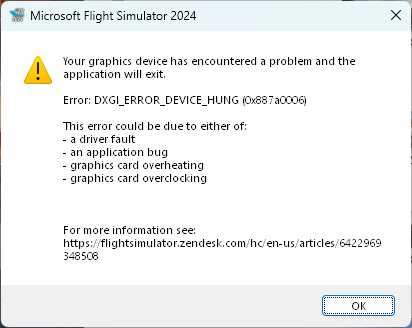
Weirdly when it was crashing before, the path to the file did not even exist on my system.

(I had no such _xxxxx folder. But since rolling back to 552.44, I do have the _2673283c5a4c598 folder now).
I noticed in the UserOpt.cfg there is a driver version. My friend had this filled in with the correct version that they are using, but mine says 0.0 0.0. What is this? Does it have an impact on the game.? I’ve tried typing in my actual driver number earlier - does it matter?
CurrentGPUDriverVersion 566.36.0
Also had this warning AFTER one of the freezes before it CTD’d - usually there is nothing except the freeze then the note in Event Viewer.
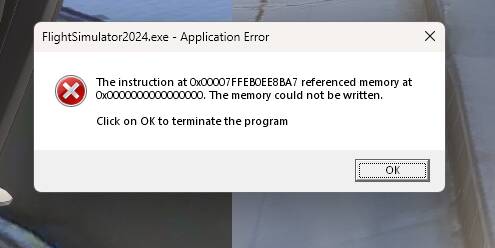
Problem is without OXRTK, my performance is terrible in 2024. Micro stutters and hitches no matter what other settings I use. Had to turn it down to DLSS Performance to regain anything but even with that and it looking so blurry, it is still not smooth at all. Maybe it is Turbo Mode or just ONE of the features inside that I am using. Going to experiment there now but I think I am stuck!
EDIT: Looks like I solved it by turning off Foveated Rendering in OXRTK!  (discovered from this topic: VR mode, in MSFS menu, suddenly crash with nvwgf2umx.dll, flightsimulator2024.exe 0xc0000005)