Using the template below will greatly help the team reproduce the issue and ease the process of fixing it. Before posting, search for an existing report. If you are not sure it’s a bug, please first report in User Support Hub.
3 tags are required - add them in the tag section next to the title above:
One for aircraft (start typing in your aircraft name in the tag section and pick correct option)
Feel free to delete this quote section after adding your appropriate tags.
ISSUE DESCRIPTION
Description of the issue: The main hydraulic brakes on the DA40NG are so weak as to be almost non-existent. Even on relatively long runways, it is almost impossible to stop before the end of the runway during the landing roll-out
FREQUENCY OF ISSUE
Happens 100% of the time.
How often does this occur for you (Example: Just once, every time on sim load, intermittently)?
REPRODUCTION STEPS
Please list clear steps you took in order to help our test team reproduce the same issue:
Approach any runway for landing.
Touchdown at the appropriate marker.
Apply brakes.
YOUR SETTINGS
If the issue still occurs with no mods and add-ons, please continue to report your issue. If not, please move this post to the User Support Hub.
What peripherals are you using, if relevant:
Logitech Yoke and Throttle Quadrant
[PC Only] Are you using Developer Mode or have you made any changes to it?
No
[PC, MSFS 2020 Only] Are you using DX11 or DX12?
DX12
[PC Only] What GPU (Graphics Card) do you use?
RTX 3070
[PC Only] What other relevant PC specs can you share?
I7 12700k CPU
MEDIA
SSD Please add a screenshot or video of the issue occurring.
I did a first flight mission with the DA-40 ng that comes with the Standard version. Taxiing, takeoff, and flight was incredible. Easily could see it being my favorite GA plane, however even with a smooth landing the braking did not work when pressing the square button. It was working on taxi.
FREQUENCY OF ISSUE
everytime
REPRODUCTION STEPS
Please list clear steps you took in order to help our test team reproduce the same issue:
Restarted the same mission, landing was even smoother yet brakes “failed”
Tried the same aircraft in free flight at a different airport, brakes failed once again
I already own this one. No braking problems.
But still the default sim version should work right. It’s been like this since the launch of MS2024, as far as I know.
I really hoped that the SU4 would fix it, but it didn’t.
I own the DA40NG as well and can reproduce this issue with a vanilla, up-to-date MSFS2024. No MODs installed! No mapping issue since I can hear and see the articulation of the toe brakes. Oddly, the parking brake, when set while the plane is taxiing, slows it down consistently with the expected force. So that seems to be an odd one.
I also had the impression, but no proof, that this issue can creep up for other planes too. I thought once that I had very poor braking performance in the TBM930 on dry tarmac.
Edit: I might add that I do see this issue in free flight even with the very first flight of a session - I don’t care about career mode, so I don’t know if it is there too for me. I also have to add that I am on PC with the Steam version of MSFS2024. I use a Thrustmaster pedal set.
Is there any update to this issue. It is quite anoying and the DA 40 NG is nearly not usable due to this issue.
I have tested further and expand my report:
The toe breaks of the DA40NG have nearly no breaking power, thus makes the DA40NG unable to land on short and medium sized airports/airfields.
I was not able to slow down the aircraft from a touch down speed of about 80kts to 0kts over a length of 800m (grass) runway. Same behabviour on paved runway btw.
The plane also gets very twitchy on the ground wenn aplying breaks.
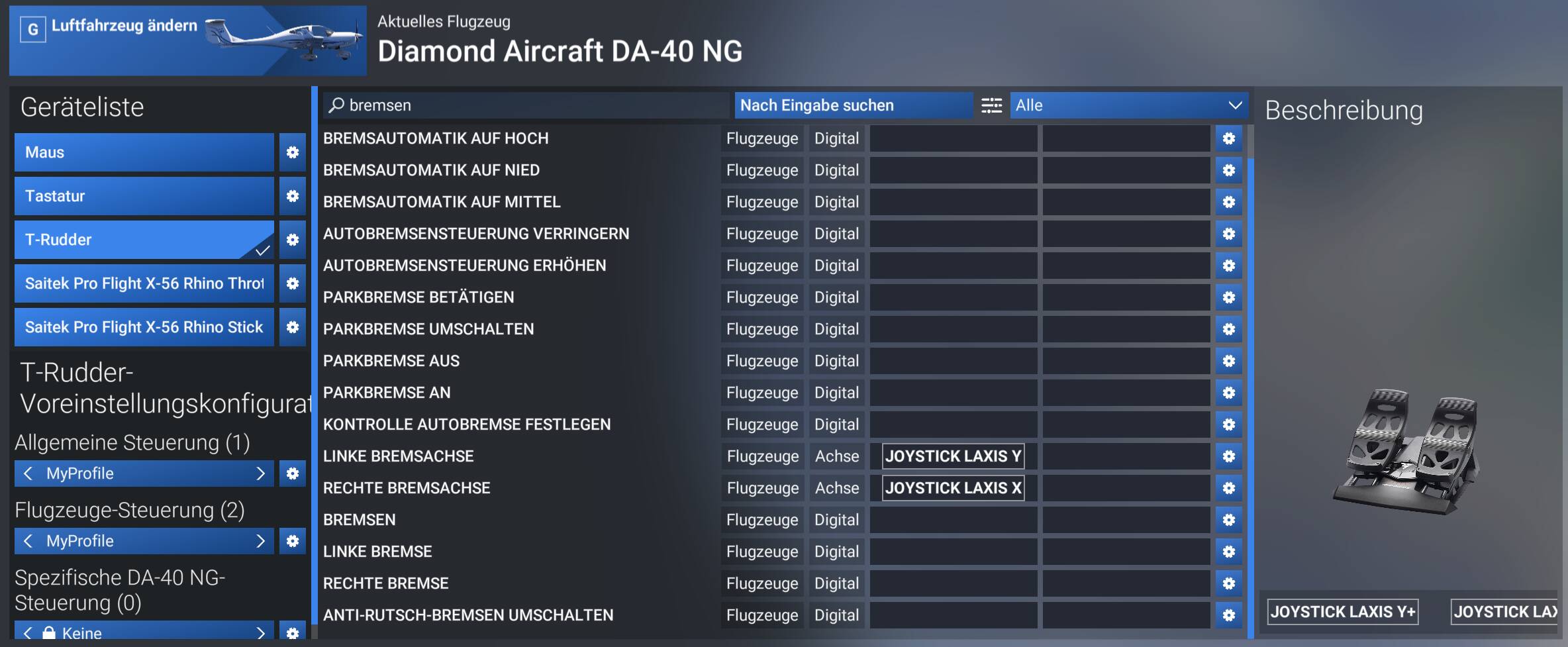
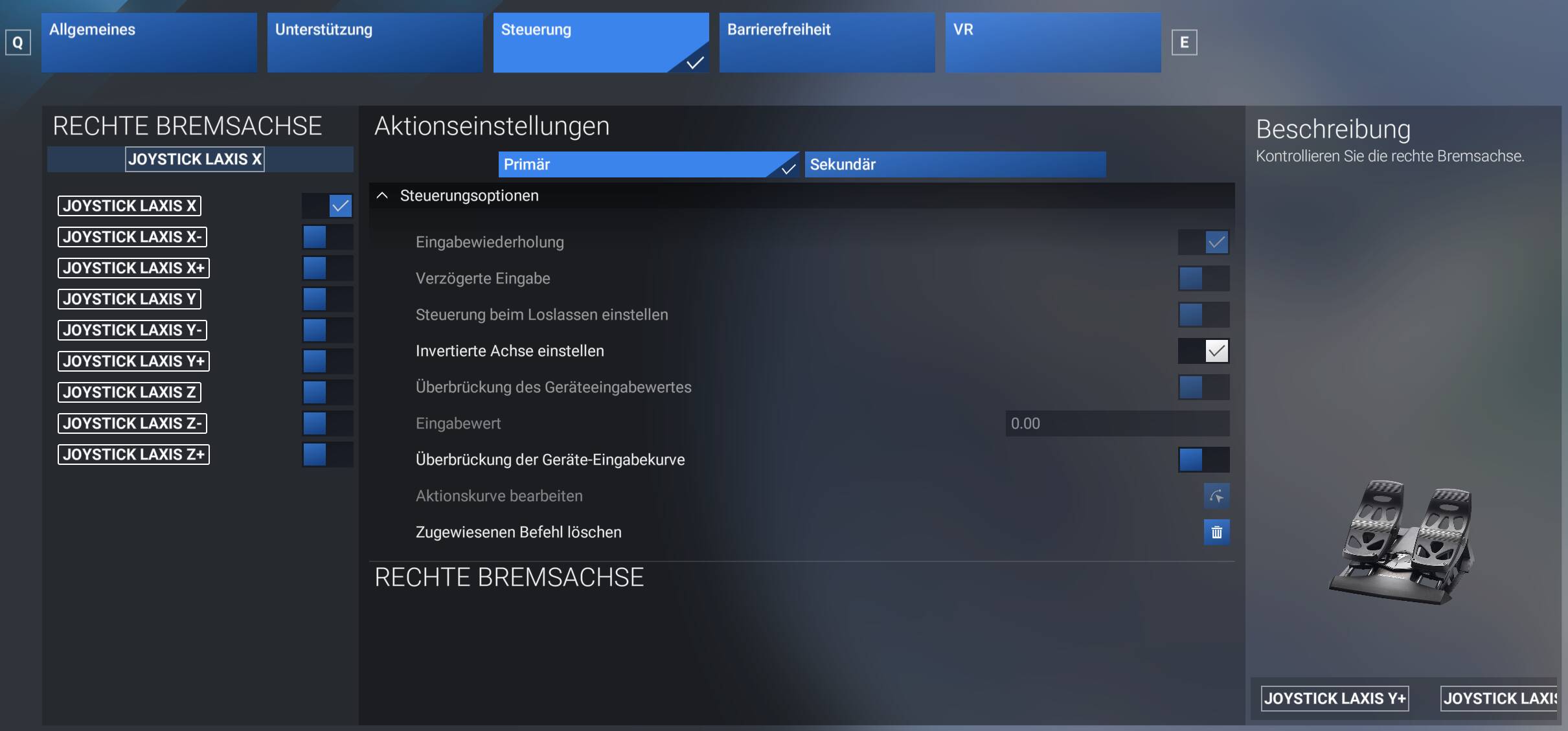
I use the thrustmaster T-Force rudder peddals. When not pushed they are 1 (see attached image) :
This is also true for the other break axis JOYSTIK_LAXISY (Left break axis, JOYSTICK_LAXISX is right break axis).
When pushing the breaks fully forward the axis responds and the output is as follows:
From these pictures we can see that the axis work on a HW level and are also correct assigned to the aircraft breaks.
I have this also verified in the cockpit of the plane, seeing the toe breaks react to my inputs.
FREQUENCY OF ISSUE
Every timesince at least SU4. I think prior SU4 it did work, but I am not 100% sure. Maybe it was already broken in SU3.
REPRODUCTION STEPS
Load a flight with the DA 40 NG
Take of from e.g.: LOLT and try to land again (direction from east to west). This is an airfield with a 800m grass runway which should be plenty to bring the DA 40 to a halt.
Whach you overshooting the runway and shatter either in the little stream or on the road bank.
YOUR SETTINGS
What peripherals are you using, if relevant:
Thrustmaster T-rudder
Logitech X56 HOTAS
[PC Only] Are you using Developer Mode or have you made any changes to it?
NO
[PC Only] What GPU (Graphics Card) do you use?
Nvidia RTX 5090 (Zotac AMP! Extreme)
[PC Only] What other relevant PC specs can you share?
CPU: AMD 9800X3D (PBO active)
RAM: 96GB, 6000MT/s, CL30
Chipset: X870E
Windows and MSFS installed on Corsair MP700 Pro Se 4TB
Using the template below will greatly help the team reproduce the issue and ease the process of fixing it. Before posting, search for an existing report. If you are not sure it’s a bug, please first report in User Support Hub.
3 tags are required - add them in the tag section next to the title above:
ISSUE DESCRIPTION
DA40NG brakes are extremely weak on landing. Even with full brake input on rollout, the aircraft barely decelerates and will overshoot medium‑length runways. Braking works during taxi, but becomes almost non‑functional after touchdown.
FREQUENCY OF ISSUE
Every flight.
REPRODUCTION STEPS
Load the DA40NG in MSFS 2024 (any airport).
Land at normal approach speed.
Apply full brakes using assigned trigger.
Aircraft barely slows down and requires excessive runway length.
YOUR SETTINGS / HARDWARE
CPU: AMD Ryzen 9 9800X3D
GPU: NVIDIA RTX 5090
RAM: 64GB
Controls: Turtle Beach VelocityOne Flight Stick
Brakes assigned to trigger
Platform: PC (Windows 11)
Version: MSFS 2024 (latest update)
Mods: None
Developer Mode: Off
Graphics API: DX12
ADDITIONAL OBSERVATION
With full brake input after touchdown, airspeed decreases at only about one knot per second, making it impossible to stop within a realistic distance. This behavior is consistent across multiple airports and sessions.
This thing is very hard to stop after landing it will if all is perfect but takes a lot more than anything else as far as I can tell, several go around due to running off the end of the runway User Support Hub.
3 tags are required - add them in the tag section next to the title above:
Interesting, I obviously haven’t flown those two for some time.
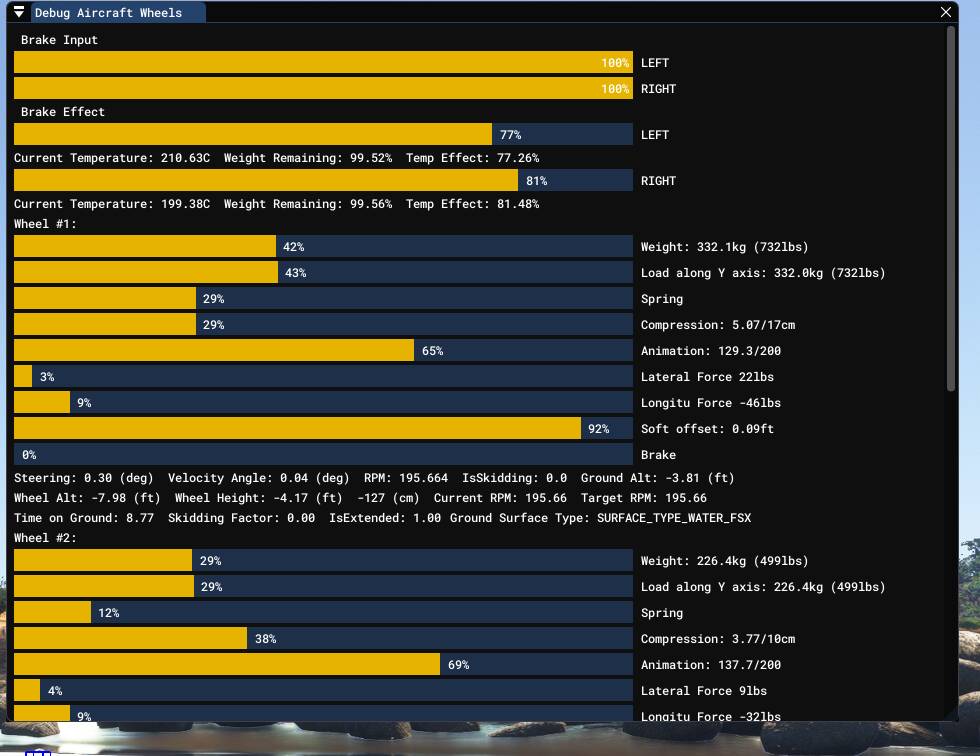
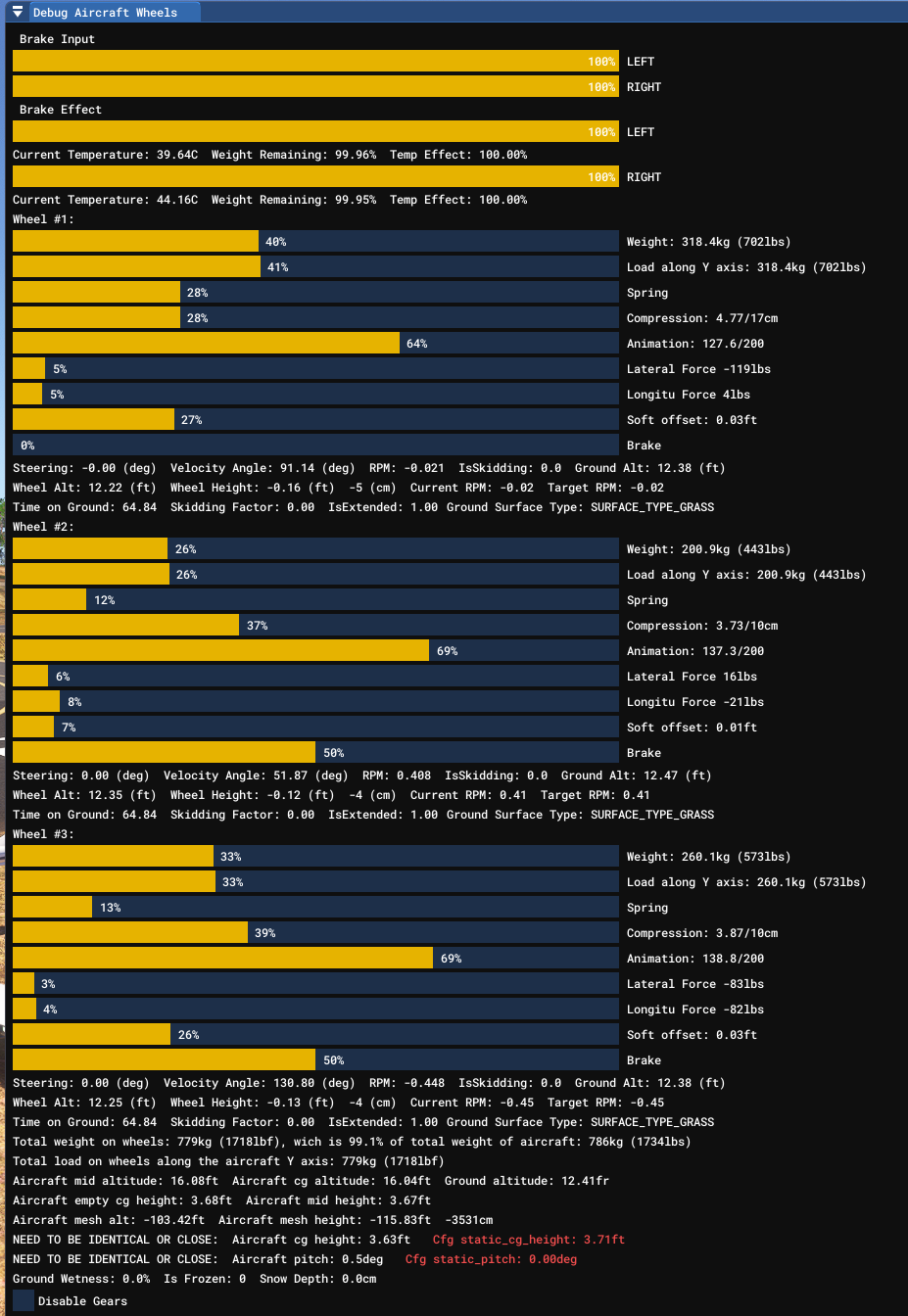
Interesting as well: using debug mode and displaying the brake values it is clear that 100% input and 100% brake effect is in place, it just has very little effect on the plane…must have something to do with “friction factors” or something like that.
Regarding my screenshot: the brake effect here has decreased because of the high temperature (a result of my ongoing tests), so even that behaviour seems to be properly.
You obviously have a much deeper understanding of the various parameters that bear (or should) on this issue. I personally have kind of hangered the default DA-40 and fly only my COWS version, now.
But, I do seem to recall that there was an inordinate amount of thrust from the prop even when the engine was completely de-throttled. With the engine at idle, it would still accelerate down the taxi-way after I released the brakes and just “blipped” the throttle a little.
Next time I fire up the sim, I think I am going to pull the Asobo DA40 back out of the hangar and attempt a “dead-stick” landing test to see if that theory produces anything.
More to follow…
Edit:
Well after a little more testing, I think I might be on to something.
First of all, shutting down the engine at about 500 ft above the end of the runway, I glided it in repetitively with no flaps, touched down at around 75 kts. and stopped in what to me seemed like a normal distance.
What I also discovered is that the Asobo engine is set to idle at around 935 RPMs, 235 RPMs more than the real one idles at - 700 RPMs.
My guess? I think the engine is still producing considerable thrust at 935 RPMs which is in effect counteracting the effectiveness of the brakes.
As the default planes are all encrypted now, I assume there is probably no way to hack some config. file to test my theory… but the developers might want to check into this.
it’s been 3 months now. EVeryone seems to be having the same problem, regardless of peripherals or PC/GraF. IS NOONE able to answer or explain this fix? PLEASE!!!
Using the template below will greatly help the team reproduce the issue and ease the process of fixing it. Before posting, search for an existing report. If you are not sure it’s a bug, please first report in User Support Hub.
3 tags are required - add them in the tag section next to the title above:
One for aircraft (start typing in your aircraft name in the tag section and pick correct option)
Feel free to delete this quote section after adding your appropriate tags.
ISSUE DESCRIPTION
Description of the issue: The engine idle is too high and the brakes are too weak. The plane will move during run up and when landing it can’t come to a stop when at idle and full brakes. It’s like landing a jet without air brakes. The normal landing speed shown in the EFB of 71KTS is too fast.
FREQUENCY OF ISSUE
How often does this occur for you (Example: Just once, every time on sim load, intermittently)? Every time.
REPRODUCTION STEPS
Please list clear steps you took in order to help our test team reproduce the same issue:
Try the run up or landing.
YOUR SETTINGS
If the issue still occurs with no mods and add-ons, please continue to report your issue. If not, please move this post to the User Support Hub.
What peripherals are you using, if relevant:
[PC Only] Are you using Developer Mode or have you made any changes to it?
[PC, MSFS 2020 Only] Are you using DX11 or DX12?
[PC Only] What GPU (Graphics Card) do you use?
[PC Only] What other relevant PC specs can you share?
MEDIA
Please add a screenshot or video of the issue occurring.
We have created an internal ticket to see if our team already has this logged, and if not they will attempt to reproduce the issue and create a new bug report. This item is now marked as feedback-logged. If there is an existing bug report or one is created, we will move this thread to bug-logged.
I just redid a mission with this plane about 8 times because I kept rolling off the grass runway when I landed. I thought it was my fault because it was my first time flying this plane and I’m still getting used to landing (most of the landings were mid-strip).
But I just now finally did a perfect landing right at the end of the grass strip and with full brakes on the plane kept rolling from one end of the strip right off the other end of the strip, and would have rolled right into a forest at near take-off speeds if I didn’t hit esc and finally give up on this mission.