I had the same issue as you (I posted a video in this thread just like you), and the solution for me was to delete/disable Uwajima’s light mod for da62. I guess other similar mods can cause this too, so check your other mods as well if you don’t have the Uwa lights mod.
That was that
Got rid of it and its working fine


Perhaps it wasn’t clear enough, I hope this makes more sense now

I have just stumbled upon it in the Kodiak topic and yes, it has became my immediate favorite. No extra storage space is needed, quickly adjustable, profiles makes it very efficient to manage. One comment though: there are some “mods” that have their own installer and not all of them likes these linked folders. So addons like Honeycomb driver, SpadNext “driver” and FSUIPC remained fixed in the community folder to be on the safe side - but Addon linker has no issues with that.
Just tried v0.6 and sad to see the sim connect control of de-ice is still the same, broken. Again, it always loads ok and the first press of max mode button results in the full 2 minute of max operation. However whatever is being done either during or when max mode completes stops subsequent operation of the max mode button. Reloading again allows the one first use and then same issue.
Would be good if we could control the oxygen on/off via sim connect events or a variable too.
Otherwise seems good but haven’t flown with this new version yet.
i don’t understand. can you explain more?
Deice:
Aircraft loads
Elect Master on - “TOGGLE_MASTER_BATTERY”
select deice mode norm - “L:DEICE_MODE”, “Enum”, 1
select deice mode hi - “L:DEICE_MODE”, “Enum”, 2
select deice mode max (press)- “L:XMLVAR_IceLightMaxStateEnabled”, “Enum”, 1
select deice mode max (release) - “L:XMLVAR_IceLightMaxStateEnabled”, “Enum”, 0
max light driven by “L:XMLVAR_IceLightMaxStateEnabled”, “Enum”, changes to 1 and stays at 1 for 2 minutes then returns to 0.
After the correct operation of the max mode has ended we try again.
Elect master is already on and deice mode is already hi.
select deice mode max (press)- “L:XMLVAR_IceLightMaxStateEnabled”, “Enum”, 1
select deice mode max (release) - “L:XMLVAR_IceLightMaxStateEnabled”, “Enum”, 0
max light driven by “L:XMLVAR_IceLightMaxStateEnabled”, “Enum”, changes to 1 momentarily and then returns to 0.
If you reload aircraft again the max mode works again just the once then stops working correctly as listed here.
Oxygen:
Can’t seem to find any events or variables to control the green oxygen on/off handle.
I hope this helps identify the issues.
I use this DA62X mod 0.6. and the NXI 0.8.0. The only other item I have in the community folder is the MD30X.
I am trying to pin down whether problems with the HUD (Heads Up Display - External Camera) CDI can be fixed in this DA62X mod, the NXI, or if these are problems that can only be fixed in the sim:
- When I initialize cold and dark and turn on the Electric Master switch, the NXI PFD is showing GPS (magenta) CDI, but the HUD is showing a VOR (green) CDI. I must click the PFD CDI softkey 3 times before the HUD will dsplay the magenta GPS CDI to match the PFD CDI. After doing that, the HUD CDI stays magenta during takeoff and climb and cruise while using AP with HDG and/or NAV mode.
- When flying in NAV mode with an NXI visual approach loaded but not activated, I will use the ALT knobs to set an altitude below the last waypoint before landing altitude and click VNV to get the white pending VPATH indicator in the PFD. Upon activating the approach, the HUD CDI is still magenta, but upon clicking APR to get the pending GP indicator, the HUD CDI switches back to a VOR (green) CDI. Because the entire approach and landing are using GPS, why is the HUD not showing a GPS (magenta) CDI?
While I use the NXI exclusively now, as I recall using the default G1000 with this DA62X mod also causes the HUD CDI to switch to VOR when APR is clicked.
Sorry for the lengthy post, but I do not know where I should be reporting these issues: this thread? the NXI thread? or is it a sim issue that should be reported to Zendesk?
UPDATE 11/7/21
DA62 Flight manual Page 4A - 58 Rev. 0 11-Jan-2019 Doc. No. 11.01.05-E checklist for GPS approach confirms the settings in #2 above:
c) GPS
- Navigation source . . . . . . . . . . . . . . . . . . . . . select GPS using CDI button on PFD
- Approach . . . . . . . . . . . . . . . . . . . . . . . . . . . . load in FMS and ACTIVATE
- Intercept heading . . . . . . . . . . . . . . . . . . . . . . establish in HDG or ROL mode (if required)
- Mode controller . . . . . . . . . . . . . . . . . . . . . . . select APR on mode controller
- Green or white GPS annunciation . . . . . . . . . note on PFD
- Vertical mode and reference . . . . . . . . . . . . . select on mode controller
Is the G1000 NXI a must now or will it work with G1000 (plus Mod) and the modified (old) Panel.cfg from the previous Build too?
I’m using Skyelite and the NXI has some Issues with Simconnect, not sending correct Waypoint, Distance and ETE Data via the Simconnect Interface to Skyelite. Tho old G1000 with Mod does work with Skyelite.
Maybe you can also add it causes flashing garmins to help troubleshooting.
Its already in the FAQ
Many thanks for a superb mod for the DA62. Any chance of animating the TOGA button left of throttle?
Flew the Cessna 172 with the G1000 NXI and confirmed the same 2 issues of the Heads Up Display (HUD) Course Deviation Indicator (CDI) showing a VOR CDI when the cockpit PFD is showing GPS CDI, reported at length in my post that this post is a reply to.
The DA62 flight manual states that a GPS approach requires that the APR mode must be selected but the bug is that the HUD CDI behaves as if GPS is not a legitimate CDI to use during an approach.
Because the Cessna and DA62X both have this issue, there may be nothing MrTommyMXR can do in this mod to correct this.
Because the stock G1000 and the G1000NXI both have issues with the CDI in approach mode, there may be nothing Working Title can do in the NXI to correct this.
That may mean that this issue is in the sim itself that only Asobo can fix, but with no comments on this subject, I have no idea if that is true or not.
Does no one else who reads about this excellent DA62X improvement mod here care that the HUD CDI does not stay in sync with the PFD CDI and want to see the HUD CDI fixed?
The DA62 IRL does not have a hud so I doubt many even fly with it. I certainly do not.
wtf is going on here
By HUD I think they mean when you’re “flying” in third person mode, outside the aircraft.
Yes, I am talking about the generice instruments shown there. I said external camera in my original post, that’s what I am referring to as the HUD, sorry that was not clear.
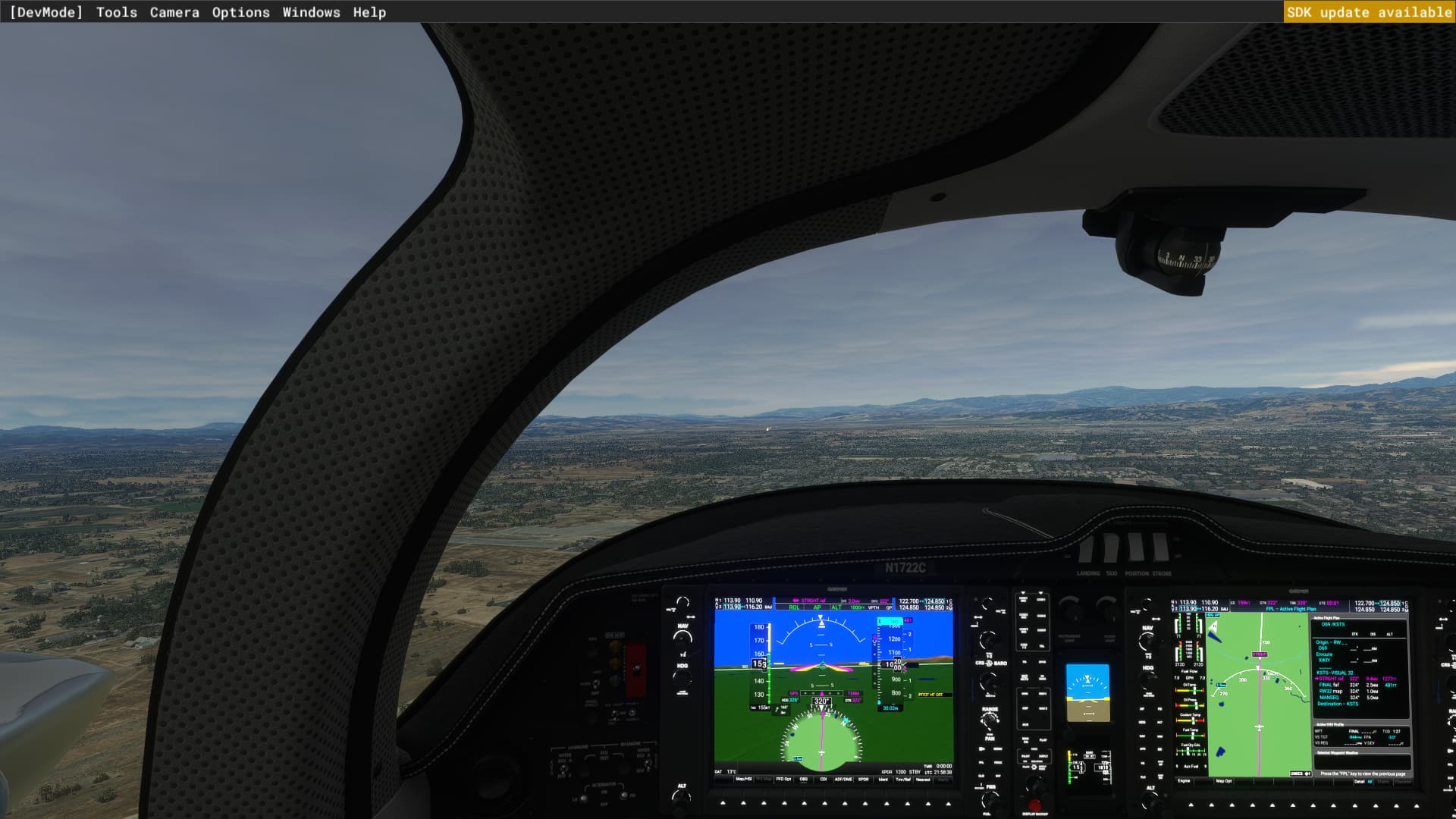
These screenshots illustrate the issue.
- Inside the cockpit the PFD CDI is set to GPS
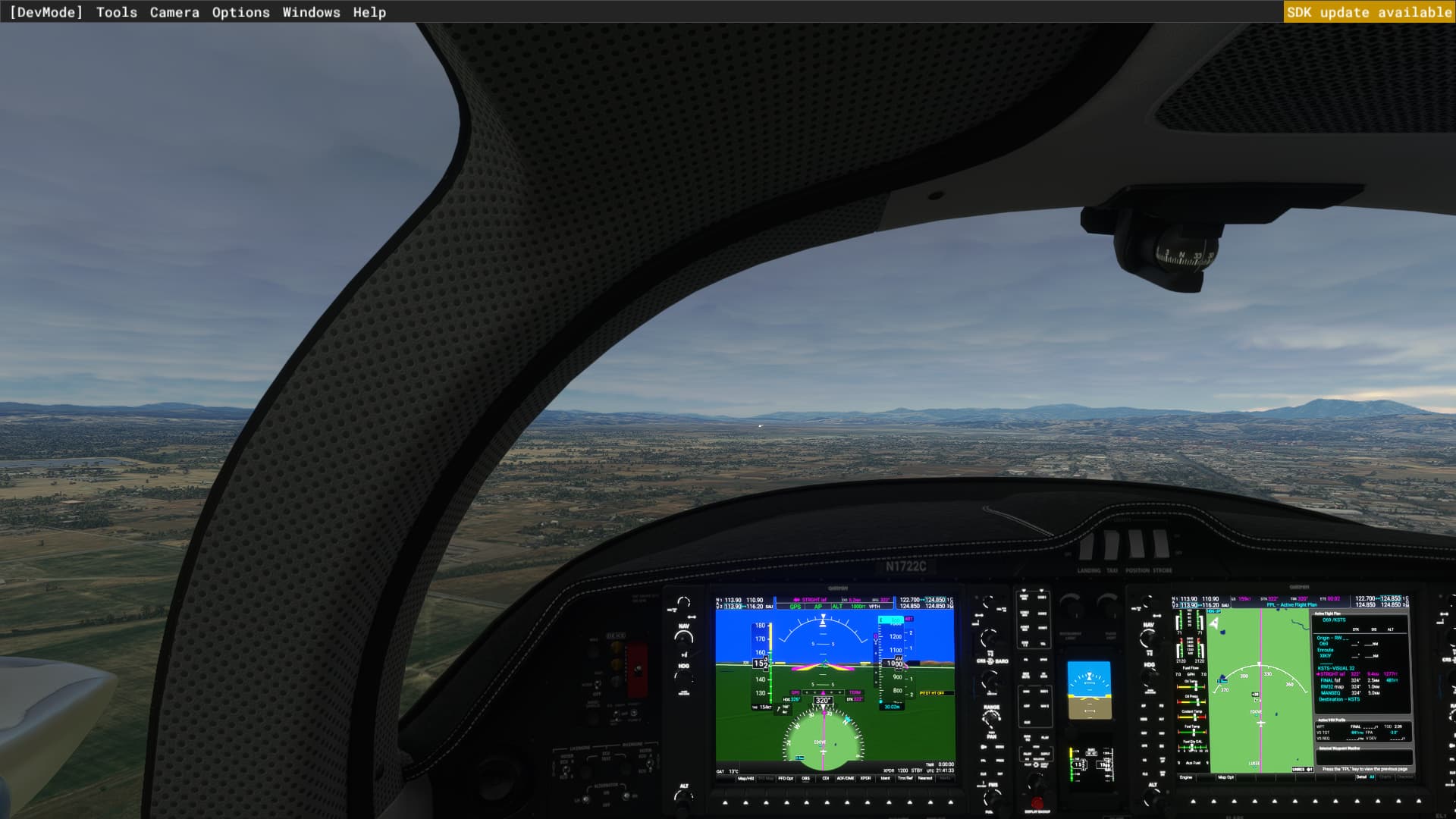
- The HUD CDI has stayed correctly using GPS during takeoff, climb, and cruise
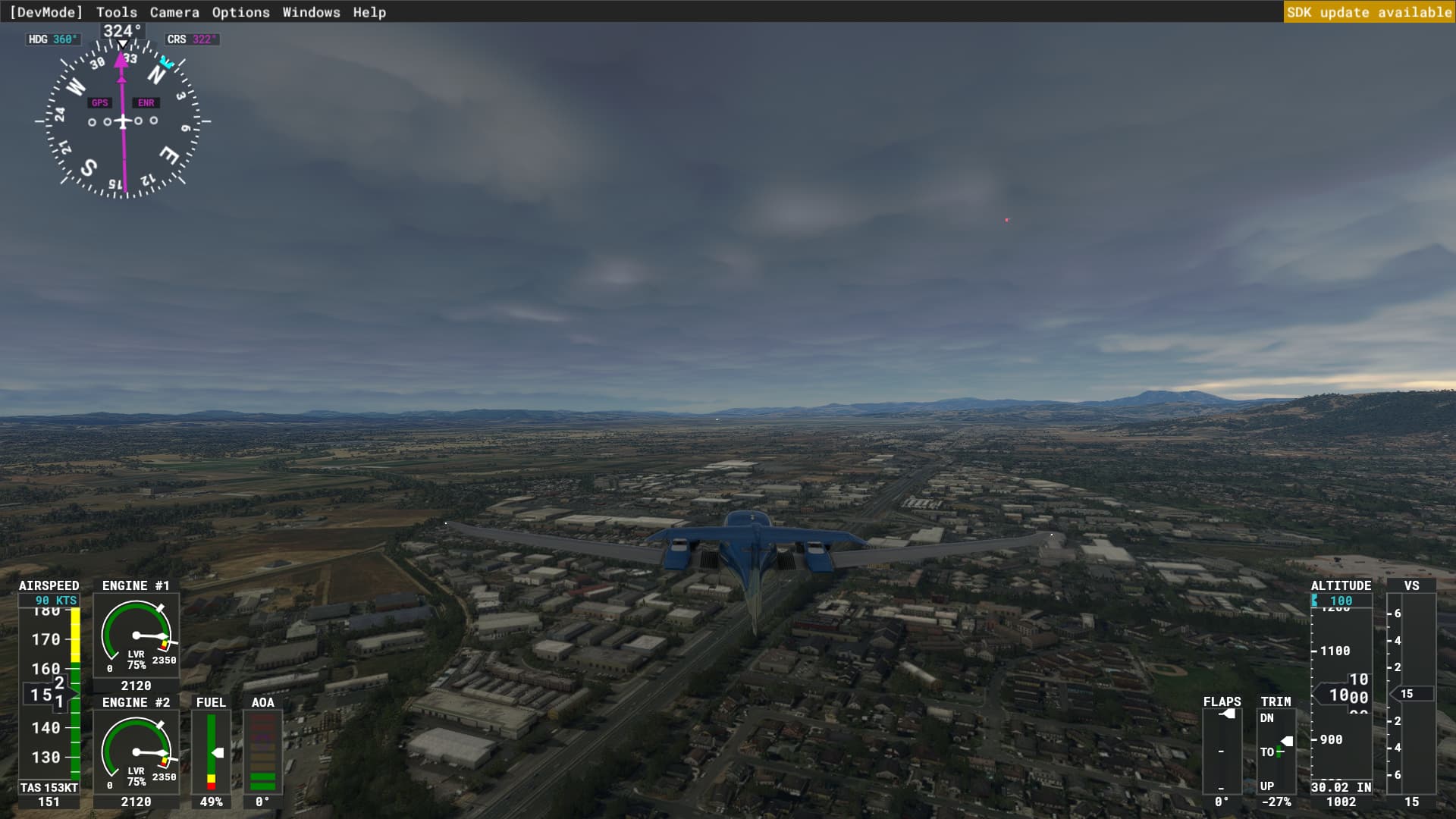
- Inside the cockpit we have activated the approach and clicked the APR button. The cockpit CDI is
correctly still showing a GPS CDI and has the white GP pending in the PFD
- After doing #3 above, the HUD now is incorrectly showing a VOR CDI
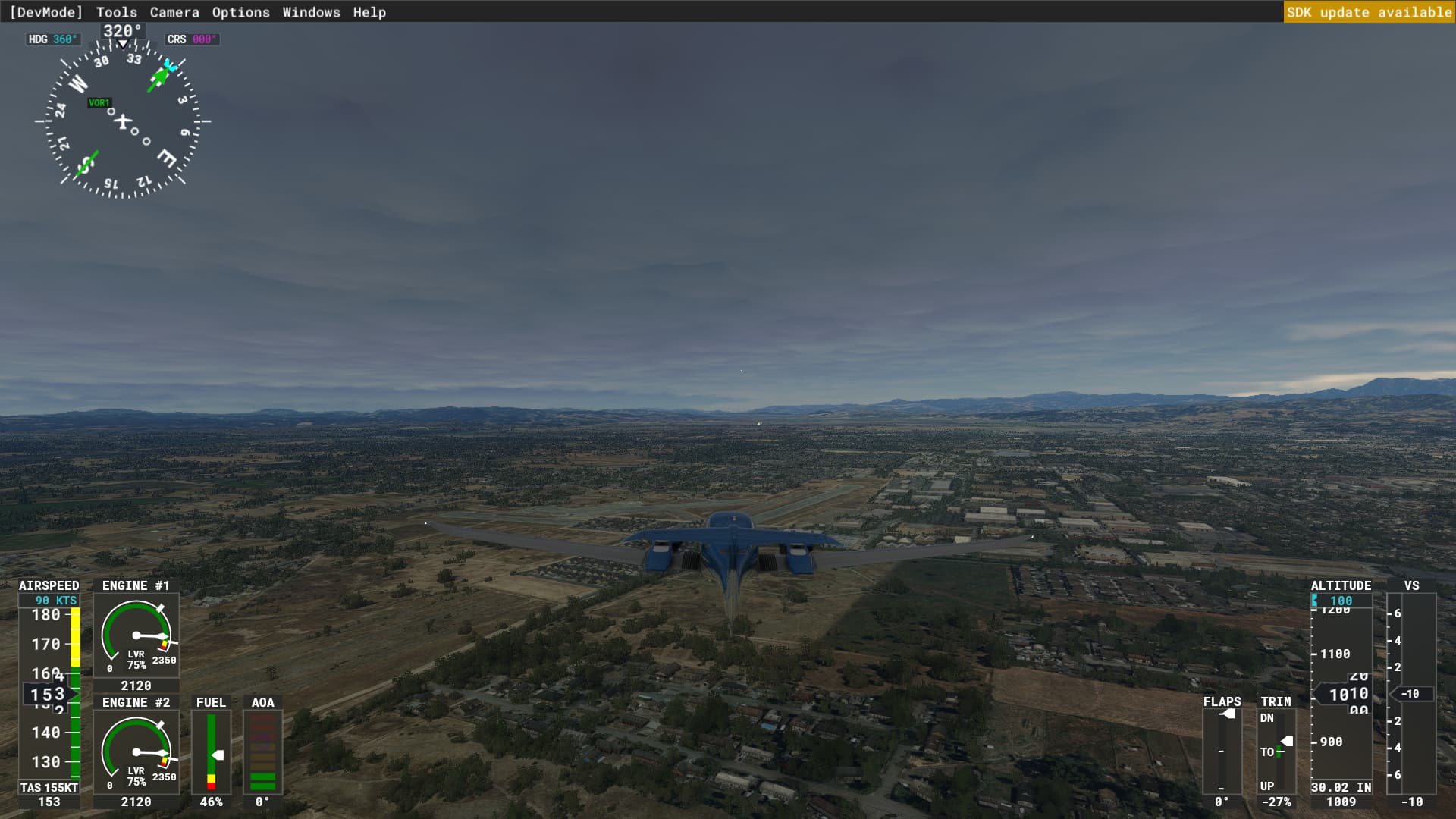
To correct the HUD display after switching to APR mode and getting the white GP indicator in the PFD, click APR, then click APR again and confirm HUD CDI is now GPS again. VPATH descent will still work as expected. However, when the white pending GP changes to a larger green GP in the PFD, the HUD CDI again will switch from GPS to VOR. Now if you click APR or other buttons again to get GPS, you may get a HUD CDI in GPS but you will lose the GP vertical autopilot. Apparently, the HUD CDI is set by some code somewhere to VOR whenever the large green GP appears in the PFD.
I am using Developer Mode only to avoid these test flights for screenshots from being logged.
These things are driven by G1000 / NXI addons. Best place to report this issue is the WT discord channel dedicated to NXI beta.