Give it a day and let things cool down.
Or take it to a friends house who has a fast internet.
Last resort delete and re-install which should give a clean system without a lot of old patches.
Give it a day and let things cool down.
Or take it to a friends house who has a fast internet.
Last resort delete and re-install which should give a clean system without a lot of old patches.
Here’s an interesting development. The Xbox app is suggesting I can update my MSFS installed to 1.18.15.0.
Now shouldn’t I be using the MS Store to do the update? Should I let the XBox app do it?
I really like what I have seen so far, mainly Frankfurt and Vienna.
In such updates, are they replacing all the building in a city like Frankfurt or only the points of interest? I ask this because I have flown over Geneva lately and the buildings do not appear to be the same now… maybe it’s just an the update effect in my mind!
Floating lights in the sky anyone? Or maybe the stars have collapsed.
What also got worse is when you switch the camera from cockpit to exterior view, the game freezes for a moment. This was better with SU5! 
In general, MSFS does not like overclocks, so whether yours have been stable or not, I strongly recommend disabling them, at least when you’re using the sim. Having said that, as I said, every time I’ve seen that particular error, it has been strictly from the overclock itself, and unrelated to whether or not I was using the sim at the time.
Kev
Hello,
that’s exactly how it worked.
Thank you. 

Let Xbox do the upgrade.
Shouldn’t matter which one initiates it, source will be same.
There is also a command to re-install store if the other route does not help via powershell. But then you should have your fingers crossed that part does not fail. It does fix a lot of issues, but is quite rigorous to do so.
I also made a little video of the >100 render scale issue for night lighting. If you have this issue, the obvious workaround for now is to set the render scaling to 100. When set above 100, the effect is like a layer of lights disconnected from the ground - looks really weird.
i’m stuck , i can’t even download the update, it’s like a loop, please help me
Hi Guys, looks like it’s working now. MS really need to clean up this mess. I don’t know how non technical people handle these types of issues. It should be turnkey and just work seamlessly. There are enough challenges with the sim without the update process being a challenge.
Microsoft/Asobo FIX IT.
Hmm, I’m getting some dependencies are missing or out of date: (Asobo-aircraft-da40-ng (0.1.0)) for the world update. I’ve updated everything that was showing as update available, restarted after that and still get that warning? for the world update.
Can I install it or maybe better to reinstall the DA40 first?
After several hours still no luck installing the update. Starting the sim, it directs me to the Microsoft Store, and there is no update available. Starting the Sim from the Store, it loops me back to the Store.
PC, FlightSim Deluxe version from MicroSoft Store
Edit (1h later): After several PC restarts and tries the update finally appeared in the store. Downloading now.
Did a long flight over Vienna (my home city) and am generally satisfied.
However the handcrafted buildings just don’t fit in. Colors and geometry are wrong compared with PG.
Even more they seemed to have messed up the proportions. St. Stephen’s Cathedral’s tower seems too thin and the Stadium looks like the work of a 5 year old.
If they had invested the time into sorting out PG issues the overall result would have been better in my opinion.
But that’s complaining on a high level, it’s definitely an improvement.
Let’s post this again, I don’t understand why this one is still in.. I’ve seen it since oct 2020 
Check out the autotuninglevel trick.. always helps against repeats. Cancel your download, leave MSFS, apply the trick and restart MSFS again.. it will resume where it started.. and not repeat
@NumberNumber481 Do you mean the LOD setting?
Is the atc fixed or did you not go over 18000ft?
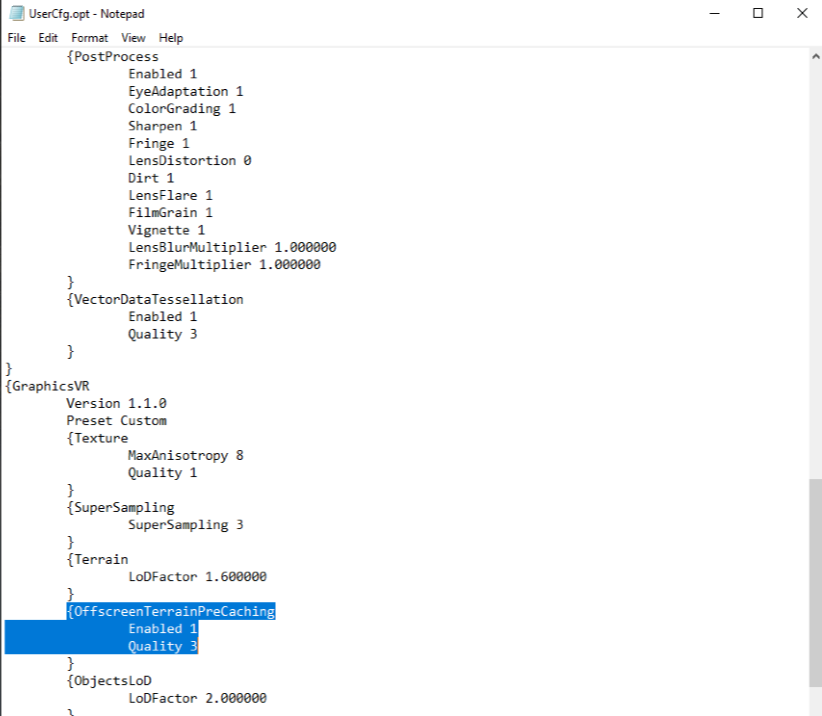
No… the “off screen caching” setting in the VR section. Works the same as the one in the PC section but there is obviously no control for it in the sim. Manually setting the values in the config file works.
My big take away from this update is that getting really good quality high res satellite imagery for the sim makes a huge difference. I kind of knew that anyway having paid for that 8K texture pack for Tenerife but to see it done properly with decent optimisation makes the sim look incredible.
The thing is now that Asobo and Bing have started this they’re going to have to continue with it because the places like Switzerland that have been updated now really show how bad some ( infact most ) of the rest of the areas of the sim are.