New Version 4.5.3.0 Stable available
Changelog
- Bugfix: Fixed warning message about outdated drivers on NVIDIA GPUs displayed by “Samson” game.
New Version 4.5.3.0 Stable available
Changelog
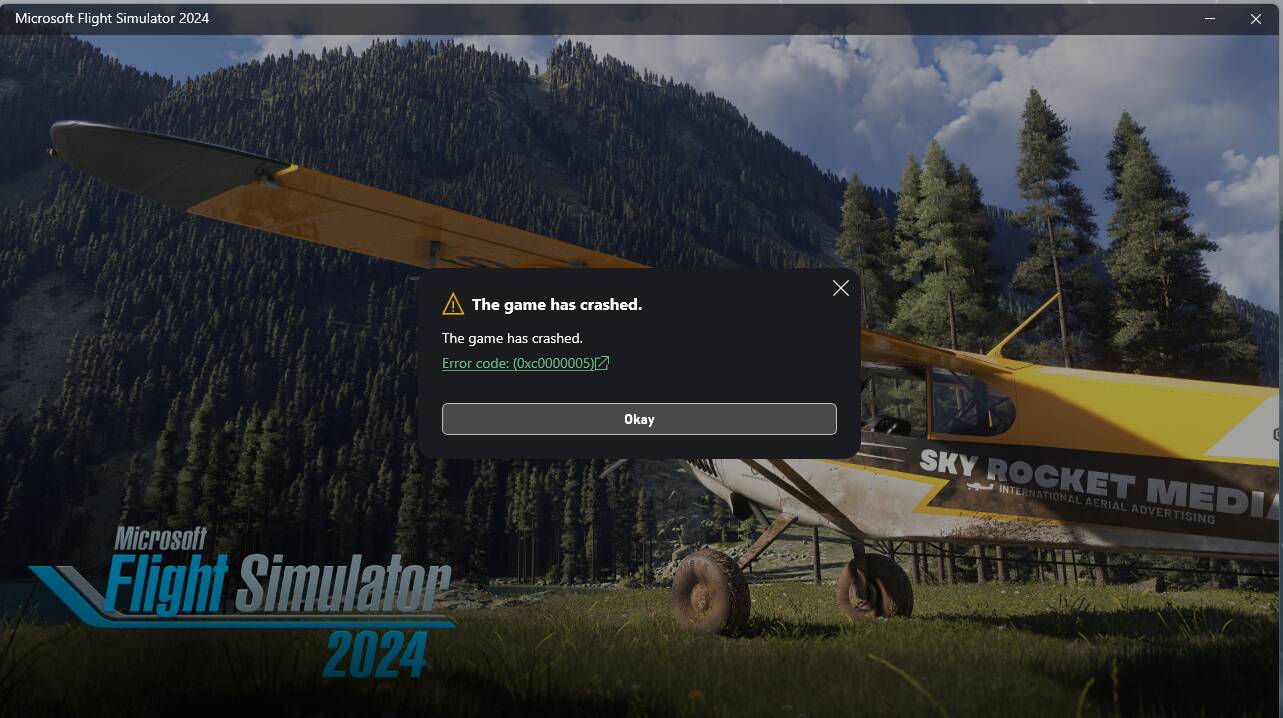
Hello! I am getting a crash (see attachment) when I try launching MSFS2024 with DLSS Enabler installed.
I followed all the instructions: 1.I changed ReShade’s dxgi.dll file name to d3d12.dll because I use Reshade, as specified on mod site 2. I
downloaded latest 4.5.3 STABLE hotfix and moved version.dll to the location of FlightSimulaor2024.exe file (for me its C:\XboxGames\Microsoft Flight Simulator 2024\Content) 3. Opened the game as usual and prompted with this
I also noticed that it created files in my Content folder, like nvng_dlss.dll, sl.dlss_g.dll, dlss enabler.ini and a lot of other files that look like they are related to the mod app. I also tried completely uninstalling reshade, still the same. I tried deleting those weird files, and double-checked that they actually were deleted, and did a “verify and repair” in the Xbox app, and when i checked the folder again they reappeared, like they now were part of the game and the algorithm found them essential to repair and re-create them…
I hope that anyone wil be able to help me with this, note that I am running on a 7800X3D and a 9070XT.
Thanks!
How do I get this to work in 2020?? I put the DLL file in the folder however there’s no option to select x how many fps???
That error code is a memory error.
I did a quick google search on that error with MSFS and found a video https://www.youtube-nocookie.com/embed/vmThzyRFw3Y .
Whether it will be of any use or not I don’t know, but it seems to indicate a software conflict, so I would absolutely start with ensuring that reshade is removed completely from your system.
Well i did use the “uninstall” function of ReShade setup, which usually, works, i do it at every game update or reshade update to do a clean install of the new version. So when i try launching with reshade, it crashes, and when i try launching without reshade, it still crashes. The weird thing is that now the dlls enabler files i talked about higher seem to now be incorporated in the game files… Although when i simply remove version.dll, i can play the game normally even with reshade and everything as usual.
Well i couldnt install it that’s what i troubleshooting, but normally you should be able to select the option inn the in-game settings, as you would usually for any integrated frame gen option. Now i dont really know bcuz I have 2024, im not used to 2020
I’ve been using the latest update for 2 days now and I’m happy with the results I’m seeing on my 13900K/4090 @ 4K. Holding 120FPS throughout my flights.
I downloaded the DLSS Enabler from Nexus mods. I got one file, DLSS Enabler 4.5.3 which I extracted. Now I have one folder, DLSS Enabler 4.5.3 When I open it with notepad it’s a lot of code. I don’t see a bunch of DLL’s to copy and paste. Is this what I need? If so, what do I do with it?
I do not see a ‘Version.DLL file’ to do anything with.
Are you downloading it from the right place here?
If you click on Preview File Contents for 4.5.3 at this link it shows that the contents are a single file Version.dll. then after logging in you can just click on Manual Download to get it.
That is what I downloaded from that location.
MY mistake, sorry. I see now that when I extracted it it created a file named Version.DLL Do I just copy that file to the MSFS 2024.exe location? Where do I copy the Version.DLL file to? I have been unable to find the .exe file for MSFS 2024.
I have to say that if you can’t download an archive containing a single file and you don’t know where your flightsimulator2024.exe is then I would suggest that you not touch any modding at all.
I am not being dismissive or derogatory here, I just worry that you are taking actions that you don’t understand and this is a recipe for trouble.
@Firebird FGR2: come on, give others, not have been born with all the wisdom, a chance!
@FunnierCello585:
My store version installed MSFS2024 into
C:\XboxGames\Microsoft Flight Simulator 2024\Content
Put the extracted file version.dll there.
MSFS2020 with RTX3080 @DX12 instant CTD before loading screen  . At DX11 the Simulator starts but enabling Frame Generation has zero impact on Frames
  . I‘ll stay with lossless scaling
Thank’s for your help sowosaamma11. I found the file that launches flight simulator at C:\users\name\Appdata\Local\Microsoft\WindowsApps\MicrosoftFlightLimitless_8wekyb3d8bbwe. Hope that is the right place
DLSS Enabler is working well for me on 4070S, now that I got the version.dll file in the right place. My .exe file is actually on F: rather than C: even though C: has the same MSFS files on it. Thus my confusion. It was exactly where sowosamma11 said it was, except on F:\
My FlightSimulator2024.exe in …..Microsoft.Limitless_8wekyb3d8bbwe… has a size of 0kB. the one in C:\XboxGames\Microsoft Flight Simulator 2024\Content has more than 180000 kB. The first one may be a link to the second one, or to whereever we find another one.
does it make sense to use the DLSS Enabler even when you have a 5080, just to make sure Dynamic FrameGen is working?
It’s easy enough to install it and check and remove it if it doesn’t change anything
It doesn’t really make sense, since Dynamic Multi Frame Generation already works natively on your 5080 without needing DLSS Enabler mod.
For more details, check the thread linked below:
https://forums.flightsimulator.com/t/dlss-dynamic-multi-frame-generation-and-6x-mode-is-a-game-changer-discussion/761729/12