i did, menu still comes up. Weird, i won’t take up more of your time I will try to figure this out but the file is gone and menu is still there. Thank you also I still have 3 and 4 x frame generation
If you deleted the version.dll file and the menu still appears, it might mean you have two different MSFS folders and you’re removing it from the wrong one. Are you using the MS Store version or Steam?
Do you have MSFS installed on a drive other than C: ? I have FS installed on drive F: However there is still a MSFS 2024 execute file on my C: drive. I mistakenly put version.dll into the C: file and of course it wouldn’t work till I put it on my F: drive. Is it possible those files you don’t see are in a different place? Or drive?
Store Version, i’ll look for another location
Open Xbox app > select MSFS 2024 > click 3 dots > manage > files > browse
After clicking Browse open Microsoft Flight Simulator 2024 folder and then open the Content folder. Delete version.dll and the other files mentioned above.
That was it, not sure how it got there but it is gone now. I’ll make a note for future installs. Thank you all for the help.
Anthony
Fly safe 
What is the video in the post of SimSoaringClub above? Is that a different MFG program for 4000 series Nvidia cards?
The video explains the new hybrid mfg feature of dlss enabler, which uses a mix of dlss and fsr framegen to improve its quality. And yes, that only works with 4000 and up cards, that natively support dlss fg, if i understood it correctly.
#1 mod in my opinion for MSFS 2024 right now. I’ve already managed to get a few folks on the bandwagon of trying it and they love it. I’m still absolutely blown away by performance. Still hoping this will catch on for other folks who have a 4090 to release the true potential of their systems.
I fly in VR. With Quest 3 - will this mod make a difference
CPU: AMD Ryzen 9 7900X3D
Cooler: Corsair H150 RGB Liquid CPU Cooler
Motherboard: ASUS TUF GAMING B650-PLUS WIFI
GPU: Gigabyte GeForce RTX 4070 WINDFORCE OC 12GB
Memory: CORSAIR VENGEANCE RGB DDR5 RAM 64GB (2x32GB)
Storage: WD_BLACK SN850X 2TB NVMe M.2 SSD
PSU: MSI MAG A850GL PCIE5 Power Supply (850W)
Case: CORSAIR 6500X Mid-Tower ATX Dual Chamber PC Case
Fans: 6x Corsair iCUE AR120 RGB Digital
No. DLSS Frame gen is not working in VR.
I finally managed to resolve the issue I was having when using DLSS for AA caused the game screen to be quarter size when using this mod. eg.

This post here made me go back and look at my MSFS 2024 installation folder, where I discovered that I had previously installed DLSS Tweaks to be able to get DLSS Ultra Quality. Removing all its associated files has fixed the issue and I can now use DLSS AA with this mod, so yay!
While I can get this mod working perfectly on SU4, it does not work in the SU5 beta at all (even with a completely clean install), causing MSFS to CTD as soon as DLSS FG is enabled, then MSFS will not even start again. The only way to get it working again is to change FrameGeneration in the UserCfg.opt file from DLSSG back to NONE. Does anyone else have this issue with the SU5 beta?
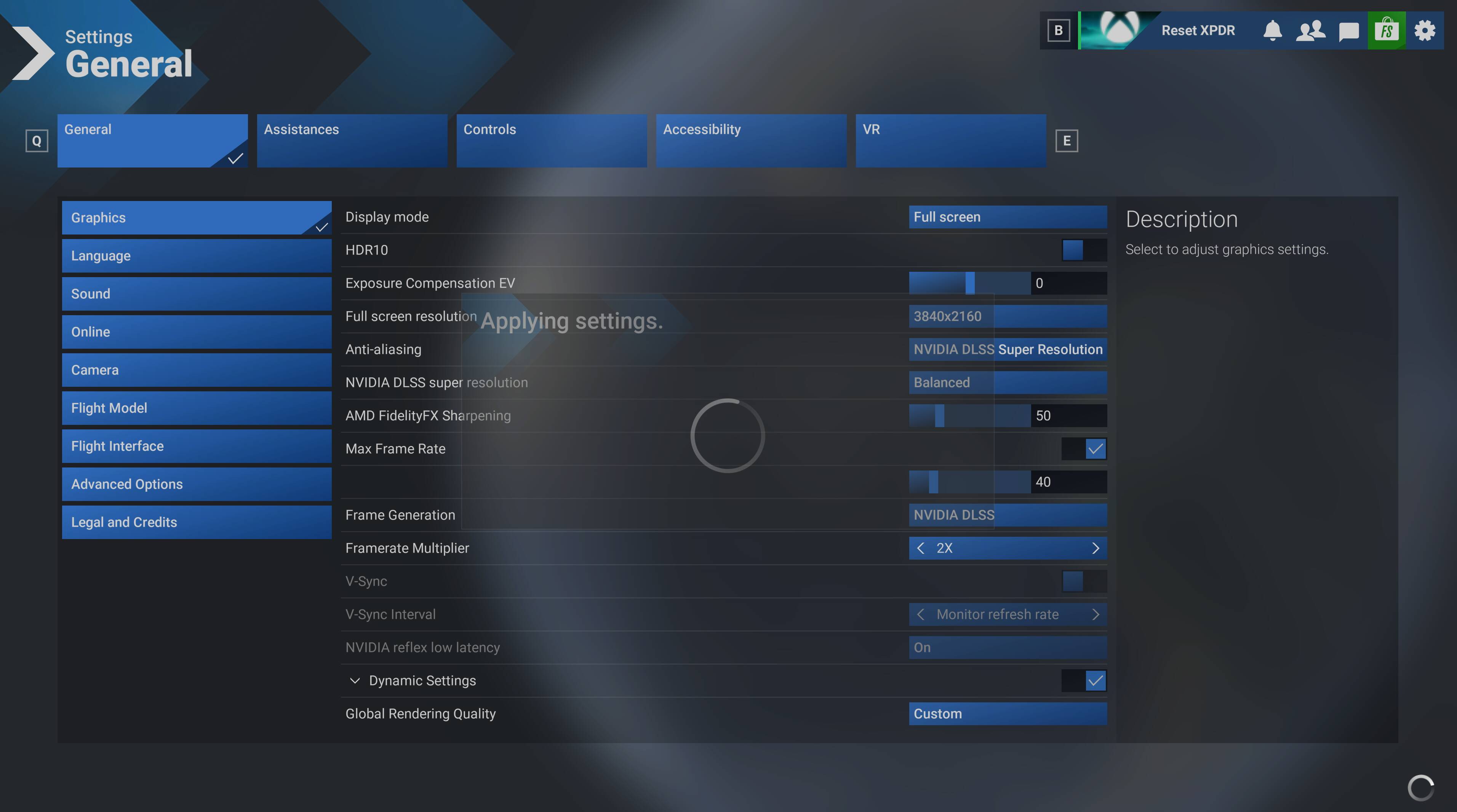
Edit: I tried it again in the just-release SU5 Beta 1.7.21.0 and it still freezes up when selecting DLSS FG then never starts again until I change it back to NONE in the UserCfg.opt file.
Im now getting frequent CTD in the Fenix in MSFS 2024….please help, this didnt happen before.
4070 TI Super, I9-10850K.
Hello,
is Dynamic Frame Generation working in MSFS 2024 with an 4090?
Apart from DFG i’m using this Mod now with FG 3x and have nothing to complain about so far.
Thanks and Greetings
Hi ten patrol, thanks for your continued help to the community. Do I need to delete all the files before updating the DLSS enabler, or is it enough to simply copy the DLL file back in? Thanks.
It should be enough to just overwrite the version.dll file when “updating” DLSS Enabler.
However, as we know, sometimes things can bug out or files can get corrupted, so you can also delete all files.
BUT
Just make sure to keep any .ini configuration files if you made changes, since those store your settings.
Still wondering if it is possible to also use Dynamic Frame Generation with DLSS Enabler and MSFS 2024? I tried different settings but seems not to work.
If you mean that the multiple will alter between 2x and 6x automatically then yes it does do that, but you have to activate the dynamic mode in the Enabler settings themselves. You disable the hardcoded multiple option and enable the dynamic mode further up the side tab.
Plus you have to set a value using the nvidia profile inspector.
For a complete overview, although it should be noted that I didn’t need to rename the version.dll.
NOTE
I was asked by another user to remove the video link, so as not to promote a YouTube channel. This I have done to avoid unpleasantness.
Hey guys, so i am trying this out…
I am noticing base FPS fluctuations, in even in 2x, and when I use DLSS for both AA and FG, i am getting very high CPU (mainthread) consumption.
I am running AMD 9070 XT, could this be the problem?
Thanks for your help!