No dice. I did that last night and right now.
Aircraft Light mods caused this for me in the past.
I’ll try that. Went through the Beta’s fine. This all happened a day or two after SU3’s release.
Don’t have any mods other than Navigraph.
1 Like
Why are your settings so low with that system. You should be able to run high to ultra settings
1 Like
Driver 577.0 - I have 4070ti too. The newer ones cause issues. Oh and I will add, I had to revert to a wide screen monitor. HDR TV was too much for this PC I have.
Trying to track down the problem
I’m using a 4090. Try driver version 581.15. I’ve been flying for hours on end with the sim maxed out aside from Terrain LOD at 300 and it’s peachy.
Your Vram is way better than ours Maki - ours only 12 Gb. The 4090 is just a much superior GPU.
That’s a fair point but would a newer driver really cause more VRAM usage?
Not necessarily but with me trying the newer drivers I have +++ctd’s and have to turn down settings. I also have a 5080 which with a new driver is impossible to do a single mission with. I wish I had bought a 4090 when I had the opportunity.
Thinking about it, I think every time I’ve had this crash it’s been in PG areas. Anyone else seeing this?
And for me it only happens with drivers a above 576.88. Was already happening in the betas.
For me, I went back to driver 576.40 and it’s really much better.
I9 13900K, rtx4090, 64GB.
576.88 is fine for me too
1 Like
I’m having this issue to on MSFS 2020 trying to fly the tfdi md-11 (more so making an axis and oh’s profile for it), I’m on 518.15 with a 5090.
Turned out to be an outdated drive for my stream deck.
I recently confirmed again that this error only occurs to me in 2024 when I’m in a PG areas (and use a driver newer than 576.88). If I stay away from PG, it never happens.
Anyone else seeing this?
Today mfs decide to hate dlss in dx 11 and sarted to crash i reinstalled the nvidia drivers multiple times but does not seems to work, the only work around that i found is to switch to dx12 if i want to use dlss. Anyone has got the same problem in the past if yes do you fix it ?
NOTAM UPDATE XD
I deleted the UserCfg.opt and it works LAMO XD
hope it helps
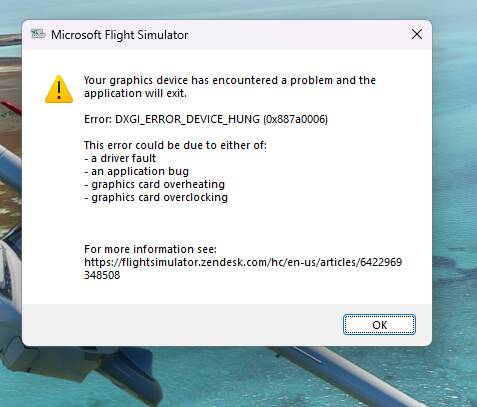
Yeah I had this issue. The only fixes I’m aware of is use DX12 or a driver at or below (I think) 572.83.
EDIT: Oh just saw your update. That’s interesting, what Nvidia driver are you using?
And were your crashes during flight or while loading into a flight?
I am still getting this on all the newer Nvidia drivers in 2024, but weirdly only in PG areas. This indicates to me that it’s an issue in the sim. Is anyone seeing this too and is Asobo looking into it?
No. And if it would be a generic issue, it would be reported by more users. So I am convinced it is an individual issue of your system.