Very interesting. This error code (x887a0007) seems to have never occurred before, or even been discussed here in the forum. If you google this error code, the list of results is very limited. There’s a Reddit post that also mentions this error code, and it occurred in the Nvidia environment. I’m an AMD user, so please read it yourself ;). https://www.reddit.com/r/blackops6/comments/1gfs8xv/error_code_0x887a0005_0x887a0007_6070_d_on_startup/
Are you undervolting/overclocking your GPU at all?
1 Like
No undervolting or overclocking, all defaults…
Looked at the Reddit post… (I’m on AMD too)…
I am thinking it’s time to format C: and re-install everything… I found that it is the quickest way (sometime) to fix bugs rather than spend days on something nobody has seen. Saves a lot of frustration too lol.
Thanks for the feedback, greatly appreciated!
1 Like
I’ve been there, done that -reinstalling windows- for a different reason tho’.
I didn’t have this dxgi error while I had the 6900xt for 3 years. When I replaced it for a 7900xtx, a week later it became daily.. brand new card, no overclocking, etc. The only solution which helped me is to turn on the radeon chill, and limit at 60fps. Since then knock on wood, I haven’t had this crash. The moment I unleash the card’s true power, MSFS crashes -no other games does it.
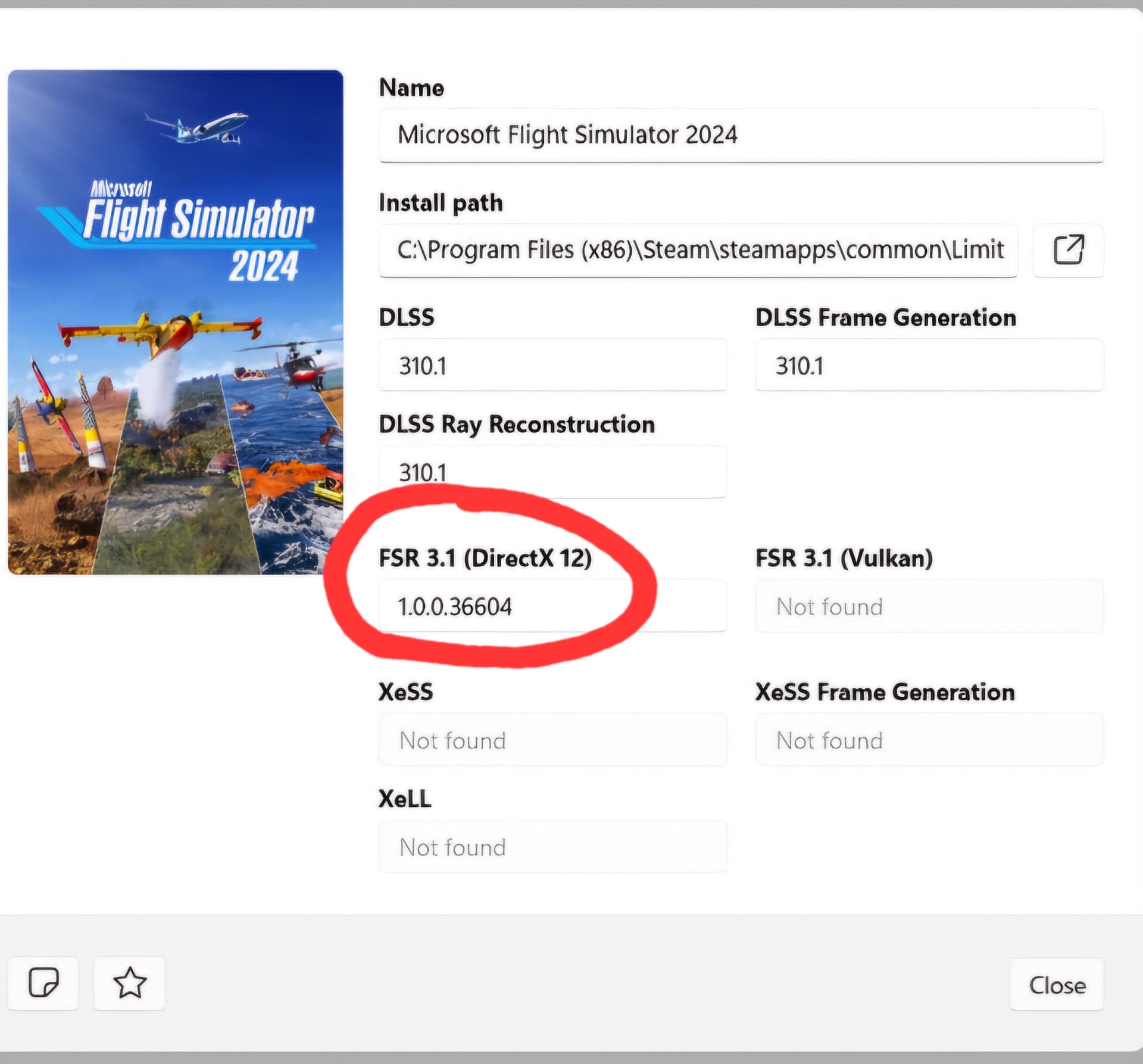
To AMD GPU users who encounter “device hung” type CTD with recent adrenaline drivers: you can try the procedure below, it worked for me with my 9070xt: it consists of downloading and activating the most recent version of fsr 3.1 with the DLSS swapper tool in the msfs 2024 profile
1- Quit msfs 2024 if running
2- Install “DLSS Swapper” and launch it ( GitHub - beeradmoore/dlss-swapper )
3- In the msfs 2024 profile, click in the “FSR 3.1 (dx12)” area to download and activate the most recent version (the first in the proposed list)
4- restart msfs 2024.
if it does not work for you, return to dlss swapper, you can then reactivate the previous version of fsr, the original 1.0.0.36604 from msfs).
Please note that each time you install a new version of msfs, you return to the default fsr version and you have to repeat the operation in dlss swapper.
Hope this help
1 Like
This unfortunetely did not help for me. I’m on a 7900XTX.
Yes, unfortunately, I experience crashes less frequently, but they still happen from time to time.
On my 9070xt, I noticed that the “device hung” CTD occurs when I activate developer mode or when I activate the “display fps” function, or sometimes when I switch to another window with ALT + TAB. I tried with an old Adrenaline driver from a few months ago and it still happens, so I think this is clearly related to the latest SU 4 beta versions of MSFS 2024. Before, it never happened.
I had most of my crashes whilst my plane was paused at TOD or over empty areas (Iran, Atlantic ocean). The issues started after I disabled the frame limiter in SIM since it’s bugged in the su4 beta. It seems like the higher my FPS, the higher the chance I get the error.
I’ve tried deleting shader cache, msfs’s cache, directx cache, did a ddu and reinstalled the drivers, tried with default bios settings, tried with another driver version, nothing seems to work. I’ve now tried an entry in windows register which I found in this topic as last fix. If that doesn’t work I’ll try to lock the FPS again in Radeon software to see that fixes it again.
I can confirm this workaround works, and I’d like to share the complete technical analysis of why this crash occurs for anyone interested in the actual root cause.
MSFS 2024 ships with an outdated and incompatible version of amd_fidelityfx_dx12.dll (v1.0.0.36604) that crashes with newer AMD GPUs, particularly the RX 9070 XT. Updating to FidelityFX SDK 1.1.4+ or using DLSS Swapper to inject FSR 3.1 seems to resolves the issue.
After experiencing intermittent “device hung” crashes and CTDs during loading, I performed a deep dive using WinDbg crash dump analysis. Here’s what I found:
Exception Code: 0xc0000374 (Heap Corruption)
Faulting Module: ntdll.dll
Offset: 0x0000000000118bd5
This generic heap corruption error wasn’t particularly helpful, so I generated full crash dumps and analyzed them with WinDbg.
The complete stack trace revealed the actual culprit:
Call Stack (bottom to top):
┌────────────────────────────────────────────────────┐
│ amd_fidelityfx_dx12.dll                            │
│   └─ ffxCreateContext()                            │
│       └─ ffxQuery()                                │
│           └─ FSR Context Initialization            │
├────────────────────────────────────────────────────┤
│ D3D12Core.dll                                      │
│   └─ CreateComputePipelineState()                  │
│       └─ CreatePipelineStateImpl()                 │
│           └─ Pipeline Shader Compilation           │
├────────────────────────────────────────────────────┤
│ ntdll.dll                                          │
│   └─ RtlpAllocateHeap()                            │
│       └─ RtlpLowFragHeapAllocFromContext()         │
│           └─ HEAP CORRUPTION (0xc0000374)          │
└────────────────────────────────────────────────────┘
The crash occurs during FidelityFX context initialization when amd_fidelityfx_dx12.dll attempts to create DirectX 12 compute pipeline shaders for FSR processing. The memory allocation fails with heap corruption in ntdll.dll due to incompatibilities between the legacy FidelityFX SDK implementation and the RX 9070 XT’s RDNA 4 architecture.
The crash is non-deterministic because it depends on heap memory state at the time of FSR initialization, thread timing during pipeline state object (PSO) creation and GPU driver state and command queue allocation. This is classic race condition behavior seen when legacy graphics libraries interact with hardware architectures that didn’t exist during their development.
As mentioned above, DLSS Swapper injects FSR 3.1.4 (from SDK 1.1.4+) which has proper RDNA 4 support. This isn’t a driver issue - it’s an application-level library incompatibility. Even with the latest Adrenalin drivers, MSFS 2024 loads its own bundled amd_fidelityfx_dx12.dll which takes precedence. The driver can’t override application-specific DLLs.
AMD has released SDK 1.1.4 and 2.0.0 with fixes for RDNA 4, but MSFS 2024 needs to update the bundled library to benefit from these improvements.
Hope this helps anyone else encountering the same issue! 
5 Likes
Funny enough, this topic has bug logged status -which means AFAIK, they were able to recreate the issue. In the latest dev stream it shows no repro…
This bug steadily climbs up on the list and I am more than happy to turn off my FPS cap for the devs-and get this crash straight, as no other game does this with me.
1 Like
Yeah I noticed they had it as NO REPRO on the latest dev update as well, which conflicts with teh bug logged status and, quite frankly, is bewildering given the sheer number of posts from people affected in this thread.
Hi, got my PC C: drive re-formatted and all sw re-loaded. Haven’t experienced CTDs after two flights… such as above reported DXGI_ERROR_DEVICE_RESET error.
Do you have the same issue if you follow the OP’s steps to reproduce it?
Provide extra information to complete the original description of the issue:
If relevant, provide additional screenshots/video:
If on PC, Fault Bucket ID - Instructions here - Please type in just the Fault Bucket ID # rather than a screenshot for privacy reasons:
I’ve the same issue but in FS2024 SU4
I tried running WndDBG as well, not really known but with the program but I got this out of it:
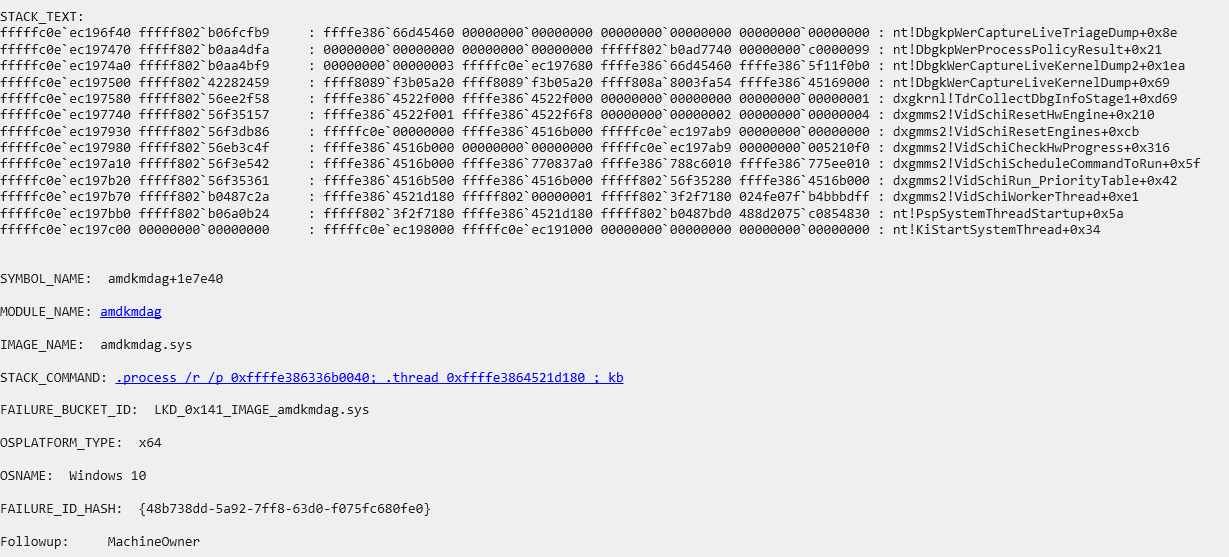
Seems like a different error than @intersecato
Do you have the same issue if you follow the OP’s steps to reproduce it?
Fairly similar procedure, updated windows (Yesterday), Updated Nvidia driver to 581.42 a few days ago.
Provide extra information to complete the original description of the issue:
Flight crashed at later parts of flight in VIP career mode. This is not the first time I have had “DXGI_ERROR_DEVICE_HUNG” so it is not related the latest Nvidia driver only causing it.
Game has been reinstalled recently and the error has happened in the past as well. I run without mods.

If on PC, Fault Bucket ID - Instructions here - Please type in just the Fault Bucket ID # rather than a screenshot for privacy reasons:
Fault bucket 1607434675159883695, type 5
Exact same error on 2020
5080
9800x3d
64GB ram
Painful
I can confirm that, for me, setting the frame limiter solves this issue. I also tried the registry edit ‘‘RdrDelay’’ and ‘‘TdrLevel’’, which helped in not getting the device hung error, but this completely frooze my computer so I removed that again. The only thing I did not try was to reinstall the sim and reinstall Windows but I can’t be bothered at the moment. I always used the frame limiter anyway just not now because it is bugged in SU4beta.
1 Like
I eventually ended up doing a re-install of msfs2024, also deleting shader and directx cache and it solved the issue for me.
Thanks so much for this. Have not had any hangs/ctds for a week now since implementing proposed solution. Hopefully a permanent fix, though need longer to be sure. Issue was very intermittent and there was no obvious way of replicating issue. It could easily hang on home screen just as much as it would mid flight. Could go a couple of weeks with no issues and then get crashes every day for a while.
EDIT - Posted too soon - Ten days after making above adjustment I suffered another hang. This time occurred on start screen after loading before I actually entered sim. Search for a solution goes on……
7900X3D / 7900XTX
Do you have the same issue if you follow the OP’s steps to reproduce it?
yes
Provide extra information to complete the original description of the issue:
the crash also happens upon entering career mode. every single time.
If relevant, provide additional screenshots/video:
If on PC, Fault Bucket ID - Instructions - Please type in just the Fault Bucket ID # rather than a screenshot for privacy reasons: