My exe.xml started working since the last Update of SU11 beta.
Same. I think its finally fixed in SU11
I have issue with auto-starting AAO), even the latest version with SU11 beta.
It starts, but doe not read the simconnect variable when the plane loads.
I have to close AAO & re-start it manually, and the it reads the simvars.
Not the end of the world, as it does work with the manual reload
If you are trying to start Mobiflight via your EXE.xml and it doesn’t work (because Mobiflight has to be started from within its own install directory), I found a workaround. It might be helpful with some other programs that refuse to start, so I thought I’d share…
		<Launch.Addon>
			<Name>Mobiflight</Name>
			<Disabled>False</Disabled>
			<Path>C:\windows\system32\cmd.exe</Path>
			<CommandLine> /C START "" /D "C:\Program Files (x86)\MobiFlightConnector" "C:\Program Files (x86)\MobiFlightConnector\MFConnector.exe"</CommandLine>
		</Launch.Addon>
Of course, don’t forget to edit the code above and use the correct path where Mobiflight is installed on your machine 
1 Like
EXE.dll has been working perfectly for a few days, I don’t know why, but IT
1 Like
I had issues with basically nothing starting automatically for weeks. Checked the exe.xml countless times, deleted some and all entries, except for one, but it still didn’t work most of the time.
For the last 7 or 8 days, it works like a charm. All the stuff is being started automatically, every single time. I have no clue why that is, but I surely won’t complain…
Thanks, this works to start mobiflight. Is there a way to automatically stop it when the sim exits? When the sim exits, I get an error and it keeps running until i exit manually.
Also, I have seen the same as other comments. About a week or two ago, all of a sudden, exe.xml started working
@KenZ8143 Same error for me, and no way to stop MF automatically when you exit the sim as far as I know…
You could write a batch to periodically check if the MSFS process is running, and kill MF if it is not, but that is kinda too much  Or maybe you could contact the MF team and suggest they add the feature!
Do you have the same issue if you follow the OP’s steps to reproduce it?
yes
Provide extra information to complete the original description of the issue:
none, identical issue
If relevant, provide additional screenshots/video:
Congrats! Could you please provide your exe content. My be we can compare with ours.
Thanks
Is there a way to write the exe.xml file to close all add ons after you close the sim?
use a batch file to run MSFS ?
Here is the solution, why some programs start via the EXE.xml and some don´t!
Check, if the programs are checked with admin rights in the settings of the i.e. Fenix.exe!
If so, the EXE.xml will NOT load the Fenix.exe.
So simply uncheck the program´s admin rights and all programs will start without any problem.
Tried it out with many other programs, and the admin rights are THE culprit!
4 Likes
Many thanks. Will test this out soon and report back
1 Like
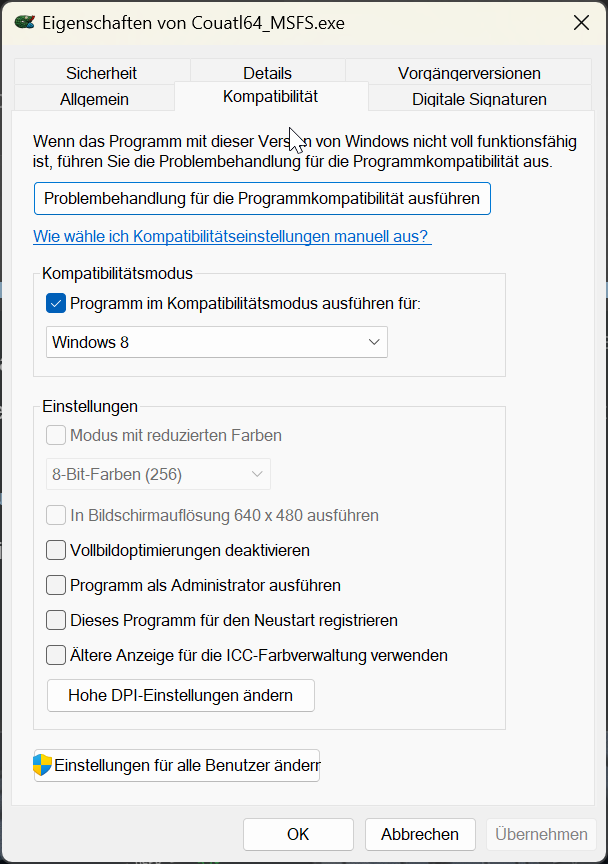
Well, and what if, e.g. Couatl, NEEDs to be started with admin rights to properly work?
I checked my Couatl64_MSFS.exe and it doesn´t need admin rights to work properly!
Look at the screenshot…
1 Like
Ok, interesting, will have to try this then 
1 Like
My exe.xml suddenly stopped working again, no real good reason that i can see either, except maybe the latest update, unsure. edit: copied a backup xml and its fine
1 Like
Has anyone had success running a batch file from the exe.xml file?
Never tried to be honest, but I’d be interested to try. Even if it can’t execute a .bat file, there are ways of turning those into .EXE’s. One I have used in the past was AutoIT.
You can also use ‘iexpress.exe’ to do a similar job, creating a SED (Self Extraction Directive) file, which could be called from ‘EXE.xml’, though I have never tried this myself.