Hi, I am new to MSFS and want to fly from San Francisco to Tijuna, Mexico. I have watch a prep video and so far so good. But the autopilot boots up in selected mode, and I want it to follow my flight plan. How do I do this? Here is a picture:
I basically want the 3 lines and the yellow dot to turn on, so that I can follow my flight plan.
Thank you very much in advance!
You need to “push” the heading select knob in. If you are in “legacy” control mode, hover your mouse of the top and bottom of the knob. An up arrow is “push” and a down arrow is “pull”
You need a valid flight plan and I think be close to an intercept of the path on your navigation display for LNAV (lateral navigation) to enable.
1 Like
I cannot push or pull. The arrows don’t show.
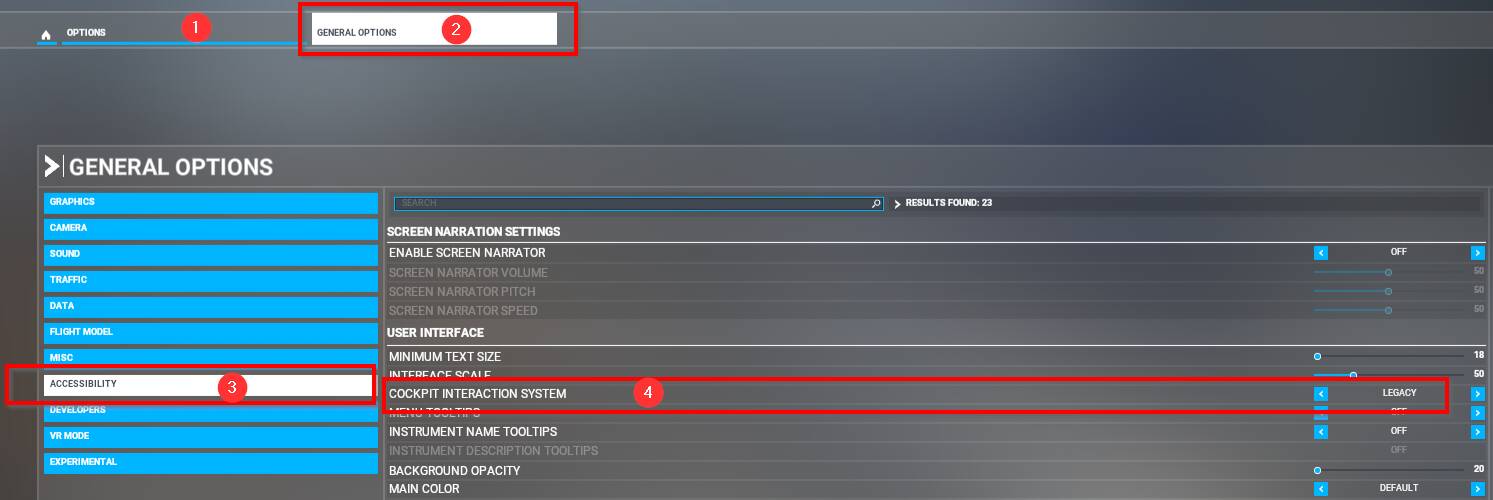
And how can I check if I am in that mode? But I never recall changing anything.
Classic cursors and behavior instead of the immersion breaking big blue arrows.
2 Likes
General Options → Accessibility → Cockpit Interaction System
1 Like
Now I do get the arrows, but nothing happens when I click on them.
Speed works, but HDG does not work.
As I mentioned, there may be some pre-conditions that need to be met before LNAV engages. You need to have a flight plan in the MCDU. You need to see the magenta lines on the ND, and you need to be on an intercept course for LNAV to activate.
You can also do a DIRECT TO command in the MCDU to a waypoint, it will then re-draw a path from your current location, and then enable managed heading mode.
1 Like
So I need a flight plan for the HDG to work and LNAV to activate after I press AP1 after takeoff?
You need it for managed heading to work (so the one where the airplane follows a planned route). For selected heading (where you put in the number yourself) you don’t need it.
I suggest you watch a YouTube video about how the autopilot works. The airbus way is a bit different than most others.
1 Like
It works now. Thanks! But I don’t know who to give the solution