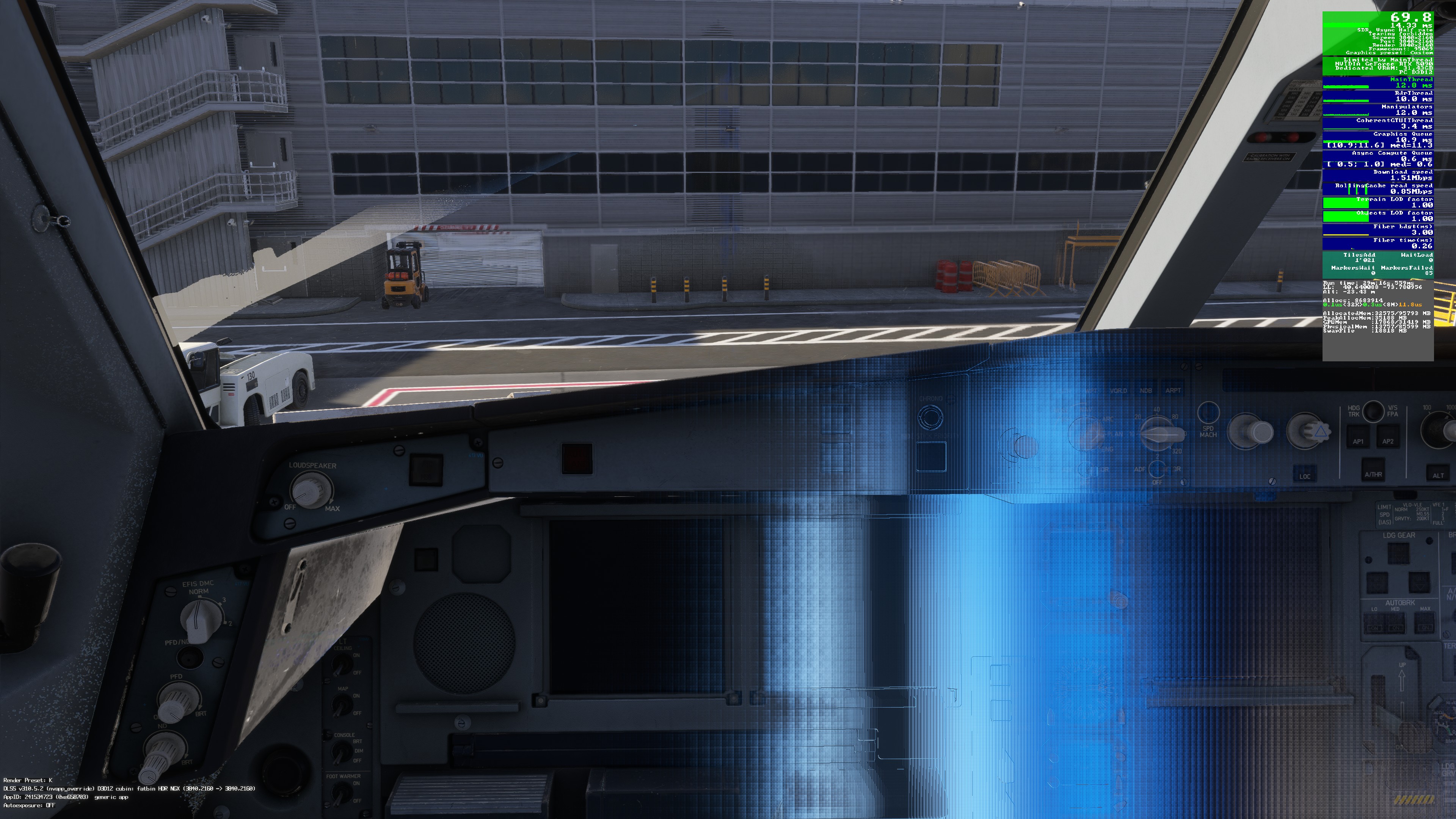
I am getting this combination of flashing and terrain and textures re-morphing in the last couple of days. Posted a while ago a separate topic but I think it’s the same - what do people think ?
Adding a video of another issue that goes hand-in-hand with the flashing and the textures re-loading and re-morphing. Please watch the video - shadows are not drawn properly and they are flickering. No add-ons.
Glad to know ours not just me. This drives me crazy! How it made it through the betas into release I do not know, it was very noticeable for me quite a while before the release went live in December
Just tested with Motion Blur at Medium and at Off. Visible forming of textures in the cockpit and external in both scenarios, i.e. the problem is there irrespective of Motion Blur.
I noticed this bug yesterday while testing MSFS 2024 with the latest NVIDIA driver version 591.86. It turned out that the issue only occurred when NVIDIA DLSS Frame Generation was enabled.
That’s a good catch.
I just came to this thread from the other discussion for the latest Nvidia driver 591.86.
Frankly, I was kind of puzzled regarding the previous 60+ posts about this one, because I haven’t noticed any flashing effect.
This is as you surmised, probably because I strictly adhere to the TAA setting and haven’t really delved into DLSS.
If/when they get DLSS to render cockpit instruments as clear or better than TAA, then I’ll consider trying it again.
Yeah I noticed it yesterday, just a single discarded frame coming back for a visit … but I’m not turning off frame gen just for this, hopefully Nvidia’s next offering will have it fixed.
Here’s an interesting version of this flash. I have a brand new clean install of MSFS (MS Store), and I’ve been trying the default A330 for the first time. No addons.
Sitting cold and dark at the gate at KJFK, entering the cockpit there is this blue flash - hard to capture on screen shot but I managed to time it just right. I have DLAA, no frame gen, settings are Ultra with Motion Blur off.
First test of SU5 Beta - the re-morphing of textures when moving between cockpit and external camera has not been fixed. I am not surprised because while the bug is logged, it has a low vote count. Which is surprising because it is very obvious, happens under any settings and is very much immersion breaking.
The issue is still present in SU5 beta.
However, if I cap the FPS to 60 in the NVIDIA Control Panel, enable Vsync in the MSFS settings, and disable displacement mapping, the bug no longer occurs or is barely noticeable.
Hi there - thanks for the steady support you are giving to people here.
I tried with the method you described but still getting the morphing. I should clarify that I have been seeing it (and still see it) with TAA and no FG.
Description of the issue: After starting a flight I sometime will switch to an external view to see the weather conditions or look at other aircraft on the tarmac. Yesterday I switched between cockpit and external views on the ground and in the air with no issue. Today I am experiencing a strange momentary refocusing of the image when switching cockpit to external and external to cockpit. I have never seen this phenomenon since MSFS 2024 day 1, so it appears to be caused by SU5 Beta 1.7.7.0.
FREQUENCY OF ISSUE
How often does this occur for you (Example: Just once, every time on sim load, intermittently)? Almost every time I switch between cockpit and external views.
REPRODUCTION STEPS
Please list clear steps you took in order to help our test team reproduce the same issue:
Start Free Flight
Select a departure location
Complete walk around and enter aircraft
Switch between cockpit and external view (I use Xbox controller button)
YOUR SETTINGS
If the issue still occurs with no mods and add-ons, please continue to report your issue. If not, please move this post to the User Support Hub.
What peripherals are you using: Honeycomb Alpha, Bravo, Turtle Beach Rudder Pedals, Xbox Controller
[PC Only] Are you using Developer Mode or have you made any changes to it? No
[PC Only] What GPU (Graphics Card) do you use? RTX 3600
[PC Only] What other relevant PC specs can you share? Windows 11 25H2, Intel i9-10900, RTX 3060 Driver 581.80, 32Gb RAM, 1TB NVMe (OS and MSFS) + 2TB 7200 rpm drive. MSFS monitor is 4K Samsung 55" TV, two other monitors are 27" HD