ISSUE DESCRIPTION
Description of the issue:
• There are two settings named Live Weather, though they have different results. This is confusing. The button label doesn’t clearly indicate its function, which leads to user mistakes without a standardized UI.
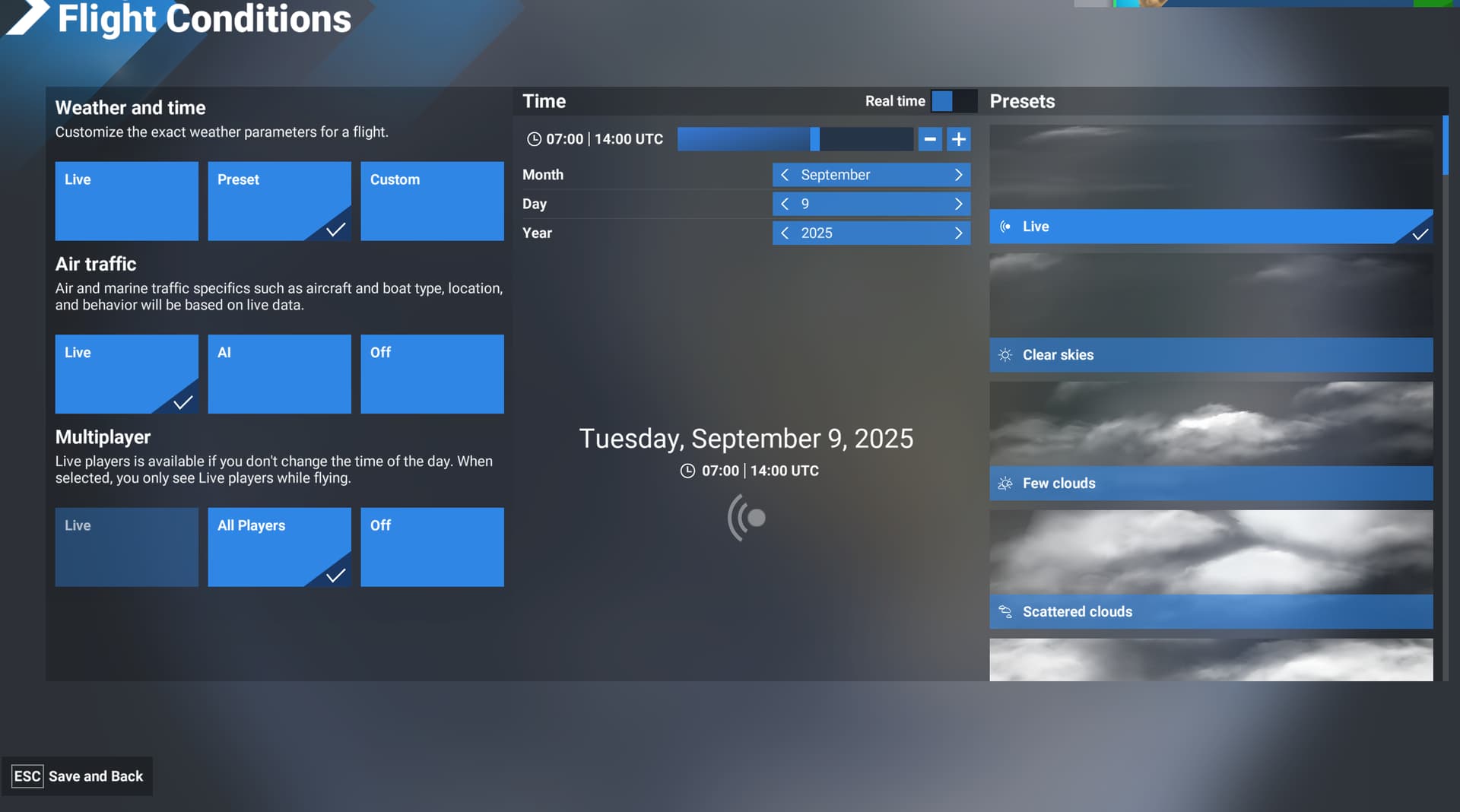
• Flight Conditions > Weather and Time > Live is different from Weather and Time > Preset > Live, but it is not evident how they’re different or what changes occur when adjusting time of day, Air Traffic, or Multiplayer settings in both Live or Preset settings.
• When a user selects
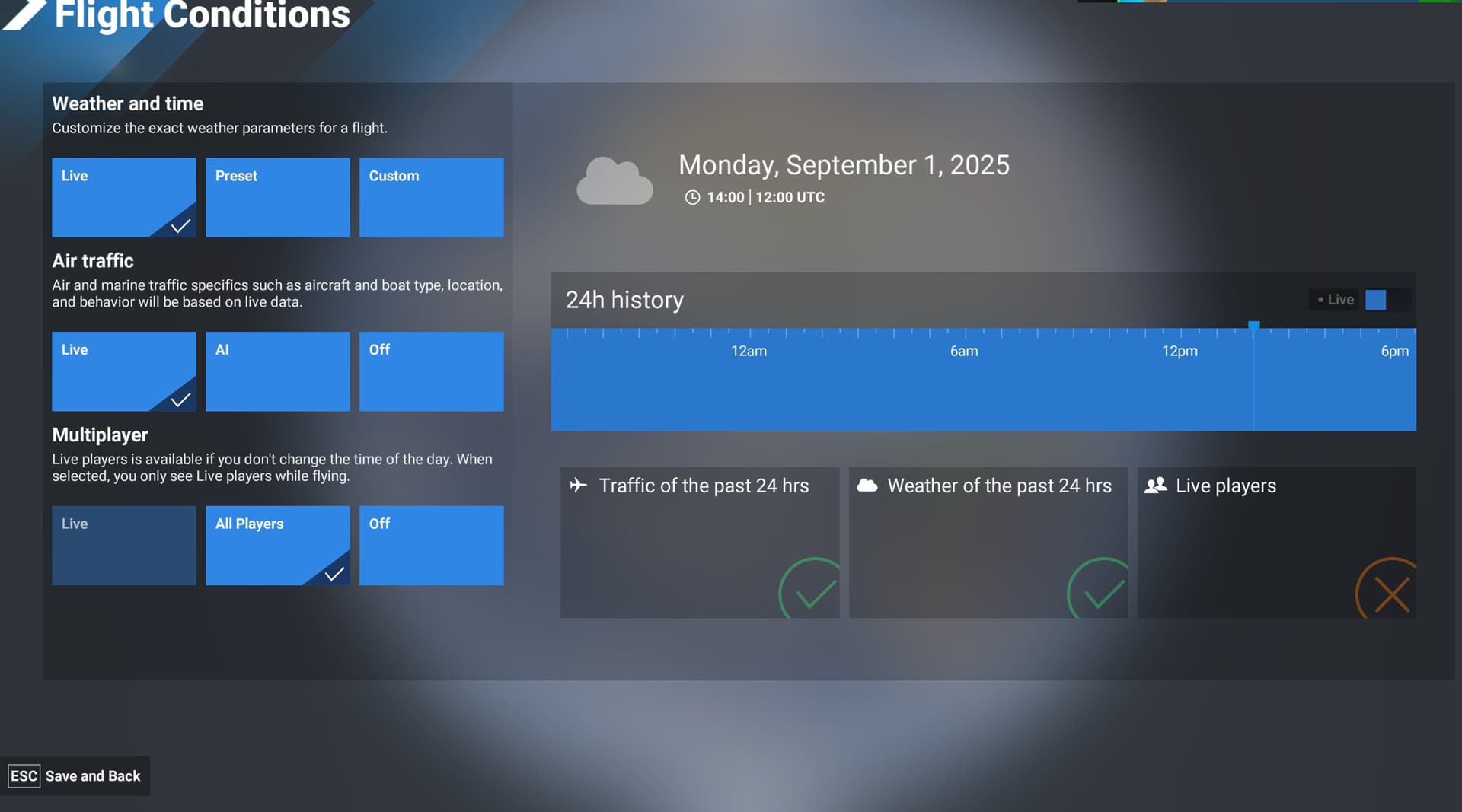
Flight Conditions > Weather and time > Live > then adjusts the time of day, they are no longer on Live weather. The result is now Historic weather, but it is still displayed as Live with a checkmark at the top of the page, which is confusing.
• This is a different result than when the user selects
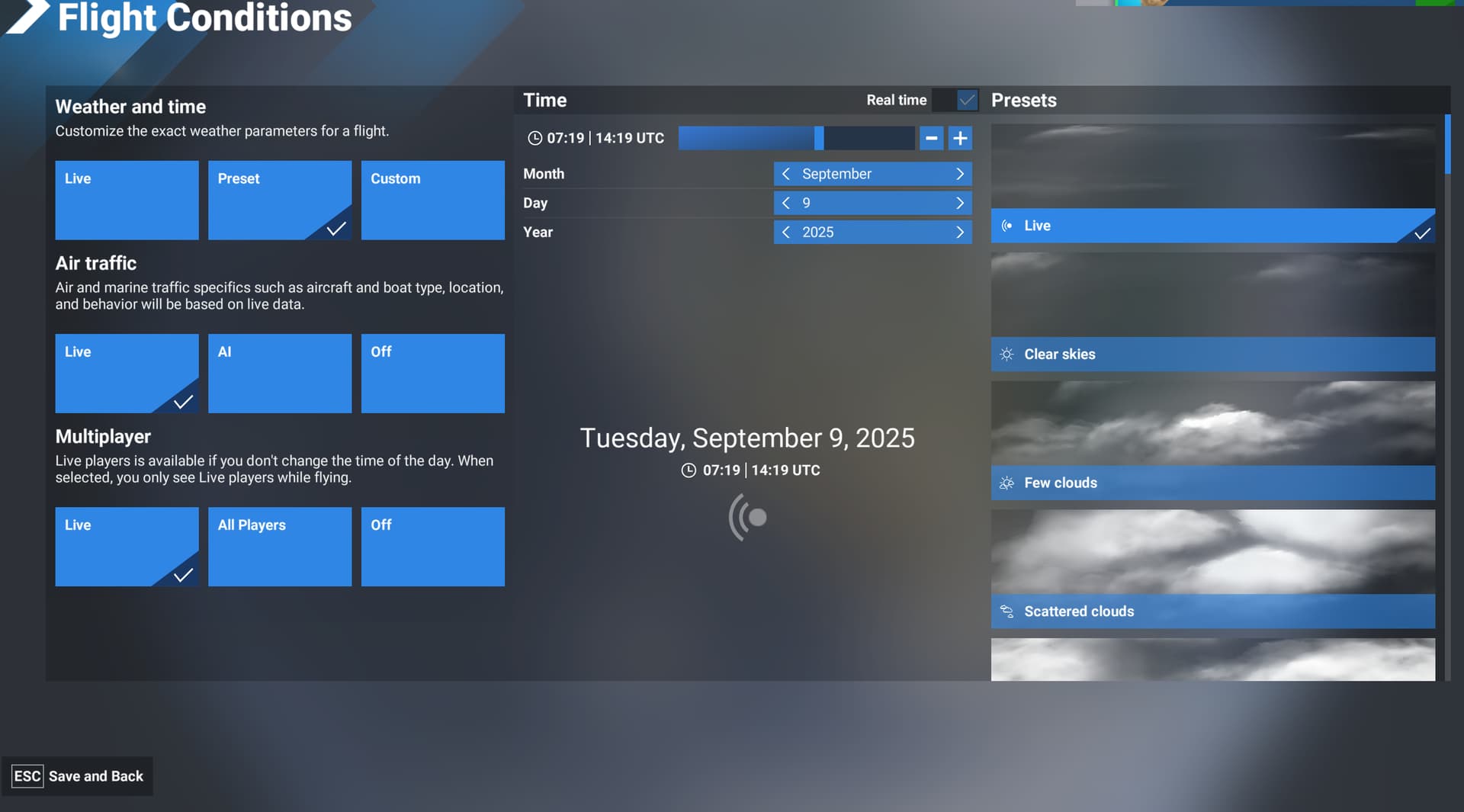
Flight Conditions > Weather and time > Preset > Live > then adjusts the time of day. The weather remains the Live (currently occurring) weather, only the daylight has been changed.
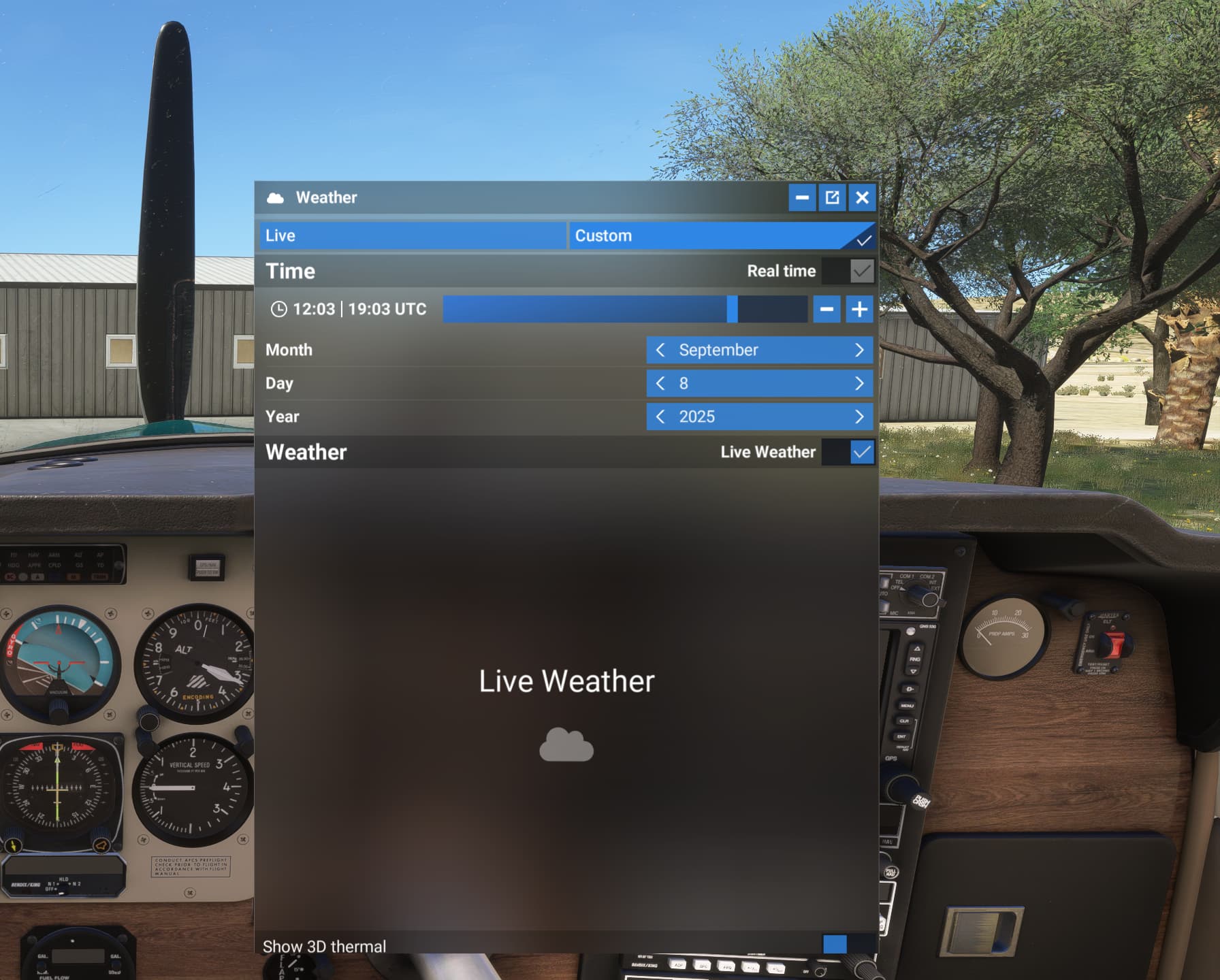
• From the inflight Weather Toolbar Menu > the option shows Live is selected with a checkmark, even after changing the time. It does not clearly indicate the weather selection has changed and is now Historic weather.
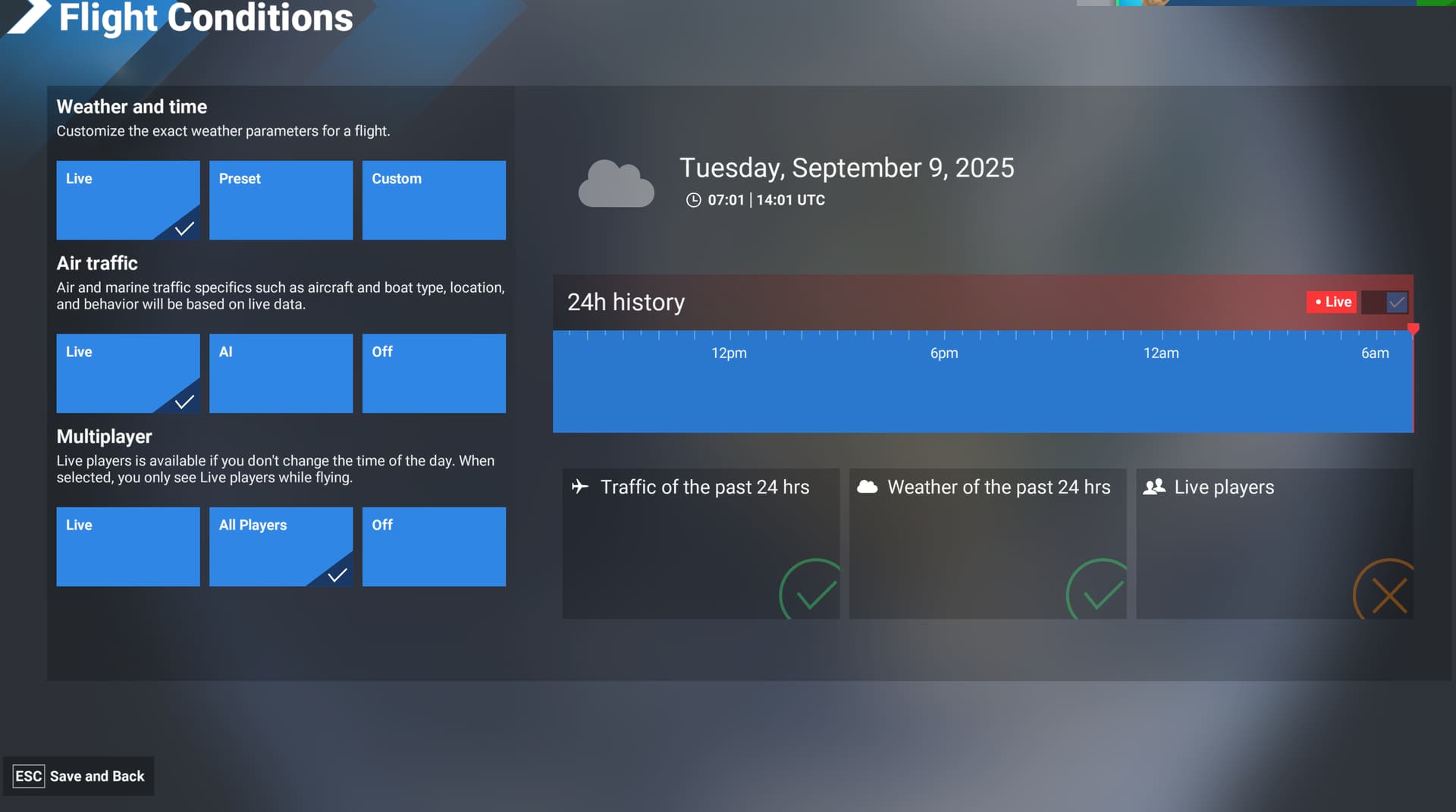
• “Weather of the past 24 hrs” remains marked with a green checkmark if the red Live button is checked or not (if Live weather or Historic weather is active). The green checkmark indication is always green on the Live page or Weather toolbar and it is not displayed anywhere else, making its message not very clear.
• The Red Live button is adjacent in the same row and header color bar as “24h history” which isn’t clear what either is indicating. The 24h history is the label for the timeline below it. The Red Live button controls both Live Weather and Live time to be set but does not have any text description about this function.
Proposal: These two functions of the Red Live button should be labeled separately. The 24h history label and the Red Live button should not be in the same header box.
• When group flights set the same weather, users may mistakenly believe they have set Live Weather by selecting Weather and time > Live, but if they change the time of day, they are now using Historic weather, though Live is still checked at the top of their Toolbar Weather Menu.
• Selecting Preset > Live is displayed as Custom with a checkmark in the Toolbar Weather Menu, with Live Weather also checked. The group flight users will have different weather despite both having Live display with checkmarks in their Toolbar Weather Menu.
Proposal: Change the name of the Live tab of the Weather setting and toolbar menu to Historic Weather and Time, as it is not Live weather when the time is changed. Reduce the frequency of the use of the word “Live” or add clarification to each “Live” title word. Change the Red Live button label to indicate it will set Live Weather and Live Time, or add separate options for Live weather and time. Add a clear indication that Historic Weather is active. Standardize the use of the term “Real Time” (possibly in place of so many uses of “Live”.
• Flight Conditions > Multiplayer > Live is poorly named and does not indicate that the setting requires both Live Weather and Live Historic Time.
When selecting Multiplayer > All Players: Live Players displays a Red X, indicating no Live Players will be visible.
This is incorrect, selecting All Players allows visibility of all players in that session. Selecting All Players does allow the user to see Live Players and also players with any combination of time of day or weather settings.
Proposal: The status icon should read Live Players visible with a checkmark or red X. It would then be a green check when Live or All Players is selected and only Red when Off. If the goal is to inform users they will only see other Players who have selected Live Weather and Live Time, the label could use the word Only Live Weather and Time Players visible.
• The Green and Red checkmark display is not present if Preset is selected, though all options remain present. The graphical representation of the user settings is not standardized between the Live menu page and the Preset menu page.
Proposal: Add the checkmark status icons to all pages. Clarify their messaging of what the user should understand from the markers.
• Once in a flight there is not a Preset option in the Toolbar Weather menu. The option listed is Custom. Selecting Custom then allows access to the weather presets. This could be renamed to Presets and Custom.
SU3 1.5.27.0
Related bug reports:
Real Time toggle switch doesn’t change the time to real time - Bug Reporting Hub / User Interface & Activities - Microsoft Flight Simulator Forums
FREQUENCY OF ISSUE
How often does this occur for you? Every time.
REPRODUCTION STEPS
Please list clear steps you took in order to help our test team reproduce the same issue:
- Select Free Flight > Flight Conditions.
- Select Weather and time > Live
- Observe the Red Live button is checked. Observe Weather of the past 24hrs is checked.
- Adjust the time under 24h History.
- Observe Weather and time > Live is still checked. Observe Weather of the past 24hrs is still checked. Observe no description appears that the weather is now set to the historic weather for the selected time.
- Select Weather and time > Preset
- Observe Real Time is checked. Observe Live is checked under Presets.
- Adjust the time.
- Observe Live remains checked under Presets. Observe no description that the currently occurring weather is now set no matter what time is selected.
- Select Weather and time > Live
- Select Multiplayer > Live
- Observe the 3 status icons with green checks or red X appear.
- Observe Live players has a green checkmark
- Select Multiplayer > All Players
- Observe Live players has a Red X. All Players setting includes visibility of players with Weather and time > Live and the Red Live button checked.
- Select Weather and time > Preset
- Observe the 3 status icons with green checks or red X do not appear, but their status remains the same and still applies.
- After starting a Free Flight > Open the Weather panel from the toolbar.
- Observe the header options are only Live and Custom. Preset is not listed. If Preset was selected the 3 status icons are not present but still apply.
YOUR SETTINGS
Issue still occurs with no mods and add-ons.
What peripherals are you using:
[PC Only] Are you using Developer Mode or have you made any changes to it? No.
[PC Only] What other relevant PC specs can you share? SU3 1.5.27.0
MEDIA
Live Setting > Red Live Setting
Live Setting > Historic Weather for adjusted time
Inflight Toolbar: Live Setting > Historic Weather for adjusted time

Preset > Real time > Live Presets
Preset > Adjusted time > Live Presets
Weather Toolbar Preset