No. At the time of posting that was a 3 flight day.
Well, it’s how it works out for me. As you can read a bit up the thread, spawning in counts as a flight, so what I do at the start of a session is just spawn in and immediately end the flight. All subsequent flight then gets saved (for me).
That’s not how it works for me, and I can’t help you further, sorry.
I thought the log system was broken but now it seems like the devs totally gave up on fixing anything. NOT A SINGLE FLIGHT WAS LOGGED SINCE THE END OF JULY. The moment I finish a flight and go to the logbook, there’s absolutely nothing since July. It’s not even deleting logs like before, it just won’t log them at all.
This sounds like something different that the bug report I posted at the top of this thread. The bug I reported is specific to flights logged upon completion then dropped, the flights do make it into the log first. Perhaps search as there may be other bug reports/threads that discuss what you describe? Just a thought.
Agree. I now do the “RESTART” method someone posted above and have not lost a flight since.
That should be cry easy for Asobo staff to replicate. Why it has not been logged as a bug yet is frankly mystifying.
Maybe it is viewed as a server-side issue and therefore not technically a bug in the sim itself? Just a wild guess. If so, they may acknowledge the feedback but put it in a different work queue or category?
Now that I’m on PC, I’m seeing exactly the same thing I was with Xbox. If it’s the first flight after turning the PC on, the entry will be deleted. If you restart the flight before actually doing the flight or are on your subsequent flight (this even appears to apply if you shut down the sim and open it up again but don’t shut down or restart the PC) then the logbook entry will not be deleted
Nice that you now have a PC! It’s neither here nor there for me, just kicking it around, but it’s not every flight on my PC and there are intervals of flights not dropped. For example, I still have my last 8 flights logged since a drop. The intervals are random seeming, even after I have adopted the practice of making sure that the sync completes before I close the Xbox app or shut down the PC. Whatever, right? Cheers!
During the April 2026 dev stream they said flights dropped from logbook are planned for SU6 but more realistically SU7. Why this thread is not marked as “bug logged” is beyond me, though.
Logbook stopped updating 07/24/2026
Bug-logged status occurs when the internal test team have reproduced the issue on their internal test systems. Last time I remember the community team interacting on this it was mentioned that they were having difficult doing that.
My theory is that this behaviour only occurs in the live production environment as the test environments probably talk to the XBOX game save back end where the logbook is ultimately stored in a different way. It might need to be investigated in a different way too, probably by tracing/debugging what’s happening in the live environment using a known broken account. On a system of this scale that’s not an easy thing to do.
Maybe. But if that was the case and they were unable to reproduce it, why would they say on a dev stream that a fix is planned for one of the next SUs?
Thinking about it … does anyone know any person who does NOT experience this bug? Are all of us experiencing this bug people who have used MSFS 2020 before or are people who started with MSFS 2024 and never used MSFS 2020 experiencing this bug as well?
That is an interesting juxtaposition. Deploying a fix for a bug they have yet to reproduce. That’s efficiency, right there.

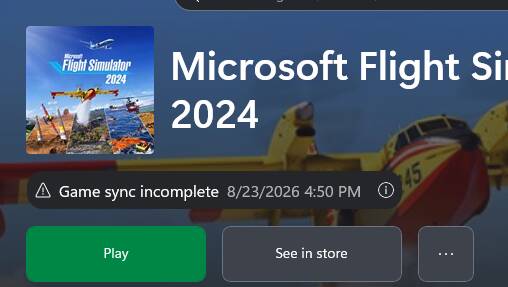
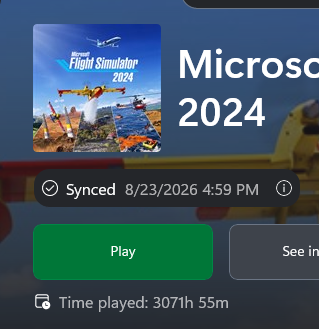
After 1.5 years and six updates, Asobo and Microsoft still haven’t managed to fix the logbook recording issue.
Either the problem is extremely difficult to solve, or they simply couldn’t care less.
I’m sorry, but it’s not right that, after all this time, we still have to rely on workarounds. I flew two flights yesterday.
The first was a circuit flight.
The second was a VFR cross-country flight that lasted 55 minutes.
Of these two flights, only the first one was recorded.
I faced similar issue as OP stated. And I monitored this issue and I found that (in my case) new flights could overwrite existing logbook entries. That is, I make a flight, check it is recorded. Then make another flight, check it is registered. And new flight would register, but overwrite my previous flight. I wasn’t able to find exact steps to stable reproduce, because sometimes it doesn’t overwrite. And I have quite big difference in total flight hours in logbook and in general stats.
However, it seems this issue is fixed for me after SU6. And every time I ensure to exit using “End Flight” instead of “Go to Main Menu”, which may affect the way how it is logged.
It is not fixed in SU6.
But it is worth to say that logbook in 2024, is virtually useless. I see no value in it. In 2020, you could re-flight selected entry, in 2024, it is just an entry which gives no useful information. But that’s a different story.
It is not fixed in SU6.
I’ve pretty well given up on the MSFS logbook and now use a third-party add-on which usually records the flight accurately. Just another part of my “shutdown” routine to check, only takes a few seconds. As it happens I also keep manual written “logs” for all my flights, something that was drummed into me when I was learning to fly for real. Old habits die hard!