Full system specs?
Got this too today (for the first time I think). But I was in VR so not sure I got the popup, it just paused, then went black. By the time I had my headset off the view on the screen was static and when I opened taskmanager it kinda had gone away.
Faulting module name: FlightSimulator.exe, version: 1.34.16.0, time stamp: 0x00000000
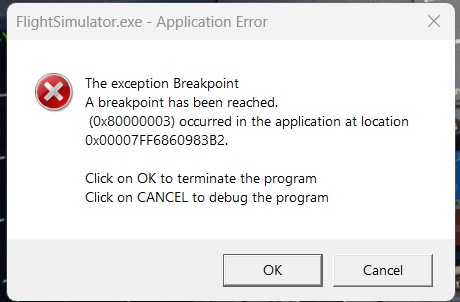
Exception code: 0x80000003
Fault offset: 0x0000000001fc30f2
7950x3d/3060TI/32GB/Win11
1 Like
I had the same issue recently for the first time. RTX 4090 with 32GB of system RAM. I cant understand why its happening but its happened twice in the last month for me.
1 Like
Go through each of the following steps one at a time. Copy each line, one at a time , paste it into the Dos window (crtl + V) and press return
and it will then run. Wait until each runs and finishes before you move on to the next one.
When you are completely finished, Restart your computer and then try to see in MS2020 will start and run properly
Dism.exe /online /Cleanup-Image /checkhealth
Dism.exe /online /Cleanup-Image /scanhealth
Dism.exe /online /Cleanup-Image /Restorehealth
sfc /scannow
Dism.exe /Online /Cleanup-Image /AnalyzeComponentStore
Dism.exe /Online /Cleanup-Image /StartComponentCleanup
RESTART your computer as the last step. Then go for a test flight.
2 Likes
Looks like it may be back again …
Running DSM checks now in case it’s just me …
No, it’s not just you.
Me too, yesterday evening, at the end of an otherwise trouble free two hour flight.
I won’t be wasting my time double checking Windows 11.
When writing this, I saw a message “this topic has been solved”, so evidently, we must all be mistaken. 
Some CTDs are related to the streaming content from Microsoft’s end. Which makes having them hard to define if it lies within our OS or on their end.
Windows 11 CTD: uninstall update KB5033375 and disable windows update for 2 weeeks, every flight i made i got CTD after 20 minutes, now is working again
I had this CTD, but I found it was FSRealistic 2.1.1 that was causing the issue. If you start FSRealistic before you start your flight, it will slowly consume memory and virtual memory (page file) until you get this error. After closing and re-opening FSRealistic after the flight had begun, FSRealistic no longer consumes gigs of memory and the page file had shrunk significantly. I am able to complete long haul flights again.
You got a CTD now too? Me as well.
I was able to get past “Checking for Updates” by clearing my community folder. After downloading the 665mb update, it proceeded to load.
I thought it was fixed. Now I get a CTD before it gets to the home screen every time.
Weak.
Here’s the error code:
Log Name: Application
Source: Application Error
Date: 6/17/2024 7:52:15 PM
Event ID: 1000
Task Category: Application Crashing Events
Level: Error
Keywords:
User: DESKTOP-JV00IPG\B***
Computer: DESKTOP-JV00IPG
Description:
Faulting application name: FlightSimulator.exe, version: 1.37.19.0, time stamp: 0x00000000
Faulting module name: FlightSimulator.exe, version: 1.37.19.0, time stamp: 0x00000000
Exception code: 0x80000003
Fault offset: 0x0000000001dfc840
Faulting process id: 0x0x12B0
Faulting application start time: 0x0x1DAC129E80588CF
Faulting application path: C:\Program Files\WindowsApps\Microsoft.FlightSimulator_1.37.19.0_x64__8wekyb3d8bbwe\FlightSimulator.exe
Faulting module path: C:\Program Files\WindowsApps\Microsoft.FlightSimulator_1.37.19.0_x64__8wekyb3d8bbwe\FlightSimulator.exe
Report Id: 9d48403c-bad9-4c86-8af4-bbf64616ed58
Faulting package full name: Microsoft.FlightSimulator_1.37.19.0_x64__8wekyb3d8bbwe
Faulting package-relative application ID: App
Event Xml:
1000
0
2
100
0
0x8000000000000000
2081
Application
DESKTOP-JV00IPG
FlightSimulator.exe
1.37.19.0
00000000
FlightSimulator.exe
1.37.19.0
00000000
80000003
0000000001dfc840
0x12b0
0x1dac129e80588cf
C:\Program Files\WindowsApps\Microsoft.FlightSimulator_1.37.19.0_x64__8wekyb3d8bbwe\FlightSimulator.exe
C:\Program Files\WindowsApps\Microsoft.FlightSimulator_1.37.19.0_x64__8wekyb3d8bbwe\FlightSimulator.exe
9d48403c-bad9-4c86-8af4-bbf64616ed58
Microsoft.FlightSimulator_1.37.19.0_x64__8wekyb3d8bbwe
App
I think we might have the same issue. There is another thread just started on this one that isn’t a 6 month necro. Hopefully there are some fresh suggestions soon.
Here’s the other thread 1.37.19 Crashes Every Single Time - Ryzen + Radeon - #5 by fataldarkness
Has anyone ever found the fix to this, I have tried the page file thing but it didn’t work.
I have a R9 7950X3D, RTX4090 and 64gb DDR5.
Still happened, but quite rare
Faulting application name: FlightSimulator.exe, version: 1.38.2.0, time stamp: 0x00000000
Faulting module name: CoherentGTJS.dll, version: 0.0.0.0, time stamp: 0x65045659
Exception code: 0xc0000005
Fault offset: 0x00000000001b549d
Faulting process id: 0x0x7C28
Faulting application start time: 0x0x1DBBCE2BA06AA3B
Faulting application path: C:\Program Files (x86)\Steam\steamapps\common\MicrosoftFlightSimulator\FlightSimulator.exe
Faulting module path: C:\Program Files (x86)\Steam\steamapps\common\MicrosoftFlightSimulator\CoherentGTJS.dll
Report Id: 5778530b-232d-4f7f-a76c-a955b31a60c5
[SOLVED] MSFS2020 Crash After Windows 11 Upgrade — Fixed by Enabling .NET Framework 3.5
After upgrading from Windows 10 to Windows 11, I found that all my programs transitioned smoothly — except MSFS2020. It would freeze during startup or crash outright, sometimes showing a brief “lost contact” message despite a stable internet connection.
Here’s what finally resolved it:
 Fix: Enable .NET Framework 3.5
-
Go to Control Panel > Programs and Features > Turn Windows features on or off.
-
Enable “.NET Framework 3.5 (includes .NET 2.0 and 3.0)”, including both WCF Activationoptions.
-
Reboot the system.
After this, MSFS launched successfully, performed an update, and has remained stable across reboots and with all add-ons re-enabled.
 Other Steps I Tried (and recommend checking):
-
Running MSFS as administrator — no effect.
-
Deleting the rolling cache manually.
-
Verifying and repairing via Xbox app.
-
Temporarily disabling shell extensions (e.g., StartAllBack).
-
Checking Event Viewer — exception code 0x80000003 pointed to a breakpoint error, often linked to missing dependencies.
If you’re hitting similar crashes post-Win11 upgrade, especially with that exception code, .NET Framework 3.5 might be the missing piece.
Hope this helps someone else avoid the rabbit hole.
1 Like
But what exactly is that “breakpoint is reached" error?
I got it too after the CTD a couple of days ago.