I am going to give CapframeX a try. On the 777, are you refering to the PMDG 777?
I now have them both 777s. Both have better performance than the 787-10 on stutter but they have problems. The Captain Sim is very unreliable in my hands for the autopilot and in general. You get what you pay for. The PMDG is also tricky because if you are doing IFR it looks like really need a Simbrief contract. There may be some hacks around this but also in my hands I could not upload a PLN file. I believe this works on the Captain Sim. You know you can download a PLN created from MS FlightPlanner as a PLN file…
At the end of the day I am back to the 787. The AP is just an order of magnitude better (I have a Commercial License) for example it calculates Top of descent for you and VNAV automatically descends. Also the font on all the cockpit instruments is clearer/cleaner to my old eyes. There is a bug in this aircraft the makes it slightly stutter prone, but this is a CPU issue and not VRAM of which I have plenty and my CPU is never pegged (5080). I am happy to put up with a few microstutters knowing where the bug lies and have a smooth operating aircraft. If I want a small plane it is the C-172 or the new C-210, which seem stutter-free.
Anyway, good luck and happy skys!
3 Likes
classic MSFS24 right there. Hilarious 
Bonjour, j’ai un gros soucis, à part l’A310 aucun des autres avions du jeu ne veut démrarrer ses moteurs normalement. Ca ne marche pas non plus avec les raccourcis clavier ou quoi, je ne peut donc pas commencer un vol a une porte car les moteurs ne veulent jamais démarrer. Aussi, mon pilote automatique se desactive toute les 30 secondes les peux de fois ou je reussis à voler. Quelqu’un peut-il m’aider ? Je commence sincèrement a regretter l’achat du jeu
Yep, only thing that has reduced this behaviour for me is reducing TLOD to 180 but even then it will still happen on occasion, like yesterday at Miami. Everything was smooth sailing, then just as I was about to touchdown, death by PowerPoint…
It has to be something to do with loading in ground items at an airport but no idea what.
The only thing I’ve found to mitigate this is set a performance optimisation target in the sim. I’ve set it to 25fps - much lower than my usual performance. So when the sim does run into trouble on landing it automatically reduces settings to cope. I’ve found that in lieu of an actual fix, this works wonders.
1 Like
Sorry if I missed something but how do we know this is related to VRAM? Usually stutters like this on final are more associated with CPU load than GPU but they don’t have the FPS display open to see what’s happening at that time.
Edit: I don’t mean to imply that this is a non-issue or shouldn’t be addressed/resolved by the team, just that it might not be right for this thread.
1 Like
I have a Radeon RX 5060 with 8 GB of VRAM, and MSFS 2024 constantly shows that the VRAM is full.
When this happens, the game starts stuttering badly, glitching, and eventually becomes unplayable — to the point I have to completely close and restart it.
1 Like
I know there’s been a lot of VRAM talk here. There 100% is an issue that Asobo needs to fix.
However, 8GB of Vram in 2025 is no where near enough I’m afraid..
You haven’t posted your resolution or settings but anything over 1080p for you is going to be a risk I’m afraid..
This may be a hard pill to swallow but 8gb is just too little for gaming.
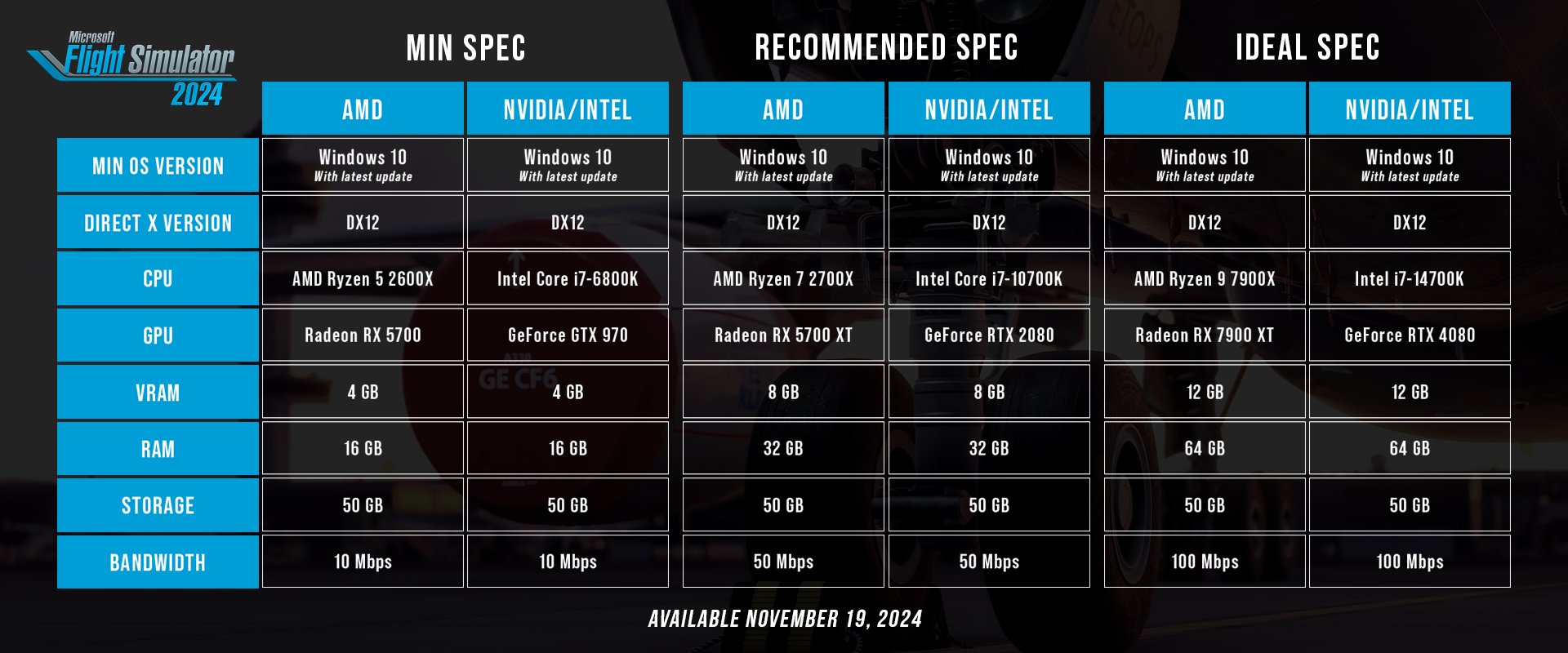
I will keep bringing this up everytime someone mention “8GB is not enough in 2025”. The reason people with 8GB cards got 2024 is because it is listed under “Recommended Specs”. Then we have people coming in here saying that the people who thought their hardware would run the sim are in the wrong somehow? This is a Microsoft/Asobo problem that they have to fix, not a consumer issue.
Nobody has said that 8GB is enough for 4K high settings, people with 8GB are mostly playing 1080p and trying to get by as it is.
Edit: Typo
11 Likes
That is simply not true. 8GB VRAM is still enough for gaming, even in 2025.
Yes it’s all dependent on settings and resolution and of course it’s not going to suffice for 4K Ultra gaming with maximum texture resolution and all bells and whistles, but 8GB is -in most cases- just fine if you want to play video games. Let’s not get into this discussion again.
MSFS2024 has issues with VRAM usage among other things. It’s very obvious that it was released too early and in an unfinished state and they are working hard to fix that. I have no doubt about that.
Please stop telling people that 8GB vram on graphic cards is not enough, unless of course they’re trying to max out @ 4k 
4 Likes
I’ve got RTX 4060 8Gb vram and it’s completely fine to fly GA 1440p 200/100 TLOD/OLOD and pretty high settings. I spend probably 90% of my time in FSR500 turboprop which works smooth even in populated areas like NYC. Airliners are a different story but not everybody is interested in airliners.
The problem is that the sim gives random results. Even top notch pc can cause problems because of unknown reason and then you have to be computer sience engineer to make it works  It shouldn’t be like this.
There are cases when 8gB vram is enogh and you don’t have to sell your kidney to play the sim Unfortunately reading this forum you may get the impression that only very expensive pc can handle msfs.
2 Likes
1 Like
it would be nice if you could save graphic and controller settings in a different manor.
If i fly VFR in a cessna or small GA aircraft i can raise my graphic settings and for instance in the Fenix i can have a different graphic settings mode, without having to spend much time in the graphics menu.
Its more or less the same with the controller setups. Although i have no idea why i have to wait for like 5 seconds after every thing i change to save it since SU2.
Controls settings seems to have been fixed in the SU3 beta, so at least that will be resolved Soon  . As for a similar “assign X to Y plane” setup with graphics settings, I could not agree more. I want the best possible performance and the best possible visuals at all times, and to do that means carefully managing settings based on the demand I’m placing on the sim with aircraft and scenery selections.
It would be fabulous for us to be able to create proper graphics presets in the GUI (not just saving a random collection of UserCfg files to be swapped out before booting the sim) and then having them dynamically attach to aircraft as we desire. I understand that this would pose issues with certain settings that require the sim to restart after changing, but many do not, including some of the highest impact ones like LODs and Raytraced Shadows. If this isn’t already a Wishlist item, it 100% should be.
Exactly the same experience here! (RTX 4070), to emphasize, I have never had such a smooth experience, not even in FS2020 (although I didn’t check DLSS 4 with HAGS and Rbar off).
- Resizable bar and HAGS - OFF
- DLSS swapper - latest DLSS version - preset K
- DLSS - Performance upscaling to 4K
- Frame rate locked at 30 fps in game
- FSR 3 FG bumping it up to 60 fps
- Vsych forced via Nvidia profile inspector
- TLOD and OLOD set to 100
- Dynamic LOD set to 30 fps
Finally working, super smooth, no stutters or screen tearing. Turning resizable bar off is probably the main thing, it makes all the difference. DLSS FG for me is borked, it stutters a lot FSR 3 FG works 1000 times better.
1 Like
Recently, I’ve also limited the in-game FPS to 30, but I’m using MSG 3x for 90 FPS. TLOD is set to 100 on the ground and 300 above 2,500 ft (you know the drill). Ultra settings across the board, except textures on High. It runs extremely stable and nearly free of any frame drops, even with heavy hitters like the A380.
The only thing that’s driving me crazy are the 30 FPS in the main menu and pause menu, it’s giving me eye cancer. Anyone have an idea how to get around that?
Radeon RX 5060 ? You mean Nvidia RTX ?
I run FS2024 fine on my laptop with an 8GB 4070. The key is having textures on Medium. Everything else can run on high. My VRAM usage doesn’t get close to the max.
FSR FG gives 60 fps in main menu as well
2 Likes