So do you recommend any changes after latest 1.27.0 update?
Running same settings. I only retest about every ~year due to the time consuming process and the fact that performance scaling / graphics scaling doesn’t change much between updates.
This was the best post in the flight simulator community bar non. Asobo don’t even explain their own game settings.
2024 is far worse than 2020 it’s illiterate in places when trying to work out what control does what.
Yes, I can imagine it is very time consuming.
Thank you very much!!
Great job.
This is something I always wondered about.
Such a big money and not even the shortest manual about how to use the features provided.
I think it’s probably knowing the community will just do it for them. It’s quite shameful really.
Can you imagine that it would be like buying a car and you would need to figure out all on your own or ask people.
Ridiculous beyond doubt.
I am not a complainer type and I am quite understanding and all but certain things are just too big to ignore.
This is one of them.
I was unaware of your previously released 2020 guide, as I could run it mostly maxed out on ultra in most scenarios, so didn’t need to go looking for tweaks too much. But have had weeks of endless mucking about trying to understand why I couldn’t get FS2024 working right.
My 4080 would be maxed out at 99-100% with 1 screen, and as soon as I added my second and 3rd 4k screens GPU usage would instantly drop to around 30%. Couldn’t figure it. Thanks to your guide I now better understand what the settings are actually affecting, and what the impact is, and have actually got the sim usable with my 3 4k screens.
This is exactly what should be built into the game. Microsoft/Asobo should be ashamed for not providing an official guide along the same lines of what you have done here. Thanks for your efforts in doing this. I look forward to tweaking a bit more based on your testing to maximize what my hardware can do, rather than me aimlessly trying to get the sim to work.
It’s most likely due to the VRAM overflow. Known issue for many. The 2024 requires a LOT more VRAM and same settings will cause this abysmal performance loss.
3pcs of 4k displays are joke I suppose, not even the 4090 has enough performance, let alone not enough VRAM to drive those.
I hope VRAM management will be repaired and performance loss will be mitigated but I suggest to start getting texture quality lower. In DEV mode you can check FPS to see if your VRAM is overcomitted or not. There’s a separate topic for that here too.
Welp, looks like that was the case, DLSS4 will bring a bunch of enhancements to existing features like Frame Gen and DLSS/DLAA. It also no longer will require to go in and manually update the .dll files.
It seems like the major detractor for DLSS in MSFS is blurry instruments caused by the down-sampled text.
Does DLSS4 address this natively, or will it still require something like “masking” the displays and not applying DLSS there (which has been talked about and requested for a long time, but appears no closer than it ever was.)
Probably a mix of both. They mentioned on a devstream they were working with Nvidia on it. And with DLSS 4 you can have the option to let the game manage the upscaling, or force an override with the Nvidia App. I guess we will have to wait and see which method may have a fix for ghosting. I’d love to finally be able to move off TAA to DLSS Quality or DLAA.
Is DLSS backwards compatible when I comes to GPU’s or will it require a 50 series card to run DLSS 4?
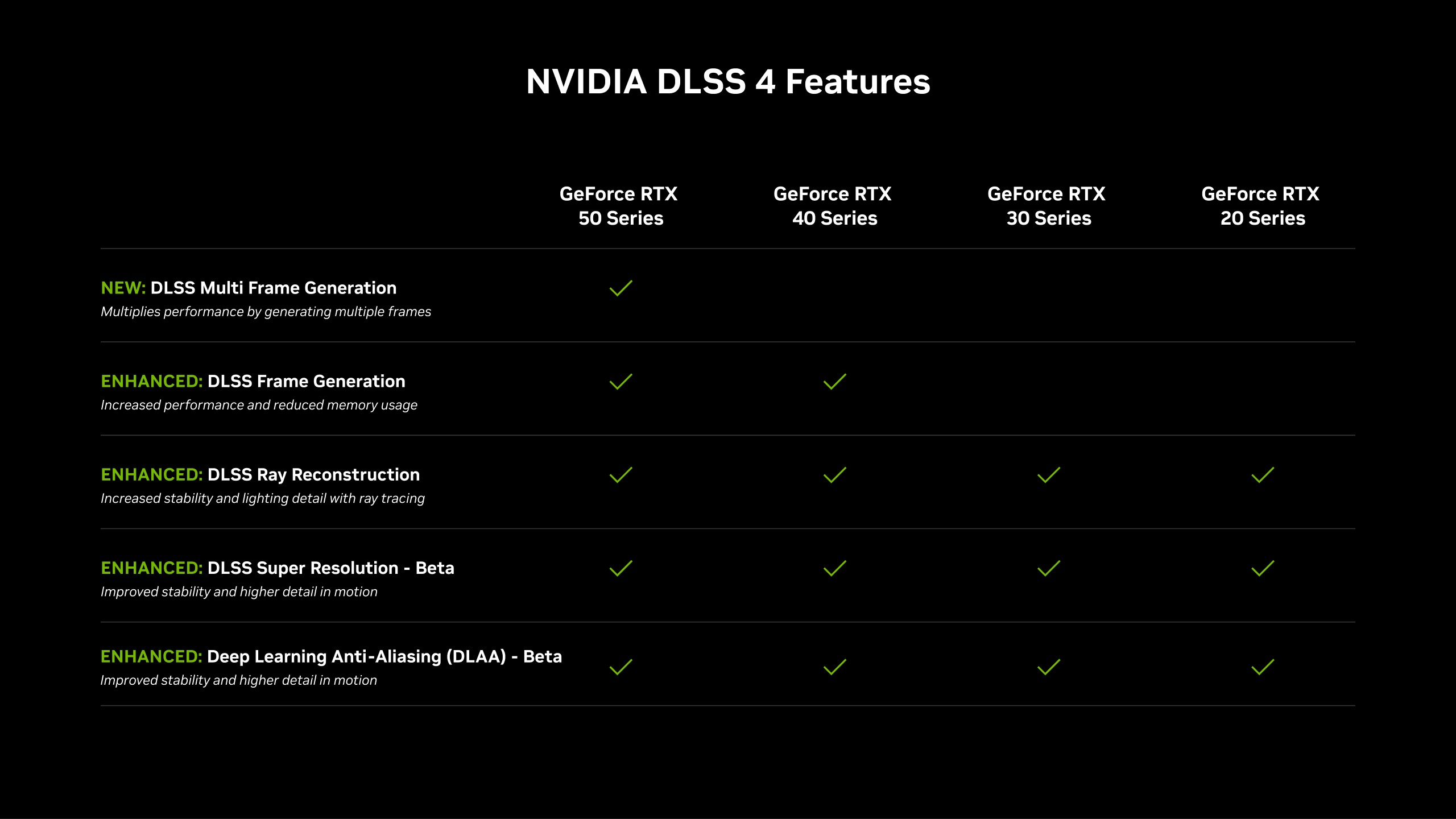
does DLSS 4 require the new hardware or will it roll out to all of us?
ghosting should be improved due to the new model that they use for upscaling, but i think the underlying issue will always be there until it’s masked.
Directly above your question is a chart
I’m interested in a pure performance comparison between the RTX 4090 and RTX 5090 without any extras like Frame Generation (FG) or DLSS. I don’t use FG because my eyes can detect “fake frames” so I have it turned off. DLSS is also disabled since I notice a drop in visual quality. As such, I’ll be looking for reviews that compare these two graphics cards under default conditions, without FG and DLSS. Only raw performance matters to me.
Me too, that’s what literally everyone is interested in. Apart from some 12-year-olds maybe who now want a 5070 that’s as good as a 4090 
the official nvidia slide showing far cry 6 does exactly this, and its shown as a ~27.5% jump
https://www.reddit.com/r/nvidia/comments/1hvvrqj/50_vs_40_series_nvidia_benchmark_exact_numbers/