Yes, same here.
Both issues are fairly rare, but should be fixed in the next update.
I wish it was rare in my case.
I had that experience today loading up a Fenix A320 at Manchester. Found a way past it but it was not intuitive.
I had the fuel truck issue last night too, on the turnaround flight. Umberto had fixed this issue but its back. I am sure he will take care of it. The workaround for now is to abort the services using the GSX menu.
Still loving the Stream Deck profiles and integration there is very well done. Question: when I call on my first service, using, say, a business jet on a ramp, just like that my plane is surrounded by vehicles - stair trucks, baggage loaders, etc, like I’m boxed in. Where can I look for the setting that determines whether vehicles suddenly appear all around me instantly versus rolling in from offscreen and showing up as I call them and leaving when I dismiss them?
Version 4.0.10 – July 29th, 2026
-
GSX Pro NEW: Seated Passengers support for Leonardo SH Maddog 2024 version.
-
GSX Pro NEW: The aircraft editor can now define three more connection points on the airplane: the audio port the ground crew plugs their headset into, and two Pre-Conditioned Air (PCA) points. They are placed exactly like the existing GPU point, in both the 2D and the 3D editor, each with its own marker, and they are saved with the rest of the aircraft configuration. Nothing uses them yet: they are being introduced now so aircraft can be prepared for a future update.
-
GSX (all versions) Fix: On multi-aircraft (MARS) parkings, customizing one sub-position could unintentionally change the parent position or its other sub-positions — pushback points, passenger and vehicle routes, and per-vehicle settings were all affected. Each sub-position is now properly independent: it still inherits the parent’s settings until you customize it, and from then on your edits stay on that sub-position alone, leaving the parent and the other sub-positions untouched.
-
GSX (all versions) Fix: A fuel truck that had finished refuelling could still get stuck at the stand — most often boxed in among the baggage loaders working the cargo doors — leaving the loaders idle and the baggage trains held back for several minutes before it finally freed itself, and occasionally not leaving at all until the engine was restarted. Extending the automatic rerouting introduced in the previous version, the fuel truck now reliably makes its way out as soon as refuelling is complete, with both tanker and underground-hydrant fueling, so loading and the rest of the turnaround are no longer stalled.
-
GSX (all versions) Fix: When the destination was your last flight of the session and you closed the simulator without departing again, the ground-handling invoice for that turnaround — whose charges you could see building up on the status page — was never issued. It is now produced when you quit and is kept in your invoice history.
-
GSX (all versions) Fix: Refuelling now works on aircraft that use the newer Microsoft Flight Simulator fuel system, such as the ATR 42/72, which previously could fail to take on fuel.
-
GSX (all versions) Fix: On aircraft that ask you to set the fuel quantity from their own fuel system, an uplift too large for a single tanker forgot what you had asked for: when the second truck arrived it prompted you to set the quantity all over again, and would only continue if you entered a new figure for each truck. The remaining quantity is now carried over, so every following tanker simply resumes where the previous one left off until the amount you originally asked for is on board.
-
GSX (all versions) Fix: On some aircraft a baggage loader could hold back waiting for the catering service to finish before approaching, even when the two never share the same space; it no longer waits unnecessarily.
-
GSX (all versions) Fix: On aircraft fitted with their own airstairs, the question asking whether to use the airplane’s airstairs or the airport stairs was only asked when selecting a gate before departure, never when choosing a stand to park at after landing — so the arrival was always served with airport stairs. The question is now asked when you pick the stand on the ground as well, in time for your answer to decide which vehicles are sent to the aircraft.
-
GSX (all versions) Fix: A member of the cleaning crew could momentarily jump from one spot to another while walking through the cabin; they now move smoothly along the whole route.
-
GSX (all versions) Fix: In MSFS 2024, starting a flight and walking around the aircraft in first-person (avatar) view could make the GSX menu flash open and close on its own, with the ground-services menu unavailable until you had first sat in the cockpit. The menu now opens normally in avatar view.
-
GSX (all versions) Fix: Taxiing onto a de-icing pad when GSX did not consider icing conditions to be present could leave the menu unable to open at all, appearing as though GSX had stopped responding. GSX now tells you exactly which condition is missing — for example the ambient temperature being above the threshold below which icing is possible — and still opens the normal parking-selection menu, so you are never left without a menu.
-
GSX Pro Fix: Ground vehicles could arrive missing the figure that belongs with them — most often reported as the passenger stairs turning up with no operator standing at them, but the same could happen to the fuel operator, the GPU operator and the baggage train crew. The figure is a separate object attached to the vehicle, and GSX could attach it before the simulator had finished creating it, in which case it silently never appeared. Whether it happened depended on how quickly the simulator responded, which is why it affected some users constantly and others never. GSX now waits for the figure to exist before attaching it.
-
GSX (all versions) Fix: Calling a ground service again after another service had already sent its vehicles away could leave GSX completely stuck: the vehicles never turned up, no further menu selection did anything, and only restarting the flight recovered it. The most commonly reported case was calling the passenger stairs back after a cleaning crew visit. GSX was still trying to drive vehicles that had been dismissed and replaced in the meantime, and now always uses the current ones.
-
GSX (all versions) Fix: Calling de-icing at a remote de-icing pad could leave nothing happening at all: no de-icing vehicles arrived, and from that moment the GSX menu no longer opened, with the whole product appearing frozen until the flight was restarted. De-icing at the parking was unaffected. Arriving at a remote pad was mistakenly treated as a move to a different airport, which tore down the ground services that had just been set up and then stalled part-way through. De-icing at a remote pad now works normally, and — as intended — the de-icing trucks are the only vehicles that come to meet you there.
-
GSX (FSX/P3D) Fix: When the GSX battery charger stopped — for example when the jetway power unit was disconnected — the readout on the charger panel was not always blanked, so it could be left showing the last charge and voltage readings, and an error was reported every time charging ended. The panel is now cleared reliably.
-
GSX Pro Fix (MSFS 2024): Opening the GSX EFB app before GSX had finished starting could leave it stuck on an empty page: it never noticed the engine coming up afterwards, so the app had to be closed and reopened. It now keeps looking for GSX in the background and connects by itself as soon as the engine is available.
-
GSX Pro Change: Further reduced the overhead of the Remote control server. Every time a client connected — the web remote, the EFB, or the Stream Deck plugin — GSX rebuilt its complete state from scratch to send it, so a client reconnecting repeatedly made it do that work over and over. Clients connecting close together now share a single build, which cuts the cost of a reconnect, of several devices connected at once, and of any client that keeps dropping and coming back.
-
GSX Pro Fix: With the Remote control active, a brief stutter could occur every few seconds, getting worse the more devices were connected. A large block of reference data was being resent to every connected client on a timer even though it had not actually changed. It is now sent only when it really changes, removing the recurring hitch.
-
GSX (all versions) NEW: Handler scripts can now query the current icing conditions with a new isIcingConditions() function, returning whether GSX considers icing to be present — the same weather assessment that drives the de-icing service. See the Handler Scripts Developer Guide for details.
-
GSX (all versions) NEW: Added the following Handling operators: Air Tindi, Canadian North (Canada), ATS Korea (South Korea), Vietjet Ground Service (Vietnam), Zadar Airport (Croatia), Jeju Air Service (updated logo).
-
GSX (all versions) NEW: Added the following Catering operators: Eastar Jet Catering, Jeju Air Catering, T’way Air Catering (South Korea), Sky Chefs (USA), SriLankan Catering (Sri Lanka).
-
GSX Pro NEW: Added the following Refueling operators: Ampol (Australia), BAFS (Thailand), Ceypetco (Sri Lanka), Petrolimex, Skypec (Vietnam).
I’m relatively new to GSX and finding my way with it each time I use MSFS (after a period away from the sim). These regular updates are great. One thing I have noted, though, is that the power cable from GPUs tends to dip beneath ground level. Has anyone else noticed this or could it be a conflict with the aircraft / scenary?
Umberto, I was doing a cabin cleaning at Portland the other day and suddenly a cleaning crew member appeared in the flight deck, then a second one appeared on the nose of the airplane, then “zip-lined” to the terminal windows in a straight line. It elicited a few laughs, but is this a product of the bug I quoted above and if not, can this be identified and fixed? It was in the Fenix A320.
Version 4.0.11 – July 31st, 2026
-
GSX (all versions) Fix: Following the multi-aircraft (MARS) parking fixes in the previous version, three further problems remained. Opening the 2D vehicle or pushback editor from a sub-position could edit the parent stand instead of the sub-position you had selected, quietly moving the parent’s points. Adding a new sub-position could start it off with another sub-position’s settings instead of the parent’s. And square parking areas could not be authored at all — the width and length you entered were discarded and the area reverted to a circle. The editors now always work on the position you picked, a new sub-position inherits from the parent as intended, and square areas are kept.
-
GSX (all versions) Fix: Editing vehicle or pushback paths at one parking could change where vehicles were placed at an unrelated parking, and overwrite settings already saved in your profile. While an editor is open GSX temporarily moves vehicles around to show previews and to let you drive them into position; those temporary moves were being remembered as though you had placed the vehicle yourself, so an unrelated save later on wrote them into the profile. Temporary editor moves are no longer recorded, and only the positions you actually set are saved.
-
GSX (all versions) Fix: An airport customization profile that referred to a Handling or Catering operator not installed on your system could be partly erased while it was being read, losing customizations you had made — in some cases for the whole airport, not just the parking concerned. Profiles referring to operators you do not have are now read without being altered, and the parking simply uses the operators available to you.
-
GSX (all versions) Fix: At walk-in gates, where passengers walk to and from the terminal instead of taking a bus, they could walk straight through the ground equipment parked beside the aircraft rather than around it. They now use the same obstacle-aware routing already used for bus boarding, on the way both to and from the stairs. Waypoints you have drawn yourself are still followed exactly as authored.
-
GSX (all versions) Fix: Two vehicles leaving the stand at the same time did not take each other into account and could drive through one another on the way out, and a vehicle already leaving could needlessly hold up another that was waiting to move. Departing vehicles now see each other, and only a vehicle actually approaching the aircraft holds up the others.
-
GSX Pro Fix: While a cargo loader was lifting a container up to the aircraft, the container could jump back onto the baggage cart for an instant — by then already driving away — before jumping back onto the loader platform to carry on. The container is now handed over cleanly from the train to the loader.
-
GSX Pro Fix: The number keys could still trigger ground services when the GSX menu was not on screen. Once the menu had been opened and then closed again with its hotkey, pressing 1-9 or 0 in the simulator — as can easily happen when those keys are assigned to camera views or to another application — started whatever service had occupied that position in the menu you had just closed, with nothing on screen to explain what had been called. The number keys now work only while the menu is actually displayed. The “Select menu options with number keys” option added in 4.0.9 is unchanged and still available, but is no longer needed to work around this.
-
GSX (all versions) Change: The Handler Scripts Developer Guide now documents eleven aircraft and SimBrief attributes which scripts could already read but which were not described anywhere.
Hello everyone,
I have a question regarding GSX Pro and fictional airlines. I’m flying a custom livery for a fictional airline with the ICAO “ARV”, and I’d like to know if it’s possible to assign custom cabin crew uniforms to it.
The issue:
When using a fictional ICAO (“ARV”), GSX doesn’t find any associated uniforms and ends up displaying uniforms from another random airline.
What I’ve tried:
Creating custom folders in FSDT_Crew using the naming convention texture.FSDT_Attendant_hsXX_ARV (where XX goes from 01 to 24) with right texture.CFG inside.
Keeping icao_airline=“ARV” in the aircraft.cfg.
Result: GSX ignores the custom folders and loads uniforms from another random airlines.
The only thing that works:
Changing icao_airline=“VIR” (or another real airline) in the aircraft.cfg.
My question:
Has anyone managed to have custom uniforms (or uniforms from a real airline) while keeping a fictional ICAO in the aircraft.cfg? Is there any way to “map” a fictional ICAO to a real airline’s uniforms without changing the icao_airline parameter?
Thanks in advance for any help or advice. Best regards!
I just realized. I bought this app in 2023, have been using it since. Every update since then has been free. I rolled with the good and the bad, always apreciate the immersion. The seated passengers and the new SI integration are wonderful. But truly amazed that they have been giving me updates, for free, since 2023! Don’t you people at FsDreamTeam have to eat once in a while?
I feel EXACTLY the same way. I’ve been hoping they come out with some updated airports or something I can buy from them!
Version 4.0.12 – August 2nd, 2026
-
GSX (all versions) NEW: GSX now keeps AI airplanes off the parking spot you have selected. Until now, if the simulator had put one of its own AI aircraft where you were heading, you had to notice it yourself and use the “Free this parking from AI” menu option, often only realising once you had already arrived. GSX now watches the spot and removes an AI airplane standing on it, so the parking is clear by the time you get there. Only an AI actually standing inside the detection area of your own parking is removed, so AI parked on the stands next to yours is never touched. It also only acts once you are reasonably close to the spot — 60 metres by default — because the simulator simply sends another AI to a parking you are still far away from. Both the option and the distance can be changed in Settings > Parking.
-
GSX (all versions) Change: With automatic repositioning enabled, GSX now also clears the simulator’s own default ground vehicles from the parking you started at, even when no repositioning actually takes place — for example when that parking has no custom stop position saved, or your engines are already running. Until now those vehicles were only removed as part of the repositioning itself, so if your parking did not qualify they were left standing around the aircraft until ground services were called.
-
GSX (all versions) Fix: When more than one customization profile existed for the same airport, your customizations could appear to come and go between sessions: parkings you had customized read as untouched, and restarting GSX appeared to fix it until the next time. GSX was choosing between the profiles by file date, and every save changes that date, so the profile in use could flip from one session to the next; the dialog that asks which profile you want was also permanently suppressed. GSX now picks the profile that genuinely matches the airport, asks you when it cannot tell, and no longer creates a new empty profile without saying so.
-
GSX (all versions) Fix: In the 3D vehicle editor, a vehicle could be shown at its default place instead of the position you had saved — most noticeable with the baggage trains, which seemed to sit somewhere different every time — and some vehicles could be missing from the editor altogether, with nothing to explain it, varying from one time you opened it to the next. The editor now always shows each vehicle at its saved position, places the vehicle itself there as well, and waits for vehicles that are not ready yet instead of leaving them out. The 2D editor was never affected.
Version 4.0.13 – August 4th, 2026
-
GSX (all versions) NEW: A new “Seated passengers always visible” option in Settings > Simulation > Services. By default, seated passengers are hidden when you look back from the cockpit with the cockpit door closed, so you don’t see the cabin through a shut door. With this option enabled the door is ignored and they stay visible at all times. This is mainly useful on airplanes whose cockpit door GSX cannot read: on those, the door always counted as closed, so the cabin was never visible from the flight deck at all. The option is disabled by default, so nothing changes unless you turn it on.
-
GSX (all versions) Fix: Ground vehicles could finish their work and then stay at the airplane indefinitely, holding the area they were occupying and blocking every other service that needed it. The refuelling truck was the case most often reported, but the same kind of problem existed in every service and has been fixed throughout: in some places the instruction to leave was being lost, in others the vehicle was left waiting for a signal that never came.
-
GSX (all versions) Fix: At a remote de-icing pad, with the engines still running, both de-icing trucks parked ahead of the wings instead of behind them, and each one went to the wing on the opposite side, crossing paths on the way in. The trucks now always approach from behind the airplane and work from behind the wing, whether the engines are running or not.
-
GSX (all versions) Fix: After disconnecting from the nose gear, the pushback tug could drive back and forth over the same points before finally leaving. The tug now plans its way back to its parking exactly like every other GSX vehicle does, which removes the erratic movement. It still treats your airplane as an obstacle and routes around it, so it will not drive underneath the fuselage on its way out.
-
GSX (all versions) Fix: If you stopped slightly beyond the stop point, the docking system would show “TOO FAR” and stay on it indefinitely: shutting the engines down, setting the parking brakes and calling ground services made no difference, because the only way out was to physically move the airplane back. The docking system now recognises that you have settled for the position once GSX considers the airplane parked at the gate, and completes normally.
-
GSX (all versions) Fix: If you selected a gate while still some distance away and that gate was occupied by an AI airplane, GSX could report the jetway as connected and start charging for it, because it was seeing the jetway attached to the AI. GSX now only considers a jetway connected once you are actually at that stand, and where the simulator provides the information, it also checks that the jetway is attached to your own airplane rather than to somebody else’s.
-
GSX (all versions) Fix: A docking system could appear at the wrong height, sunk into the ground or floating above it, when the scenery was still loading around it. The height is now measured after the terrain underneath has settled, instead of at a fixed moment after the display appears, which on a slow-loading airport happened too early.
-
GSX (all versions) Fix: Several CRJ variants were not identified correctly, so docking systems could display the wrong aircraft type. The CRJ550 now has its own identity, the CRJ700 is no longer mistaken for an Avro RJ70, and variants that report only a bare ICAO code are now recognised.
-
GSX (FSX) Fix: A recent update moved part of the aircraft position handling into the Couatl engine itself, but the 32 bit engine that FSX uses was not rebuilt at the time, so it did not contain the new code and FSX users were left with errors. The 32 bit engine has now been rebuilt and matches the rest of the update.
-
GSX (P3D) Fix: At airports that use a custom ground elevation — Memphis being the reported case — ground vehicles could stop dead partway through a service and never recover, typically a second or two after a baggage train had been created, filling the log with errors. While placing a newly created vehicle, the engine was asking the simulator for the ground height at a moment when it was not allowed to wait for an answer. It now skips that one correction instead of stalling, which costs a single frame of slightly imprecise height on a vehicle that has just appeared.
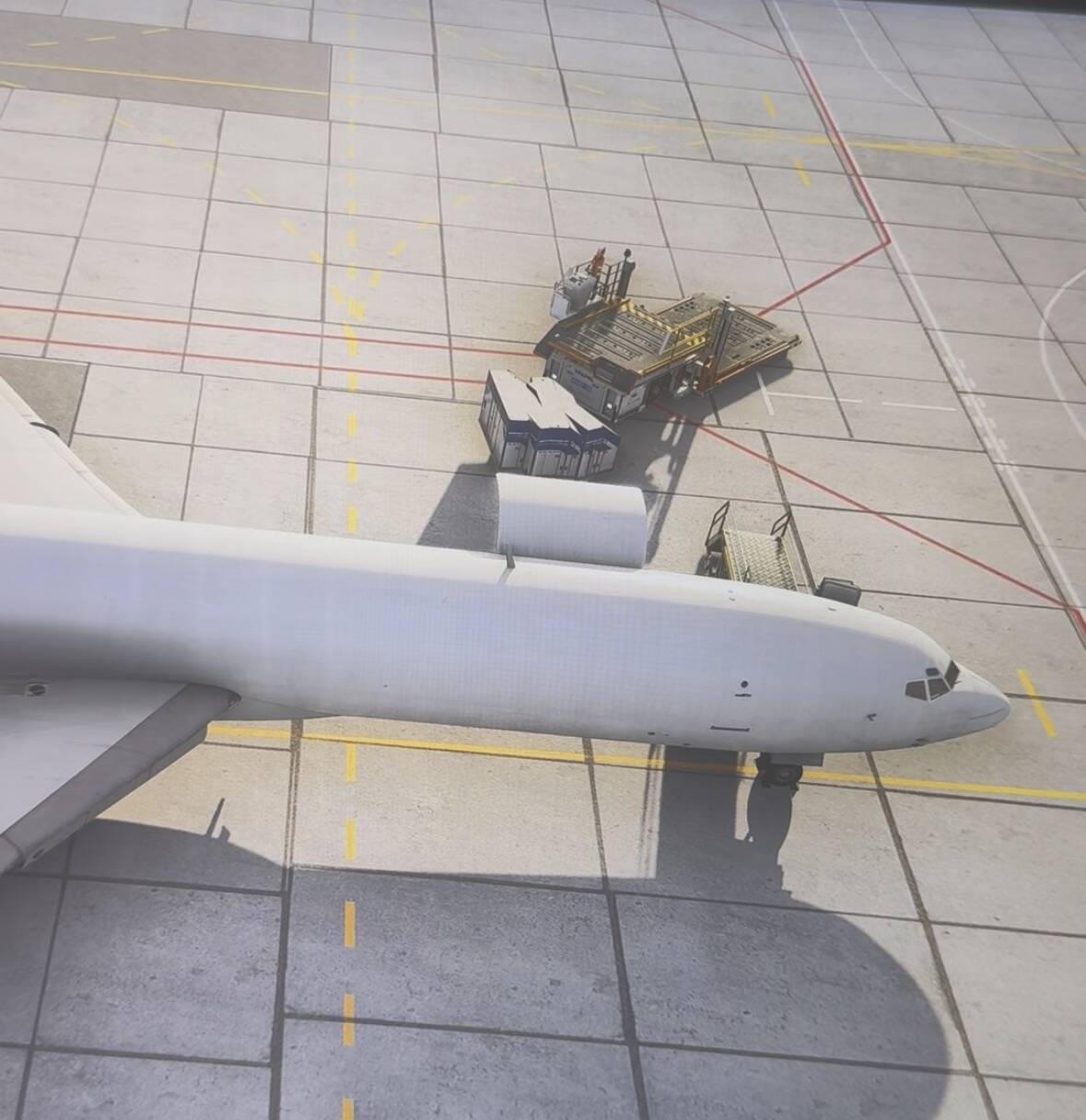
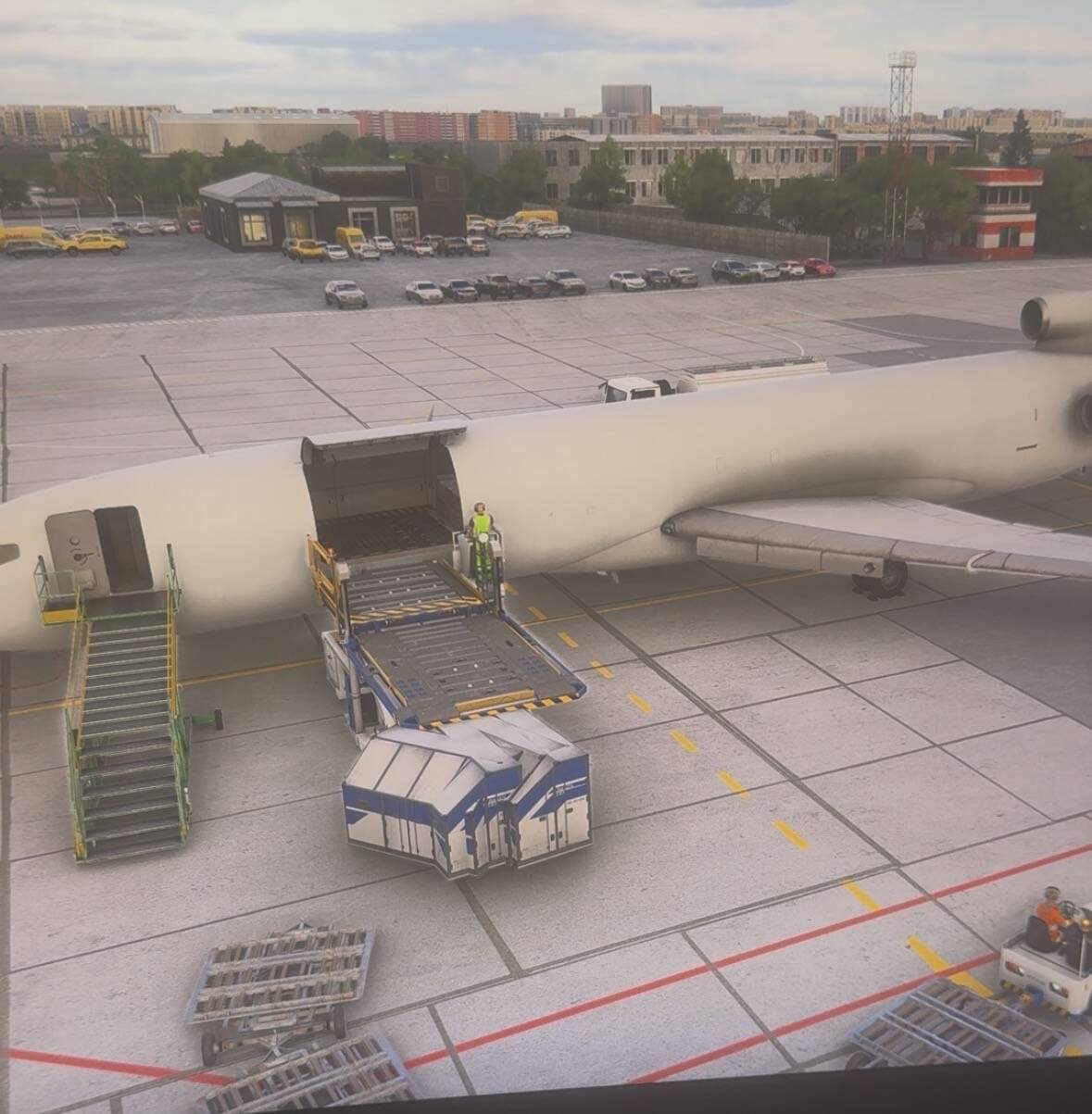
If you download offline installer, do you have to uninstall the online installer?
I first installed the 4.0.13 patch using the online installer, and that’s when the issue started. Then I completely reinstalled GSX Pro and reinstalled the patch using the offline installer, but the problem didn’t go away.
I’ve seen a streamer report you have to completely remove all gsx files before reinstalling .You have to search for them to get rid of them.
Eugh… Things are never easy with flightsim.