Fulham FC ground appears as huge object over London

:wave: Thank you for using the Bug section, using templates provided will greatly help the team reproducing the issue and ease the process of fixing it.

Are you using Developer Mode or made changes in it?

no, Xbox series X no dev mode

Have you disabled/removed all your mods and addons? If the issue still occurs with no mods and add-ons, please continue to report your issue. If not, please move this post to the Community Support section.

N/A default scenery

Brief description of the issue:

flying over London, the Fulham FC stadium becomes huge at certain view distances. It shows up when flying from redhill north towards London heli port

Provide Screenshot(s)/video(s) of the issue encountered:
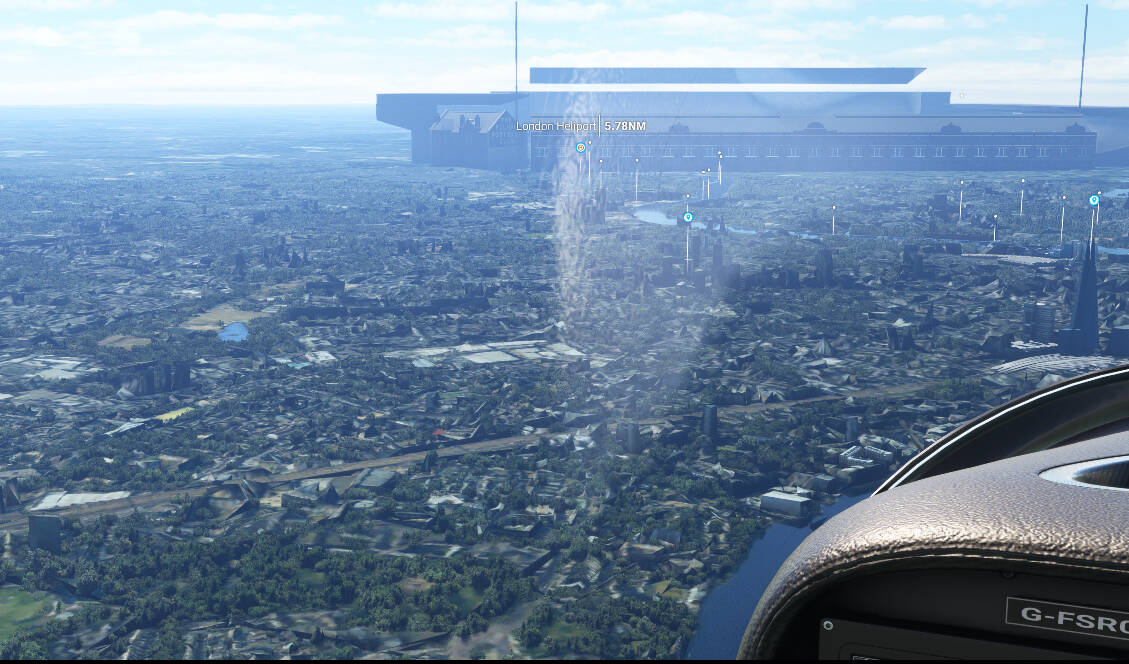
View Capture |  Xbox

ICAO or coordinates (DevMode > Debug > Display position)

cannot get coordinates but it’s just north west of the London heliport on the banks of the Thames. This stadium doesn’t have a POI marker

Detailed steps to reproduce the issue encountered:

flying towards London it will appear as a huge thing over London and if you adjust zoom it will go away, see video.

PC specs and/or peripheral set up if relevant:

n/a Xbox

Build Version # when you first started experiencing this issue:

latest su15 .19 load


:loudspeaker: For anyone who wants to contribute on this issue, Click on the button below to use this template:

Do you have the same issue if you follow the OP’s steps to reproduce it?

Provide extra information to complete the original description of the issue:

If relevant, provide additional screenshots/video:
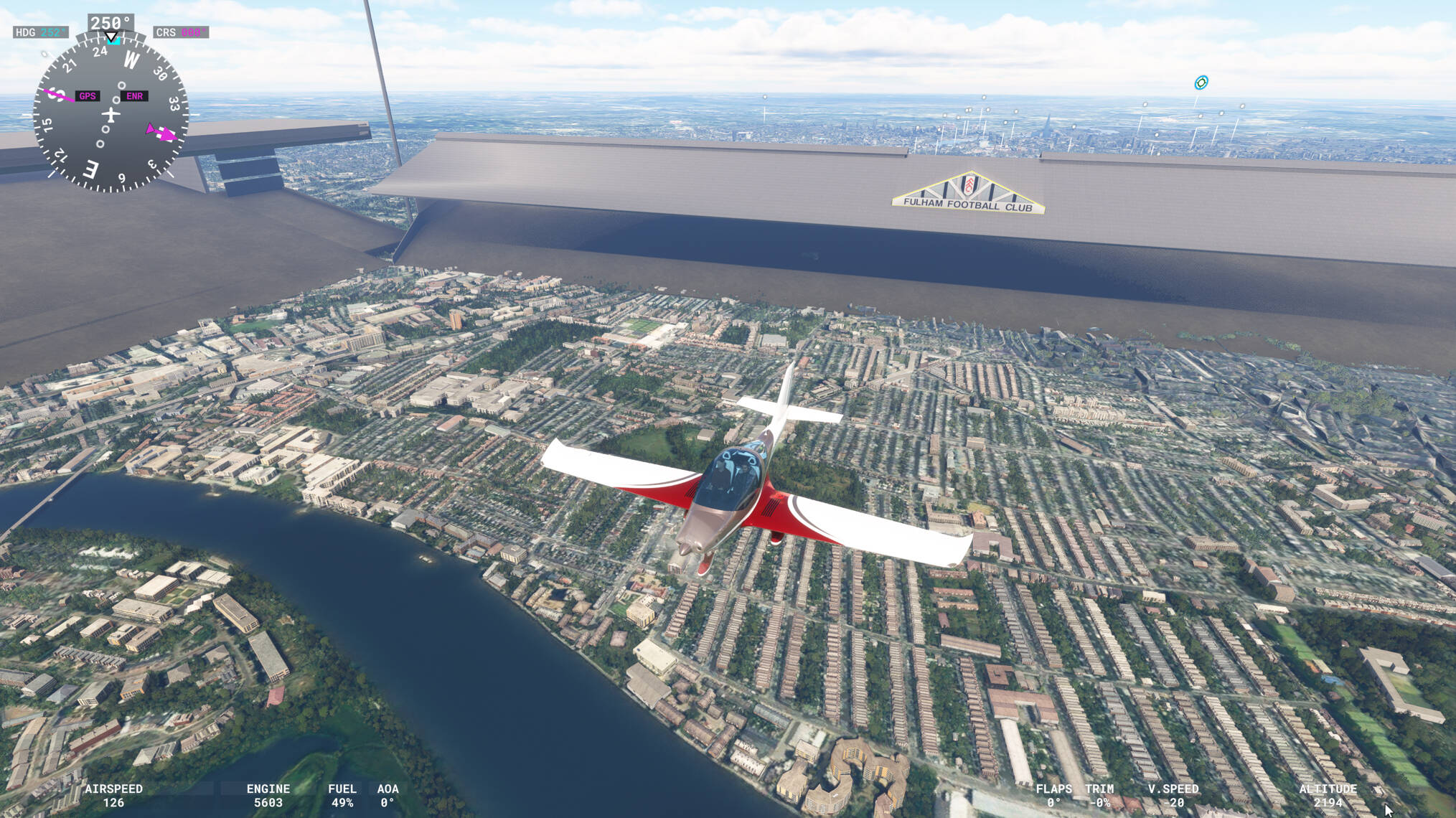
ORBX London City Landmarks causes it.

Oh really? It’s not happened before only since SU15 for me. But I do have that installed.anyway round it other than uninstall LC Landmarks? It really adds quite a good amount of stuff that is essential to make London look right IMO so don’t really want to lose it

I had it pre SU15. Original bug report I just added to my post was raised in July 2022.

I’m not aware of a fix with it installed.

1 Like

Thanks for the info, it’s highly annoying but orbx don’t seem to do much updating so guess I’m stuck with it. Yesterday it didn’t go away at all and I ended up flying inside this giant stadium!

1 Like

Hi @ALANajH ,

Thank you for this report. We’ve moved your topic into the User Support Hub.

The Bug Reporting Hub is for posting suspected or confirmed bugs that other users are able to reproduce without duplicating an existing bug report. Using the template or providing all the relevant information about your bug and sim setup is required in order to provide valuable information, feedback, and replication steps to our test team.

If you are not sure if your issue is a bug or need further input from the community, please use the User Support Hub category. If the community can replicate your issue, first search the Bug category to see if there’s an existing topic. If it already exists, contribute to that report. Duplicate bug reports will be closed.

If you believe it is a new report and no duplicate exists, then create a new bug topic using the provided topic template.

All issues caused by or involving third-party addons/mods should be reported to the third-party developer. Assure that no addons/mods are used when reporting issues in Bug Reports.

This issue persist into 1.37.19.0 and if anything with my experience the stadium is clearer and more defined than in earlier updates. I’ve yet to fly inside it as this mammoth stadium disapperars the closer one travels to it from EGLC.

It doesn’t seem to me that ORBX (Landmarks London City Pack) has made any attempt to rectify this issue since I contacted them way back. Such a shame as it breaks immersion, but without the pack installed so much of the impressive London scenery is lost!

And yes this is on an XBOX X not a PC

It usually goes when you get close but since SU15 it actually stayed there for me so I flew around inside!

My theory is that the Sting S4 is complex with lots of screens and actually they kept going off (black avionics) so I think that the new memory thing didn’t work exactly right or was overwhelmed with photogrammetry, a complex plane with multiple screens and it was low priority to sort the stadium out. Displays only came on once I approached the stadium at low level from the west and it returned to normal size, then displays came back and went a couple of times until I got out of the photogrammetry area the they came back

Just wondering which EGLL you have.

It would be behind you coming from the west so probably less load on the system.

It’s been an issue since 2022. Maybe once London PG gets updated it’ll break some more and ORBX will have to finally update.

I am using the default Heathrow, zero chance of any of the add on EGLL running on console! I do have the UK2000 London Ciry installed though

Thanks.

I actually use the Iniscene EGLL and it works ok on Xbox. It doesn’t seem to have as much live traffic as I’d expect so it’s probably limited intentionally. Also T5 main building loads in ok but the two T5 satellites pop in and out when starting at T5.

I’ve also got ORBX EGLC V2 installed.

I have the orbx V1 London city, but had bought UK2000 version before the V2 orbx arrived. I quite like the UK2000 one, it’s fairly light (compared to orbx v1)and only thing missing is the Lyle sugar factory, but on the plus side it has working DLR trains and people in the terminal

I had a rule that any scenery above about 1GB I avoid as that seemed to be the size that above that was problematic on Xbox. Good to hear that it actually works on Xbox, the default Heathrow is (frankly) woeful

I’ve logged a support ticket with Orbx around the stadium issue so let’s see if they respond,

1 Like

I got a response to the ticket, first off they were a little unhelpful and said “Most likely another product has used the same GUID as the stadium has, but with a much larger scale setting”

I responded saying other people had it also, and I had no other products installed, also by removing London Landmarks the issue no longer occurs. To which I got the response “I can ask for it to be fixed and I will do that later today”.

So, fingers crossed..

2 Likes

This topic was automatically closed 365 days after the last reply. New replies are no longer allowed.