Giant cursor in FS24 on Xbox Series X and Playstation


ISSUE DESCRIPTION

Description of the issue:
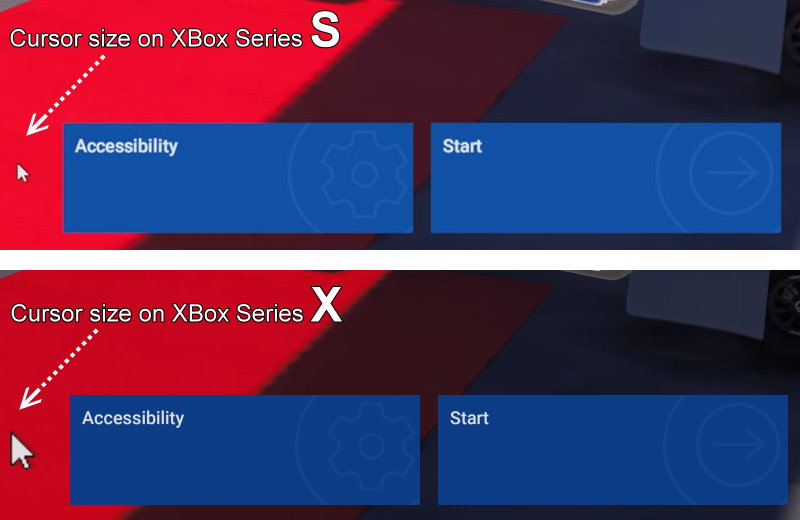
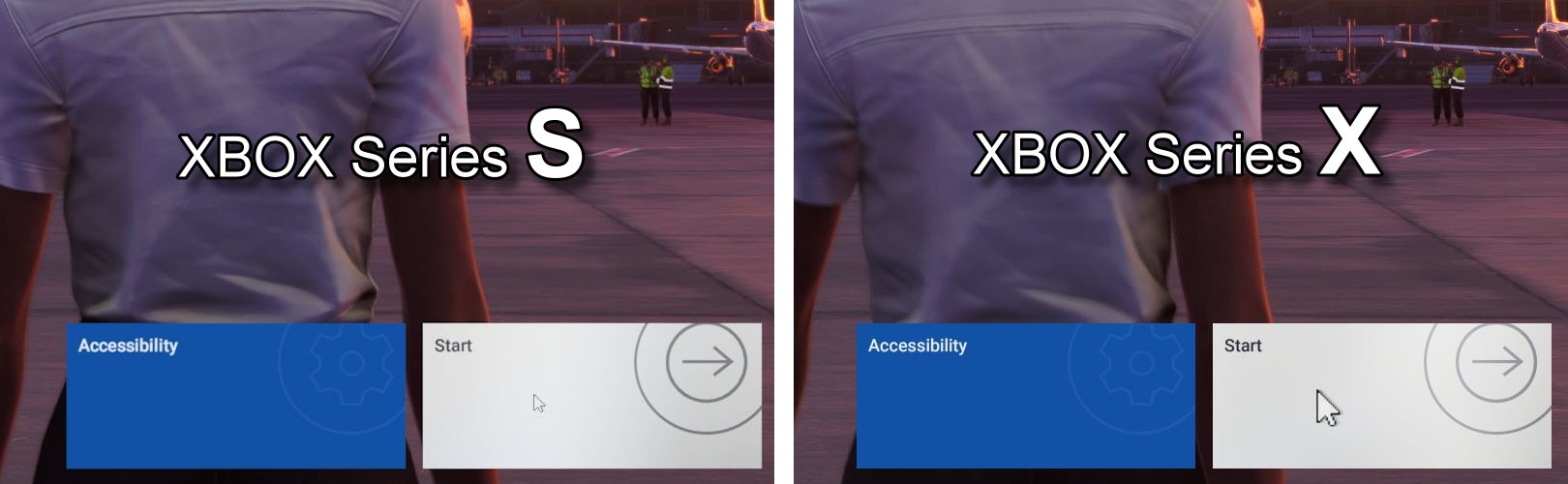
Navigation cursor on menus and in the 3D environment is really large on Xbox Series X. This has been sporadically mentioned in the forum and dev stream comments but didn’t see it officially logged. According to the “this is how FS24 runs on Xbox” thread, the cursor size is “normal” on series S.

[PC Only] Did you remove all your community mods/add-ons? If yes, are you still experiencing the issue?
Not PC

FREQUENCY OF ISSUE

How often does this occur for you (Example: Just once, every time on sim load, intermittently)?

Always

REPRODUCTION STEPS

Please list clear steps you took in order to help our test team reproduce the same issue:

  1. Launch game on Xbox X
  2. Launch game on Xbox S or PC
  3. Compare cursor size

YOUR SETTINGS

If the issue still occurs with no mods and add-ons, please continue to report your issue. If not, please move this post to the User Support Hub.

What peripherals are you using, if relevant:
N/A

[PC Only] Are you using Developer Mode or have you made any changes to it?
N/A

MEDIA

Please add a screenshot or video of the issue occurring.

[END OF FIRST USER REPORT]


:loudspeaker: For anyone who wants to contribute on this issue, Click on the button below to use this template:

Do you have the same issue if you follow the OP’s steps to reproduce it?

Provide extra information to complete the original description of the issue:

If relevant, provide additional screenshots/video:

2 Likes

Voted :wink:.

Do you have the same issue if you follow the OP’s steps to reproduce it?
YES

MEDIAS

Mouse cursor is by far bigger on Series X than on Series S (even when running at the same screen resolution) :

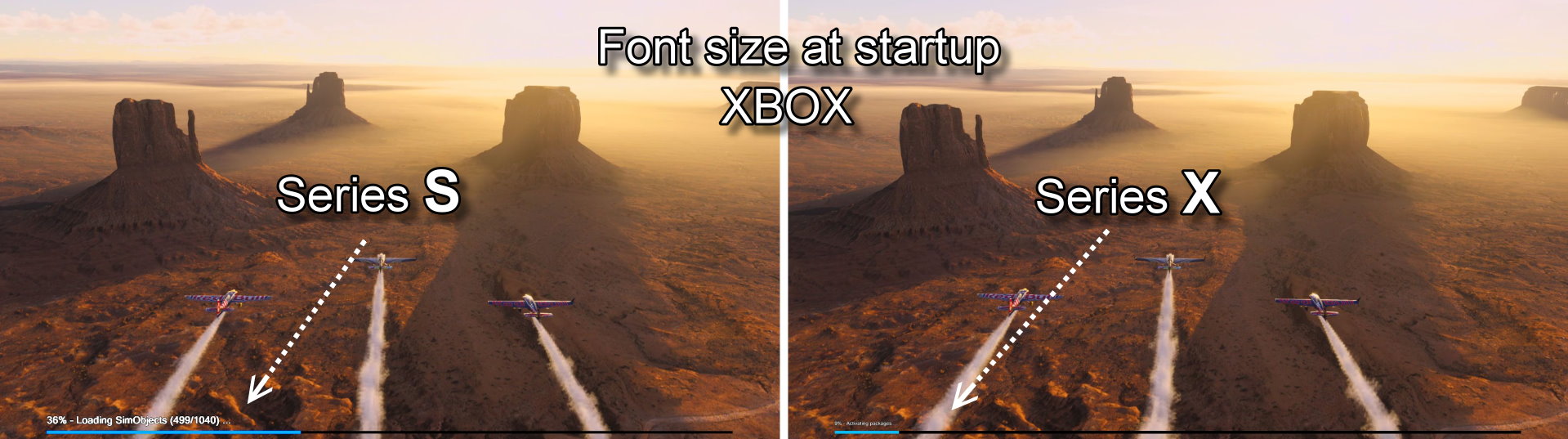
May be, this could be also related to the font size at startup that is also different from X to S.
Here we notice the opposite, the font size is small on X but bigger (normal) on S:

There is definitely a problem initializing and detecting which resolution to use.

4 Likes

Can confirm this issue. Is there any news on a possible fix?

3 Likes

Not even an acknowledgement, never mind a fix.

3 Likes

Hopefully will see the bug-logged tag appear at some point at least. It’s not a crippling bug so can understand if it isn’t prioritized but, like you said, getting it acknowledged would be nice,

1 Like

Do you have the same issue if you follow the OP’s steps to reproduce it?

Provide extra information to complete the original description of the issue:

If relevant, provide additional screenshots/video:
• yes

1 Like

Don’t forget to hit the vote button at the top. Still no “bug-logged” tag. :frowning:

4 Likes

The SU3 is out, and there’s no change :confused: .
Only 13 votes :woozy_face:

Hey, Xbox pilots : You’d have to be blind not to see that the mouse cursor, on the Series X is abnormally large !

2 Likes

Still the same issue after SU4. It’s horrible on the series X :frowning:

5 Likes

At least they fixed the font size bug during the startup sequence. We’ve been waiting a year for that; will we have to wait another year for the cursor? :slightly_frowning_face:

4 Likes

It’s a really annoying issue and kind of embarrassing for MS/Asobo. It really shows how much testing is done on an actual Xbox, especially with peripherals.
Like I said earlier, I don’t think they know about it.
And with 19 votes, it probably won’t be resolved for a long long time.
I wish we could get the moderators to highlight it.

5 Likes

I really hope they fix the cursor soon . It’s ruining it for me unfortunately. Looks like windows 98!

As we close out 2025, it is frankly embarrassing that Microsoft Flight Simulator 2024 a flagship title for Xbox Series X is still plagued by a massive, oversized mouse cursor that renders high fidelity cockpit interaction nearly impossible.

For over a year, the community has provided consistent feedback regarding the disproportionate scaling of the mouse pointer on console. In a simulator that prides itself on “unprecedented realism” and “digital twin”technology, having a cursor the size of a landing gear handle obscuring critical Garmin displays and overhead switches is not just a nuisance; it is a fundamental failure of User Experience design.

It is deeply ironic that Asobo can simulate global weather patterns and complex aerodynamics, yet seems unable to implement a simple UI Scaling slider or a Small Cursor toggle features that have been standard in gaming for decades. This oversight treats Xbox pilots like second-class citizens, forcing us to abandon the platform for PC just to achieve basic functional precision in the cockpit.

Is MSFS 2024 a professional grade simulator or a casual console port? As long as this “giant arrow” remains unaddressed, it remains the latter. It is time to stop ignoring the console community and fix the most basic interaction tool we have. We don’t need more aircraft DLCs; we need a cursor that doesn’t hide the very instruments we are trying to fly with.

5 Likes

And on PS5 please :folded_hands:

2 Likes

Thank you for the bug report.

We have created an internal ticket to see if our team already has this logged, and if not they will attempt to reproduce the issue and create a new bug report. This item is now marked as feedback-logged. If there is an existing bug report or one is created, we will move this thread to bug-logged.

4 Likes

Thanks so much Chewwy for highlighting the issue.

2 Likes

Hi folks,

This topic has now been changed from feedback-logged to bug-logged after successful reproductions by our testing team.

Thanks for your help in identifying this issue!
The MSFS Team

5 Likes

Can also be noted that the cursor on X box also pushes all the buttons when simply moved over them in any aircraft without any input from the user , which makes it almost impossible to adjust any headings or knobs etc with a mouse .

In PS5, the cursor clicks buttons that are behind the EFB. I was mid flight and working on the EFB and suddenly the parking brake activated from behind.

Don’t know if that’s because of the huge laggy cursor or another bug.

Happens on Xbox as well . The mouse cursor activates things on its own when simply moved over .

1 Like