I created a panel with the G1000 and the GMA 1347 Audio Panel. With the G1000 popped out into Air Manager, it works fine. But the Audio Panel does not. Is there a way to make it work on Air Manager? I don’t see a way to pop out the audio panel, but I just assumed it would work automatically.
Which panels are you using? The ones from Air Manager directly? Or the ones created for MSFS specifically by Simstrumentation?
Get the ones from Simstrumentation, they work perfectly. You can also get the G1000 bezels there too, they have more functionality.
Thank you! I will try that. I’m brand new to Air Manager, and didn’t know that Simstrumentation made panels. I just thought I had to use the ones that cam with Air Manager. I’ll investigate, and see if I can make them work!
No problem,
If you have any issues / need assistance there is a Discord as well for Simstrumentation and lots of people willing to help.
You can also reach out to me directly skypilotYTS#0670
OK, I’ll join the Discord, but just real quick, how to I import the new panel into Air Manager? I see the import button, but do I need all the other stuff as well, like the sounds etc., or just the .siff file?
Do I need to copy all the files into the Air Manager folder someplace?
You would download the instruments (.siff file) and then use the import button within Air Manager.
Then add the instrument to your panel.
Not all instruments in Air Manager are MSFS compatible. Some will only work with XPlane, FSX, P3D, or AeroflyFS. When selecting instruments from the list to add to your panel, there will be an icon beside the instrument to let you know what sim it’s compatible with. Even better, a recent AM update added a filter at the top of that window so you cn filter out all instruments to only see what’s compatible for the sim you’re setting up a panel for.
EDIT: I’m assuming you’re using the desktop version of Air Manager and not the mobile version. Is that correct?
Our G1000NXi and GMA 1347 panels are already natively in the AM store and no longer have to be downloaded from our GitHub.
The Sim Innovations G1000 works with MSFS and is about 95+% on par feature-wise with ours now. It I think the only thing currently lacking is the radio volume controls in theirs.
Their GMA 1347, however is X-Plane only though.
Discussion of third party items can be done in #third-party-addon-discussion:tools-utilities - thread moved.
OK, I see the simulator icons now. The Simstrumentation audio panel works fine, except for the Display Backup button. That just gives a “fail” sound when pressed. It would be nice to have that work, since I only have one touch screen for the PFD currently.
So the Sim Innovations G1000 overlay works with X-Plane and MSFS, but the Simstrumentation G1000 NXi overlay only works with MSFS, is that correct?
What are the advantages of the NXi? Anything besides the radio volume?
I am using the desktop version of Air Manager.
That INOP status and error sound is there intentionally. That’s because if you have popouts and you use the reversionary mode button, it breaks the G1000NXi popouts. It was reported to Working Title months back, but they haven’t fixed it yet. Until they do, I’m not adding that button to the GMA.
You can try it out if you want. Pop out the G1000 screens, and press that button in the virtual cockpit and see what happens for yourself. You’ll understand why I made this decision.
Correct. Simstrumentation instruments are made only for MSFS.
In terms of actual functionality, ours had some extra when it was first released. SI have made some additions to theirs since and closed the gap. Currently, the functional differences are:
-
Our radio volumes work
-
The behaviour of the switching between FLC / VS mode and associated nose up / dn buttons is correct to the real unit (and the sim’s G1000NXi) on ours. It’s not 100% correct on the SI version. It’s a minor, but it’s there.
Other “advantages” of ours are cosmetic for the most part.
-
Ours are custom drawn and modelled after the current G1000NXi. SI is drawn based on an early model of the early G1000 from the mid 2000s in X-Plane. Ours matches what you see in MSFS a lot better.
-
Ours has the lighting around the knobs when avionics power is received, like the real thing. Again, only cosmetic, but a nice touch.
-
You can select from user options what logo to display (Garmin or Simstrumentation) vs having to see that XP1000 logo that can’t be changed
-
Via user properties, you can show or hide the AP buttons and ALT knob to match the exact G1000 variants in the plane you’re flying. Some G1000 variants won’t have the AP when they have a separate AP module in the plane. Some will show the ALT knobs, some now. Some show the AP on both PFD and MFD, some just on MFD. You can set up to match the look of the plane you’re flying.
In either case, both work fine for MSFS. There are just minor functional quirks with the SI one that don’t really impede anything. Use whichever you want for MSFS.
Thanks for the detailed response, I appreciate it!
So I tried making a panel with the G1000 NXi and the 1347 Audio Panel. Then I popped out the G1000, positioned it under the NXi overlay on my touch screen, and then clicked on the Reversionary Mode button in the virtual cockpit as you suggested, and it worked fine. The engine instruments come up and the NXi overlay functions just fine.
What am I missing?
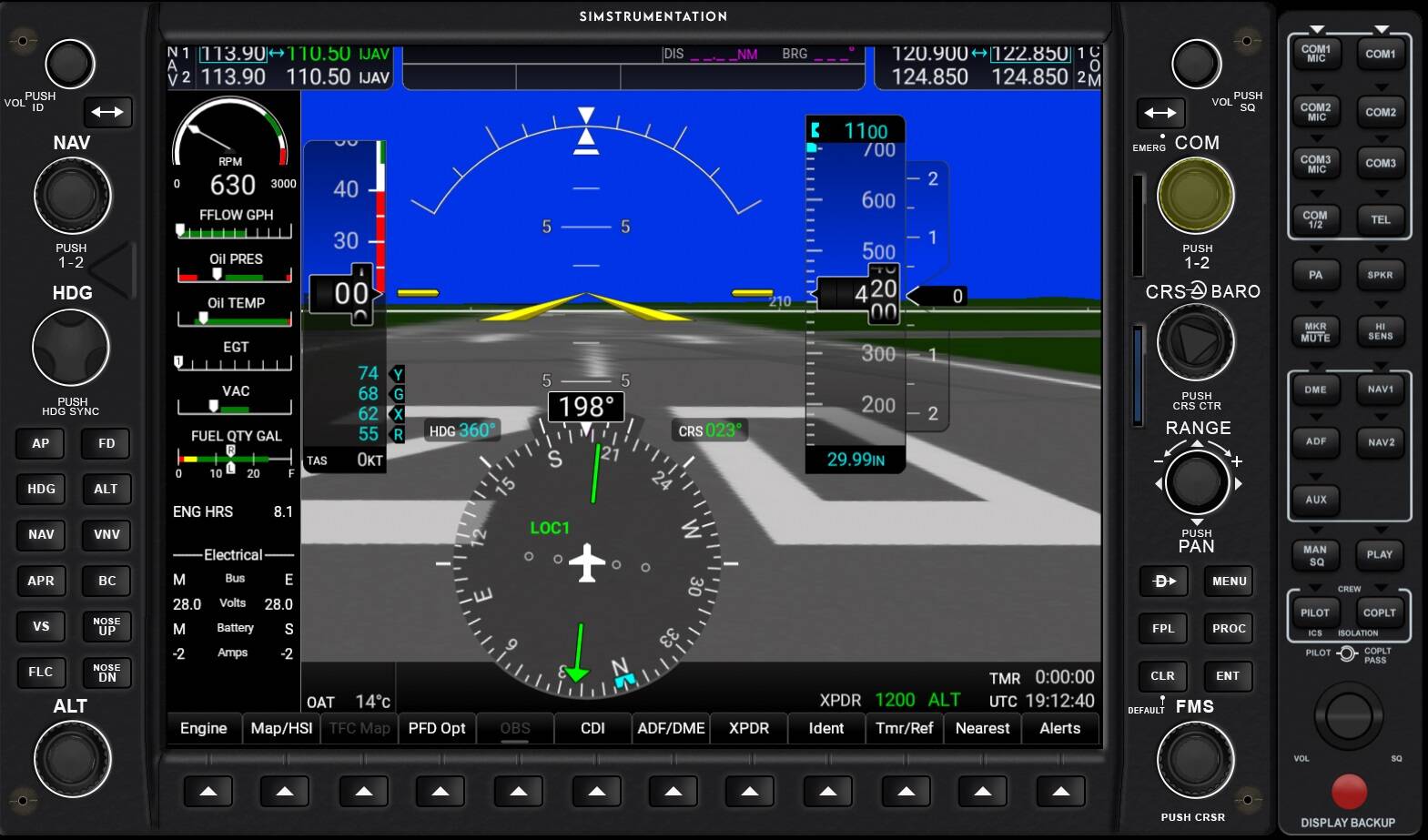
Perhaps they’ve fixed it recently and I wasn’t aware. I’ll check tomorrow and let you know. If they fixed this, I’ll add that function and submit the updated instrument to the Site Manager community store. I’ll also upload the updated panel to out GitHub for immediate download.