I found a really nice 4K 32" monitor to replace my old 32" non 4K monitor. It is this one - Dell S3221QS 32 Inch Curved 4K UHD (3840 x 2160), VA Ultra-Thin Bezel Monitor and here is a link to the Amazon web page.Amazon.com I figured I would pick it up now before the tariffs went into effect on April 2nd. I got it yesterday and spent a lot of time getting it tuned in. So far I am really happy with my purchase.
4 Likes
Hate to say it, but that 60Hz refresh rate would have been a deal-killer for me.
4ms response time isn’t awful, but mine is 1ms, and that makes a big difference.
If I sound critical, I’m not. And if it works for you, great!
1 Like
So a question comes to mind (go figure). I had the 64" Samsung Q80 before returning to MSFS and was playing Forza on Xbox. While not really in the market to replace it, I think the newer ones refresh up to 120Hz? And if that is correct, what would I gain in sim, experience-wise? Right now the new rig has no trouble making 58-60 native FPS with all settings on HIGH, 150/150, in TAA (no DLSS or FG needed). Not dissatisfied at 60Hz/fps, but curious.
That’s a good question, with a fairly generic answer:
You should get the highest refresh rate you can afford, they are typically better quality panels with lower response rates and lower input latency.
2 Likes
The big difference maker is HDR level.
OP’s monitor has HDR, but it’s HDR10 (properly called DisplayHDR 400.) Note the 300 nit brightness.
My 32" monitor (which truthfully cost more than most want to spend) is an HDR1000 panel, with 1000 nits, 144Hz refresh, and 1ms response.
HDR10 is certainly better than none at all. But HDR1000 (more properly called VESA DisplayHDR 1000, is an amazing leap in visual quality, with much deeper blacks and dynamic range than Display HDR 10.
OLED has even better black levels and colors, and the best have even faster refresh and response. But good OLED panels are still quite expensive.
3 Likes
Ah so. What kind of demands, if any, does HDR1000 make of the PC over HDR10?
None that I know of. It’s a panel specification.
Note that good OLED panels are rated for DisplayHDR True Black 400.
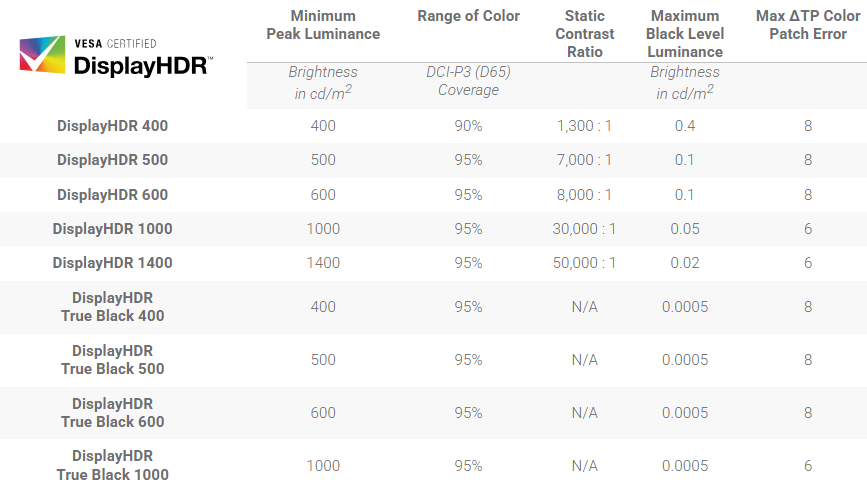
I’ve seen professional DisplayHDR True Black 1000 panels at a broadcast equipment conference. Unreal. So was the price. 
1 Like
“You get what you pay for”… except for with MSFS2024. I’ll see myself out! 
3 Likes
Sony BVM-HX310 31" 4K HDR TRIMASTER HX Professional Master Monitor
Only $19,999.00

1 Like
I’m a fan of my 65" Sony OLED. It was only $4k though.
2 Likes
The PC will treat them all roughly the same, except that when applying tone mapping to fit the maximum brightness of the screen it will be processed for the higher maximum reported by the fancier screen.
Having simmed on both a DisplayHDR 400-level monitor and a DisplayHDR 1000-level monitor, wow I can tell you it makes a difference in representing bright specular reflections and direct sunlight to have the higher maximums. 
On the downside, working with HDR10 mode at all complicates your workflow working with screenshots and recordings/streaming. 
(If you’re not going to activate HDR10 mode, then a DisplayHDR 400-level monitor is absolutely fine.)
1 Like
That’s for sure.
That’s true. But refresh rate (especially VRR) and response time are still at least somewhat important, right?
I imagine that looks amazing!
I am limited to a 32" monitor for my setup, I am also limited in what I can spend. Taking those two limitations into account I really like my new “under $400” monitor.
If I had an unlimited budget and had the space to have what I wanted I would probably think and act differently. FWIW
1 Like
And that’s all that really matters.
Depends. Some people are very sensitive to jitter and aren’t comfortable without super smoothness, other people can lock to 60 or even 30 and never notice the difference between any of the options.
Honestly I’m not at all sure I can tell the difference between VSYNC/60 and VRR/144, especially when the critical times for being able to see high motion are all rendering less than 45 fps at major airports.
Maybe I’m more sensitive than some to refresh, and especially smearing caused by slow response time.
2 Likes
I “suffer” from this “phenomenon” as my wife would call it. I have an MSI 34” that I was using, 1ms, but could see the smearing when moving around the cockpit. She could not see it.
Forced me to swap to a 24” 1080p .3ms acer to please my high refresh rate eyeballs. That being said, I still only run at 60hz 
To the OP, I wish you many smiles per hour on your new monitor. Always an exciting moment getting a new display and firing it up!
1 Like
They have zero point 3 ms ones now?! Wow! 
Shoot I think I saw a monitor with a .1ms response time.
0.3ms might be overkill for the sim but my eyes are happy.
1 Like