loving it so far. it’ fits in so well with the mystical island hopping vibe


Regarding this, yes I have it mapped to the following via axis. I’m sure the non-axis version works for buttons as well.

Honestly, it may not be quite as realistic, but (at least in 2020) the standard Prop Pitch axes work just fine. So now that I think about that, I suppose the prop increment/decrement bindings should work just as well. I just don’t know how granular you can get. You may get five notches between the limits or you may get 20.
@kaha300d Good find, thank you. I hadn’t considered hardware gauges. The master avionics switch on the overhead panels should disable the ADF when it’s off, but it was still working with the avionics switch on and “use modern avionics” selected on the clipboard. In the next update the ADF will be off when using modern. If it still works after that for you then there’s some simconnect witchcraft going on in the background. 
@nume00 The prop switches currently do not animate with propeller slider or key events, but I’m looking at binding some input events for them in the next update (if possible) so that “decrease/increase propeller pitch” and “decrease/increase propeller pitch (small)” will activate the switches.
In the short term, if you really want to drive the switches directly you can use axes & ohs, fsuipc, or other binding tools to set the following local variables…
XMLVAR_Prop_Switch_Mode_1
&
XMLVAR_Prop_Switch_Mode_2
#1 is the left propeller, #2 is the right prop. Setting the variable to 0 = decrease rpm, 1 = off, and 2 = increase rpm.
Hope that helps!
@SinfulDanTheMan Lovely shots!
Grumman HU-16 Albatross Italian Air Force 15-9 - MSFS Add-on - Flightsim.to Finally Italian Force
Since SU5 and the update. my trim isn’t working anymore. Neither the keybind nor actually moving the cockpit switches adjusts the elevator trim. I haven’t tested the rudder/aileron trims. Not seeing this in other aircraft (e.g. the Goose). Don’t know what mod/s could be conflicting… Anyone else seeing this issue, perchance?
@DaveR44 Hmm, that’s the first I’ve heard of that specific problem. Nothing was changed in any of the trim code in this update, but it’s not the first “weirdness” I’ve seen reported since SU5 went public.
I checked all the trims in both the HU16 and G111 just now using the current streamed version and they’re all working fine for me. Can you please try uninstalling the plane, clearing the rolling cache, and running the streamed version to see if that fixes the issue?
Also, if you turn on tooltips, does anything change there when you activate the switches? Obviously the master battery switch needs to be on and the elevator trim circuit breaker should be pushed in as well of course, but that one should be in by default.
Thanks for the work-around recommendation.  Would also be great to have native MSFS keybind support in the future if it is not too big a thing to implement.
I have a spring loaded three way switch in my setup that would work perfectly for that. Everything for the immersion, right!?  #armchairpilot
Thank you for the quick response, really appreciate it!
Me too. I’d like to know how this works in the real thing. Does the switch need to be tapped or can it be held? How many taps or how long to hold would it take from end to end?
@kaha300d The propeller RPM control switches are spring loaded momentary types. You have to hold them in place for continuous changes in governor setting. “Tapping” them adjusts the rpm by a small amount. The associated lights next to them will glow blue whenever the upper rpm limit or lower limit have been reached.
The flight manual for the real aircraft doesn’t say what the duration required for a full cycle from 1500 rpm to 2700 rpm is, but from videos I’ve watched it seems to be around 10-12 seconds, so that’s what I’ve set them to in the sim.
Cheers.
Thank you, that’s perfect then.
It was a mod conflict, as it turned out. I didn’t narrow it down to the specific one, but my suspicion is that it was the mod to the Aerosoft Twin Otter that lets it be used in 2024. All is well now. It was only the elevator trim that was affected, too - the rudder and aileron trim worked fine. Weird!
@DaveR44 Thanks for letting me know. Interesting. The pitch trim in the Albatross uses a default Asobo template, which is also used by probably a dozen or more default aircraft. If they’re overwriting that template with their mod it may have affected many more planes in the same way.
Anyway, glad that’s sorted out!
Cheers.
any recommendations for some good seabase addons to use with this bird? would be great to be able to island hop in the carribean or lake hop in the arctic between actually modeled docks water airports
I was just taking this for a spin around the Antarctic tip (opposite South America) the other day. Really interesting area.
There are some bases packs around: eg Antarctica Airfield Pack - Scenery Enhancements for MSFS | Flightsim.to
That said, who needs bases with this plane, you can land anywhere!
I just completed an eleven-hour (real-time, no sim-rate increases) flight across the Atlantic in the G-111. You can see the pics here. This was, by far, the longest flight for me in 2024.
It was a lot of fun - particularly the second half of the trip where I was flying through two storms systems (live weather & real time enabled for the flight).
I was a bit concerned about running out of fuel, but ended up with 282 gallons to spare (less the 18+ unusable gallons at the bottom of the six tanks) - about another 2 hours of flight-time.
Unlike other recent flights in the G-111, which were all in the 1-2 hour range where I left the fuel at the default 50% and was not concerned about fuel efficiency, for this flight I tried to be as fuel-efficient as possible and fly by-the-book (though - in the interest of time - my cruise MAP was 35 rather than 30), but would not have made the 2,300 NM that the G-111 with drops tanks is shown to be able to achieve - at my fuel burn rate, I calculate that I’d have run out at around 1,970 NM. My flying skills clearly need some improvement here!
[Edit: I’d also add that at the end of my flight, the floor of the cabin was amazingly clean - not a peanut shell, candy wrapper, empty crisp packet or puddle of spilt coffee to be seen:
Perhaps @Ramasurinen could use the same “window bug technology” available in MSFS 2024 to correct this!!!

@SmotheryVase665 Well done, that’s quite a run!
I’ve done a few of those in real time during testing, but usually overnight while I slept.
It’s that 35" manifold pressure that tanked your economy a bit. If you’re aiming for absolute max range you need to be at 30", mixture just a little lean of peak, rpm around 2000, and with a consistent 110-115 gph. Make sure those cowl flaps are as closed as possible (hard in the tropics) and landing lights are retracted as well.
At that point it’s just down to wind. Even a slight headwind can ruin the whole plan over that kind of distance, and if you do encounter one it may be better to descend and accept a slight loss of TAS bonus to get a significant reduction in headwind. In a plane this speed its more about eking out every knot of advantage at economy settings, rather than pushing the engines harder to reduce the duration of time spent in a headwind… which will still be forever no matter what you do.
Looking forward to where you end up next!
Cheers.
@Ramasurinen Can you give me some insight into carb heating?
Context:
I’m not a rivet counter but I do like playing the “tune the engines so they don’t break” game if a plane supports it, like this one.
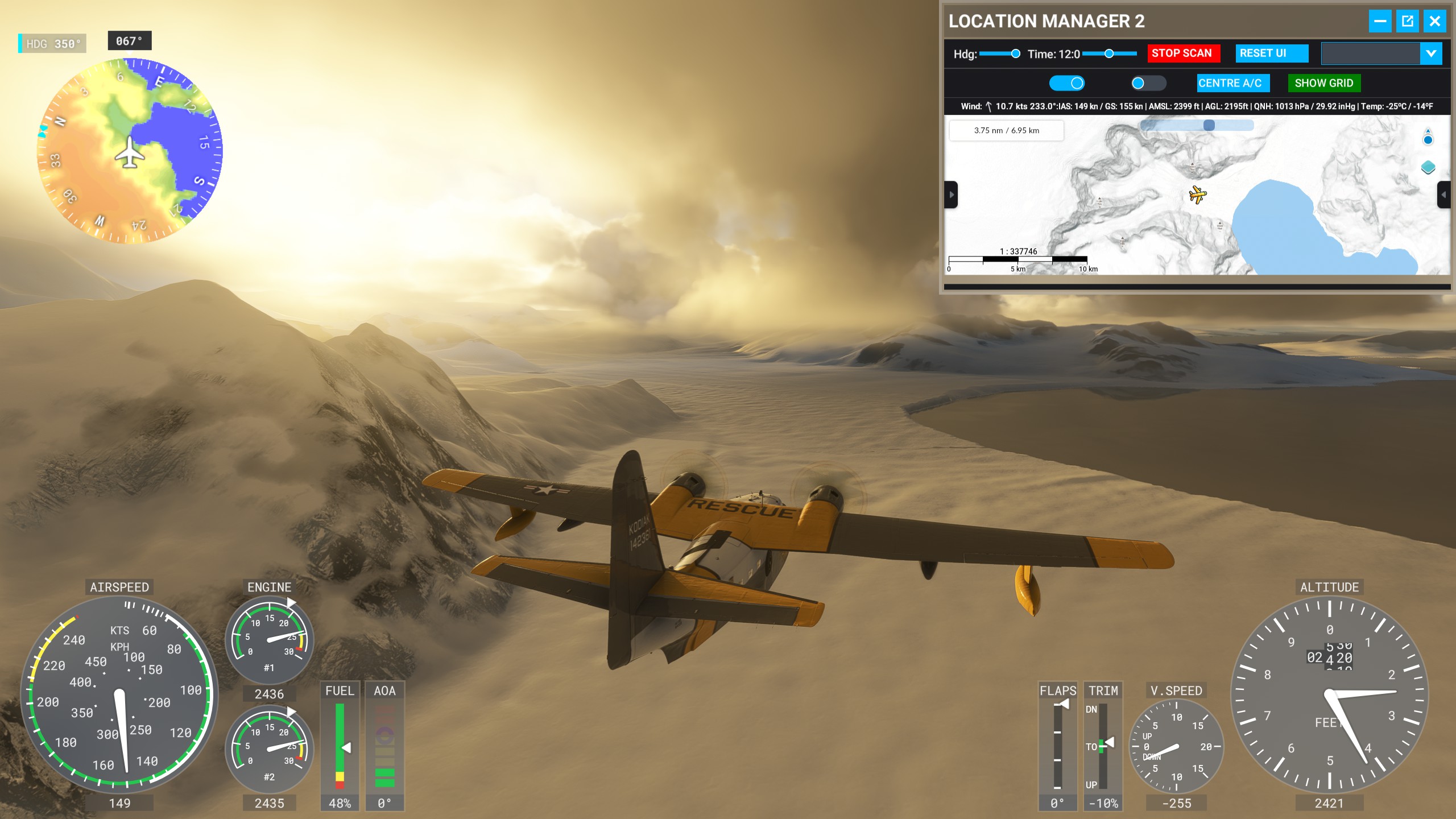
In my recent Antarctic flight Grumman Albatross HU-16/G111 Thread - #1390 by Sonicviz I was using it to learn this aspect.
Took me a while to find the carb heat (should have RTFM’d it, 2 demerit points for me), and here’s a shot below when they were off.
You can see the outside temp top right in LM2 panel vs the middle carb air temp, which appear to be the same ~-28C. (how come a US plane is metric in temps btw?)
This was live weather setting.
After I found carb heat controls (about middle of panel) the temps managed to get to the top of the yellow zone ~ 0 degrees I guess (didn’t get a screenshot, but I was checking it a lot to see the effect).
Q: What’s the expectation of the carb heat range controls and how does it relate to outside temps?
I know this was a pretty extreme temp scenario, but it just got me wondering.
Thanks for the cool plane too!
I did check the manual, but it doesn’t go into specifics.
Was just curious about the modelling aspect.
@Sonicviz Well, it’s quite a complex general topic, and I’m def not an expert in this area (maybe one can chime in!), but the basic idea with monitoring carb temps, is that there’s a specific range of temperatures (roughly -5c to +15 C) where ice can form inside the inlet and carburetor, particularly with a partially closed throttle valve (due to temperature dropping behind the valve from rapid expansion of the air). Unchecked and uncorrected this can suffocate the engine.
Within that temp range the humidity of the air is also crucial. Carb icing is normally more an issue near or in the tropics, but is less of a problem the closer you get to the poles, due to the much colder and hence typically drier air. That’s a tendency though, not a rule.
In your case, with an intake temp of -28 C there’s basically zero concern of carb icing. Most of the water vapour in the air has already been forced out and into ice crystals at that temp, which just pass right through the intake without issue. The funny thing here is that turning on full carb heat might get you into the yellow zone, which could actually induce carb icing, though likely very little.
The sim isn’t exactly excellent at modeling carb ice, but in reality you’re most likely to encounter it during taxiing and long descents, where your throttle is at a nearly closed setting for an extended period of time. Even in carb icing temperatures, if your throttles are at least 3/4 open, you’re unlikely to encounter it.
I’ve only ever experienced it twice in real flying, once in a c172 while taxiing in the rain, and once in an RV-7 during a long descent over the water. Both situations were quite humid.
Short version, if you’re in the yellow temp arc, keep the throttles open or apply some carb heat to get it into the green. If you’re above the carb temp redline you have bigger problems, and if you’re below -10C you likely don’t have much to worry about.
Cheers.
Ah, really interesting. Thanks.
It seems like carbs could use a moisture sensor then, so you don’t have to rely on heuristics, but I guess with real experience you’d figure that out by actually feeling the atmosphere anyway.
Edit: Just realized I’d also saved a previous useful reply on carb heat @ Grumman Albatross HU-16/G111 Thread - #409 by Ramasurinen