@MeerkatADV You’ll need to have “Realistic Engine Limits” checked on the options clipboard in the plane (to the left of pilot’s seat) for the engine damage modeling to work. It’s not using any of the sim’s default engine damage stuff.
Rough limits are 46" MAP and 2500 rpm for continuous operation. Going well above either of those for longer than 5 minutes can result in damage.
@MeerkatADV
A copy of the v2.3.2 manual has been sent to the Community Managers. Hopefully they will have time to upload it to the manuals website before heading out to FXExpo next week.
One thing that still appears to be missing from this otherwise incredibly complete aircraft is an adequate performance JSON file to allow the default flight planner to properly plan for the Albatross. Is that something we can expect in a future update, or is that not planned?
That is very close to the route I am flying currently in the G111 though I started at my virtual home away from home GCLA in the Canary Islands.
Definitely a very cool map for something that most of us dream of doing when we get a PPL in real life, and just about none of us ever get to do.
I have done a few circumnavigations but typically I would switch aircraft on occasion or with piston airliners with much longer legs.
@Zadma Ok, so I spent most of the weekend working on this issue, and I have to say it’s been an unexpectedly frustrating process. The SDK docs conflict with reality in a few places, and none of it really seems to work properly.
I’ve created all the data in the flight_performance.cfg, which is where the web flight planner json stuff comes from, but until that data is consumed and converted during marketplace ingestion, there’s no way to test if any of it actually works. Even the default DA62 SDK sample can’t test its own performance data in the EFB when run locally, which I just don’t understand the rationale behind.
I tried converting it manually to the json format that the web flight planner calls for, using their provided template, created a copy of the existing Albatross entries there, and uploaded my custom json, but that doesn’t work either, despite saying the upload was successful. From browsing the WT discord there is apparently some very convoluted workaround to get it to show up that way, maybe, but I can’t afford to spend a week on this one thing.
That whole performance cfg / json system is honestly… as we say in Canada… kind of “a dog’s breakfast” at the moment.
So, long story short, I’ve added the correct performance data and multiple presets for climb and cruise, and those will be included in the next Albatross update, but I probably won’t know if they actually worked or not until it gets through testing and shows up on the marketplace.
I really appreciate your work and the feedback that hopefully reaches the right people! I did share this post with the fellas over at Working Title so hopefully some progress can be made. Thanks again!
The only requirement is that it works locally in the EFB in the sim. As long as it works there, then it will also work on the web planner, as they use the same code to parse the data. The sim API serves the data to the EFB in the same JSON format.
There is no need to make an alternate version for testing on the web. As long as you follow the SDK documentation for the CFG file, and confirm that it works in the EFB planner app (i.e. you see your profiles showing up correctly in the performance page), then that’s all you need to do.
If the SDK documentation has errors for the CFG file, please let us know, but also take note that the JSON format on the web planner for end users to add their own planes is not the thing being documented there. That’s not really intended to developers, that’s just an end user feature. The CFG file is the developer target, and can be confirmed as OK by testing in-sim.
I may be missing something here, but the “local” part seems to be the problem. For instance, when running the streamed DA62, the EFB shows its performance presets for climb and cruise etc (from its flight_performance.cfg file) correctly on the performance tab.
However, if you compile and run the DA62 SDK project then the performance data doesn’t show up in the EFB at all, despite having the exact same file structure and data.
I think this is another feature that is only enabled during the marketplace ingestion process, like showing the “landing surface” type on the aircraft configuration screen.
I am in an odd position where I am currently unable to test my work in the streaming environment until it has been released, so I don’t seem to have any way to see if my data is correct.
I’m not sure exactly why the sample project doesn’t load (there was another report of that recently), but we do all our (WT) testing of performance data locally. As the developers who built this feature, I can confirm that ingestion is not required for the sim to read the CFG and give the data to the EFB; the EFB doesn’t read any of it from the cloud and the sim loads it from the local file.
@Bishop398 Well, that’s a mystery then! I even tried copying the default C172 G1000 performance cfg data into my plane, which is pretty simple overall, and nada… nothing shows up in the EFB.
Something is amiss.
Oh, while I have you!.. speaking of the G1000… would there be any chance of getting PFD indexes working correctly with the simattachment G1000 PFD in 2024? As it stands the inputs for PFD index are still present in the simattacment G1000’s xml, but there’s no way to pass an index parameter to it in the sim_attachment block in the attached_objects.cfg. You can pass parameters for potentiometers and circuit etc, but not the index.
The issue is that, without indexing, in a two PFD + one MFD setup, the knobs and buttons on both PFDs will animate when you actuate either one, the knob and button sounds play two copies at the same time (or bug out entirely), and the warning and alert flags (low oil press etc) display twice on each PFD.
In 2020 the indexing worked fine, but with simattachments it’s still broken. As far as I know this only affects the Cessna Caravan and my Grumman G111, but it’s been a sticky bug for awhile now.
Unfortunately no, the NXi has only ever supported a single PFD. Dual independent PFDs are not supported, just single mirrored PFD.
When another developer had this problem, it was a sim attachment merge issue of some kind. Perhaps there’s a rogue flight_performance.cfg in another location in the project?
I can take a look at the file if you want and try it here as well.
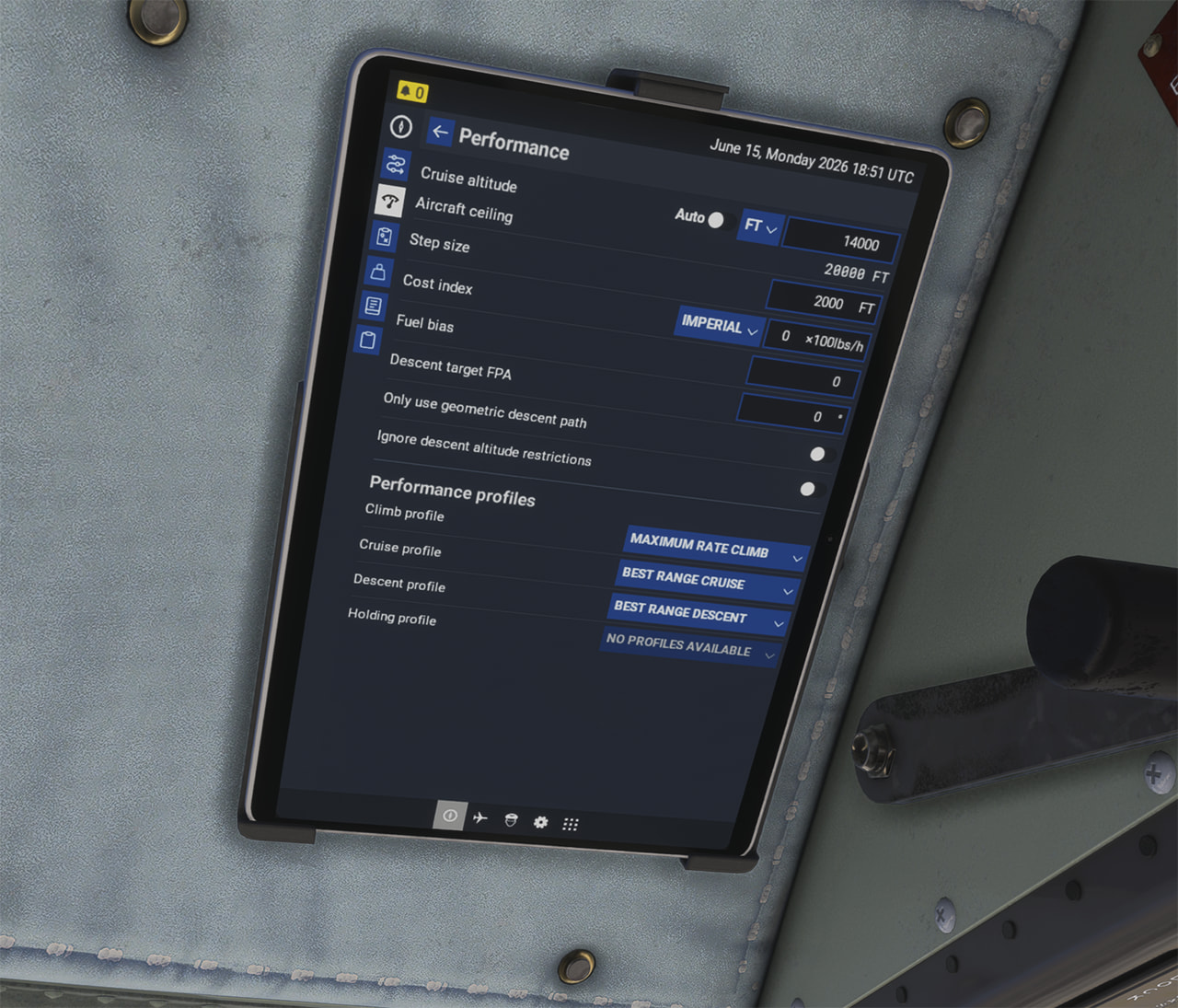
@Zadma Thanks to Matt’s (@Bishop398) very kind assistance I have the performance profiles working in the EFB now.
Seems that the SDK’s sample performance data file is incorrect, but the SDK documentation is correct.
The Albatrosses will have performance profiles for “Maximum Rate Climb”, “Best Range Climb” and “Best Range Cruise” in the next update. I think the web flight planner should automatically populate with the new profiles after the update goes live, probably with Sim Update 6.