Has FS2020 Solved these Problems?

I purchased and tried FS2020 on day 1. After several attempts to use it, even after several sim updates, I stopped and went back to FSX, in spite of loving the graphgics of FS2020, because of missing features and problems that FSX had incorporated or solved long ago. So, having not used FS2020 for a couple of years, I am wondering if these things have gotten better. I appreciate any response.

1- the difficulty in using knobs, buttons, etc. in the small, condensed 3D cockpit view, especially with even normal turbulence.
This was a big one for me. In FSX, when turbulence is present (even in normal mostly calm conditions) the outside view would move or shake, not the cockpit. So adjusting autopilot settings, turning knobs, tuning radios, etc. was not issue. When I tried FS2020, the shaking/moving was seen in the cockpit, not the outside view, and the mouse cursor often wouldn’t stay in the right spot to make the change or press a button.

2- Lack of 2D Panels (not cheesy ones but highly accurate ones, which were present towards the end of FSX development).
3D Panels are undoubtedly beautiful and realistic, but very hard to see and use. Yes, you can zoom in, program gauges and windows to open up, but doing so obscures outside views and takes away being able to see the whole cockpit at once, which for me is essential to flying and making quick decisions.

3- Usable ATC.
I know the terminolgy of the ATC in FSX was not 100% accurate and it lacked the details of real life ATC, lacked STAR and SID implimentation, but it still worked well. On an IFR flight, it almost always got me there, lined up with ILS or with the runway, and never had me flying into obstacles. I found FS2020 ATC to be terrible. I don’t want to have to pay or install exterior programs to have what is an essential part of flightsimming.

4- Airlines (and complex aircraft) that work fairly accurately without having to be study-level.
I enjoyed flying airlines in FSX. The systems, autoplilot, etc were admittedly dumbed down but enjoyable and a good “stepping stone” to the more accurate study-level aircraft that could be downloaded, either free or payware. I don’t always want to be forced to read a 100 page manual or learn the complex FMS computers every time I fly a big bird. I don’t want to always go through the entire startup procedure. There has to be a balance between 100% accuracy and user friendliness. At least give us a choice.

5- Raising or lowering the seat/angle of view.
FSX allowed you to change the angle/perspective of the view from the cockpit seat so that you could look more downward when coming in for landings, see the runway even in a high profile front of plane. It was continuously adjustable with Ctl Q or Ctl/shift Q. It was a very usable feature. In FS2020, when the nose pointed straight or slightly upward, all you see is sky.

6- Finally, outside view. The “W” key in FSX. FS2020’s claim to fame is its rendition of the world. I want to see the landscape, but not from a different or outside-the-plane perspective. It should be easy to completely hide the aircraft and just see the outside view, from the same zoom and perspective as the cockpit seat. (Who wants to set up custom camera views for each aircraft (and still not get the same effect as FSX offered.)?

Like I stated earlier, I have not bothered to do the last updates for over a year, having been so frustrated, so maybe things have gotten better. If so, let me know.
I am excited about FS2024 in November. However, no matter what the visual improvements, if these things are are still not as good as they were in FSX, I will probably pass.

Pete
2 Likes

1 - The cockpit still shakes. I think they may have done something to allow the mouse cursor to be more ‘sticky’ but I don’t use a mouse in the cockpit, so I’ll leave that to others to comment on.

2 - No change, 2D panels (other than pop-outs for glass displays) are not supported. Air Manager is your best bet for this.

3 - Essentially no improvement. There’s a growing set of alternative ATC systems which all have pros and cons. Beyond ATC is causing some excitement right now.

4 - It depends on what you think is too much effort; the PMDG 737 range doesn’t seem overly complex to me even if it could be considered study-level. You can shortcut the start procedure from the FMS and go straight to ready to taxi, for example. There’s the FSS E-Jets which are getting closer to being complete. A lot of people seem to like Just Flight’s BAe 146 and the Avro RJ is coming soon.

5 - You can raise your eyepoint and then tilt the camera down, which will give you what you’re talking about (within reason) and save it as a custom view for easy switching.

6 - No. This is on the wishlist but no indication that it’ll be done any time soon or for 2024.

1 Like

I appreciate the response. Thank you!

I am curious about your statement that you do not use the mouse. How do you select various buttons, dials, etc?

OP you have been given some good answers. I just wanted to add that I totally agree with you on Point #2. I despise 3D cockpits. I long for the days of good 2D cockpits.

  1. to me one of the most infuriating things about FS. Yes there are some options to reduce the movement but it is still there. And even in turbulence that knocked panels loose in a old 206 I ha no trouble tuning a radio frequency. This is programmed by someone who simply has never actually flown an airplane.
  2. no 2D panels.
  3. small improvements to the built in ATC, but it is not even as „good“ as the FSX ATC was in many ways. There is however an option in the form of an external application.
  4. I don’t fly airliners often enough, but the PMDG 737 is pretty much perfect as well as the Fokker F27. But they do require a little bit of getting used to them.
  5. I assigned a key on the keypad to move the eyepoint up and down. Not sure if that is what you are looking for.
  6. Not that I know of, but I honestly never looked for it. I fly airplanes in FS
from where you normally fly airplanes, the seat in the front office.

None of the things you ask about have changed in MSFS 2020 since its release, really.

We don’t know what will happen in the upcoming MSFS 2024 release, but I wouldn’t particularly expect most of these to be addressed to your satisfaction.

1 Like

I doubt that we will ever see 2D panels in future flight sims. They existed in the older sims because there weren’t modeled interiors of the aircraft. Which is also the same reason that item no. 6 will probably not happen either.

It’s a niche feature for modern sims. I would be interested to hear what the devs would say. Have you submitted any questions about these topics for the developer’s live stream?

1 Like

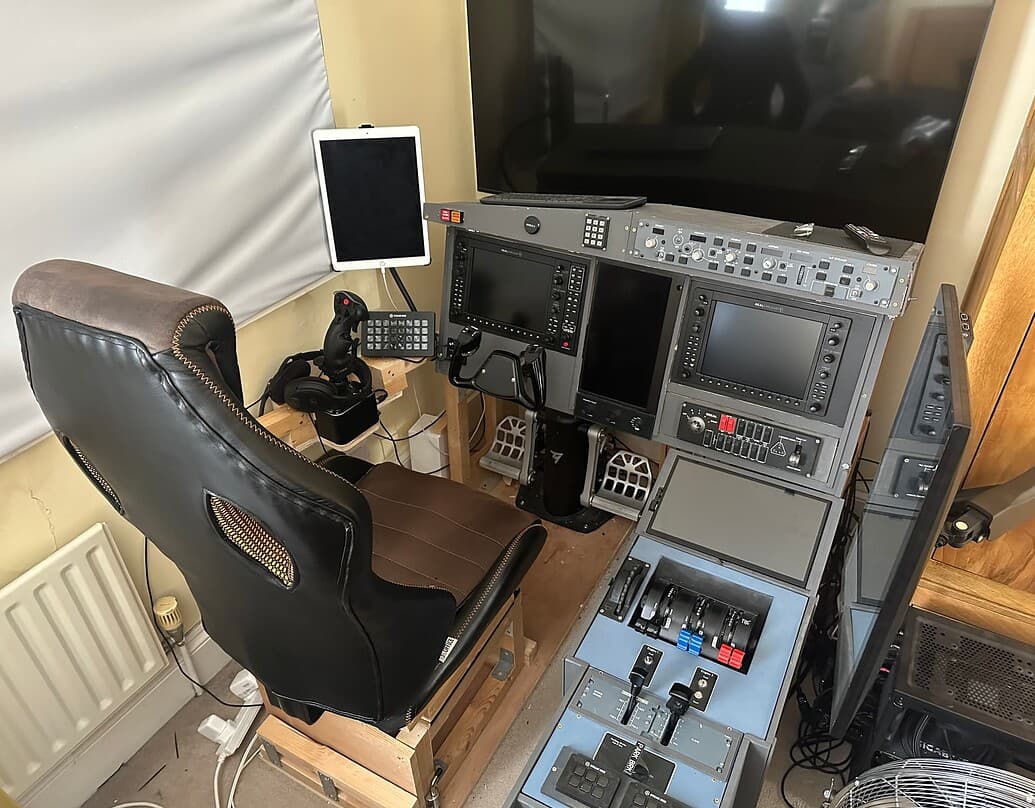
Generally I have everything either bound to hardware controls, or I use Air Manager panels on touch-screens. Bear in mind I have a home cockpit setup with 6 screens + an iPad. There’s no desk, and using a keyboard or mouse requires me to physically fetch it from its storage place on top of the glareshield and is somewhat immersion-breaking, so I try to do it as little as possible.

2 Likes

There’s more than one kind of 2D panel, though. I agree that a 3D modelled interior is better if your goal is to look around in 3D space and point and click with a mouse. Older pre-Virtual Cockpit sims used 2D panels and keybinds because there was no viable alternative. Those machines simply didn’t have the horsepower to render a fully modelled 3D cockpit interior.

But 2D pop-up panels, where you can take an entire panel or section thereof that exists in the 3D VC and get a 2D version of it that you can place on another monitor (ideally a touch-screen) as a way to access the cockpit controls while you have a cockpit-free outside view on your main screen/s (something you still can’t do in MSFS either), are very useful for home cockpit setups. That they don’t exist in MSFS is the whole reason Air Manager is doing as well as it is, but AM is a sub-optimal solution for a problem that was already solved in FSX and then un-solved in MSFS. The MSFS glass display pop-outs are not a replacement for that. Asobo should just re-solve the problem the FSX way.

Not saying it wouldn’t be useful for cockpit builders. It’s just that the older sims were built that way, and then the 3D VCs were added after. MSFS is a new engine that was built around 3D, and the 2D has to be added. I have no idea what kind of undertaking it would be, but the developers would have to build 2 versions of whatever panel, for a small number of users.

I get where you are coming from. As a helisimmer primarily, I feel your pain of being in the minority of the user group


They shouldn’t have to. All they would need to do is indicate the boundaries of the panel as a portion of the 3D cockpit model. The sim could do the hard job of working out how to re-project that portion of the scene as a 2D object. In effect, it would be like creating a camera positioned directly above that portion of the cockpit on an axis perpendicular to the surface. You would replace the lighting with a light source directly above that is tuned to the ambient light value in the scene, so when it’s dark (with no interior lights on) then the panel would be dark as well.

In fact, in P3D for aircraft without 2D pop-ups (which is most of them, these days) the common solution was to use Chaseplane (a camera utility) to create just such a camera and then add a new view window undocked to another monitor that displays that camera. And since in FSX/P3D all cameras support touch interaction for any element on them, this just works as a 2D panel.

The key here is the ability to a) create as many view windows as you want, b) position them wherever you need, c) display the view from any camera on each one, and d) enable mouse + touch support for all view windows. These are all things FSX and P3D can do, and all things MSFS cannot do. The one thing MSFS has tried to do, which is a) above, doesn’t allow you to do b, c or d, which makes it pretty useless beyond the single case of multiple outside views from the same camera position.

At the risk of going on and on, the main difference is that what FSX/P3D can do wasn’t strictly designed that way. It was simply a consequence of extending a model that already existed, of previous good choices by the developers that enabled more advanced use cases later as hardware evolved. To some extent that’s just good fortune but it’s also a result of the developers defaulting to open and extensible solutions. MSFS was designed by a game studio, whose primary experience is making games to be played on a single screen on PC and Xbox with a separate non-Windows UI. This, I feel, is why they made such different decisions, and now it’s probably too late to revisit the fundamental design of the sim.

I think that’s a real shame, and a missed opportunity to serve an admittedly minority group without in any way disadvantaging the majority.

1 Like

3D view too condensed ? It sounds like you are trying to get a similar view as what you used to get in FS9 with a 2D front cockpit, which means your view is actually way too much zoomed out.
With a 3D panel, on a single monitor, you’re not supposed to see all of your front cockpit and expect a correct view of the outside. You’re supposed to pan your view around with a much higher zoom that goes closer to a real world perspective/proportions.
You might actually want to start using something like a TrackIR. And if you want more current tech, a VR headset which is actually the only way to get a real 1:1 view on the cockpit.

Excepted that, I confirm the shaking of the cockpit is still there. It has never bothered me though. I’m flying using a VR headset and I use exclusively the mouse to interact with the cockpit buttons/knobs.

2D panels are nice for cockpit builders, I can understand that. They don’t exist in MSFS. However, I have seen some cockpit builders using MSFS so there must be alternatives :slight_smile:

I haven’t used the MSFS ATC in a while
 Last time I tried, I believe it could guide me just like FSX ATC used to do, but that was a while ago, I honestly can’t say how it is in its present state :confused:

The default liners in MSFS are already much better than the default FSX ones. Far from perfect and full of shortcomings, of course, but quite nice already. I enjoy the default 747 quite a lot. And no matter if it’s study level or not, you don’t need to program an FMS to get the aircraft airborne.
I’m pretty sure you can find any level you need. Payware or freeware (or default :wink: ).

You get exactly the same view controls in MSFS than what you had in FSX. It’s just the key combos that might be different (something based on the arrow keys and the CTRL or SHIFT keys, typically). No problems here. And again, you should really consider some more “modern” view control, like a TrackIR or a VR headset, for a more realistic experience.

1 Like

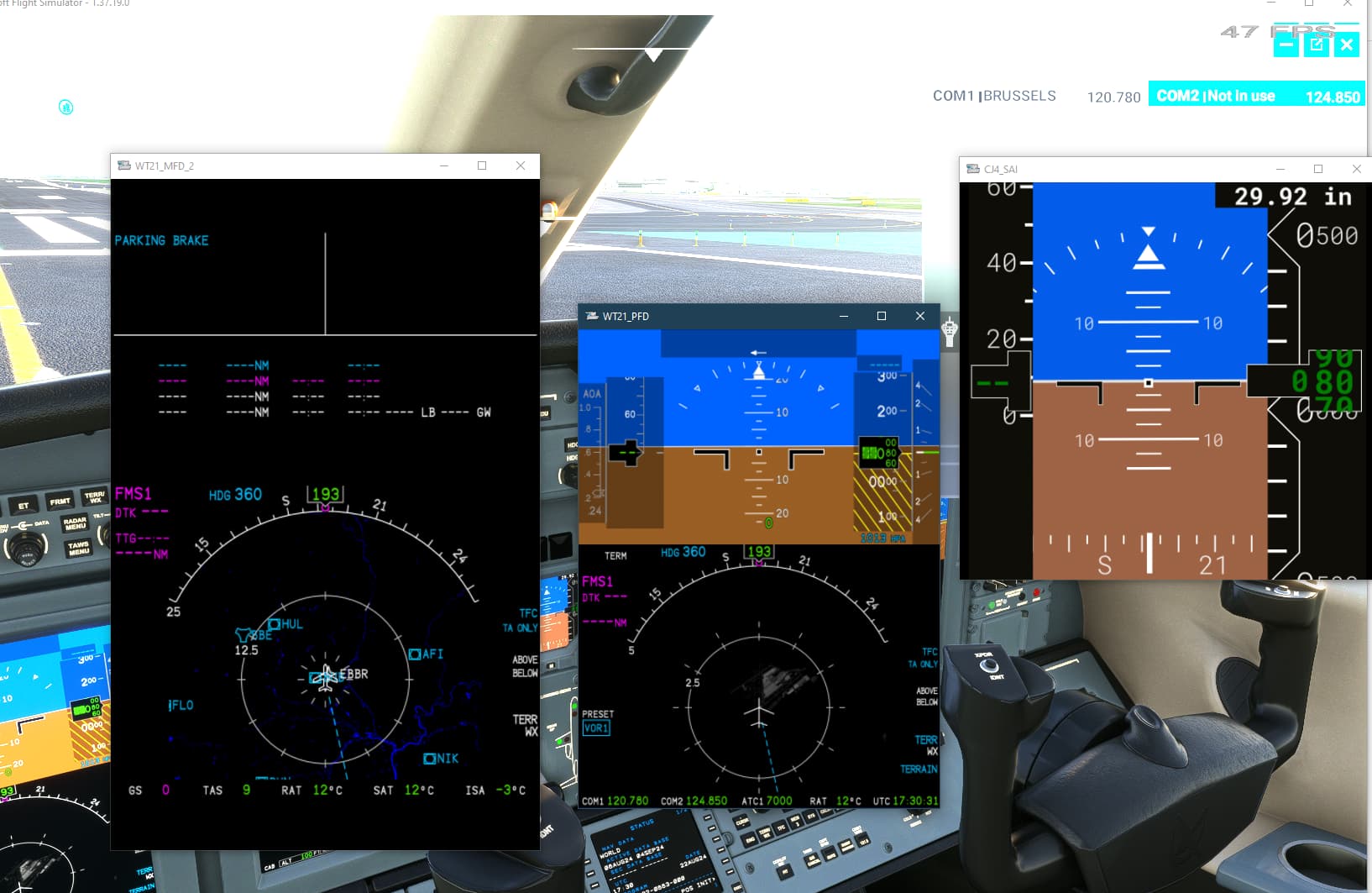
I thought I’d point out something I learned recently, in case others may not have known: you can (Right ALT)+(Left Click) some of the glass cockpit PFD/MFD panels to pop them out (note that it does not work with the Left ALT key, I just pulled my hair out trying to figure out why it wasn’t working). You should see the mouse pointer turn into a magnifying glass.

2 Likes

You don’t get the bezels for instruments, though. So you can pop out the display of a GDU10xx but you can’t control it using touch without something like Air Manager. You also can’t pop out anything that isn’t a glass display (specifically, it only works with CoherentGT drawing surfaces), so switch panels and other kinds of control panel can’t ever work like this as it stands.

Not good enough by any measure IMHO.

With the exception of ATC, I think it is a bit harsh describing these as problems. They seem to be design features (wishlist) items not in MSFS. Not broken items in MSFS. There have been a number of ATC fixes and improvements delivered recently. Today’s ATC is not your dad’s ATC.

I urge you to become active in the community, update the Wishlist with missing features, and find others to support you.

“I urge you to become active in the community, update the Wishlist with missing features, and find others to support you.”

And I have done all those things. It’s a great community here and I’m always learning.

I am back to using FSX because of the things I mentioned but I will try 2024 when it is released, and try to live with a few things I miss from FSX. The ATC and the cockpit moving from under the mouse cursor, due to the way 2020 displays turbulence, are the big ones for me.

Maybe 2024 will have some improvements there.

This topic was automatically closed 365 days after the last reply. New replies are no longer allowed.