Probably not trashed, but… the issue is either hardware, or software / corrupt settings. So just have to be methodical trying to eliminate possibilities:
Did you check for Xbox Updates?
When MSFS crashes, are the fans running loudly?
Try any other “heavy” game to stress the cpu?
Try unplugging Xbox from power for a few hours?
As I said, it’s possible the thermal paste is dried out and the CPU (SoC) is no longer being cooled properly, causing a thermal shutdown, but I’m just guessing.
Just watched your video posted above - that’s very frustrating. Try putting the Xbox on its side (so both ends are open to the air? What happens if you launch the game, the unplug the ethernet cable (so that it can’t go online)? I would try everything…
I remember that a loooong time ago I helped someone with a similar problem, not on a forum though. I don’t exactly remember what their issue was, but it was similar. I’m not sure if the OP plays or used to play on Windows, but back then I helped someone by turning off synchronization between devices using the same Microsoft account. I did it through Windows Settings > Accounts > Windows Backup, and there I permanently disabled the sync (I set everything to off permanently).
OK, but if it’s not working, I suggest trying anything.
Your video shows it resuming a download - did it crash while re-installing the first time, and now it is resuming? That’s a bad sign, and in my experience that is when data corruption can occur because xbox can run out of memory. Are you installing just the base game? When it opens the first time, don’t download the extra content - the idea is to install the minimum to just get it able to boot…
So if it crashed during the first install process, I would actually start again…
Here are a few more ideas - the steps I would do if it was me:
on your computer go to Xbox.com and sign in to your account
from the upper right click on your GamerTag > Xbox Profile
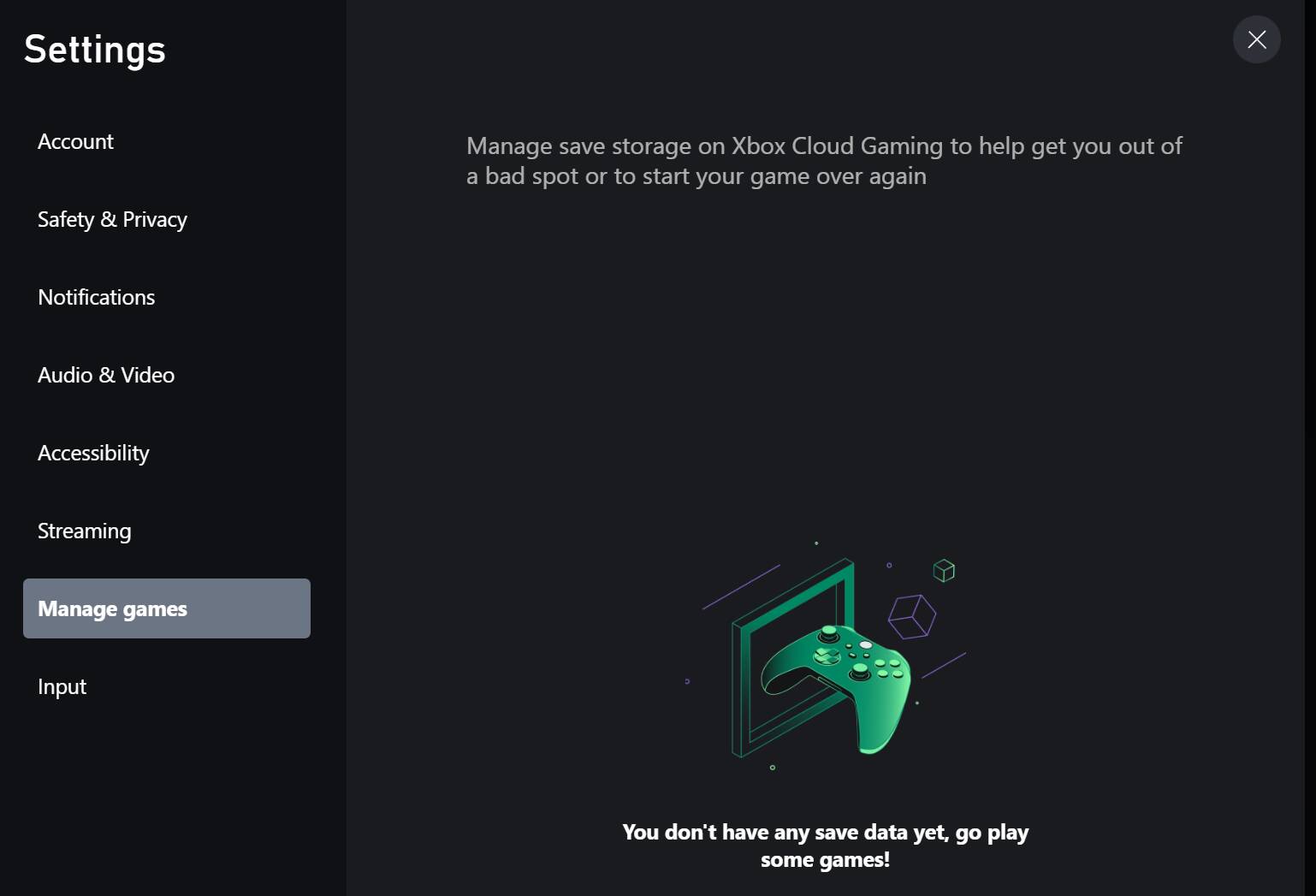
This takes you to the Xbox Cloud Gaming page, click on Settings
In the Settings pane, click on Manage Games - it’s possible there is a cloud gaming session there that needs to be deleted?
Finally, this would be the nuclear option - to really, really delete everything, as if your xbox was new to you:
If you are enrolled in Xbox Insider Hub, unenroll
Then delete Cloud Save data on Xbox
Then uninstall MSFS from Xbox
Then factory reset Xbox, making sure to Reset and Remove Everything
But do NOT sign in when it reboots… just shut it down for now…
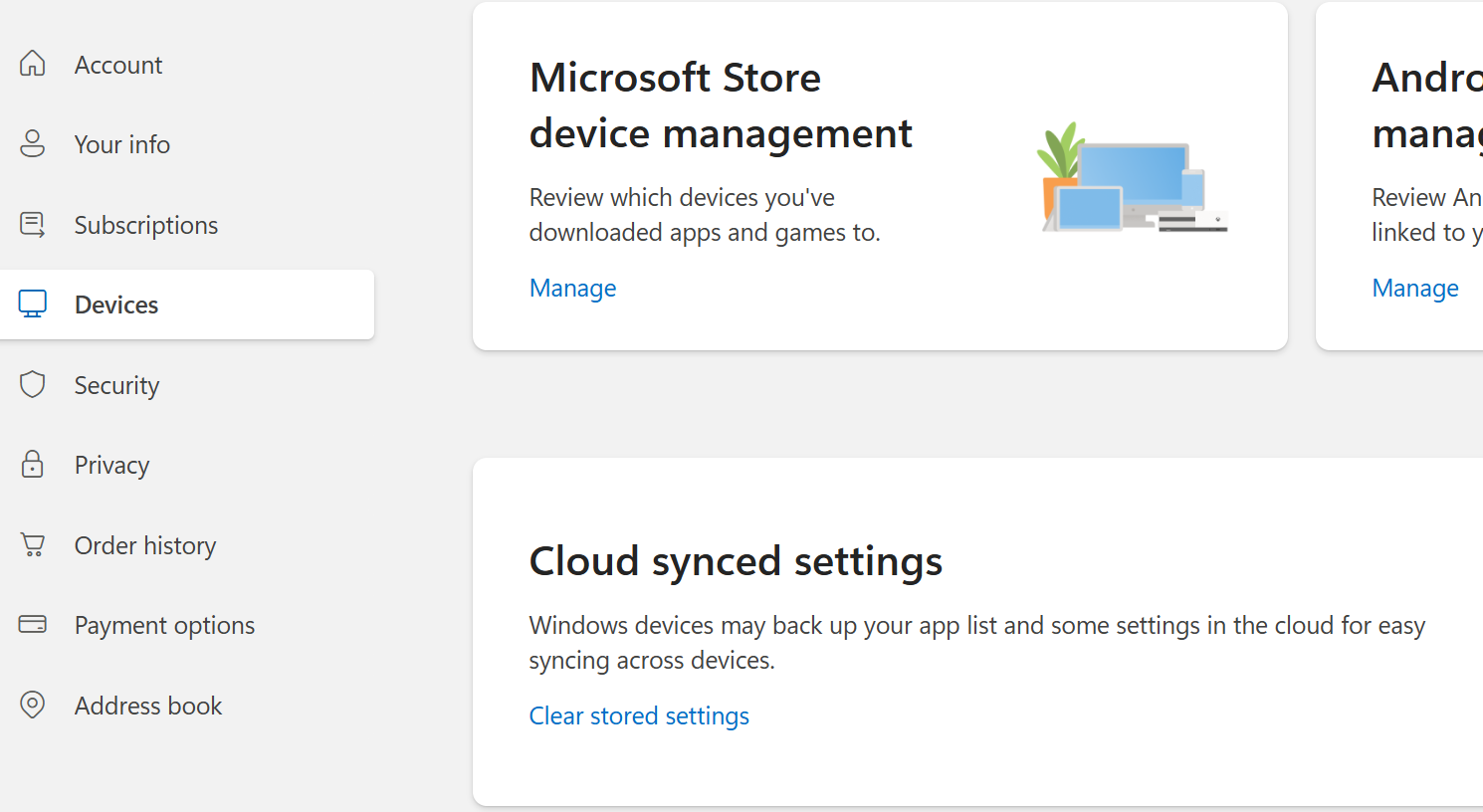
Now I would go to the Microsoft.com website on your computer, sign in, click on your name in the upper right, and go to Manage my Account > Devices
Here you can check what devices are linked on your account, and maybe remove the Xbox, so it can join again as if new
Also on the same page at the bottom is an option to clear “Cloud synced settings” - which would include cloud saved settings of all devices connected to your account. For example, if I reset my PC, during the Windows setup, it offers to restore PC settings from this cloud save, so I have learned to go here to delete first it when I really want to start things from new.
Having done all that - so that there is no history of the xbox in your account, boot the xbox, and sign in.
Be sure to select the correct Region !!
and make sure you are not using a VPN !!
When it starts up the first time, and offers additional content - do NOT install extra content at this stage.
Just install the minimum so it has the best chance of getting to the main screen.
IF you actually get to this point, another tip learned the hard way: If you load extra content from the Content Manager - like Premium, or World Updates - only install 1 at a time. The Xbox is memory limited, and I always had data corruption if I tried to get it to install more than one add on at a time. For good measure, I would reboot after downloading 3 large addons.
Hi there guys…sorry I couldn’t answer before: had been very busy in the past hours.
As for the questions you asked me here’s some clue:
Xbox is update to the last available update
When fs crashes the fan works as always, no speed raising or something strange compared to normal operation
Didn’t try any heavy load game yet, will Tru something in the next days
Tried to take the net cable for some times, even more than hour
I’m beginning to suspect that this is a hardware issue. So I will try checking in with some sort of support which I hope they will do some benchmark test to see that everything is ok. Could it be, maybe, the cpu, that react erratically when put to work at a certain level? Maybe the RAM?
XBox uses an AMD “Project Scarlett” System on a Chip, with CPU, GPU and shared RAM all integrated as part of the same chip.
Here’s another idea to help determine if it is somehow settings/account related, or if it is hardware:
Reset Xbox
Create a new Xbox identity unrelated to your existing one, just for a test, and subscribe (or free trial?) for Xbox Game Pass. Install MSFS that way. If it loads for the other account, but not for your account, that helps determine if it is hardware or software/settings.
I had a similar issue a few months ago, ctds during msfs-2020 loading.
My advice.
Unplug ALL peripherals before turning on xbox.
Boot xbox.
Go to “My Games & Apps” and check for no partially complete updates.
Clear any update pending list.
Restart xbox.
Go into Youtube app, watch a video for 10-15mins.
If no issue reset xbox and plug in peripherals then boot xbox.
Watch another YT video. If no issue load MSFS.
If MSFS crashes deinstall MSFS (not saved data file).
Reboot xbox, reinstall MSFS and sync cloud data.
Should work fine.
If not its a hardware issue contact xbox support via the help app
Thanks guys…I contacted xbox support and have to say they took great care of my case, not the usual useless advices. They told me this is not a hardware issue, according to what I explained. In addition they asked me to make an additional test, which is using xbox and furthermore fs2020 with another profile. In the next hours I will test try this and see what’s going on. It looks similar to GimbalAxis advice…Wil keep you posted…
Overall, I must say you have been so great in helping me. No matter what I will achieve, you are the best!
After referring to two guys at Microsoft support, and after trying all what you suggested, I decided to send my Xbox to service because this is something that need to be handle from the inside of the console system, maybe hardware or some kind of virus…I don’t know.
I still haven’t tried another game, which I will test in the next days.
I’m wondering, though if it is worthy to stick on xbox instead than go for a pc. Indeed the xbox is pretty easy and was, to my eyes, the perfect system given I only do flying (I used to be a real pilot). Xbox is the easiest plug and play and the cost for a very good performance is considerably lower than the one for a suitable pc.
Anyways, service asked me for something like 300 euros to check it out and substitute what’s faulty, could it be the cpu, hard drive or else. If you consider that I paid for it 500 euros, maybe I ought to go for a new one.
Let me know what you think. But as far as I know, but I might be wrong on this, a suitable pc, to fly in the proper way (I.e. with fluidity) is no less than 2-3000 euros, but as said, I might be wrong.
Your cost estimate is correct. A PC with a strong CPU and GPU will cost like 3 grand. You’ll need a monitor, too of course. The reason for many to go PC is the far greater flexibility with peripherals, and add ins. The flip side of this is that many more things can go haywire. If you are looking for plug and play, maybe XBX is still the best choice.
Good luck and let us know what you choose.
PS. Did you try someone else’s XBox, just to rule out things?
Thanks GhostlyFrend…i probably stick to xbox for the reason you mentioned: the ease of use. But gosh: if something happens like the issue I have the xbox seems more a brick than something else.
I still have to try another game. Don’t want to spend money in buying things I don’t use. Do you of something free that I can test try?
If you have a local computer shop, they could easily open the Xbox and replace the thermal paste for the SOC (CPU),
Then I would try a new Xbox account and try MSFS 2020 and 2024 with a GamePass subscription (so that it only costs you a month of subscription.) That is pretty easy, and would help to determine if the issue is hardware, or something about your account.
Alternatively, do you know anyone else with an Xbox, who might let you erase it and set up your account on it? That would also help determine if the issue is hardware, or account?
I sold my Xbox X in December (after the 2024 launch) and have just finished building a PC for flight simulation. My rationale was that I would have more choice (ie, X-Plane, DCS) if and when MSFS isn’t working as advertised.
I have to say, the Xbox is the least complex and more affordable way to go. Microsoft and Asobo must (and will) get MSFS working on Xbox - so that route only requires patience. MSFS on PC also requires patience, plus a budget, but opens up the possibility of X-Plane, DCS, etc. Not an easy choice.
I tried the different account access, as guided live by a Microsoft guy. Nothing changed! As for the thermal paste, I really don’t thing this is the case even if I’m not a computer wizard. I figure this out because the fan work exactly the same all the time: air flow is normal and can be felt closing my hand. There is no speed raise of the fan nor strange noises.
Unfortunately I have no one that has xbox. That would have been the definitive test!
Guess the less expensive solution is to send the thing to service (300 euros). As said, a new one is now more than 600 euros
Wow, so using a different account did not work? Same result of MSFS crashing?
If Microsoft can diagnose and fix the hardware - and test that MSFS actually works, with some kind of warranty period for the repair - then 300 sounds like the least expensive path forward. Assuming it works, you then have the option to sell the Xbox in the future to get some money out of it.
Unfortunately warranty has expired at the end of May. 300+ euros is because the warranty is no longer pending. They told me that for this amount they cover everything that need to be changed, could it be cpu, hard drive or anything that needed a change. In the next days I will make my decision…
I had what I thought could only be an overheating problem ,sound and ground textures problems while approaching land fron the sea easily repeatable again and again .I did the usual i.e uninstall and factory reset etc etc but unfortunately no fix.This only began with Su16 which may or may not be connected.I decided to just buy a new Xbox X due to the repair cost and importantly the uncertainty of whether a Microsoft Repair would really fix it .
Fortunately the cost of a new Xbox X is not an issue for me and I also traded my old Xbox to a dealer for cash which effectively cut the price of a new Xbox X.In the end I was out of pocket altogether by 300 Euros ,which is the same as an attempted repair cost.
So my recommendation to you if your finances can handle it is to just buy a new one to avoid the possibility of wasting money and time on a repair .My new one instantly solved the problem for me.
I did not know whether the Temp was the real problem, I had an identical problem with the sim on pc a few years ago and that was definitely a Temps problem,so I went for what I considered would be the more likely fix of simply replacing the Xbox X as the repair cost was roughly equal to the cost of trading out and replacing the Xbox for a new one, and for me it was worth it .It immediately solved my problem and I also now have a new warranty of 2 years ( John Lewis co in uk). I could have faffed around trying every possible fix ,I could have attempted to open it up and had a go myself…I chose the easy option for my sanity.