After MSFS Avionics Updates the overall fps was reduced by around 15 fps and that situation persisted over SU13 and SU14. In particular near or at ground level you will most of the time get those 30 fps. There´s nothing wrong with your settings or HW. I have a 12900ks + 4090 and also get 30 fps, while I could get 45 fps near ground with same CPU and my old 3080Ti prior to the update. However I use frame generation to cover this situation and get higher values. But this is not how it should be, as simulator was able to perform much better before.
Remember, it´s game thread what causes the problems, so there´s no way to mitigate it with setting unless you reduce quality significantly (even below your current posted settings) or disable AI traffic completely for instance.
If you consistently get an error switching to DX12 then there’s likely a problem with your display drivers. As others have suggested, uninstall your drivers, use DDU to clean up, then install the current Nvidia game-ready drivers.
Yes, DX12 is unstable for some people, but it shouldn’t just cause a CTD every time. A quick google against that DLL name suggests that some people saw crashes with this as the faulting module because of faulty / badly seated RAM. Try removing and re-seating all your RAM, maybe. You should be able to use DX12 with a 4070.
With my setup, i5 12600kf and RX 6800, I can reach 50fps with FTSL at large and bury airports, like LAX or SBGR. After taking of, the FPS goes up around 70, even with demanding addons like the PMDG 737. Flyinf stock airplanes like 747 and 787, it will go even higher, around 90.
Hm strange that i don’t get those numbers well, i’m gonna do the DDU tomorrow after work, and then set the settings in MSFS on High and check FPS…and then finetune it so i’m and the computer is happy
Interesting that you get better results with TAA. For me it’s the opposite. With DLSS Performance I see 85 FPS / 12.65 ms running 4K with no rescaling. TAA worsens that by 20%.
As mentioned, knock your OLOD down. And trees, building, grass and bushes are just fine at medium.
Fair enough. But I honestly think your goal here should be to get DX12 working rather than chasing FPS in DX11. You should get a better experience all round given you have a 4000 series card and 12GB VRAM. Fingers crossed DDU does something good for you.
If getting 70fps over NYC, I wouldn’t worry about DLSS. That’s doing amazing as is, but also useless based on your screenshot. While the frame rate is fine, I noticed it’s still CPU limited. DLSS is going to reduce the load on the GPU, so you’ll still be CPU limited to your current performance. You may have actually went too far with your GPU based tuning. I forgot to mention earlier that you ideally would want to be GPU limited to prevent micro-stutters that can happen in CPU limited situations, especially when on the approach. If you aren’t noticing anything adverse like that now, then enjoy. If you do start noticing stutters even with high frame rates, then that is an avenue to explore.
I’m wondering why you have your native ‘full screen resolution’ set to UHD 3840x2160 with a 50% render scale. Seems like this is just wrong to me.
Why not set your full screen res to your monitor res 2K (2560x1440) and set render scale up to whatever you need to se it to to get your self out of CPU limitation (150-200%). That would be my approach. The GPU will then be busier but happier.
Ideally you should be running with a 4K display. A 40x series card is going to be “twiddling it’s thumbs” at 1440p most of the time otherwise, leaving you prone to CPU limited situations. It needs to be kept busier because of this.
I’m in exactly the same position as this - completely different rig, but I’m always CPU limited, so DLSS makes no difference (actually is less quality than TAA for me).
In fact, you’d be better off jacking up the setting that will work your GPU harder because you’ve got spare capacity in the GPU as @BragRaindrop933 points out.
Given your CPU, you really shouldn’t be as CPU limited as it seems you are. I think that’s where you need to focus - what’s holding your CPU back?
This feels like a very good approach.
I’ve always found that being on the border of the GPU and CPU being limited is the best balance - where neither is sitting about waiting for the other.
…and has been proven for ages to be true for this sim especially across many higher end GPU’s (30x, 40x). Everyone runs into essentially the same issue because they fundamentally don’t understand that their GPU needs to be kept busy enough to keep their CPU from mainthread limiting. We are all CPU limited irrespective of CPU type in this sim (some worse than others). It’s probably similar to being pestered to death by your child when they are bored with nothing to do so you go find them a large puzzle to preoccupy their time with so they stop pestering you so you can get on with your work. Otherwise you keep getting pestered to the point that you can’t get your work done. CPU’s/GPU’s seem to behave like this too.
When I display FPS in Dev Mode, I love seeing the ‘Limited By’ flashing rapidly between ‘Main Thread’ and ‘GPU’. That tells me I’ve got things tuned and balanced as well as possible.
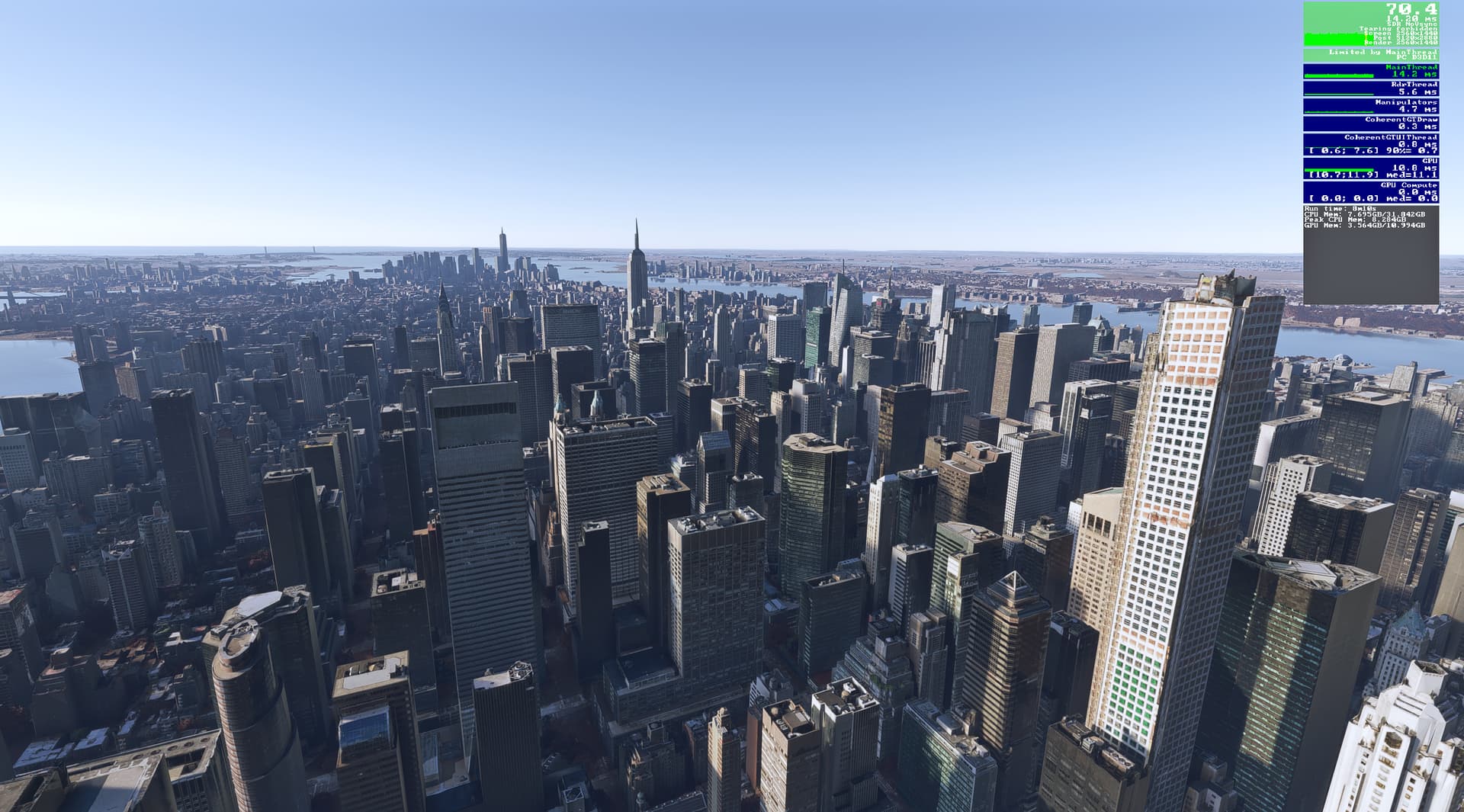
 well, i’m gonna do the DDU tomorrow after work, and then set the settings in MSFS on High and check FPS…and then finetune it so i’m and the computer is happy