I can not use the exe with Logitech Gaming Software

I can not use Logitech Gaming Sofware to use keys with my mouse because the exe of this game (located on E:\WindowsApps\Microsoft.FlightSimulator_1.18.14.0_x64__8wekyb3d8bbwe) is not accesible.

This game is good, but a pain in many aspects. This is the only one that makes my life imposible. I just am trying to use this sim with “virtual controller” app so that I can use my mouse as a joystick, and I have managed to do so, but I need to link the 8 mouse buttons to different actions, and it is IMPOSSIBLE. Too many restrictions of this game.

In the other hand, I think mouse control should be implemented in the game by default. I am just trying to find out the way to make something that this game does not let me do, and it should. Game wants to be “different”.
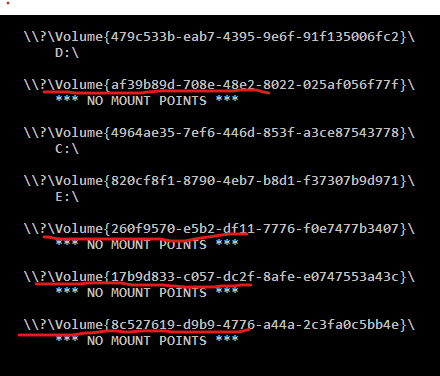
I have workaround.

  1. Go to Cmd and run ‘mountvol’
  2. You get list of mount points
  3. Copy full path of volume without mount point (red line)
    Example: " \?\Volume{af39b89d-708e-48e2-8022-025af056f77f}"
  4. Use Start → Run (Win+R) and put copied string, press enter.
  5. If you get access denied error, it’s ok. Try another line.
  6. If you find correct link - you will see opened folder contain FligtSimulator.exe (copy full path to notepad with name of executable)
  7. Open LGS and create new profile, point to any executable on a disk (C:\WINDOWS\explorer.exe for example)
  8. Save profile and exit from LGS
  9. Go to %UserProfile%\AppData\Local\Logitech\Logitech Gaming Software\profiles
  10. You will see a .xml files with your profiles. Check every files and find file with your profile for MSFS (with your name and pointed exe file)
  11. Edit file and change target path to your volume and executable file. Example:
<target path="\\?\VOLUME{260F9570-E5B2-DF11-7776-F0E7477B3407}\FLIGHTSIMULATOR.EXE"/>
  1. Save file and load LGS

Now you have worked profile with Sim and you can tune it. (This method work with any MSStore games)

This topic was automatically closed 30 days after the last reply. New replies are no longer allowed.