Well certainly not if he thought this was a standard piece of equipment from Boeing, as it sounds like he did. Looks like it’s an add-on switch to manually power the CVR. Still not sure why you wouldn’t just put it on the battery bus if you wanted it to work that way, but sure lol.
Does anyone know LVAR for “AP Disengage” push button on the captain yoke? I have L:VC_Autopilot_Disconnect_1_SW_VAL,number but it only moves the button without disengaging AP.
The iFly max is a bit weird. I’m away from sim for the next couple of days, but I believe I have a button on my TM yoke that is mapped in-sim to “TOGGLE AUTOPILOT”. I then have the below in SPAD, which initially pauses, then the two LVARS as shown. This method gives you both the AP disconnect as well as shutting off the alarm buzzer a few seconds later, in a single button press.
I do plan to redo this mapping the right way….one button push to disconnect, another to silence, like the real-world (and PMDG 737s). But maybe the below will get you started.

2 Likes
Anyone here on Beta 1.6.5.0? If so, start pls with running Engines at Night on Runway.
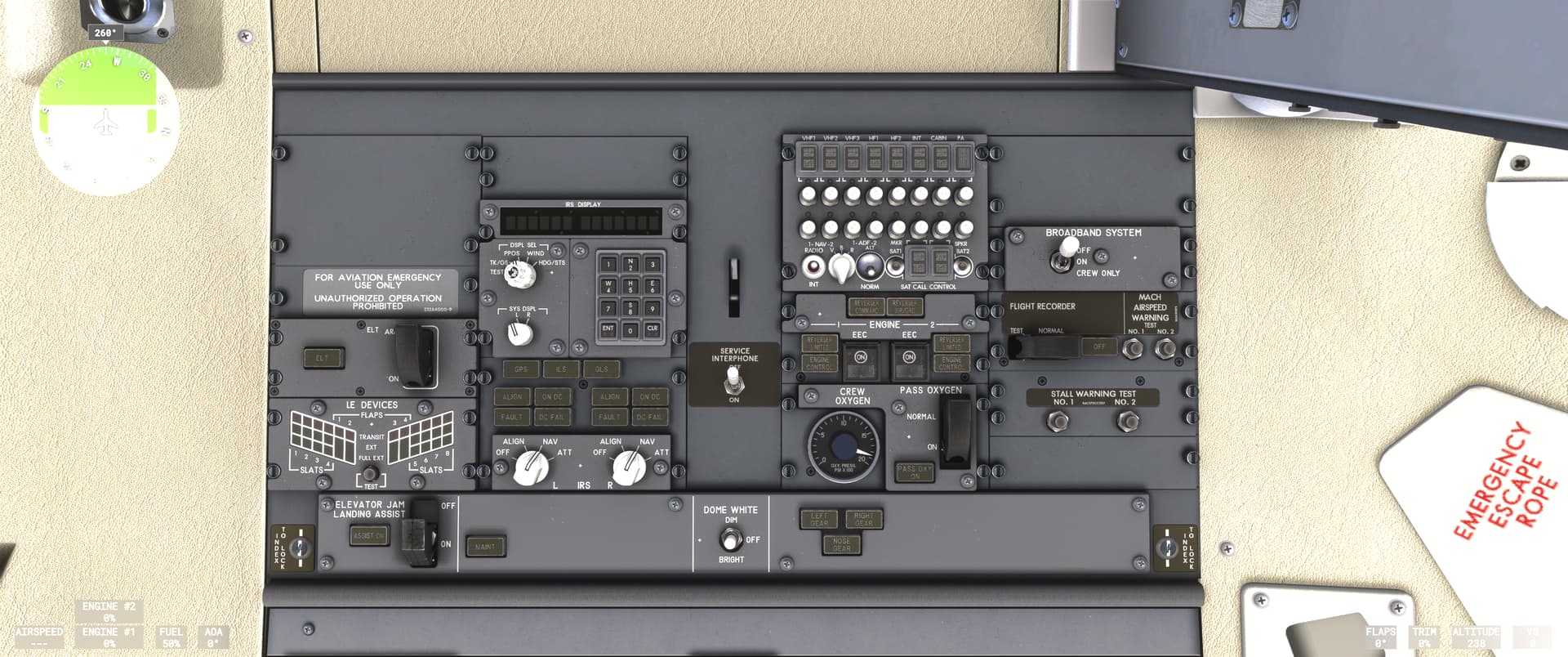
I cant turn off the Dome Light in the Cockpit. Normally i start at Gate Cold and Dark. But if i start with running engines i cant turn the Dome off.
Not entirely true, LNAV works great as well as VNAV. VNAV currently doesn’t have advanced modes to manage an idle descent all the way to the ground with deceleration points etc. It only has VPATH which performs a contant angle descent.
The autothrottle is a bit finicky on the 220, it is a bit slow to respond at times. Most prefer to land without in gusty conditions. Overall the A220 avionics are working quite well. Energy management is up to the pilot for now.
Amazing job! I love this aircraft! Now it’s become my #1 aircraft when I’m flying like airliner!
3 Likes
Can’t find if this FS2024 related question has been answered or if it’s a bug or setting. I can’t move the IRS buttons. For example in the Fenix or a standard plane when I want to move a switch up or down the mouse cursor shows an up or down arrow. When turning a button it shows this round arrow. In the iFly there’s only an arrow but unfortunately can’t turn the IRS knobs to NAV.
What input method do you use? I use Legacy and I just move these switches with my mouse wheel.
1 Like
Can anyone comment on the functionality of popout displays with this aircraft. Do they work and if so what equipment displays are available as popouts?
Yep, that’s exactly how I have it set up in PMDG - I just forgot to add it for iFly. Thanks to you, I saved myself some time. Really appreciate the tip.

1 Like
I was able to pop out the Captain-side MFD, so I assume all four Big Screens can be popped out using POPM. (I don’t do popouts for most airliners, just TDS GTN equipped planes for my small touchscreen monitor.)
1 Like
Try right-clicking a knob to turn it right, and left-clicking to turn it left.
Doesn’t work. However MHron’s solution by using the mouse wheel does work 
1 Like
Open iFly Manager and then Manage Product. There’s a mouse interaction choice there. I use the MSFS Interaction Style which is what I think you are after.
2 Likes
Works more precise. Thank you for letting me know!
1 Like
Anyone knows if they will add time acceleration like the pmdg one has? Would be useful, as a dad my free time is limited 
It’s been commonly observed that if you increase the simulator’s built-in Sim Rate, the iFly Max severely wanders from left to right, whether it’s in LNAV or HDG mode. 2X is marginally okay for straight segments, but 4x and beyond is unflyable. I’ve even seen the plane have some tracking issues at 1x speed. This is the reason why I only choose very short routes for this plane.
iFLY did say in mid-August that they have a slew of updates coming soon, including “General bug fixes including LNAV adjustments in some scenarios.” Hopefully this fixes this.
Note that all planes (except the Fenix A3xx series) allow you to use the FS202x built-in sim rate. PMDG uses this, and doesn’t have their own sim rate capability, though they wrap some other functionality around it.
Yes, iv observed this zig-zag pattern the plane flies using x2 simrate, thats why im wondering if theyd do something about it…. Should be standard for an airliner…
I think this was their first airliner they developed in FS202x, with their previous experience in FSX and P3D, so it might be a learning curve thing. Other than this (and the unintuitive tablet which is also getting fully rebuilt in the next update), this plane is fantastic.
1 Like